> For the complete documentation index, see [llms.txt](https://docs.samita.io/llms.txt). Markdown versions of documentation pages are available by appending `.md` to page URLs; this page is available as [Markdown](https://docs.samita.io/b2b-lock-password-protect/access-rules/email-contains.md).

# Email contains

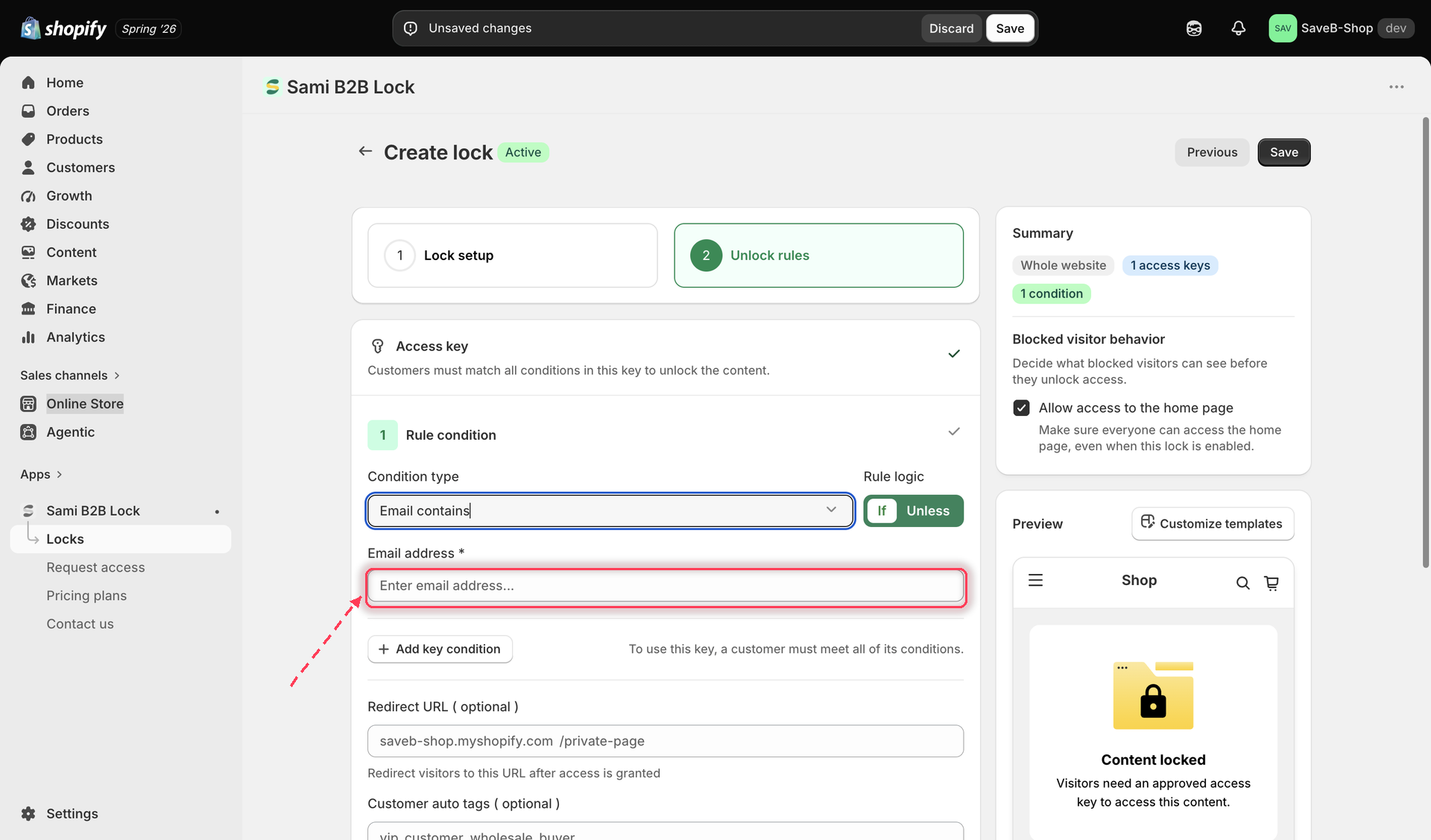
Match logged-in customers whose email address contains a given string, such as a company domain.

The Email contains rule checks whether the logged-in customer's email address contains a specific piece of text. It's most useful for matching an entire company by their email domain, without needing to tag every individual account.

## How it works

The rule only looks at the email of a customer who is currently signed in — a guest without a session has no email for the rule to check. You give it one or more strings to look for; the rule matches if the customer's email contains **any** of them.

To match more than one string, separate them with the word **or** in the same field — for example, entering `@wholesaleco.com or @partnerco.com` matches any customer whose email contains either domain.

## Adding the rule

1. Open the lock you want to protect and click the **Unlock rules** tab.
2. Add an access rule and choose **Email contains** from the **Condition type** dropdown.

   <figure><img src="https://27754559-files.gitbook.io/~/files/v0/b/gitbook-x-prod.appspot.com/o/spaces%2FF4qMYopXntYz9YgUqZSo%2Fuploads%2Fgit-blob-ecf68249cd58be06d9482dcdf2199716ec6b257e%2Fscreenshot-access-rules-email-contains-add.png?alt=media" alt="Access rule picker with Email contains selected and a text field for the match string"><figcaption><p>Adding the Email contains rule and entering the text to match.</p></figcaption></figure>
3. Enter the text to match — for example a company email domain like `@wholesaleco.com`. Add more strings separated by "or" if you need to match several domains or addresses.
4. Choose whether the rule should match **If** (the email contains the string) or **Unless** (it doesn't).
5. Optionally set a per-rule **Redirect URL**.
6. Save the lock.

{% hint style="info" %}
Since this rule depends on the visitor being logged in, it's often paired with the [Logged-in customers](/b2b-lock-password-protect/access-rules/logged-in-customers.md) rule in the same access key — that way a guest gets a clear "please sign in" message instead of simply failing this rule with no explanation.
{% endhint %}

## Example: Allow employees with an approved company email

Suppose an internal resources page should only be available to signed-in customers whose email address contains `@acme.com`.

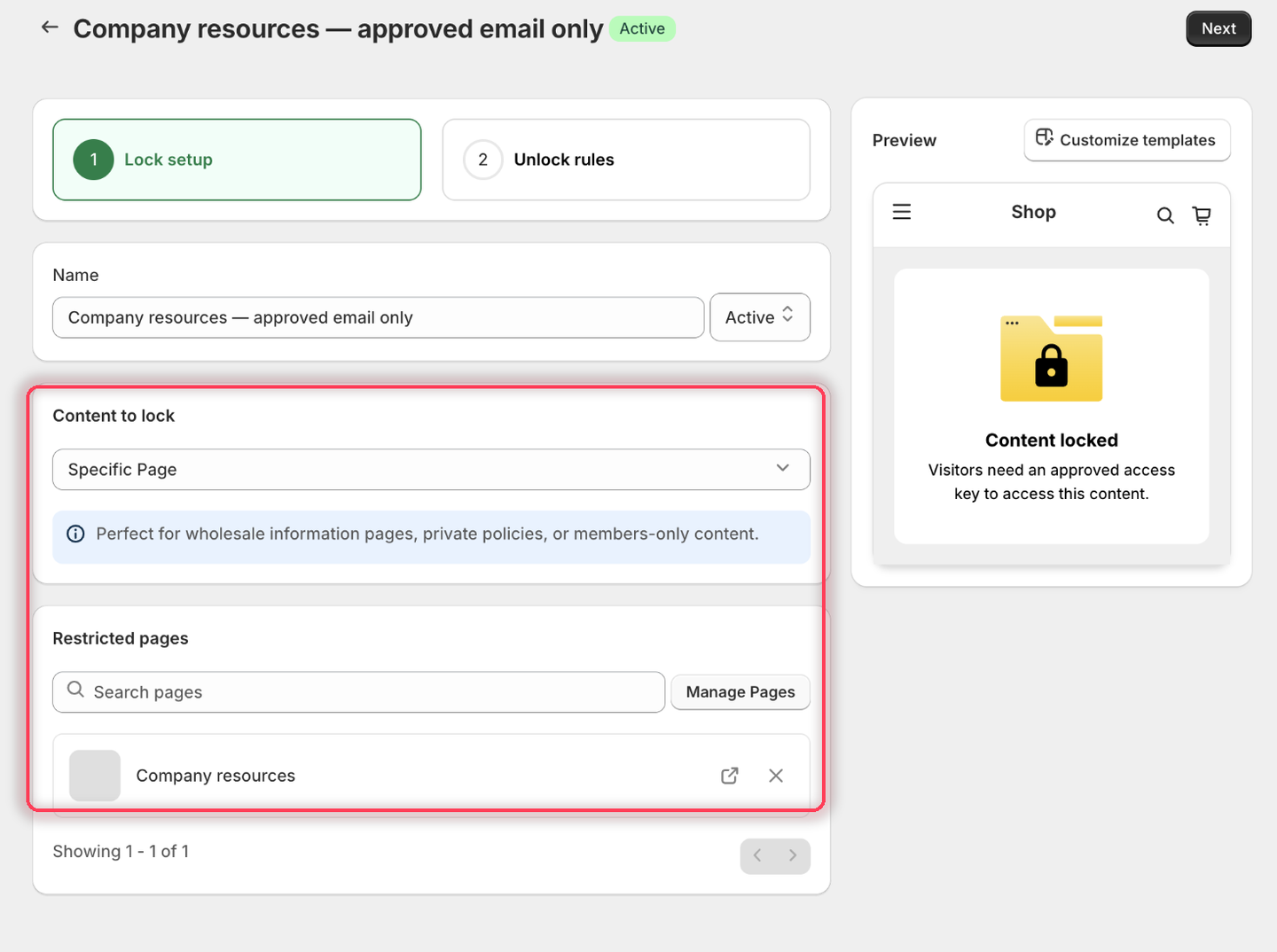
1. Select the **Company resources** page as the content to protect.

<figure><img src="https://27754559-files.gitbook.io/~/files/v0/b/gitbook-x-prod.appspot.com/o/spaces%2FF4qMYopXntYz9YgUqZSo%2Fuploads%2Fgit-blob-9f8b6cb1c910a603c1a6061e08009ef960184bbd%2Fscreenshot-example-email-contains-content.png?alt=media" alt="The Lock setup tab with Specific Page as the content type and the Company resources page listed under Restricted pages."><figcaption><p>Pick the internal page you want to gate.</p></figcaption></figure>

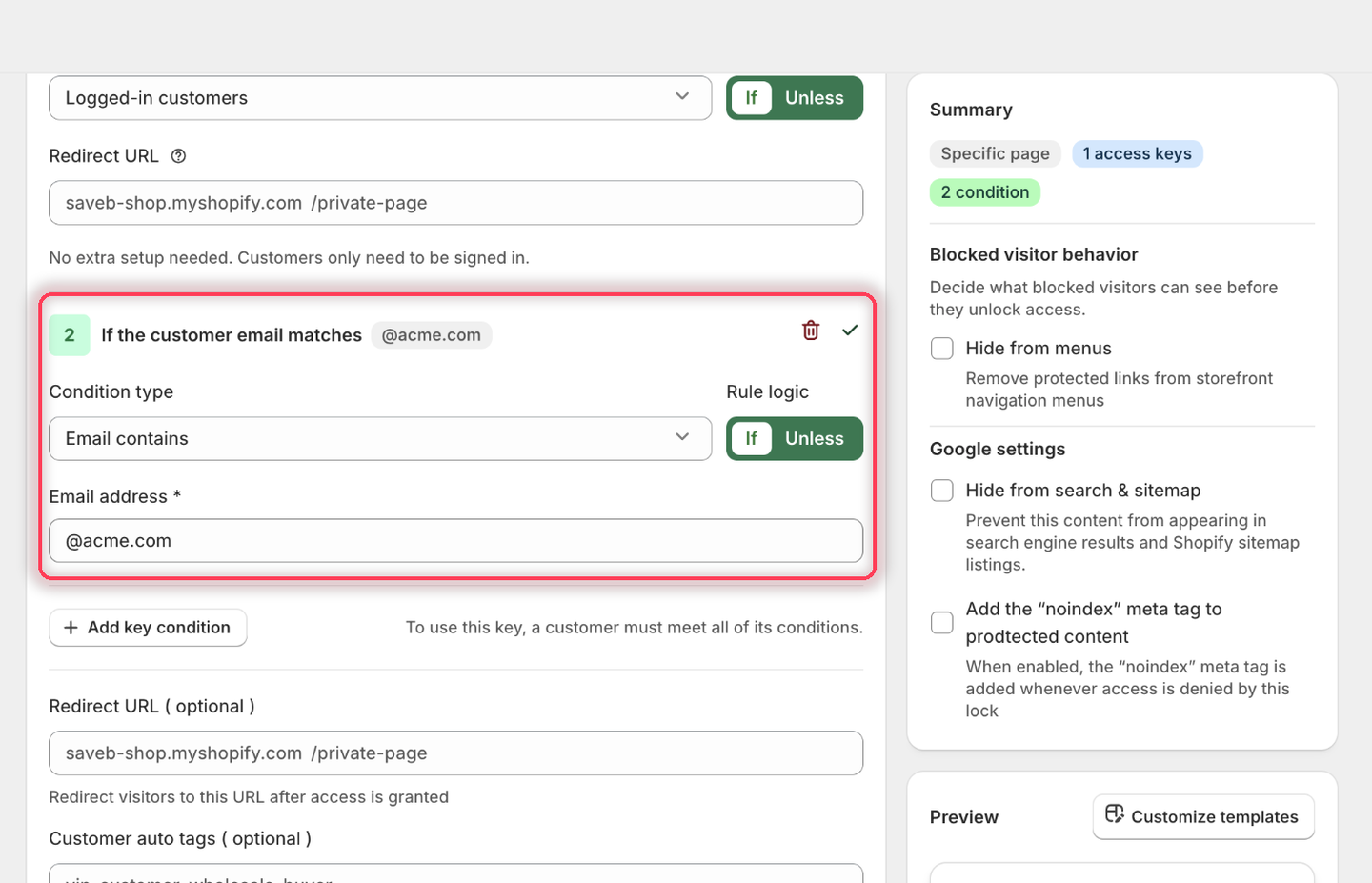
2. On the **Unlock rules** tab, the first condition already defaults to **Logged-in customers** — leave it. Click **Add key condition** to add a second condition in the *same* access key and set it to **Email contains**.
3. For **Email contains**, choose **If** and enter `@acme.com` in the **Email address** field.

<figure><img src="https://27754559-files.gitbook.io/~/files/v0/b/gitbook-x-prod.appspot.com/o/spaces%2FF4qMYopXntYz9YgUqZSo%2Fuploads%2Fgit-blob-be6da8b23a1858c4f8882633a8e743d6a4da63e6%2Fscreenshot-example-email-contains-rule.png?alt=media" alt="The second condition set to Email contains with Rule logic If and @acme.com in the Email address field."><figcaption><p>The condition heading confirms it: If the customer email matches @acme.com.</p></figcaption></figure>

4. Leave the rules' **Redirect URL** fields empty.
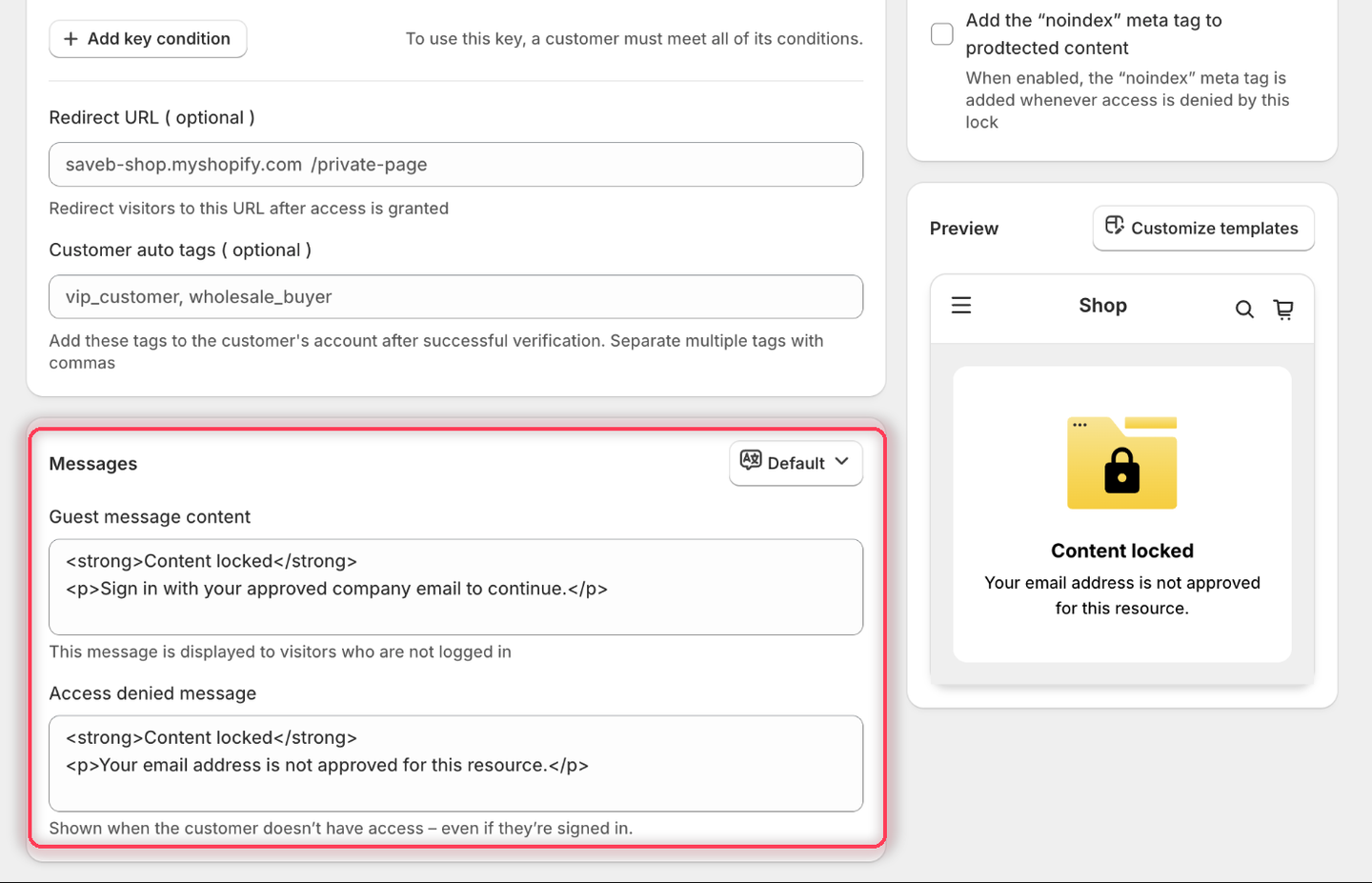
5. Set the messages to:
   * **Guest message content:** `Sign in with your approved company email to continue.`
   * **Access denied message:** `Your email address is not approved for this resource.`

{% hint style="info" %}
Both fields appear because Email contains is one of the five customer-identity rules — see [Access rules overview](/b2b-lock-password-protect/access-rules/overview.md#what-a-blocked-visitor-sees). The guest message goes to signed-out visitors; the access-denied message goes to signed-in customers whose email doesn't match.
{% endhint %}

<figure><img src="https://27754559-files.gitbook.io/~/files/v0/b/gitbook-x-prod.appspot.com/o/spaces%2FF4qMYopXntYz9YgUqZSo%2Fuploads%2Fgit-blob-16232f6d496dcd5796ed6b615c5558df117d81b2%2Fscreenshot-example-email-contains-message.png?alt=media" alt="The Messages card showing both the Guest message content and Access denied message fields filled in with the example wording."><figcaption><p>This rule needs both messages, because either kind of visitor can be blocked.</p></figcaption></figure>

6. Click **Save**.

### Result on the storefront

* A signed-out visitor sees the Guest message and the sign-in option.
* A signed-in customer such as `alex@acme.com` passes both conditions and can open the page.
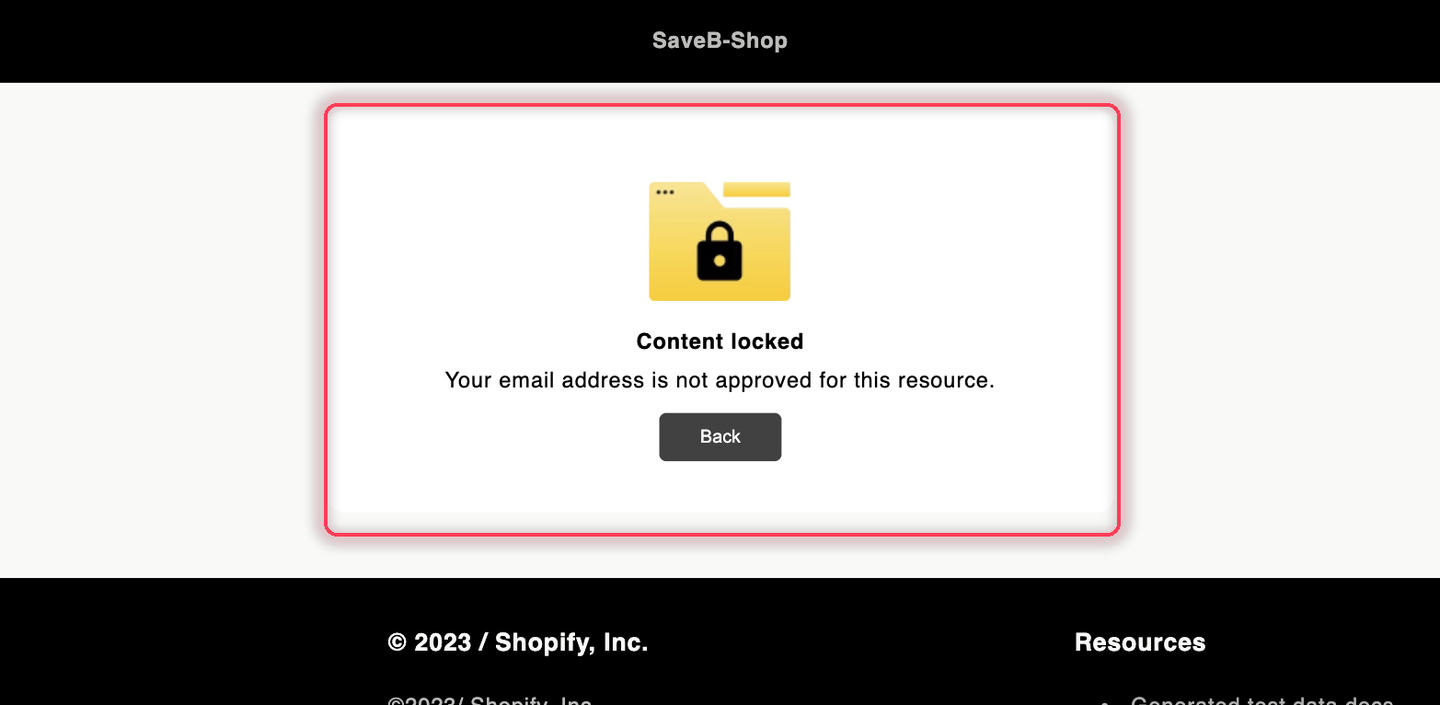
* A signed-in customer such as `alex@example.com` sees the Access denied message because their email does not contain `@acme.com`.

<figure><img src="https://27754559-files.gitbook.io/~/files/v0/b/gitbook-x-prod.appspot.com/o/spaces%2FF4qMYopXntYz9YgUqZSo%2Fuploads%2Fgit-blob-edd64bb498612a6a3046bc2f8b7cceedace7b4fb%2Fscreenshot-example-email-contains-result.png?alt=media" alt="The Company resources page displaying the configured email-not-approved message."><figcaption><p>A signed-in customer using an email outside the approved domain sees the Access denied message from this example.</p></figcaption></figure>

## Related docs

* [Logged-in customers](/b2b-lock-password-protect/access-rules/logged-in-customers.md)
* [Customer tags](/b2b-lock-password-protect/access-rules/customer-tags.md)
* [Selected customers](/b2b-lock-password-protect/access-rules/selected-customers.md)
* [Combining rules](/b2b-lock-password-protect/access-rules/combining-rules.md)


---

# Agent Instructions
This documentation is published with GitBook. GitBook is the documentation platform designed so that both humans and AI agents can read, navigate, and reason over technical content effectively. Learn more at gitbook.com.

## Querying This Documentation
If you need additional information that is not directly available in this page, you can query the documentation dynamically by asking a question.

Perform an HTTP GET request on the current page URL with the `ask` query parameter, and the optional `goal` query parameter:

```
GET https://docs.samita.io/b2b-lock-password-protect/access-rules/email-contains.md?ask=<question>&goal=<endgoal>
```

`ask` is the immediate question: it should be specific, self-contained, and written in natural language.
`goal` is optional and describes the broader end goal you are ultimately trying to accomplish on behalf of the user. GitBook uses it to tailor the answer towards what is most useful for that goal.

The response will contain a direct answer to the question and relevant excerpts and sources from the documentation.

Use this mechanism when the answer is not explicitly present in the current page, you need clarification or additional context, or you want to retrieve related documentation sections.