> For the complete documentation index, see [llms.txt](https://docs.samita.io/llms.txt). Markdown versions of documentation pages are available by appending `.md` to page URLs; this page is available as [Markdown](https://docs.samita.io/b2b-lock-password-protect/access-rules/overview.md).

# Access rules overview

What an access rule is, how If/Unless matching works, and where to find every rule type the app supports.

An access rule is the condition a visitor has to meet before they're allowed to see or use whatever you're locking — a product, a collection, a page, your whole storefront, or checkout. Every lock needs at least one access rule; without one, the app has no way to tell an approved visitor from anyone else.

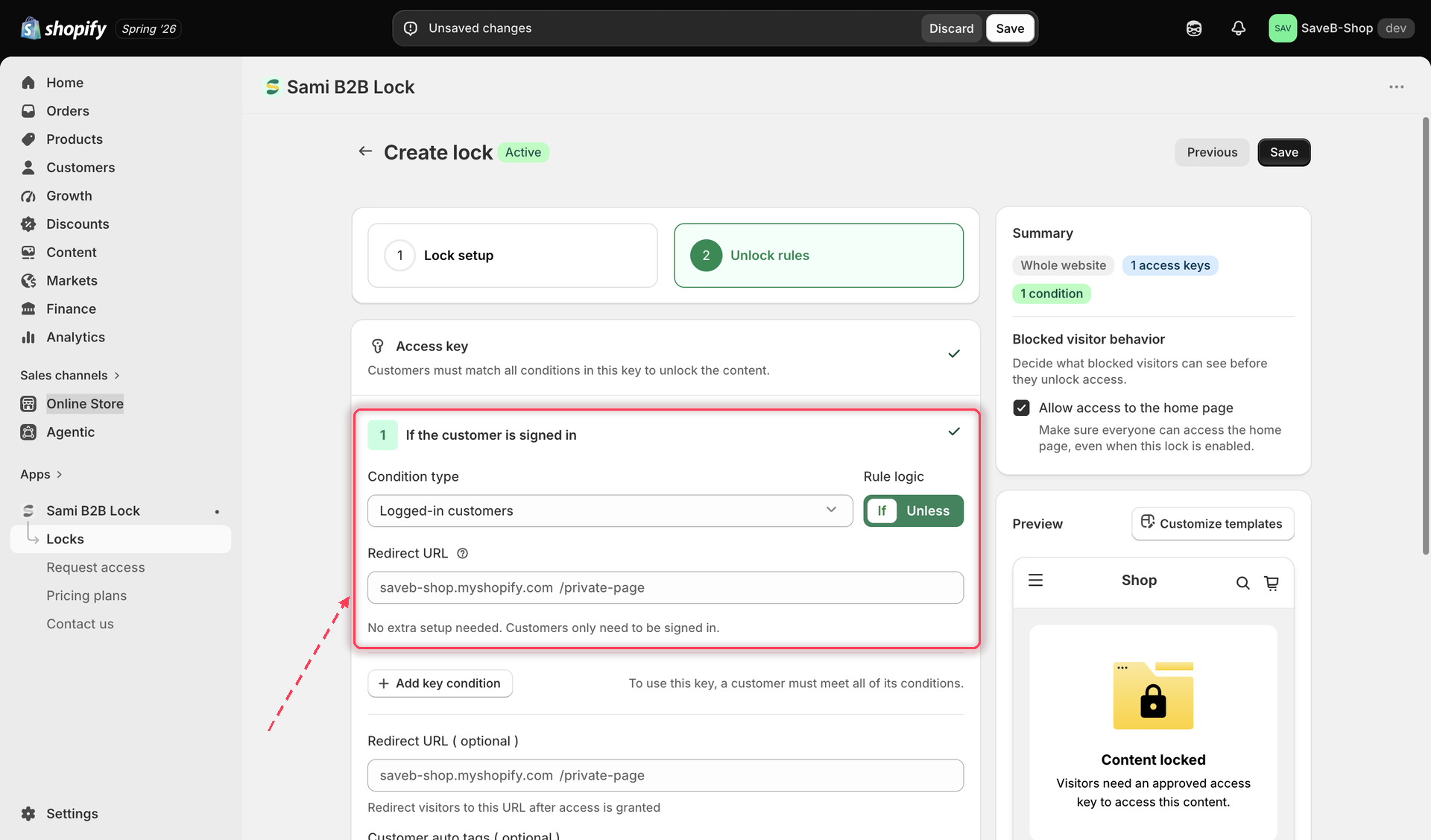
You add access rules from a lock's **Unlock rules** tab. Each rule checks one specific thing about the visitor — are they logged in, do they have a certain tag, did they enter the right passcode — and the lock only opens once all configured conditions are satisfied.

<figure><img src="https://27754559-files.gitbook.io/~/files/v0/b/gitbook-x-prod.appspot.com/o/spaces%2FF4qMYopXntYz9YgUqZSo%2Fuploads%2Fgit-blob-36dfffcafd2ffe207fe9daaecd95d73d276ad441%2Fscreenshot-access-rules-picker-overview.png?alt=media" alt="Access rule picker showing the full list of available condition types"><figcaption><p>Choosing an access rule from the condition type picker inside a lock's editor.</p></figcaption></figure>

## If and Unless

Most access rules can be set to match one of two ways:

* **If** — the rule is satisfied when the visitor *does* meet the condition (for example, If Logged-in customers: the visitor must be signed in).
* **Unless** — the rule is inverted, and is satisfied when the visitor does *not* meet the condition (for example, Unless Logged-in customers: the visitor must not be signed in).

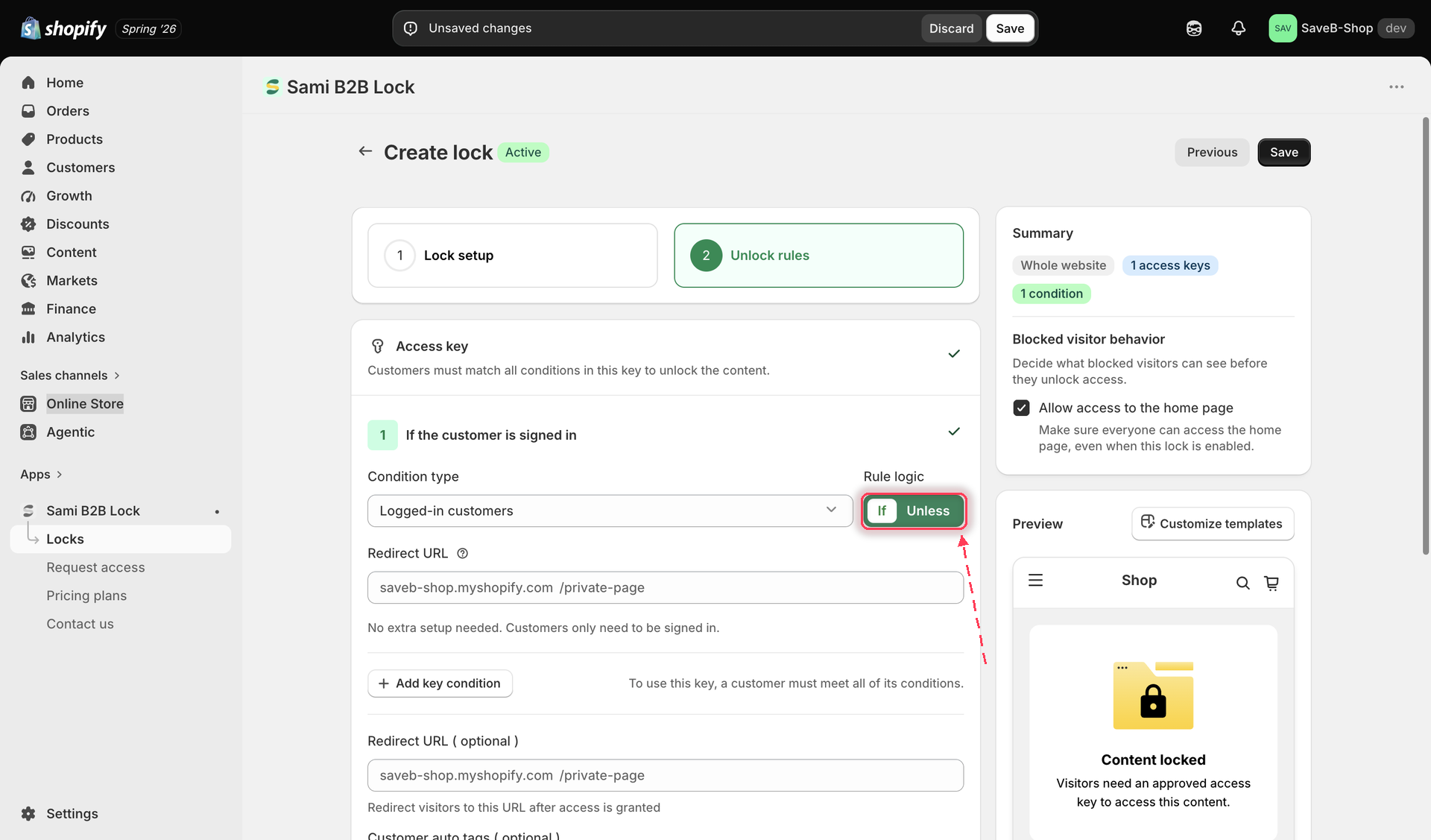
You'll find this as the **Rule logic** switch beside each rule's condition type.

<figure><img src="https://27754559-files.gitbook.io/~/files/v0/b/gitbook-x-prod.appspot.com/o/spaces%2FF4qMYopXntYz9YgUqZSo%2Fuploads%2Fgit-blob-25ec97b9d8868816fa536cba5a10f3efeae90629%2Fscreenshot-access-rules-if-unless-toggle.png?alt=media" alt="The Rule logic switch next to a rule&#x27;s condition type, set to If with Unless as the alternative"><figcaption><p>Use the Rule logic switch to flip a rule between If and Unless.</p></figcaption></figure>

{% hint style="info" %}
Five rules work differently and don't have an If/Unless toggle at all: **Passcode**, **Secret link**, **Subscribe to unlock**, **Confirmation prompt**, and **Custom liquid**. These are action-based rules — instead of matching a yes/no fact about the visitor, they ask the visitor to do something (enter a code, subscribe, confirm a statement) or run a snippet of code, and that action's own result decides whether the rule passes.
{% endhint %}

## Combining more than one rule

A lock can use more than one access rule at once. How those conditions interact — including a worked example — is covered in its own page:

* [Combining rules](/b2b-lock-password-protect/access-rules/combining-rules.md)

## Every access rule

The rules below are grouped by what they check. Click through to any rule's own page for the full setup steps.

**Identity & customer rules** — who the visitor is

* [Logged-in customers](/b2b-lock-password-protect/access-rules/logged-in-customers.md) — is the visitor signed in to a customer account
* [Customer tags](/b2b-lock-password-protect/access-rules/customer-tags.md) — does the customer's account have a specific tag
* [B2B customer](/b2b-lock-password-protect/access-rules/b2b-customer.md) — is the customer part of a Shopify B2B company account
* [Email contains](/b2b-lock-password-protect/access-rules/email-contains.md) — does the logged-in customer's email contain a given string
* [Selected customers](/b2b-lock-password-protect/access-rules/selected-customers.md) — is the customer on a hand-picked list you choose

**Unlock actions** — something the visitor does to unlock

* [Passcode](/b2b-lock-password-protect/access-rules/passcode.md) — the visitor enters a shared code
* [Secret link](/b2b-lock-password-protect/access-rules/secret-link.md) — the visitor arrives via a link containing a valid token
* [Subscribe to unlock](/b2b-lock-password-protect/access-rules/subscribe.md) — the visitor subscribes with their email
* [Confirmation prompt](/b2b-lock-password-protect/access-rules/confirmation-prompt.md) — the visitor self-certifies by clicking Confirm
* [Custom liquid](/b2b-lock-password-protect/access-rules/custom-liquid.md) — your own Liquid snippet decides

**Time & schedule** — when the lock is active

* [Date range](/b2b-lock-password-protect/access-rules/date-range.md) — a fixed start and end date
* [Weekly schedule](/b2b-lock-password-protect/access-rules/weekly-schedule.md) — recurring days and time windows
* [Storefront language](/b2b-lock-password-protect/access-rules/storefront-language.md) — which storefront language the visitor is browsing in

**Location & device** — where the visitor is browsing from

* [Location](/b2b-lock-password-protect/access-rules/location.md) — the visitor's detected country
* [Certain IP addresses](/b2b-lock-password-protect/access-rules/certain-ip-addresses.md) — the visitor's exact public IP address
* [Shop domain](/b2b-lock-password-protect/access-rules/shop-domain.md) — the exact domain the visitor is currently browsing on

**Purchase history** — what the customer has already bought

* [Purchased items](/b2b-lock-password-protect/access-rules/purchased-items.md) — the customer previously bought specific products or variants
* [Order quantity](/b2b-lock-password-protect/access-rules/order-quantity.md) — the customer's total order count meets a minimum

**Cart** — what's currently in the visitor's cart

* [Cart conditions](/b2b-lock-password-protect/access-rules/cart-conditions.md) — cart products, cart variants, cart quantity, and cart total

{% hint style="info" %}
Some rules and content types are only available on paid plans. If a rule is greyed out in the picker, that's why — the picker will point you to the plan comparison.
{% endhint %}

## What a blocked visitor sees

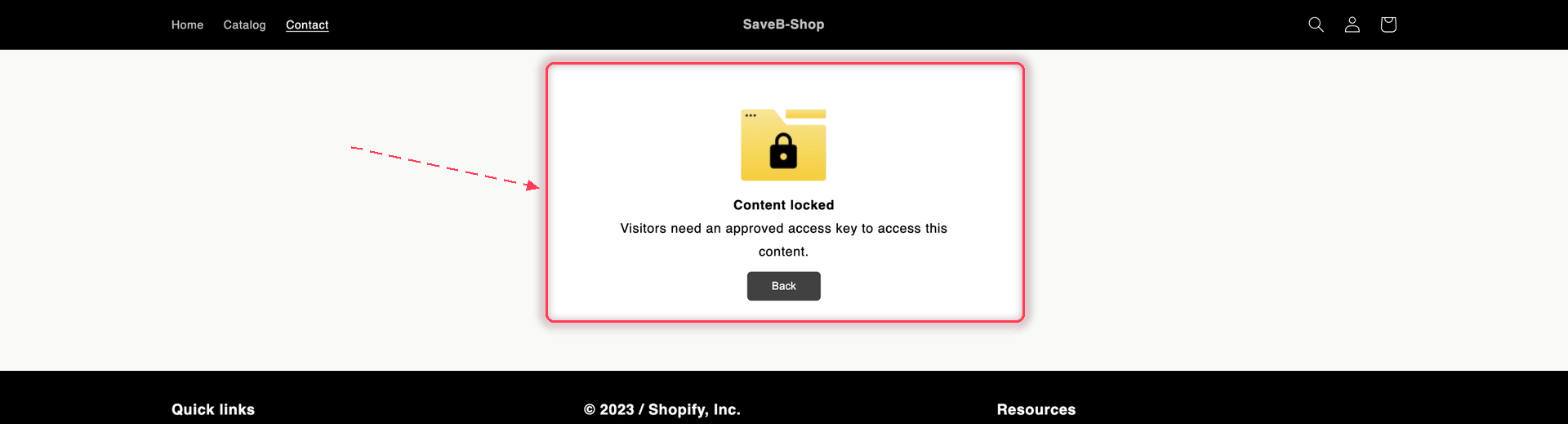
When a rule denies someone on a page, collection, or blog, the app replaces the content with a lock card. **Access denied message** is the default text on that card, and most rules always use it:

<figure><img src="https://27754559-files.gitbook.io/~/files/v0/b/gitbook-x-prod.appspot.com/o/spaces%2FF4qMYopXntYz9YgUqZSo%2Fuploads%2Fgit-blob-301f448c25efdac2bc5030caefdec5eefc6bc6a6%2Fscreenshot-storefront-access-denied.png?alt=media" alt="A locked storefront page showing the Content locked card with the message Visitors need an approved access key to access this content and a Back button."><figcaption><p>The Access denied message — the card most rules show.</p></figcaption></figure>

### For signed-out visitors

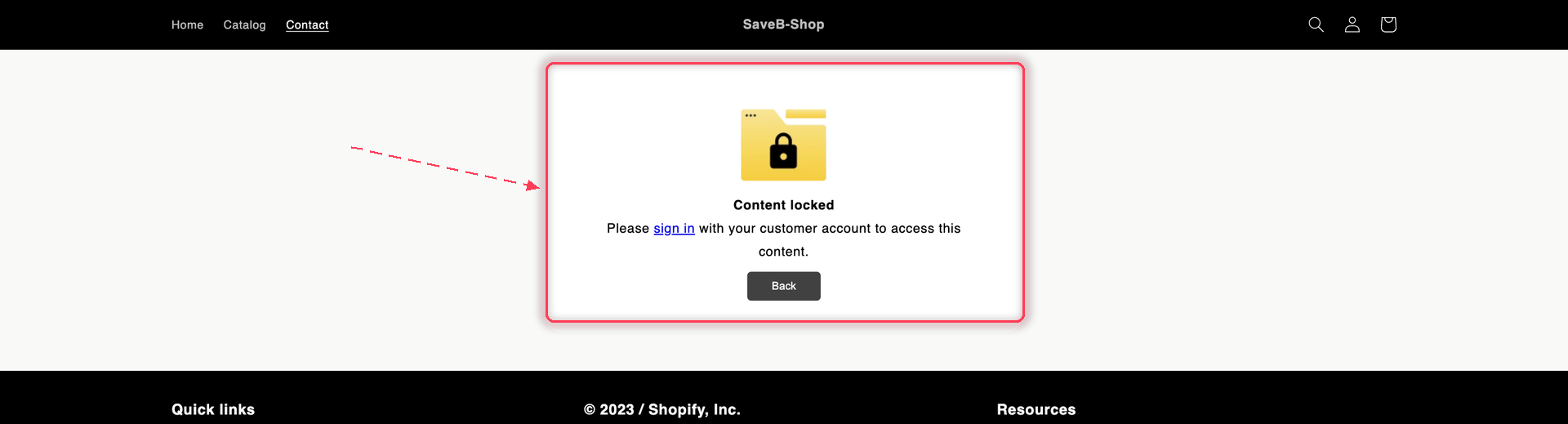
Five rules check who the customer *is*, so for those a signed-out visitor might only need to sign in. Those rules swap in a second message — **Guest message content** — which includes a sign-in link:

<figure><img src="https://27754559-files.gitbook.io/~/files/v0/b/gitbook-x-prod.appspot.com/o/spaces%2FF4qMYopXntYz9YgUqZSo%2Fuploads%2Fgit-blob-6a7bc288d08a90bb69bea8fe7002ea35030d1c66%2Fscreenshot-storefront-locked-guest.png?alt=media" alt="A locked storefront page showing the Content locked card asking the visitor to sign in with their customer account."><figcaption><p>The Guest message — shown only by the five customer-identity rules, and only to signed-out visitors.</p></figcaption></figure>

The guest message appears only when **all three** of these are true:

1. The failing rule is one of [Logged-in customers](/b2b-lock-password-protect/access-rules/logged-in-customers.md), [Customer tags](/b2b-lock-password-protect/access-rules/customer-tags.md), [B2B customer](/b2b-lock-password-protect/access-rules/b2b-customer.md), [Email contains](/b2b-lock-password-protect/access-rules/email-contains.md), or [Selected customers](/b2b-lock-password-protect/access-rules/selected-customers.md).
2. That rule is set to **If**, not **Unless**.
3. The visitor is **not** signed in.

Otherwise the card shows the Access denied message. So a signed-in customer who fails a Customer tags rule gets Access denied, and so does *every* visitor — signed in or not — blocked by a rule like Date range, Location, or Cart conditions.

| Message field             | When it's used                                                |
| ------------------------- | ------------------------------------------------------------- |
| **Guest message content** | Only the five rules above, set to If, for signed-out visitors |
| **Access denied message** | Everything else                                               |

{% hint style="info" %}
Edit both fields per lock, and per storefront language, from the lock's **Messages** section. The default Access denied wording ("Visitors need an approved access key…") doesn't tell a shopper what to do next — replacing it with something actionable, like how to apply for a wholesale account, is usually worth the minute. See [Translate lock messages](/b2b-lock-password-protect/design-and-customization/translate-messages.md).
{% endhint %}

The action-based rules (Passcode, Secret link, Subscribe to unlock, Confirmation prompt) replace this card with their own prompt, since the visitor can unlock the content themselves on the spot.

## Related docs

* [Combining rules](/b2b-lock-password-protect/access-rules/combining-rules.md)
* [Locks overview](/b2b-lock-password-protect/locks/overview.md)
* [Lock behavior overview](/b2b-lock-password-protect/lock-behavior/overview.md)
* [Create your first lock](/b2b-lock-password-protect/quick-start/quickstart.md)


---

# Agent Instructions
This documentation is published with GitBook. GitBook is the documentation platform designed so that both humans and AI agents can read, navigate, and reason over technical content effectively. Learn more at gitbook.com.

## Querying This Documentation
If you need additional information that is not directly available in this page, you can query the documentation dynamically by asking a question.

Perform an HTTP GET request on the current page URL with the `ask` query parameter, and the optional `goal` query parameter:

```
GET https://docs.samita.io/b2b-lock-password-protect/access-rules/overview.md?ask=<question>&goal=<endgoal>
```

`ask` is the immediate question: it should be specific, self-contained, and written in natural language.
`goal` is optional and describes the broader end goal you are ultimately trying to accomplish on behalf of the user. GitBook uses it to tailor the answer towards what is most useful for that goal.

The response will contain a direct answer to the question and relevant excerpts and sources from the documentation.

Use this mechanism when the answer is not explicitly present in the current page, you need clarification or additional context, or you want to retrieve related documentation sections.