> For the complete documentation index, see [llms.txt](https://docs.samita.io/llms.txt). Markdown versions of documentation pages are available by appending `.md` to page URLs; this page is available as [Markdown](https://docs.samita.io/b2b-lock-password-protect/access-rules/storefront-language.md).

# Storefront language

Match visitors based on the storefront language they're currently browsing in.

**Storefront language** matches a visitor based on which published storefront language they're currently browsing your store in. It's only useful if your store has more than one published language — on a single-language store, every visitor matches the same language, so the rule wouldn't distinguish anyone.

Common uses: showing a market-specific promotion only to visitors browsing in a particular language, or restricting content that's only ready in certain languages so visitors browsing in an unsupported language don't see a half-translated experience.

Like most access rules (aside from the action-based ones such as Passcode, Secret link, Subscribe, and Confirmation prompt), Storefront language can be set to match **If** the visitor is browsing in the selected language(s), or **Unless** they are — inverting it to match every other language instead. See [Combining rules](/b2b-lock-password-protect/access-rules/combining-rules.md).

## Add the rule

1. Open **Locks** and create a new lock, or open an existing one to edit it.
2. Choose the content you want to protect. See [Access rules overview](/b2b-lock-password-protect/access-rules/overview.md) for how rules fit into a lock.
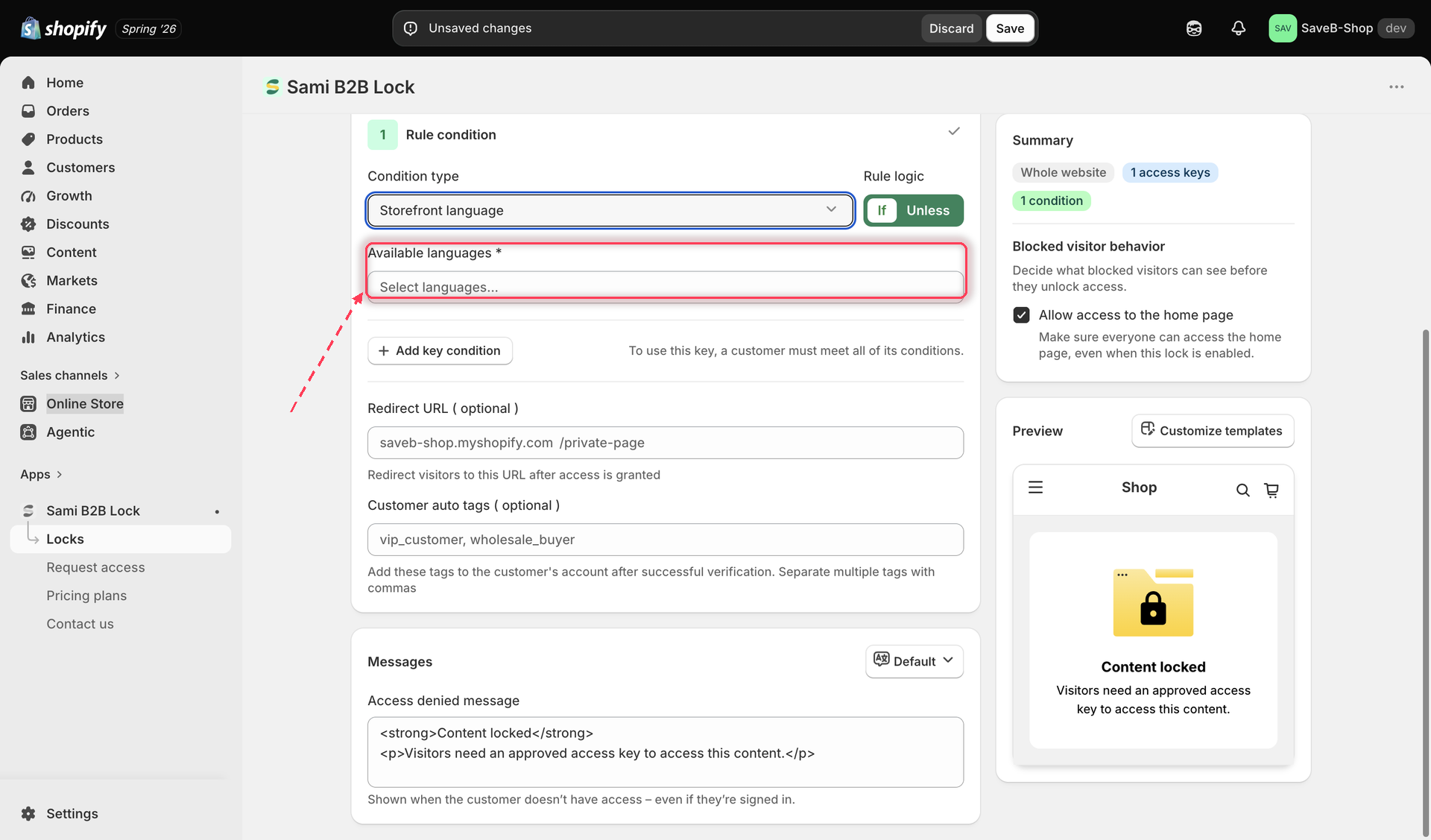
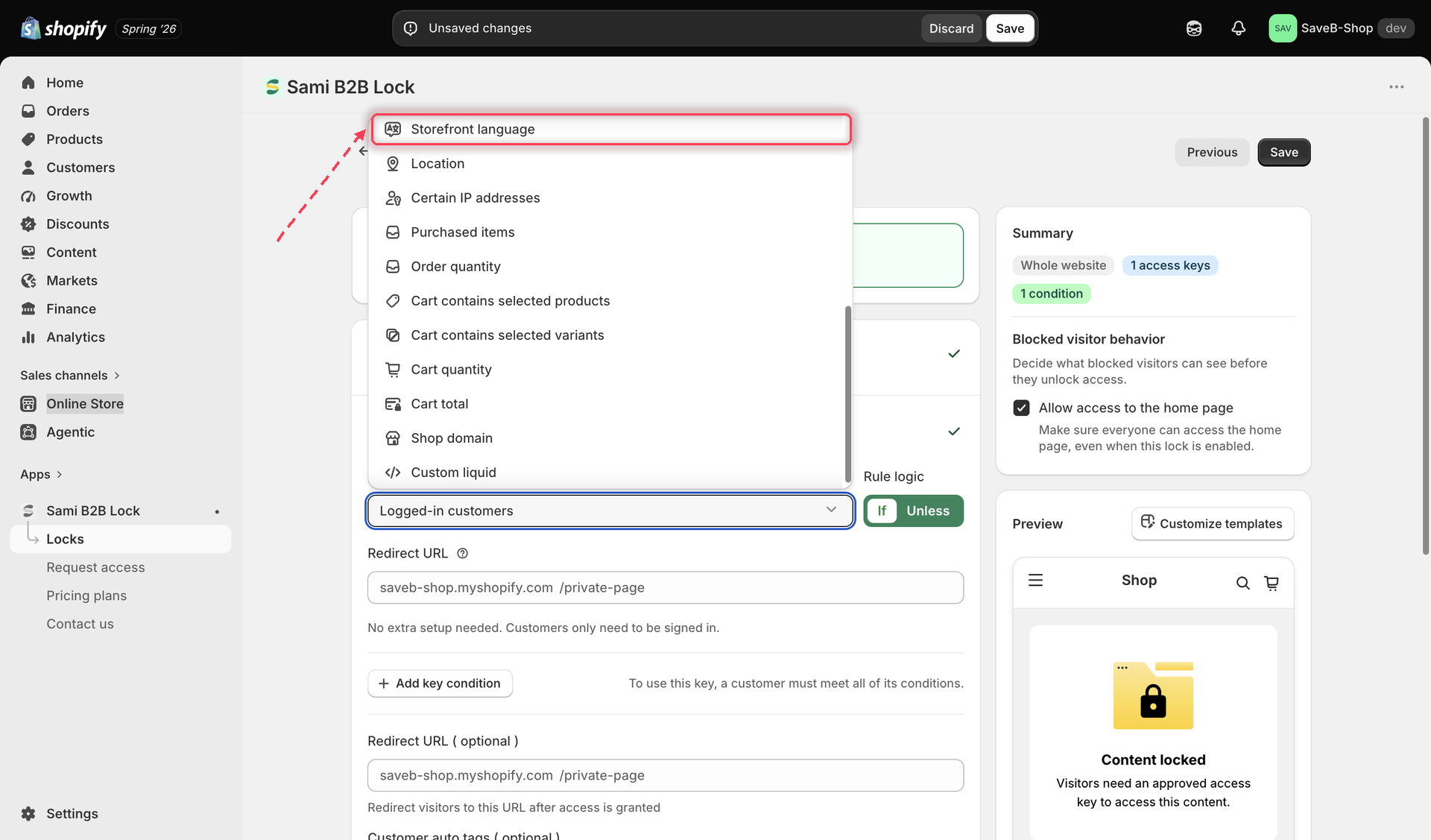
3. Click the **Unlock rules** tab, then in the **Condition type** dropdown, select **Storefront language**.

<figure><img src="https://27754559-files.gitbook.io/~/files/v0/b/gitbook-x-prod.appspot.com/o/spaces%2FF4qMYopXntYz9YgUqZSo%2Fuploads%2Fgit-blob-4ffd438ecc2e3b668e1660270eec923241a45d42%2Fscreenshot-access-rules-picker-storefront-language.png?alt=media" alt="The Unlock rules tab with Storefront language selected in the Condition type dropdown."><figcaption><p>Select Storefront language from the Condition type dropdown on the Unlock rules tab.</p></figcaption></figure>

4. Select one or more of your store's published languages to match against.

<figure><img src="https://27754559-files.gitbook.io/~/files/v0/b/gitbook-x-prod.appspot.com/o/spaces%2FF4qMYopXntYz9YgUqZSo%2Fuploads%2Fgit-blob-2cdb6bb17b019d788ccc8486a869ab662a8058c9%2Fscreenshot-access-rules-storefront-language-config.png?alt=media" alt="The Storefront language rule settings, showing a multi-select list of the store&#x27;s published languages."><figcaption><p>Choose which published storefront language(s) this rule should match.</p></figcaption></figure>

5. Choose **If** or **Unless**.
6. Click **Save**.

{% hint style="info" %}
This rule matches the language the storefront is currently displayed in — the language the visitor selected (or was routed to) via your store's language selector — not the visitor's browser or device language setting.
{% endhint %}

## Example: Show a campaign page only on the French storefront

Suppose a campaign page has only been prepared in French and should not be available in the store's other published languages.

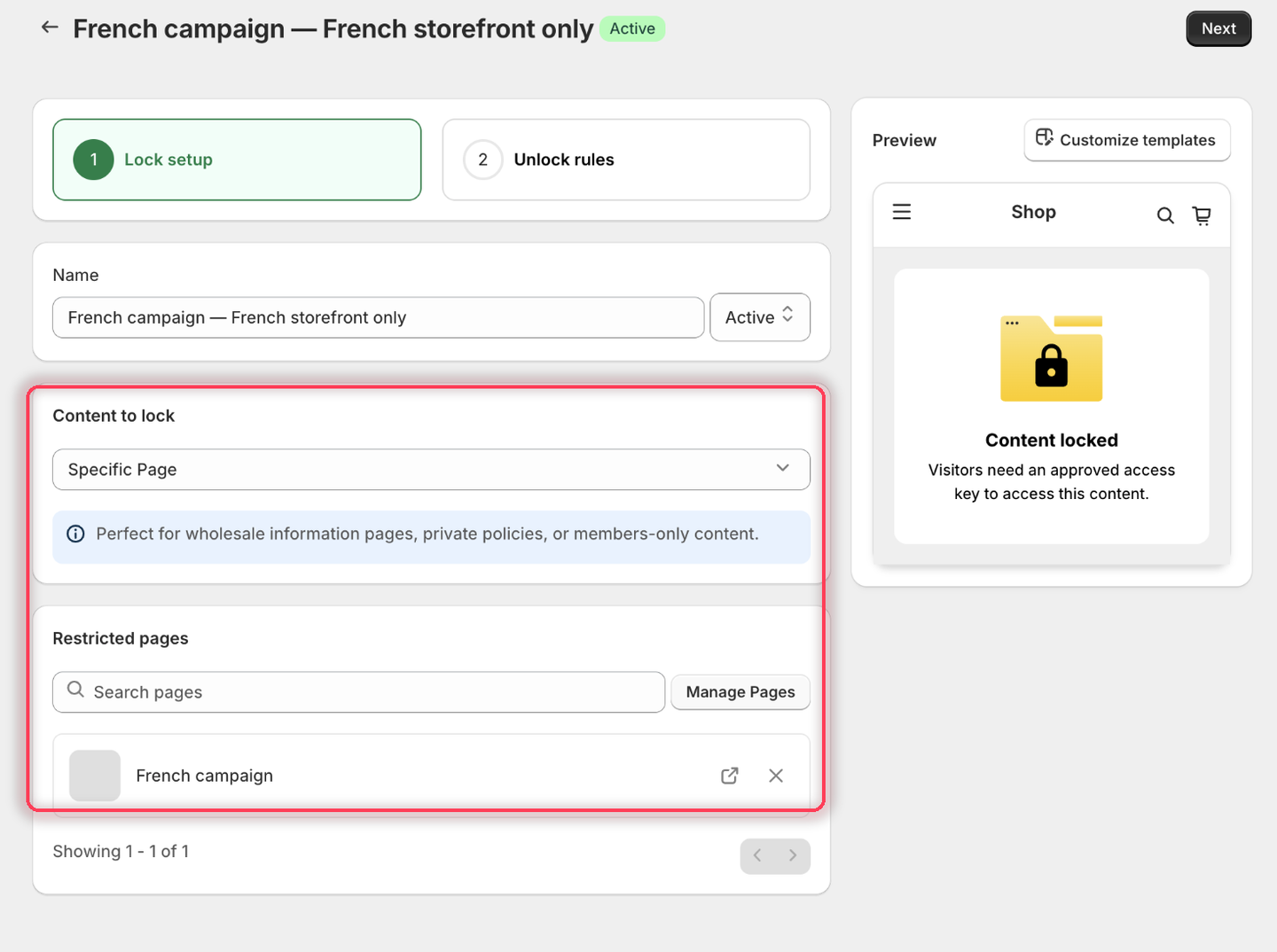
1. Select the **French campaign** page as the content to protect.

<figure><img src="https://27754559-files.gitbook.io/~/files/v0/b/gitbook-x-prod.appspot.com/o/spaces%2FF4qMYopXntYz9YgUqZSo%2Fuploads%2Fgit-blob-c4f62ad7bbc280b7700d36456604dc52abadfd54%2Fscreenshot-example-storefront-language-content.png?alt=media" alt="The Lock setup tab with Specific Page as the content type and the French campaign page listed under Restricted pages."><figcaption><p>Pick the campaign page that only exists in French.</p></figcaption></figure>

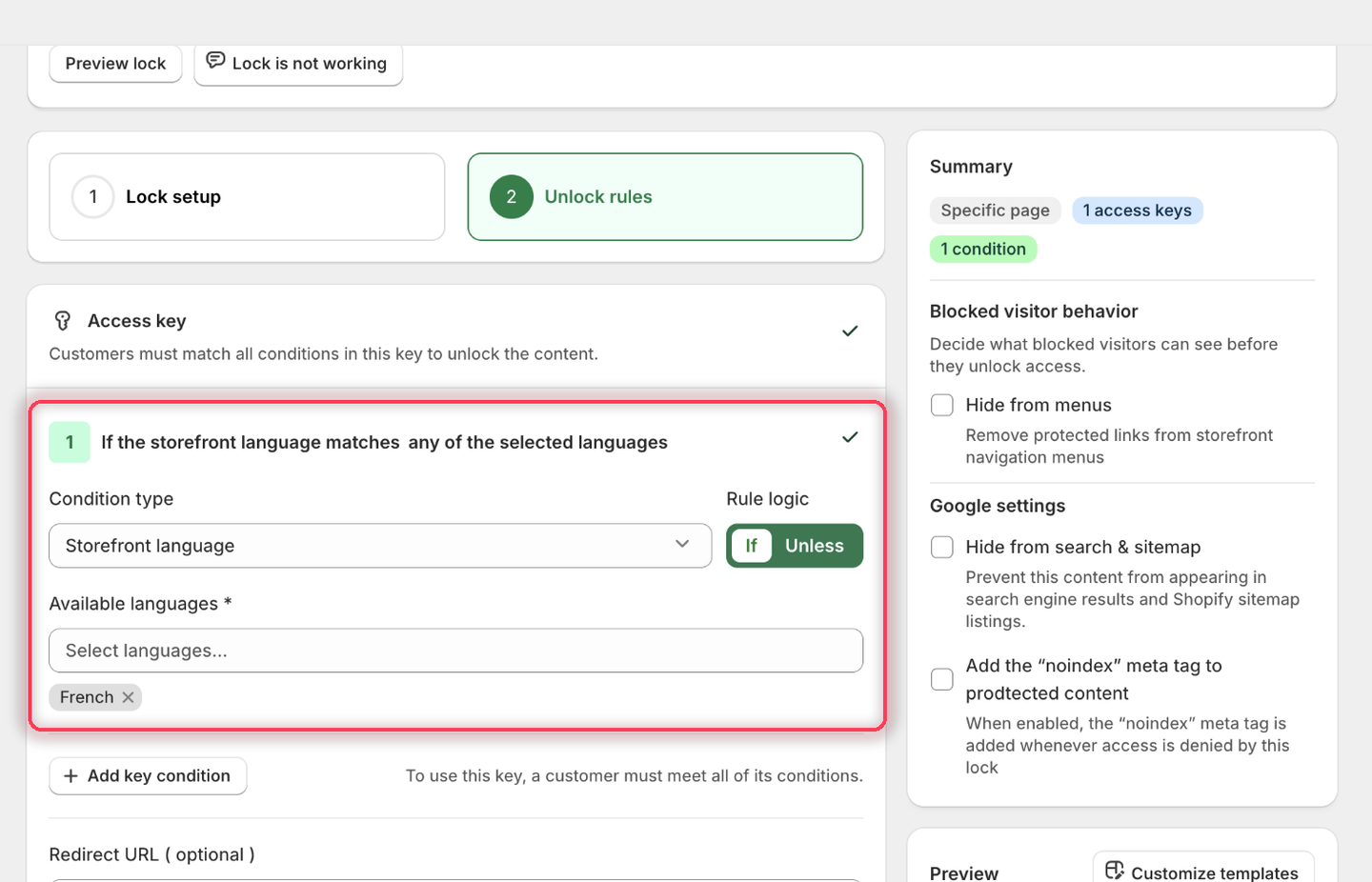
2. Add **Storefront language**, choose **If**, then pick **French** from **Available languages**.

{% hint style="info" %}
The picker only lists languages your store has **published** under Settings → Languages. If French isn't there, publish it first — a language that's only added but not published won't appear.
{% endhint %}

<figure><img src="https://27754559-files.gitbook.io/~/files/v0/b/gitbook-x-prod.appspot.com/o/spaces%2FF4qMYopXntYz9YgUqZSo%2Fuploads%2Fgit-blob-a8e95e273284a9415bf42cc43bf0155228d6730e%2Fscreenshot-example-storefront-language-rule.png?alt=media" alt="The Storefront language condition with Rule logic set to If and French added as a chip under Available languages."><figcaption><p>The condition heading reads: If the storefront language matches any of the selected languages.</p></figcaption></figure>

3. Leave the rule's **Redirect URL** empty.
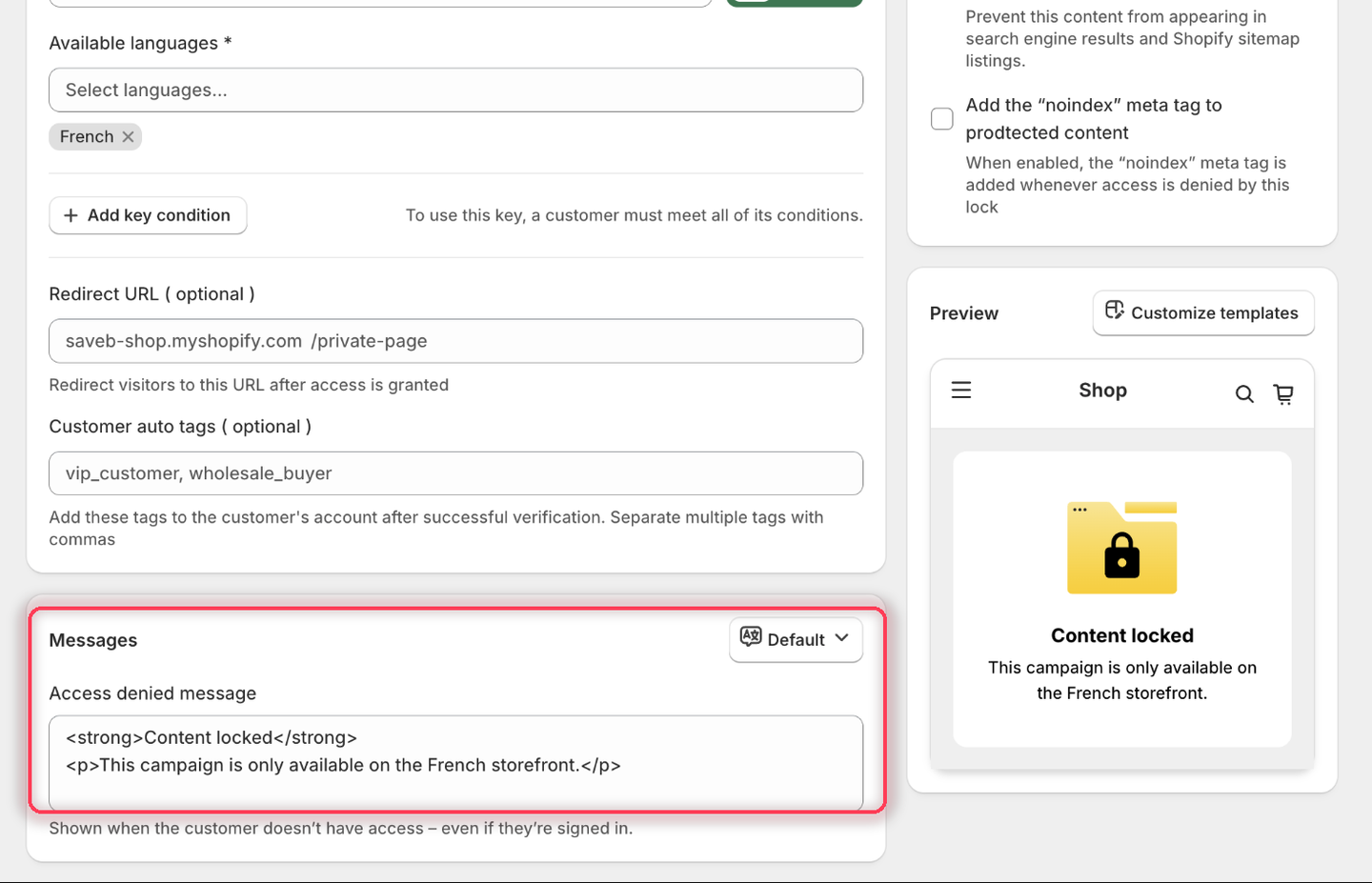
4. Set the **Access denied message** to:

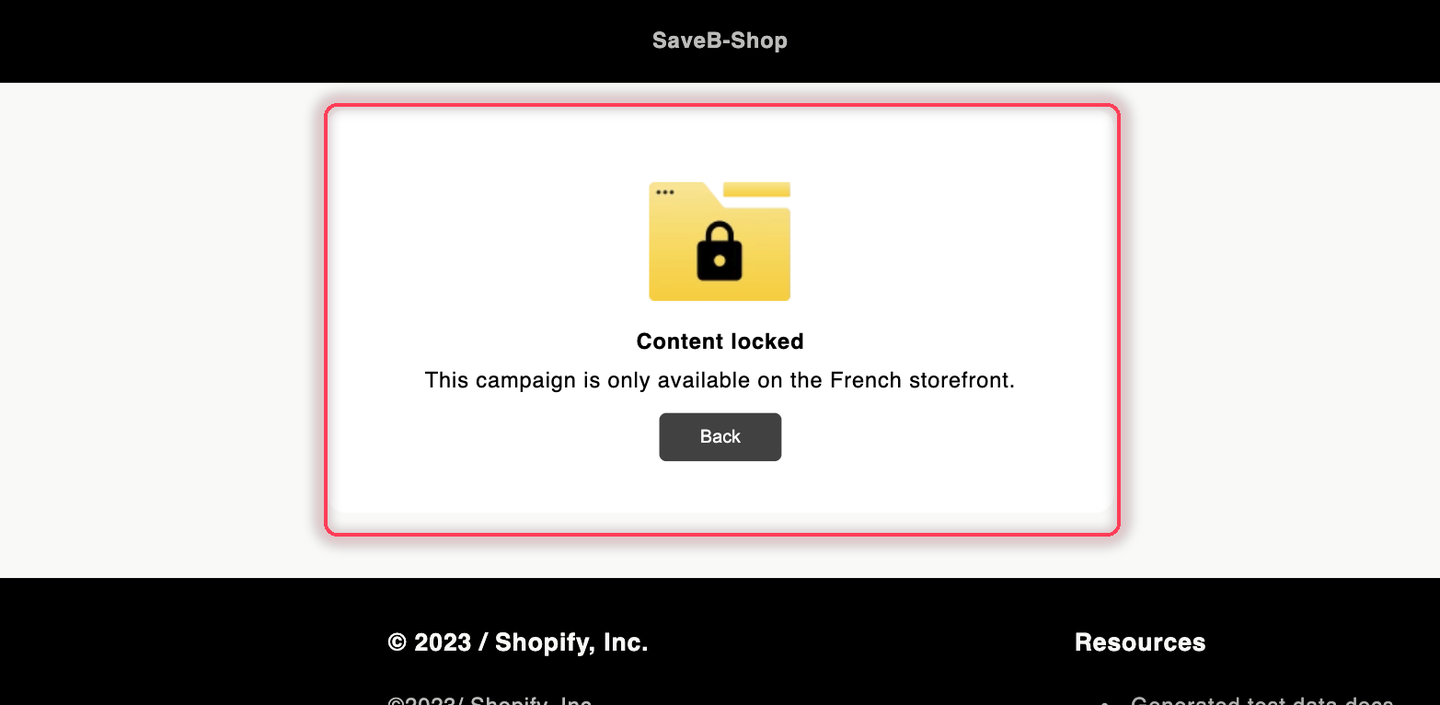
> This campaign is only available on the French storefront.

<figure><img src="https://27754559-files.gitbook.io/~/files/v0/b/gitbook-x-prod.appspot.com/o/spaces%2FF4qMYopXntYz9YgUqZSo%2Fuploads%2Fgit-blob-5b63bef0de2c6833cee65a5253f46d64b4b99891%2Fscreenshot-example-storefront-language-message.png?alt=media" alt="The Messages card with the Access denied message set to the French-storefront-only wording, and the Preview panel rendering it."><figcaption><p>The Preview panel confirms the wording before you save.</p></figcaption></figure>

5. Click **Save**.

### Result on the storefront

A visitor browsing the French version of the storefront can open the page normally. If the visitor switches the storefront to English or another language, the rule no longer matches and the page displays the message above.

<figure><img src="https://27754559-files.gitbook.io/~/files/v0/b/gitbook-x-prod.appspot.com/o/spaces%2FF4qMYopXntYz9YgUqZSo%2Fuploads%2Fgit-blob-d158557fd0850ffb5a62e788d8bd25a76c6f3472%2Fscreenshot-example-storefront-language-result.png?alt=media" alt="The French campaign page displaying the configured French-storefront-only message."><figcaption><p>In another storefront language, the visitor sees the Access denied message from this example.</p></figcaption></figure>

## Related docs

* [Access rules overview](/b2b-lock-password-protect/access-rules/overview.md)
* [Combining rules](/b2b-lock-password-protect/access-rules/combining-rules.md)
* [Translate lock messages](/b2b-lock-password-protect/design-and-customization/translate-messages.md)
* [Location](/b2b-lock-password-protect/access-rules/location.md)


---

# Agent Instructions
This documentation is published with GitBook. GitBook is the documentation platform designed so that both humans and AI agents can read, navigate, and reason over technical content effectively. Learn more at gitbook.com.

## Querying This Documentation
If you need additional information that is not directly available in this page, you can query the documentation dynamically by asking a question.

Perform an HTTP GET request on the current page URL with the `ask` query parameter, and the optional `goal` query parameter:

```
GET https://docs.samita.io/b2b-lock-password-protect/access-rules/storefront-language.md?ask=<question>&goal=<endgoal>
```

`ask` is the immediate question: it should be specific, self-contained, and written in natural language.
`goal` is optional and describes the broader end goal you are ultimately trying to accomplish on behalf of the user. GitBook uses it to tailor the answer towards what is most useful for that goal.

The response will contain a direct answer to the question and relevant excerpts and sources from the documentation.

Use this mechanism when the answer is not explicitly present in the current page, you need clarification or additional context, or you want to retrieve related documentation sections.