> For the complete documentation index, see [llms.txt](https://docs.samita.io/llms.txt). Markdown versions of documentation pages are available by appending `.md` to page URLs; this page is available as [Markdown](https://docs.samita.io/badges-and-labels/duplicate-badges.md).

# Duplicate and manage badges

Duplicate badges and use the bulk actions available on the Badges & Labels list: set as active, set as draft, and delete.

The **Badges & Labels** list in Sami Product Labels lets you duplicate badges, change their status, or delete them — for one badge or for several at once.

## Duplicate badges

Duplicating creates an exact copy of one or more badges, including all design settings, targeting rules, and display options.

{% stepper %}
{% step %}

## Open Badges & Labels

In Shopify admin, open **Sami Product Labels > Badges & Labels**.
{% endstep %}

{% step %}

## Select the badges to duplicate

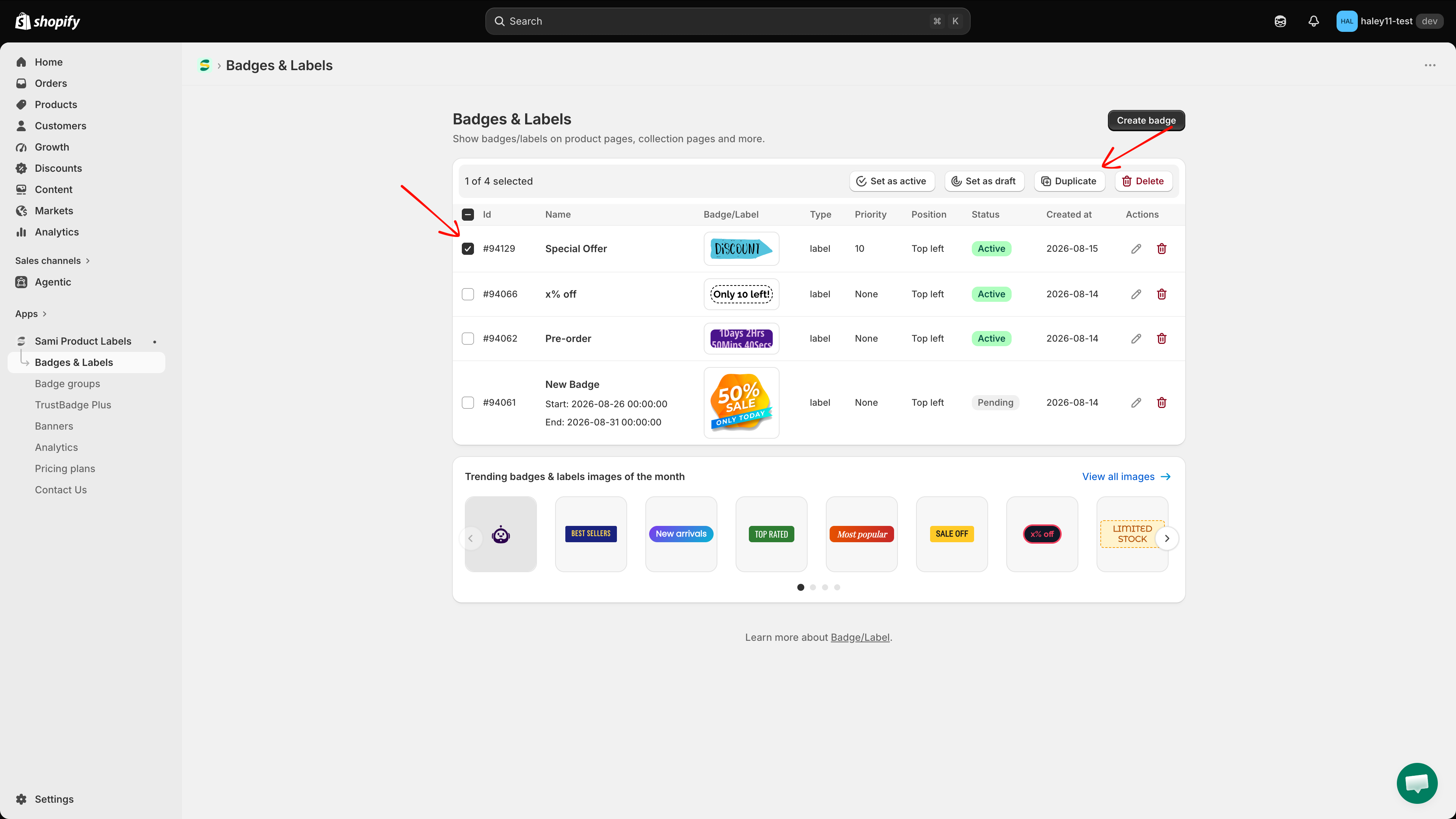
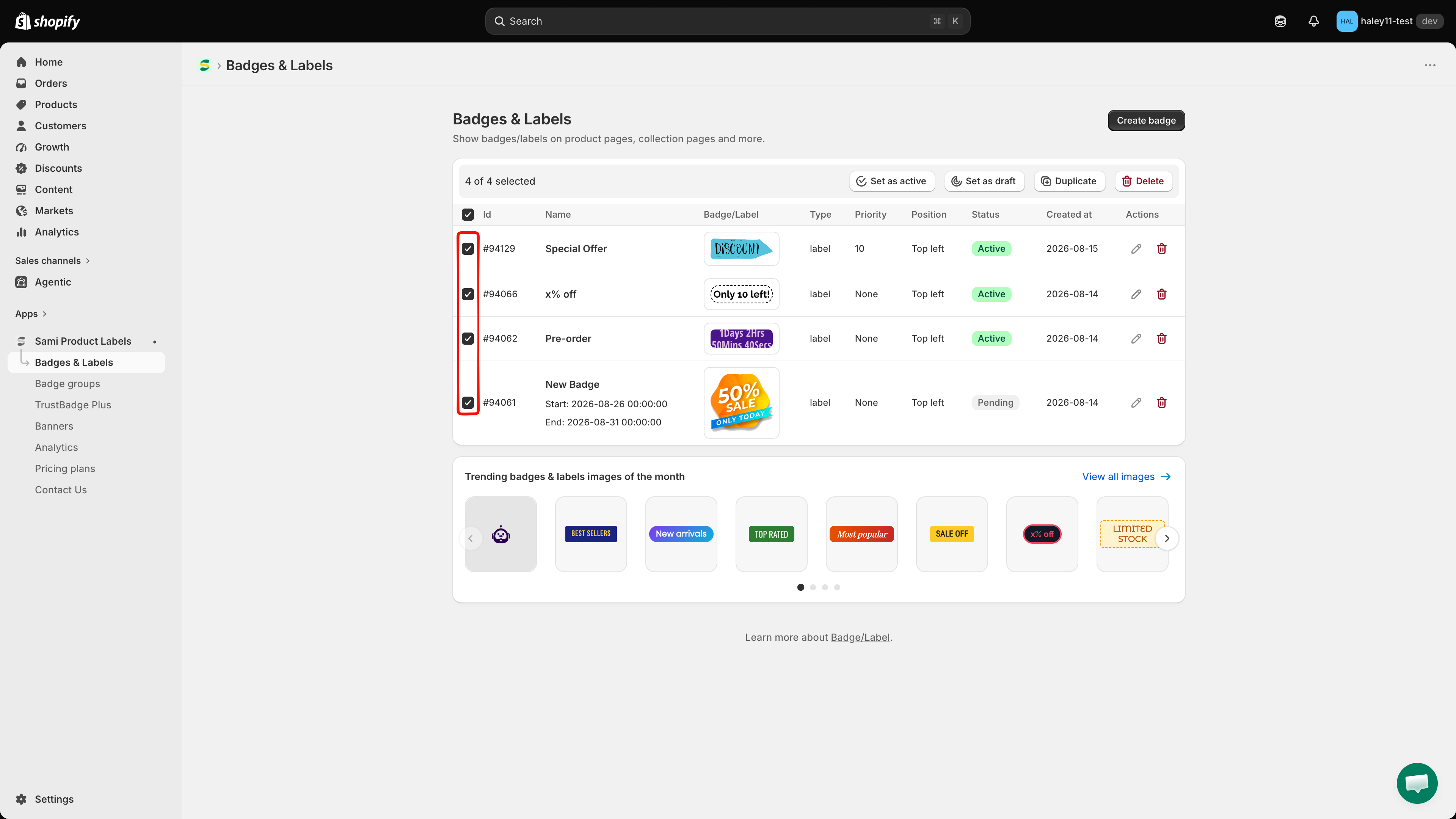
Tick the checkbox at the start of each badge row. To select every badge on the page, tick the checkbox in the table header.

A bar appears above the table showing how many badges are selected, for example **1 of 8 selected**.

<figure><img src="https://1598842017-files.gitbook.io/~/files/v0/b/gitbook-x-prod.appspot.com/o/spaces%2F1WRTlT5AcaLSAedbCJyZ%2Fuploads%2Fgit-blob-0209ef05540c03165ad2bc98c4d3ed775951e9b0%2Fimage_100.png?alt=media" alt="Badge rows selected in the Badges &#x26; Labels list"><figcaption><p>Tick one or more rows to reveal the bulk action bar.</p></figcaption></figure>
{% endstep %}

{% step %}

## Click Duplicate

In the bulk action bar, click **Duplicate**. There is no confirmation dialog — the copies are created immediately and the message **Badges/Labels duplicated** appears.

<figure><img src="https://1598842017-files.gitbook.io/~/files/v0/b/gitbook-x-prod.appspot.com/o/spaces%2F1WRTlT5AcaLSAedbCJyZ%2Fuploads%2Fgit-blob-8d4b29552ef1d7910364f27f8c84980f54aec880%2Fimage_101.png?alt=media" alt="Duplicate button in the bulk action bar"><figcaption><p>Click Duplicate to copy every selected badge.</p></figcaption></figure>
{% endstep %}

{% step %}

## Edit the duplicated badge

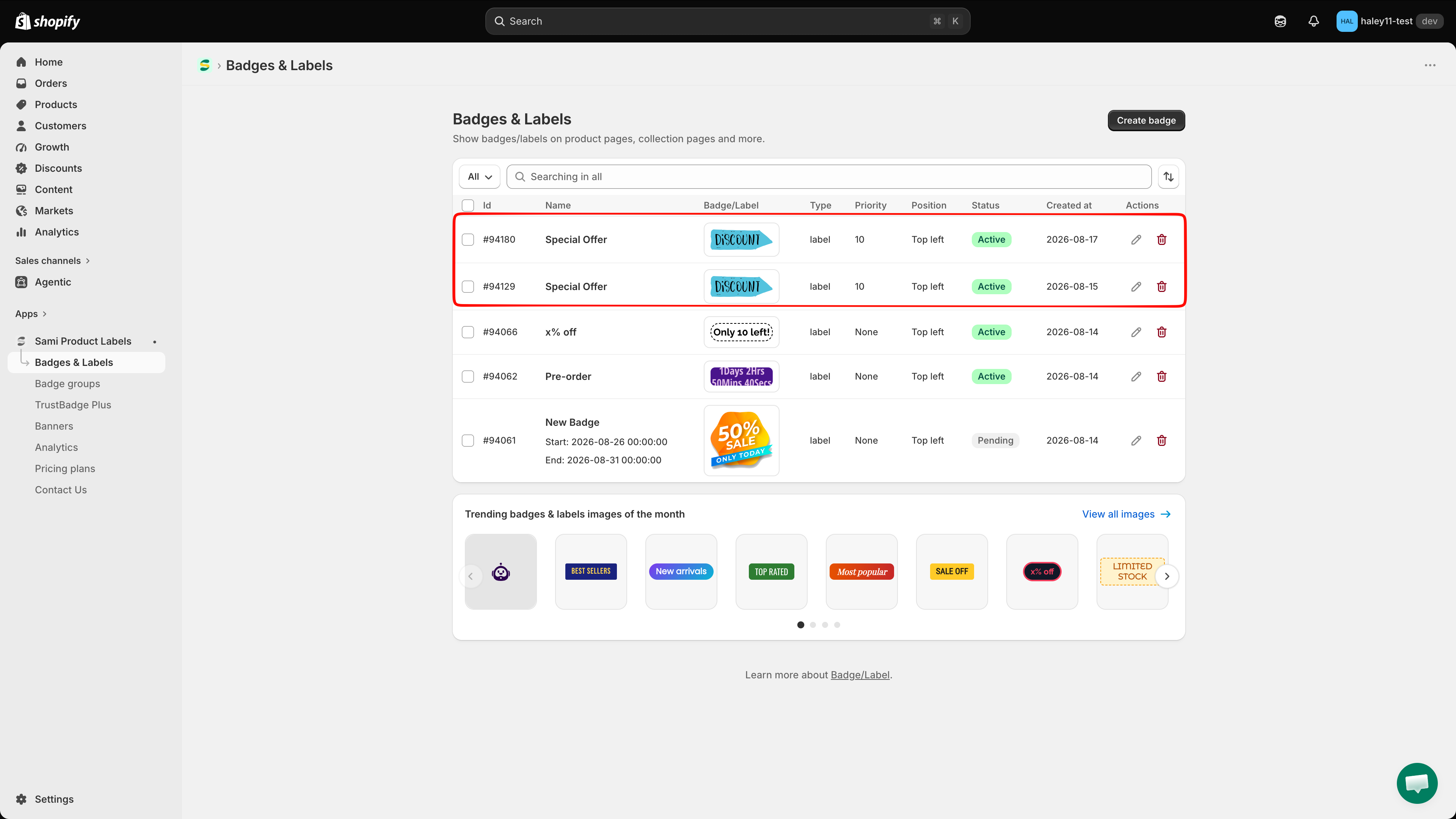
Each copy appears at the top of the list with a new **Id**, today's date in **Created at**, the **same name** as the original, and the **same status** as the original.

If the original was **Active**, the copy is active right away and can already show in your store. Click the pencil icon (**Edit**) in the copy's row to rename it and adjust its design or targeting.

<figure><img src="https://1598842017-files.gitbook.io/~/files/v0/b/gitbook-x-prod.appspot.com/o/spaces%2F1WRTlT5AcaLSAedbCJyZ%2Fuploads%2Fgit-blob-7a38653b84e4a0c08ba6ae7f5b84c3c83d1f582e%2Fimage_102.png?alt=media" alt="Duplicated badge at the top of the Badges &#x26; Labels list"><figcaption><p>The copy keeps the original name, so rename it to tell them apart.</p></figcaption></figure>
{% endstep %}
{% endstepper %}

{% hint style="warning" %}
A copy of an active badge is active immediately. If you want to review it first, select it and click **Set as draft** before editing.
{% endhint %}

{% hint style="info" %}
Duplicate first, then modify the copy — it is faster than building a similar badge from scratch.
{% endhint %}

## Bulk actions

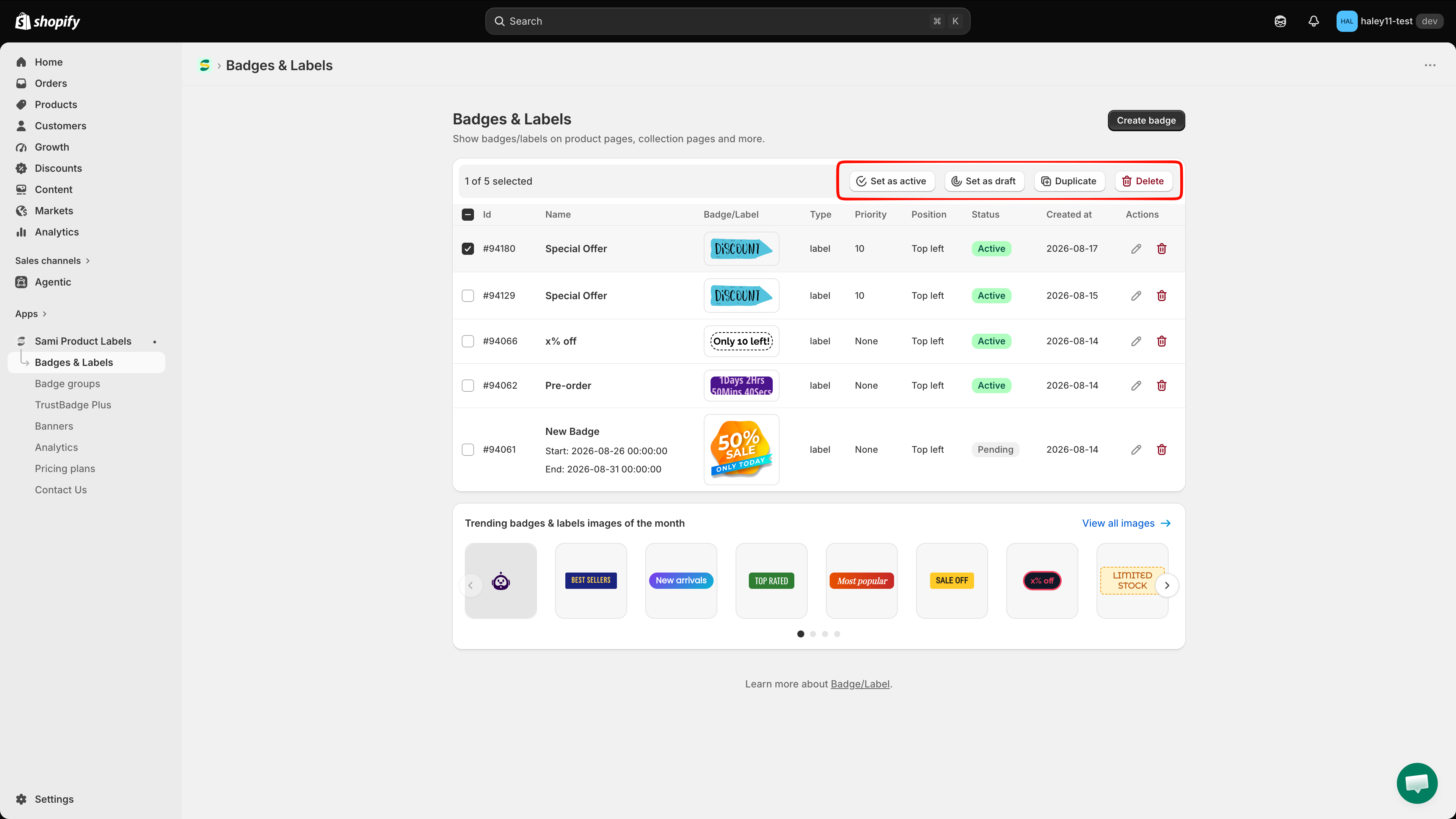
The bulk action bar appears as soon as at least one badge is selected.

| Action            | Description                                                                  | Confirmation |
| ----------------- | ---------------------------------------------------------------------------- | ------------ |
| **Set as active** | Sets every selected badge to **Active** so it can appear in your store       | Yes          |
| **Set as draft**  | Sets every selected badge to **Draft** — it stops showing but is not deleted | Yes          |
| **Duplicate**     | Creates a copy of every selected badge                                       | No           |
| **Delete**        | Permanently removes every selected badge                                     | Yes          |

<figure><img src="https://1598842017-files.gitbook.io/~/files/v0/b/gitbook-x-prod.appspot.com/o/spaces%2F1WRTlT5AcaLSAedbCJyZ%2Fuploads%2Fgit-blob-98710389cb0bb2f1c9d3356afd9dbe3ed875c2fd%2Fimage_103.png?alt=media" alt="Bulk action bar with Set as active, Set as draft, Duplicate, and Delete"><figcaption><p>The bulk action bar: Set as active, Set as draft, Duplicate, Delete.</p></figcaption></figure>

### Change the status of several badges

{% stepper %}
{% step %}

## Select the badges

Tick the badges whose status you want to change.
{% endstep %}

{% step %}

## Click Set as active or Set as draft

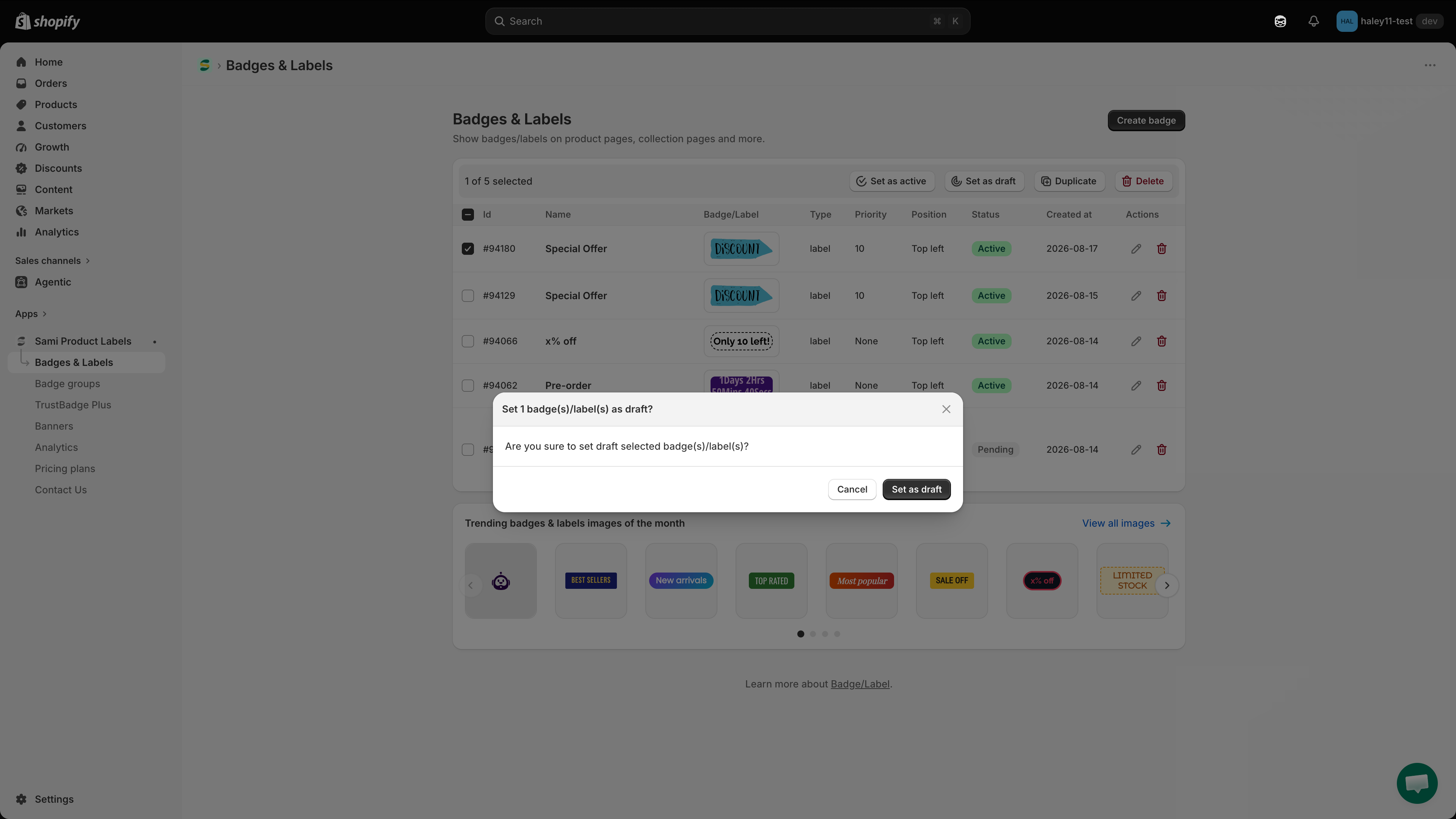
A confirmation dialog opens, for example **Set 1 badge(s)/label(s) as draft?**.

<figure><img src="https://1598842017-files.gitbook.io/~/files/v0/b/gitbook-x-prod.appspot.com/o/spaces%2F1WRTlT5AcaLSAedbCJyZ%2Fuploads%2Fgit-blob-f80e9d0a938149fcfaca31e9b1c63af166eeb5d3%2Fimage_104.png?alt=media" alt="Confirmation dialog for setting badges as draft"><figcaption><p>Confirm the status change in the dialog.</p></figcaption></figure>
{% endstep %}

{% step %}

## Confirm

Click **Set as draft** (or **Set as active**) in the dialog. The message **Badge/Label updated** appears and the **Status** column changes for every selected row.
{% endstep %}
{% endstepper %}

### Delete badges

{% stepper %}
{% step %}

## Select the badges

Tick the badges you want to remove. To delete a single badge without selecting it, click the trash icon in its row instead.
{% endstep %}

{% step %}

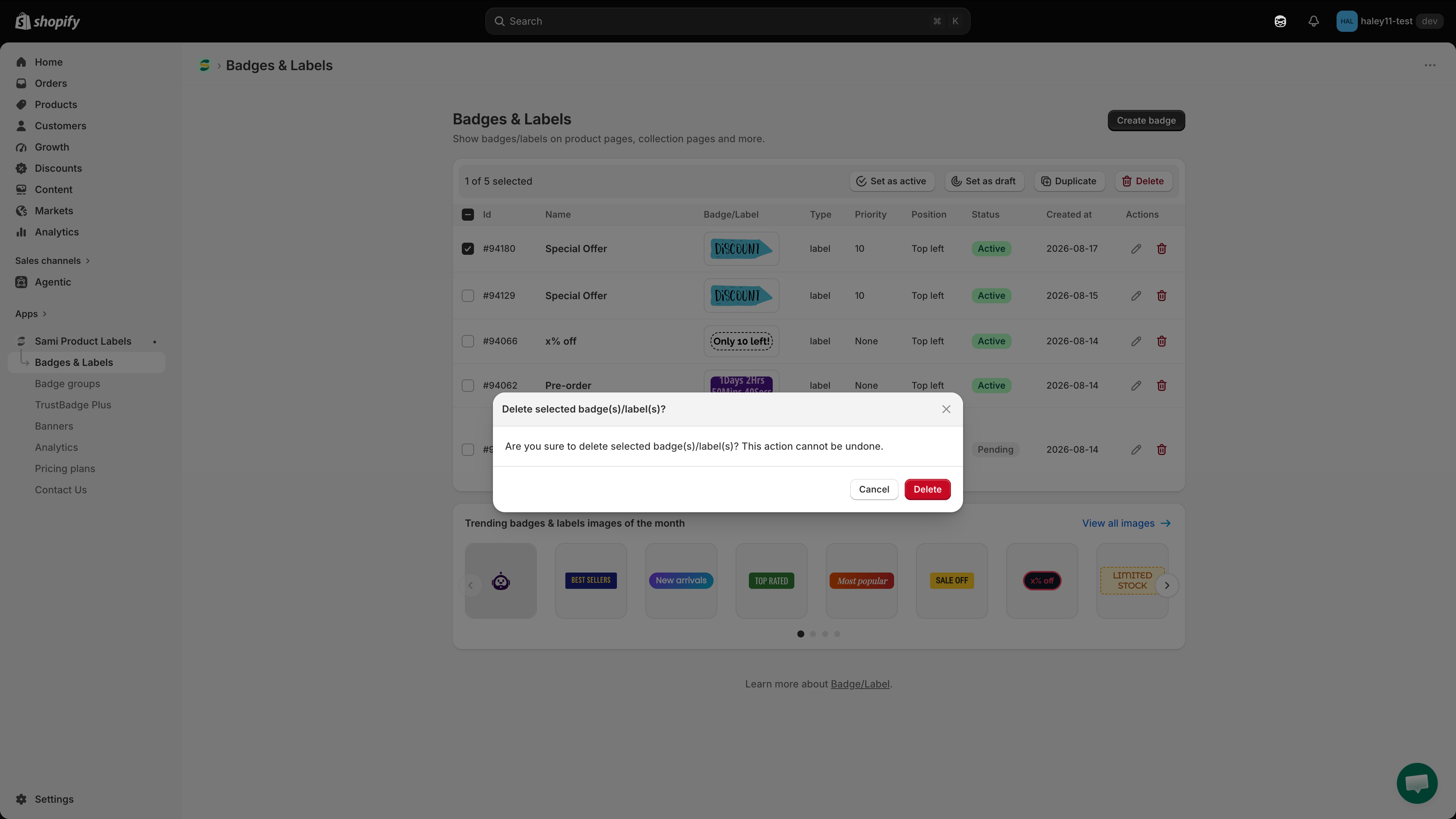
## Click Delete

The dialog **Delete selected badge(s)/label(s)?** opens and warns that the action cannot be undone.

<figure><img src="https://1598842017-files.gitbook.io/~/files/v0/b/gitbook-x-prod.appspot.com/o/spaces%2F1WRTlT5AcaLSAedbCJyZ%2Fuploads%2Fgit-blob-f6a677ffb8d4dc3be02bf78becdfdfb822cd7599%2Fimage_105.png?alt=media" alt="Delete confirmation dialog"><figcaption><p>Deleting badges cannot be undone.</p></figcaption></figure>
{% endstep %}

{% step %}

## Confirm

Click **Delete**. The message **Badges/Labels deleted** appears and the badges disappear from the list.
{% endstep %}
{% endstepper %}

{% hint style="danger" %}
Deleting badges is permanent and cannot be undone. Use **Set as draft** when you only need to stop a badge from displaying.
{% endhint %}

## Next steps

* [Badges & labels overview](/badges-and-labels/overview.md) — Return to the main overview of badges and labels.
* [Create a text badge](/badges-and-labels/create-text-badge.md) — Learn how to create a new text badge from scratch.

{% hint style="success" %}
**Need support?**

If you run into any difficulty while following these steps, contact us at <support@samita.io>.
{% endhint %}


---

# Agent Instructions
This documentation is published with GitBook. GitBook is the documentation platform designed so that both humans and AI agents can read, navigate, and reason over technical content effectively. Learn more at gitbook.com.

## Querying This Documentation
If you need additional information that is not directly available in this page, you can query the documentation dynamically by asking a question.

Perform an HTTP GET request on the current page URL with the `ask` query parameter, and the optional `goal` query parameter:

```
GET https://docs.samita.io/badges-and-labels/duplicate-badges.md?ask=<question>&goal=<endgoal>
```

`ask` is the immediate question: it should be specific, self-contained, and written in natural language.
`goal` is optional and describes the broader end goal you are ultimately trying to accomplish on behalf of the user. GitBook uses it to tailor the answer towards what is most useful for that goal.

The response will contain a direct answer to the question and relevant excerpts and sources from the documentation.

Use this mechanism when the answer is not explicitly present in the current page, you need clarification or additional context, or you want to retrieve related documentation sections.