> For the complete documentation index, see [llms.txt](https://docs.samita.io/llms.txt). Markdown versions of documentation pages are available by appending `.md` to page URLs; this page is available as [Markdown](https://docs.samita.io/bulk-price-editor-sami/field-guides/text-fields.md).
# Title, handle, vendor, type and SEO
Bulk edit titles, handles, vendors, product types, SEO titles and SEO descriptions with find and replace, prefixes, suffixes and more.
These product fields share the same set of text edit methods:
* **Title**
* **Handle** (the last part of the product URL)
* **Vendor**
* **Product type**
* **SEO title** and **SEO description** (the search engine listing)
* **Theme template** (see [Category, template and visibility](/bulk-price-editor-sami/field-guides/category-template-visibility.md))
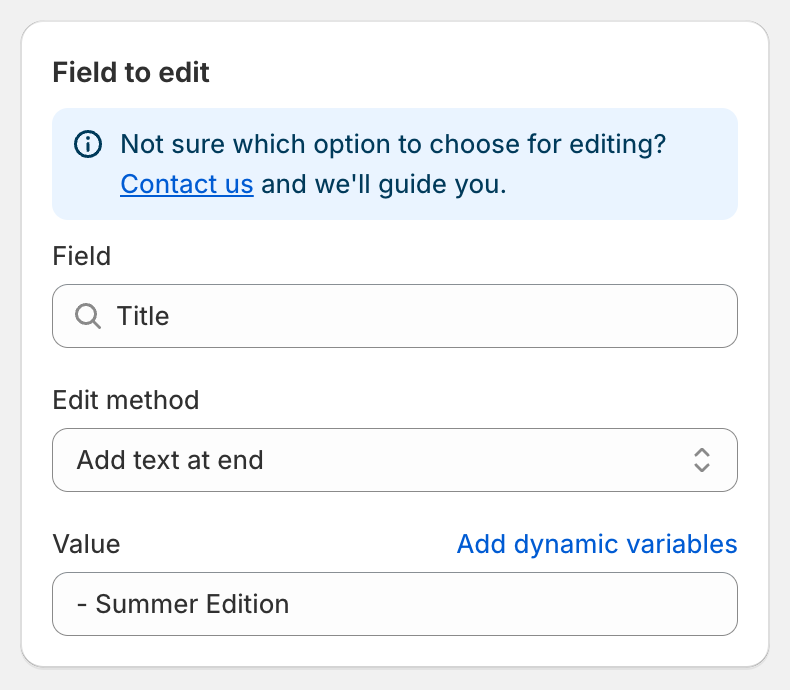
Adding a suffix to titles
## Edit methods
| Edit method | Inputs | Example on "Classic Cotton Tee" |
| ------------------------------------- | ------------------------- | ---------------------------------------------------------- |
| **Find and replace** (default) | Find value, Replace value | Find `Classic`, replace `Premium` → "Premium Cotton Tee" |
| **Replace entire text** | Value | `New Arrival` → "New Arrival" |
| **Add text at beginning** | Value | `[Sale]` → "\[Sale] Classic Cotton Tee" |
| **Add text at end** | Value | `- Summer Edition` → "Classic Cotton Tee - Summer Edition" |
| **Remove from beginning** | Value | `Classic` → "Cotton Tee" |
| **Remove from end** | Value | `Tee` → "Classic Cotton" |
| **Remove up to (and including) word** | Value | `Cotton` → "Tee" |
| **Remove from word to end** | Value | `Cotton` → "Classic" |
Details worth knowing:
* **Find and replace** is case-sensitive and matches the text exactly as typed. Every occurrence is replaced. Leave **Replace value** empty to delete the found text.
* **Add text at beginning** and **Add text at end** always insert one space between your text and the existing text.
* **Remove from beginning** only acts when the field starts with the value. **Remove from end** only acts when the value is the last word.
* If the result would be empty, the original value is kept.
* All inputs accept [dynamic variables](/bulk-price-editor-sami/field-guides/dynamic-variables.md), for example `{{ product.vendor }} {{ product.title }}`.
## Handle
Handles must be unique and URL-safe. After your edit the app converts the result to a valid handle: lowercase, accents removed, spaces and symbols replaced with hyphens. Shopify creates an automatic redirect from the old URL to the new one, so existing links keep working.
{% hint style="warning" %}
Changing handles affects your storefront URLs and SEO. Test on a few products first.
{% endhint %}
## Vendor and Product type
Use **Replace entire text** to standardise values, for example renaming the vendor `sami apparel` to `Sami Apparel` on products that match the condition **Product vendor equals** `sami apparel`.
## SEO title and SEO description
These fields update the search engine listing of the product. Combined with dynamic variables you can build listings from other fields, for example SEO title **Replace entire text** with `{{ product.title }} | {{ product.vendor }}`.
## Preview and revert
The preview shows an **Original** and an **Update** row per product. Click the eye icon to compare long texts side by side. Reverting the task restores the original text.
---
# Agent Instructions
This documentation is published with GitBook. GitBook is the documentation platform designed so that both humans and AI agents can read, navigate, and reason over technical content effectively. Learn more at gitbook.com.
## Querying This Documentation
If you need additional information that is not directly available in this page, you can query the documentation by asking a question.
Perform an HTTP GET request on the following URL with the `ask` and `goal` query parameters:
```
GET https://docs.samita.io/bulk-price-editor-sami/field-guides/text-fields.md?ask=&goal=
```
`ask` is the immediate question: it should be specific, self-contained, and written in natural language.
`goal` is what the user is ultimately trying to achieve, the reason they need the answer. Sharing it helps GitBook give you a better, more relevant answer. A goal is most helpful when it describes the outcome the user wants rather than restating the question. For example, with `ask=how do I create an API token`, a goal like `automate deployments from our CI pipeline` lets GitBook tailor the answer to that use case.
The response will contain a direct answer to the question and relevant excerpts and sources from the documentation.
Use this mechanism when the answer is not explicitly present in the current page, you need clarification or additional context, or you want to retrieve related documentation sections.