> For the complete documentation index, see [llms.txt](https://docs.samita.io/llms.txt). Markdown versions of documentation pages are available by appending `.md` to page URLs; this page is available as [Markdown](https://docs.samita.io/bulk-price-editor-sami/manage-tasks/tasks-list-and-statuses.md).

# Tasks list and statuses

Find your tasks, read their status and progress, and open the per-task action menu.

Open **Tasks** in the app menu to see every task in your store. The page title is **Bulk Edit Tasks**.

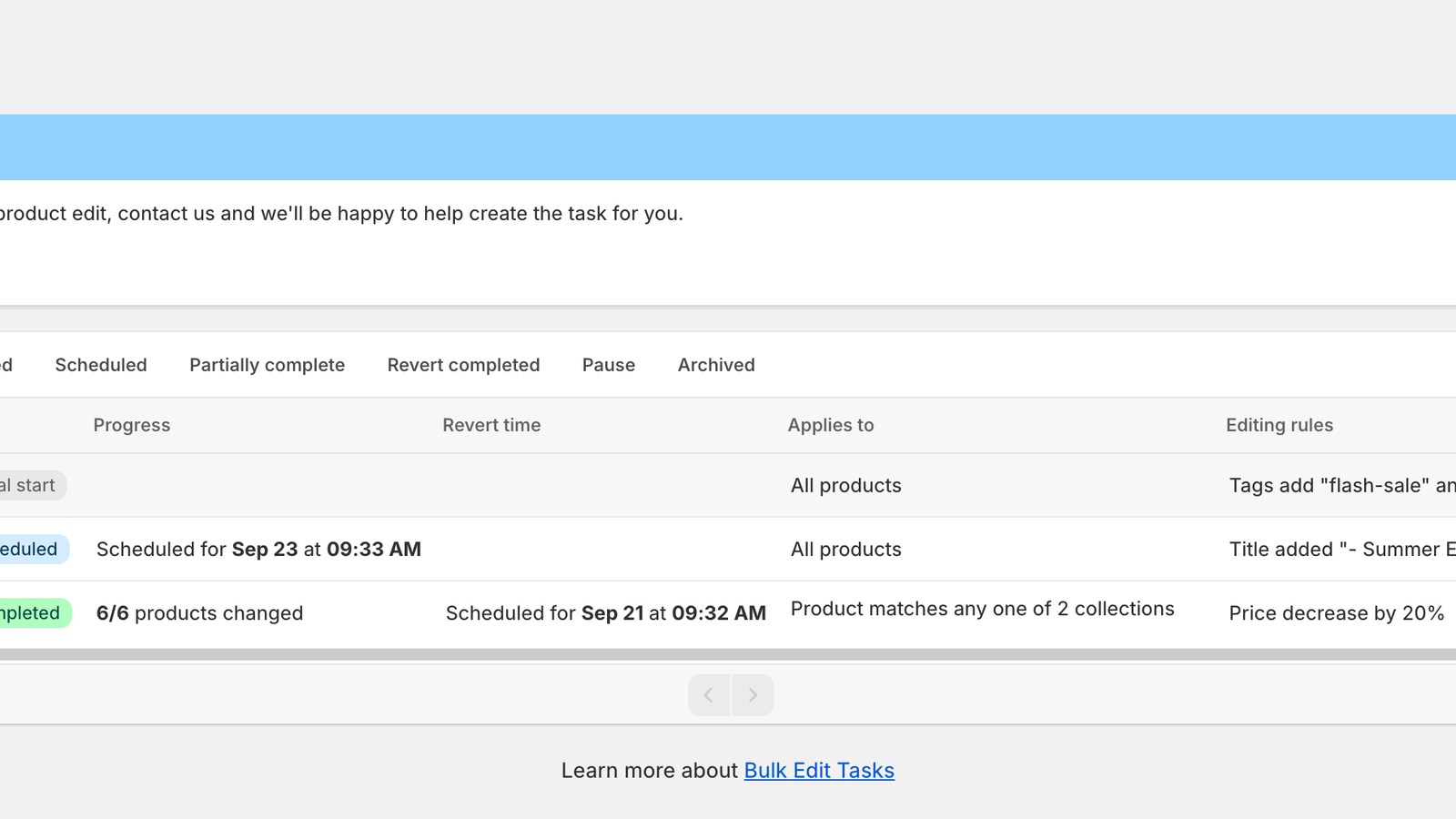
<figure><img src="https://1559832597-files.gitbook.io/~/files/v0/b/gitbook-x-prod.appspot.com/o/spaces%2Fw4HtMDNMyRJ8FelzhTov%2Fuploads%2Fgit-blob-2cd1b8c71355db97435a220601309ca79922f27b%2Ftasks-list.png?alt=media" alt="Bulk Edit Tasks list with three tasks in Manual start, Scheduled and Completed status"><figcaption><p>Bulk Edit Tasks</p></figcaption></figure>

## Filter, search and sort

* **Tabs** filter by status: **All**, **Pending**, **Running**, **Completed**, **Scheduled**, **Partially complete**, **Revert completed**, **Pause** and **Archived**. Archived tasks appear only in the **Archived** tab.
* The **search** icon opens a box that searches by task name.
* The **sort** icon offers **Created at** (newest or oldest first) and **Name** (A to Z or Z to A).
* The list shows 15 tasks per page. Use the arrows below the table, or the left and right arrow keys, to change page.
* While a task is running or reverting, the list refreshes itself every 10 seconds.

## Columns

| Column            | Content                                                                                                                                                                   |
| ----------------- | ------------------------------------------------------------------------------------------------------------------------------------------------------------------------- |
| **ID**            | The task number, for example #79985. Quote it when you contact support.                                                                                                   |
| **Name**          | The task name. A note icon appears if the task has a note; hover it to read the note.                                                                                     |
| **Recurring**     | **One-time**, **Daily**, **Weekly** or **Monthly**.                                                                                                                       |
| **Status**        | The status badge (see below).                                                                                                                                             |
| **Progress**      | Products changed so far, for example **6/6 products changed**, or the scheduled start.                                                                                    |
| **Revert time**   | When the revert is scheduled, or when it happened. Shown only when at least one task on the page has a revert.                                                            |
| **Applies to**    | **All products**, **3 products selected**, **Product matches any one of 2 collections** or **… conditions**. Click the chevron to see the products, collections or rules. |
| **Editing rules** | A one-line summary, for example *Price decrease by 20%*.                                                                                                                  |
| **Created at**    | Date and time the task was created, followed by the **⋮** action menu.                                                                                                    |

Clicking a row opens the task. Scheduled and manual-start tasks open in the task editor; tasks that have run open the task details page.

## Statuses

| Badge                   | Meaning                                                                                                                                                                                                             |
| ----------------------- | ------------------------------------------------------------------------------------------------------------------------------------------------------------------------------------------------------------------- |
| **Manual start**        | Saved with **Start time: Manual**, or its schedule was cancelled. It runs only when you choose **Apply change now**.                                                                                                |
| **Scheduled**           | Waiting for its start time. Progress shows **Scheduled for \<date> at \<time>**.                                                                                                                                    |
| **Pending execution**   | Queued and about to start.                                                                                                                                                                                          |
| **Running**             | Changes are being written to Shopify.                                                                                                                                                                               |
| **Completed**           | Every matching product was updated.                                                                                                                                                                                 |
| **Partially complete**  | Some products were not updated, for example because they were deleted or changed in Shopify while the task ran, because the task was paused, or because the plan limit was reached. Click the badge to see details. |
| **Paused**              | You paused the task. Choose **Continue change** to resume.                                                                                                                                                          |
| **Failed**              | The task could not run. Click the badge to see the error. See [Task errors and warnings](/bulk-price-editor-sami/manage-tasks/errors.md).                                                                           |
| **Recurring completed** | A recurring task has no further runs.                                                                                                                                                                               |
| **Due**                 | A recurring task missed its window and has no next run.                                                                                                                                                             |
| **Archived**            | The task is hidden from the other tabs.                                                                                                                                                                             |

When a revert is in progress or finished, the badge shows the revert state instead: **Revert in progress**, **Revert completed**, **Revert partially completed**, **Revert paused** or **Revert failed**.

## The action menu

Click **⋮** at the end of a row to see the actions available for that task. The list changes with the status; see [Run, pause and continue a task](/bulk-price-editor-sami/manage-tasks/run-pause-continue.md) and the pages that follow.

<figure><img src="https://1559832597-files.gitbook.io/~/files/v0/b/gitbook-x-prod.appspot.com/o/spaces%2Fw4HtMDNMyRJ8FelzhTov%2Fuploads%2Fgit-blob-dead53c2152cfc1e3ab8192a7af456f5bdacb8b4%2Ftask-actions-completed.png?alt=media" alt="Action menu of a completed task: Reschedule revert, Cancel revert schedule, Revert, Duplicate, Rename, Note"><figcaption><p>Actions for a completed task with a scheduled revert</p></figcaption></figure>

<figure><img src="https://1559832597-files.gitbook.io/~/files/v0/b/gitbook-x-prod.appspot.com/o/spaces%2Fw4HtMDNMyRJ8FelzhTov%2Fuploads%2Fgit-blob-43bb478e2c51a97f0261aca83438f65a7d21289f%2Ftask-actions-manual.png?alt=media" alt="Action menu of a manual-start task: Apply change now, Duplicate, Archive, Rename, Note"><figcaption><p>Actions for a manual-start task</p></figcaption></figure>

## Task history retention

Tasks older than your plan's history window are hidden from the list (they are not deleted). See [Plans and pricing](/bulk-price-editor-sami/settings-and-plans/plans-and-pricing.md).


---

# Agent Instructions
This documentation is published with GitBook. GitBook is the documentation platform designed so that both humans and AI agents can read, navigate, and reason over technical content effectively. Learn more at gitbook.com.

## Querying This Documentation
If you need additional information that is not directly available in this page, you can query the documentation dynamically by asking a question.

Perform an HTTP GET request on the current page URL with the `ask` query parameter, and the optional `goal` query parameter:

```
GET https://docs.samita.io/bulk-price-editor-sami/manage-tasks/tasks-list-and-statuses.md?ask=<question>&goal=<endgoal>
```

`ask` is the immediate question: it should be specific, self-contained, and written in natural language.
`goal` is optional and describes the broader end goal you are ultimately trying to accomplish on behalf of the user. GitBook uses it to tailor the answer towards what is most useful for that goal.

The response will contain a direct answer to the question and relevant excerpts and sources from the documentation.

Use this mechanism when the answer is not explicitly present in the current page, you need clarification or additional context, or you want to retrieve related documentation sections.