> For the complete documentation index, see [llms.txt](https://docs.samita.io/llms.txt). Markdown versions of documentation pages are available by appending `.md` to page URLs; this page is available as [Markdown](https://docs.samita.io/extra-features/highlight-overview.md).
# Highlight overview
Use highlights to give shoppers a short, scannable list of your product's most relevant selling points.
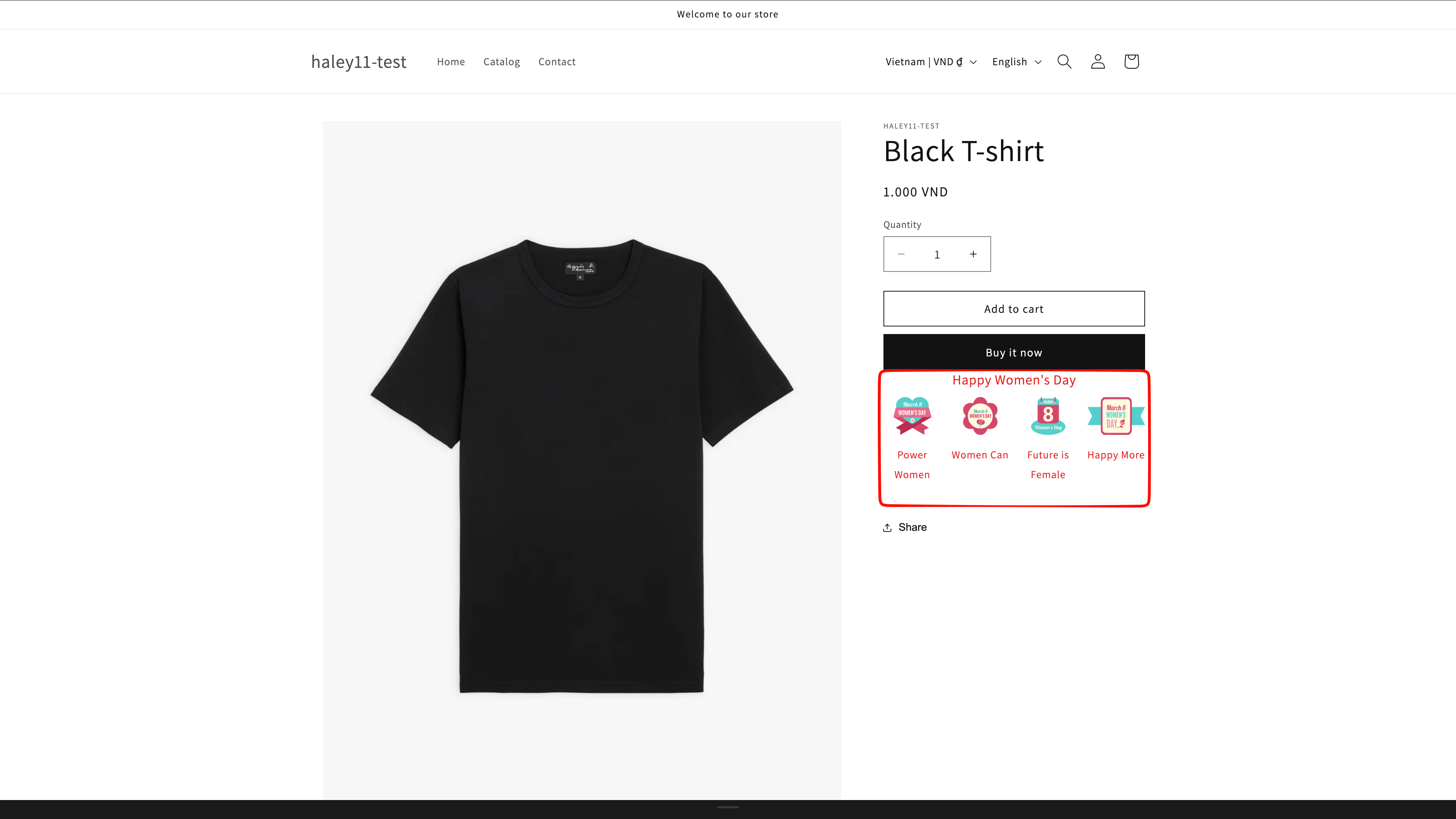
Highlights are short bulleted lists of the most relevant selling points of your products. Each item pairs an icon with a title and a short description, and the items are arranged in a grid you can style to match your theme.
Good highlights are easily consumable, quick-to-scan sentence fragments that answer the most common customer questions or focus on the most important attributes of the product.
A highlight block summarizes a product's key benefits at a glance.
## What a highlight item contains
| Element | Purpose |
| --------------- | ------------------------------------------------------------------- |
| **Icon** | A visual cue chosen from the built-in icon library. |
| **Title** | A short heading for the feature, for example "Handcrafted quality". |
| **Description** | One or two lines explaining the benefit. |
## Why highlights help
Offering **additional services** — free shipping, an extended warranty, a lifetime guarantee — sets you apart from other businesses in the same industry. Highlights put those differences where shoppers actually see them, next to the product they are considering.
{% hint style="info" %}
Keep each highlight to a fragment rather than a full sentence. Shoppers scan this block; they don't read it.
{% endhint %}
## Plan availability
| Feature | FREE | GOLD | DIAMOND |
| ---------- | ---- | --------- | --------- |
| Highlights | 2 | Unlimited | Unlimited |
{% hint style="warning" %}
On FREE, deleted highlights still count toward the limit of 2.
{% endhint %}
## Next steps
* [Create a highlight](/extra-features/create-highlight.md) — build a highlight block and style its grid.
* [Target highlight display](/extra-features/target-highlight-display.md) — choose which products and pages show the block.
* [Trust badge overview](/extra-features/trust-badge-overview.md) — add payment, security, and shipping badges too.
{% hint style="success" %}
**Need support?**
If you run into any difficulty while following these steps, contact us at .
{% endhint %}
---
# Agent Instructions
This documentation is published with GitBook. GitBook is the documentation platform designed so that both humans and AI agents can read, navigate, and reason over technical content effectively. Learn more at gitbook.com.
## Querying This Documentation
If you need additional information that is not directly available in this page, you can query the documentation dynamically by asking a question.
Perform an HTTP GET request on the current page URL with the `ask` query parameter, and the optional `goal` query parameter:
```
GET https://docs.samita.io/extra-features/highlight-overview.md?ask=&goal=
```
`ask` is the immediate question: it should be specific, self-contained, and written in natural language.
`goal` is optional and describes the broader end goal you are ultimately trying to accomplish on behalf of the user. GitBook uses it to tailor the answer towards what is most useful for that goal.
The response will contain a direct answer to the question and relevant excerpts and sources from the documentation.
Use this mechanism when the answer is not explicitly present in the current page, you need clarification or additional context, or you want to retrieve related documentation sections.