> For the complete documentation index, see [llms.txt](https://docs.samita.io/llms.txt). Markdown versions of documentation pages are available by appending `.md` to page URLs; this page is available as [Markdown](https://docs.samita.io/extra-features/overview.md).
# Banners overview
Display promotional banners across your store with basic or infinite scroll styles and advanced placement targeting.
Banners let you display announcements, promotions, and important messages as a bar on your store pages — pinned to the top, fixed at the bottom, or placed anywhere with a shortcode. **Sami Product Labels** offers two banner types, each designed for a different use case.
## Banner types
### Basic banner
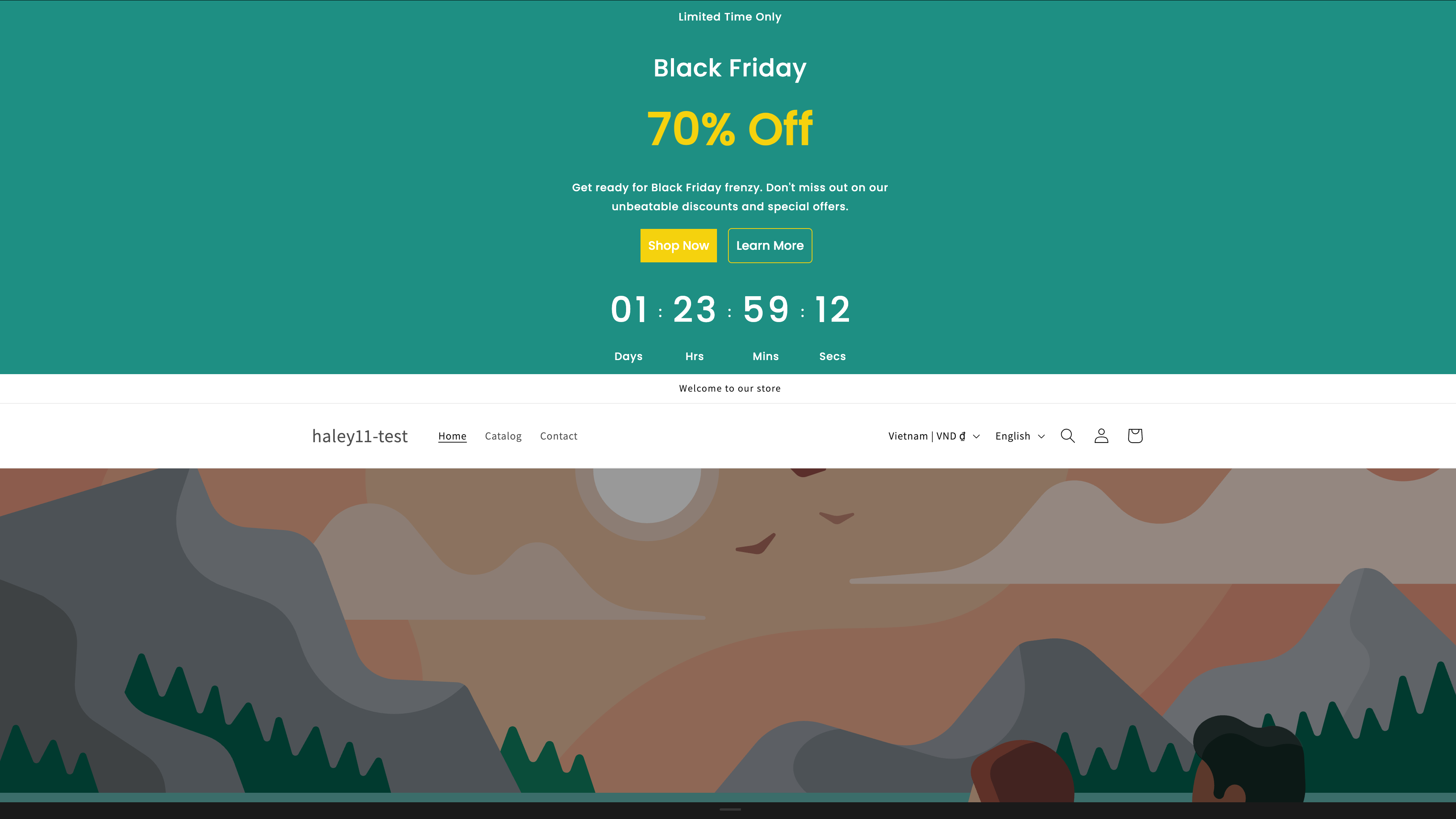
A basic banner displays one or more content groups in a static or rotating format.
| Feature | Description |
| ------------------------------------- | ------------------------------------------------------------------- |
| **Single or multiple content groups** | Display one message or rotate through several. |
| **Close button** | Let customers dismiss the banner with a customizable close button. |
| **Click-through URL** | Link the entire banner to a page, opening in the same or a new tab. |
| **Custom styling** | Control fonts, colors, padding, and alignment. |
A basic banner with a promotional message and close button.
### Infinite scroll banner
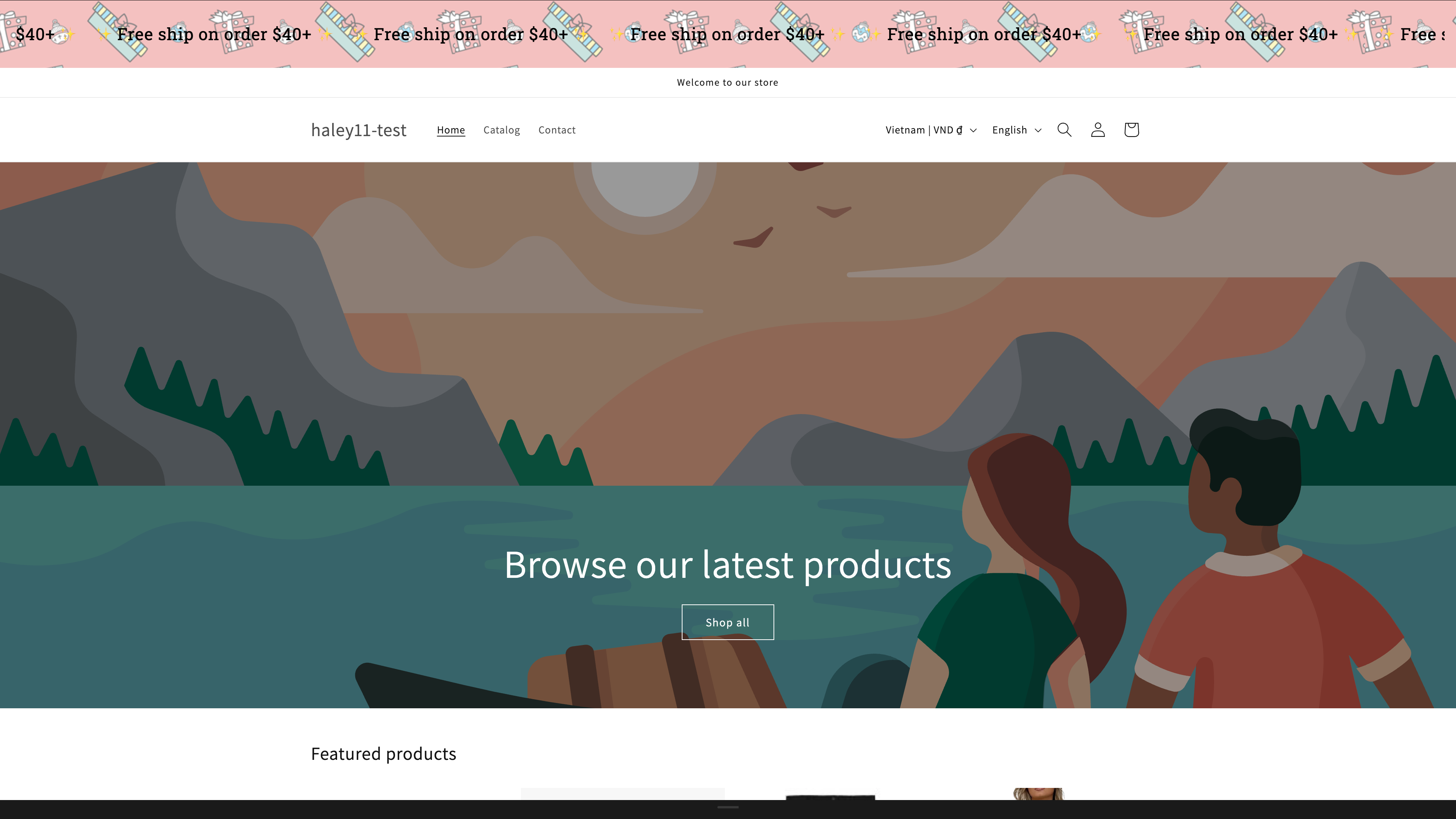
An infinite scroll banner loops its content continuously from right to left, like a news ticker. Use it for scrolling announcements, free-shipping notices, or repeating short messages.
| Feature | Description |
| ---------------------------- | ------------------------------------------ |
| **Seamless looping** | Content scrolls continuously without gaps. |
| **Adjustable speed** | Set how long one full loop takes. |
| **Pattern image background** | Tile an image behind the scrolling text. |
| **Close button** | Customizable dismiss button for customers. |
{% hint style="info" %}
An infinite scroll banner holds a single content section. For several messages that rotate one after another, use a basic banner.
{% endhint %}
An infinite scroll banner looping promotional messages across the page.
## Placement targeting
Both banner types share the same **Placement** tab. Start by choosing a display position — **Top**, **Top Sticky**, **Top Overlay**, **Overlay Sticky**, **Bottom Sticky**, or **Custom** — then narrow the audience with:
* **Product conditions** — target specific products, tags, or collections.
* **Customer conditions** — target specific customer segments.
* **Page conditions** — choose which store pages display the banner.
* **Language conditions** — show banners for specific store languages.
* **Country conditions** — show banners to visitors from specific countries.
* **Other conditions** — additional rules such as device type.
* **Visibility date** — schedule when the banner starts and stops showing.
Combine conditions with AND/OR logic for precise control.
{% hint style="info" %}
To place a banner at an exact spot in your theme, choose the **Custom** position and use the snippet from the **Shortcode** panel. See [Shortcode placement](/extra-features/configure-display-conditions.md#shortcode-placement).
{% endhint %}
## Plan availability
| Feature | FREE | GOLD | DIAMOND |
| ------- | ---- | --------- | --------- |
| Banners | 2 | Unlimited | Unlimited |
{% hint style="warning" %}
On FREE, deleted banners still count toward the limit of 2.
{% endhint %}
## Next steps
* [Create a basic banner](/extra-features/create-basic-banner.md) — set up a static or rotating announcement banner.
* [Create an infinite scroll banner](/extra-features/create-infinite-scroll-banner.md) — build a ticker-style scrolling banner.
* [Configure banner display conditions](/extra-features/configure-display-conditions.md) — choose which pages and customers see the banner.
{% hint style="success" %}
**Need support?**
If you run into any difficulty while following these steps, contact us at .
{% endhint %}
---
# Agent Instructions
This documentation is published with GitBook. GitBook is the documentation platform designed so that both humans and AI agents can read, navigate, and reason over technical content effectively. Learn more at gitbook.com.
## Querying This Documentation
If you need additional information that is not directly available in this page, you can query the documentation dynamically by asking a question.
Perform an HTTP GET request on the current page URL with the `ask` query parameter, and the optional `goal` query parameter:
```
GET https://docs.samita.io/extra-features/overview.md?ask=&goal=
```
`ask` is the immediate question: it should be specific, self-contained, and written in natural language.
`goal` is optional and describes the broader end goal you are ultimately trying to accomplish on behalf of the user. GitBook uses it to tailor the answer towards what is most useful for that goal.
The response will contain a direct answer to the question and relevant excerpts and sources from the documentation.
Use this mechanism when the answer is not explicitly present in the current page, you need clarification or additional context, or you want to retrieve related documentation sections.