> For the complete documentation index, see [llms.txt](https://docs.samita.io/llms.txt). Markdown versions of documentation pages are available by appending `.md` to page URLs; this page is available as [Markdown](https://docs.samita.io/getting-started/whats-new.md).
# What's new
Explore the latest features and improvements in Sami Product Labels.
Updates are listed from newest to oldest.
## September 13, 2026
### Version 4.4.1
#### Create discounts without leaving the app
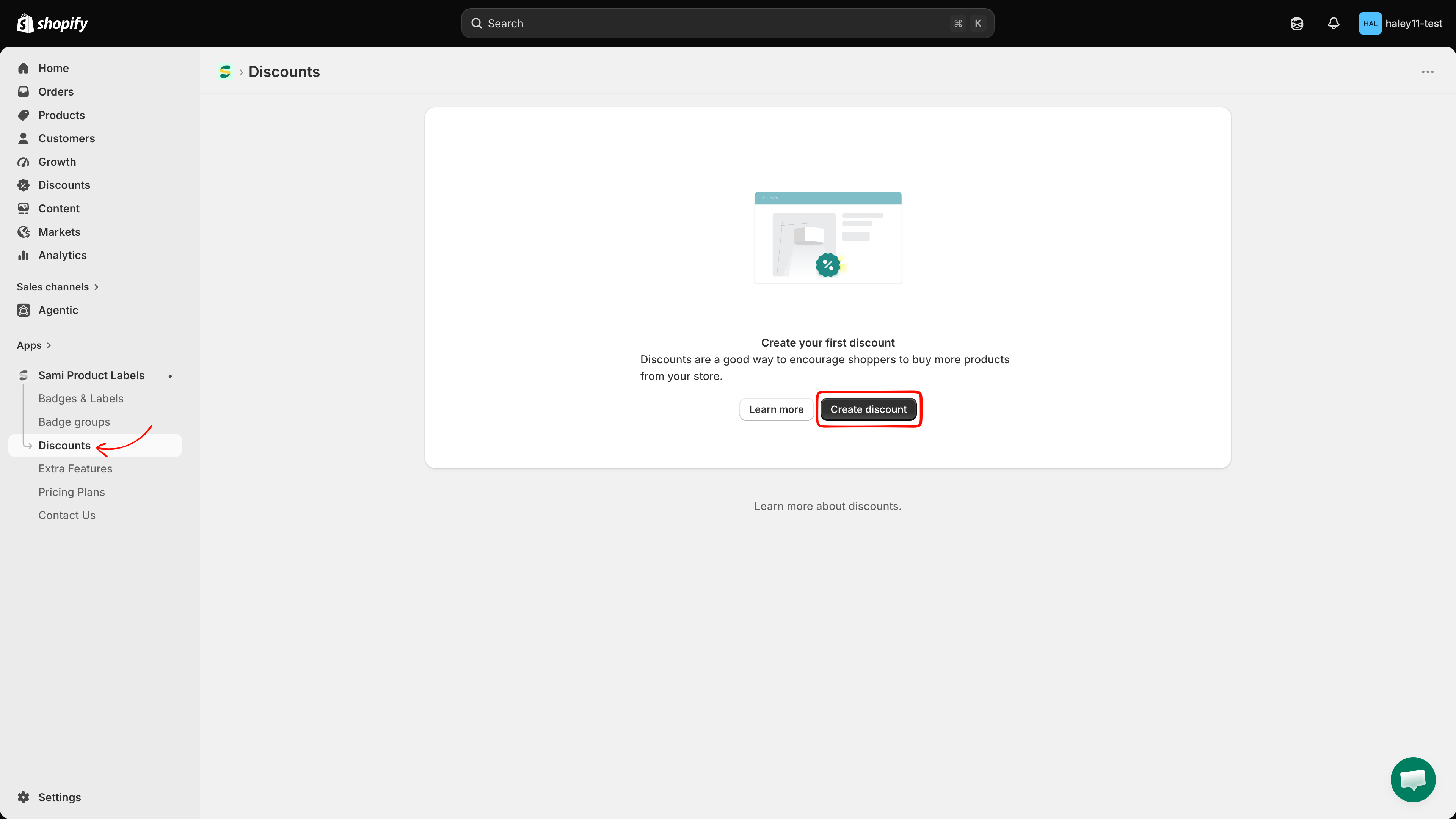
The new [**Discounts**](/discounts/overview.md) area builds real Shopify discounts from inside **Sami Product Labels**, so the app knows every discounted price and can show it on your storefront:
* [**Automatic discounts**](/discounts/create-automatic-discount.md) — applied at checkout as soon as the cart matches your conditions, with an option to cross out the original price on product pages.
* [**Discount codes**](/discounts/create-discount-code.md) — a code you choose (or generate) for campaigns, newsletters, and influencers.
* [**Matching conditions**](/discounts/matching-conditions.md) — discount every product that matches a collection, a title keyword, or a tag, and leave the exceptions out.
Saving a discount also offers to build a badge for it, pre-filled with the discount's value through the new `{sami_discount_value_percent}`, `{sami_discount_value_amount}`, `{sami_discount_code}`, and `{sami_new_price}` variables.
Create automatic discounts and discount codes from the new Discounts page.
## August 24, 2026
### Version 4.4.0
#### Manage Extra Features in one place
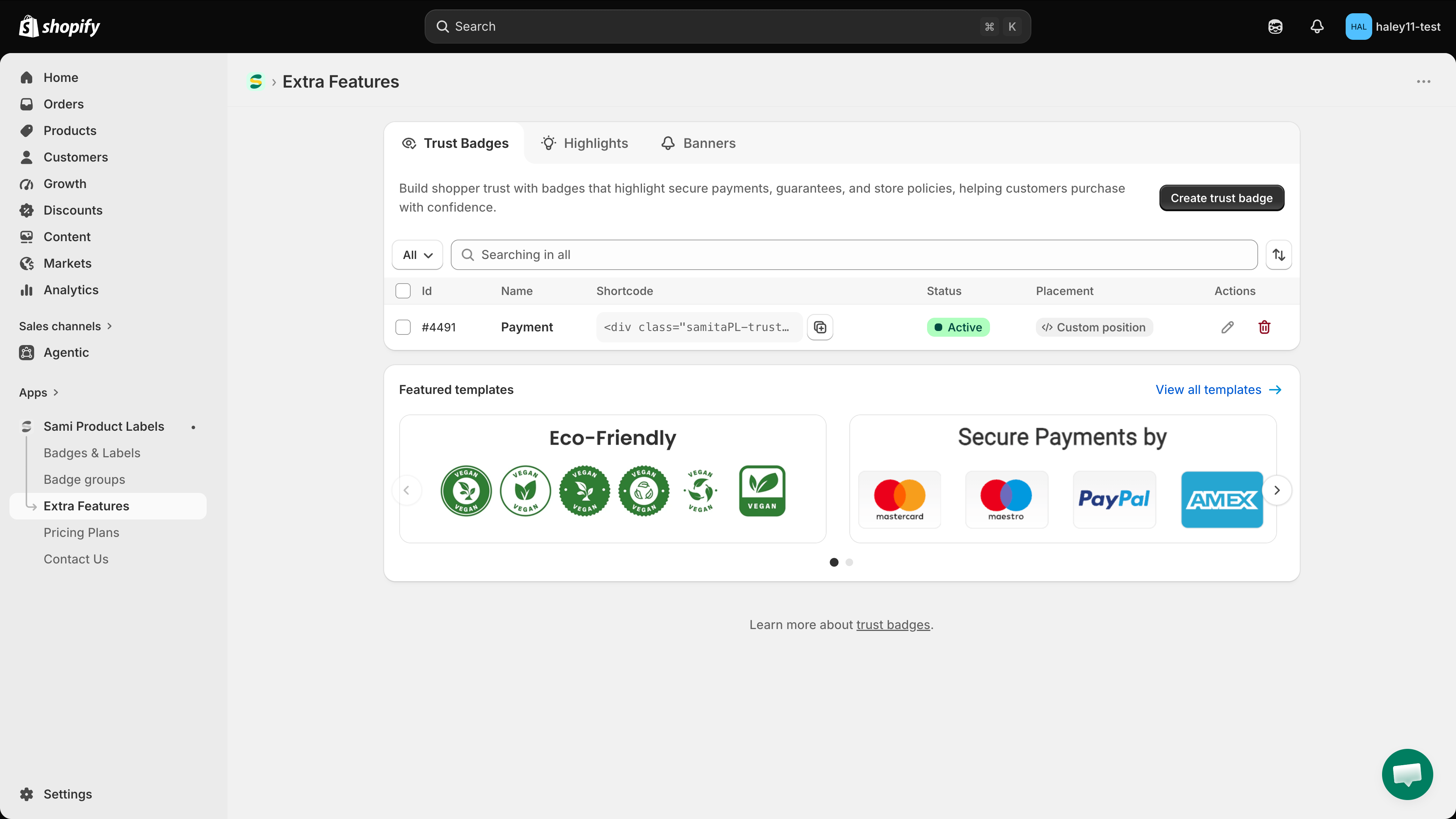
Version 4.4.0 brings **Trust Badges**, **Highlights**, and **Banners** together in a redesigned **Extra Features** area, making them easier to find and manage:
* [**Trust Badges**](/extra-features/trust-badge-overview.md) — build trust with payment, security, shipping, and guarantee badges using the refreshed interface and featured templates.
* [**Highlights**](/extra-features/highlight-overview.md) — present product benefits in a scannable block with customizable icons and layouts.
* [**Banners**](/extra-features/overview.md) — publish basic or infinite-scroll announcements and control where they appear on your storefront.
Trust Badges, Highlights, and Banners are now organized together in Extra Features.
## August 3, 2026
### Version 4.3.7
#### Create badge groups
Combine multiple badges into one group and display them together outside the product image. You can:
* Choose a horizontal or vertical layout.
* Adjust badge size and spacing.
* Align the group to match your product page.
* Place the group below important product elements or in a custom theme position.
Use it to group related messages—such as free shipping, secure checkout, and a guarantee—in one section.
[Learn how to create a badge group](/badge-groups/create-badge-group.md)
## May 2026
### Version 4.3.0
#### Understand how badges and labels perform
The new **Analytics** dashboard measures the results of your badges and labels. Review:
* Total Add to Cart actions.
* Total orders.
* Total revenue.
* Results for an individual badge or label.
* Performance changes compared with the previous period.
[Learn about analytics](/analytics/overview.md)
## March 2026
### Version 4.1.5
#### Translate text labels with AI
Translate label text into multiple store languages without editing each language tab manually. Select **Auto Translate** in the label settings to generate translations from your original text.
Review translations before publishing to keep product names, brand terms, and campaign messages on-tone.
#### Smoother dashboard navigation
Small interface and performance improvements make everyday tasks clearer and smoother.
## December 2025
### Version 4.1.0
#### Create label images with AI
Turn a text prompt into a label image. Describe the wording, colors, shape, and visual style you want, then generate a design for your campaign.
[Learn how to generate a badge image with AI](/ai-features/generate-image.md)
#### Clearer dashboard experience
Light interface and performance updates make the dashboard easier to navigate.
## November 2025
### Version 4.0.6
#### Show label content from metafields
Display product-specific content from a product or variant metafield. A single label can show a different value for each product or variant without requiring separate labels or theme-code changes.
For example, use metafields to display material, origin, care instructions, delivery information, or another custom product value.
[Learn how to show metafield values in dynamic text](/badges-and-labels/dynamic-variables.md)
## October 2025
### Version 4.0.5
#### Faster storefront loading
The new storefront API improves response times, so labels and badges appear sooner while shoppers browse your store.
#### Cleaner setup experience
Refined interface elements make settings easier to understand and common tasks quicker.
## July 2025
### Version 4.0.4
#### Organize multiple labels into a group
Label Groups let you display three or four labels together. Arrange them horizontally or vertically, adjust their size and spacing, and choose whether the group uses each label's existing conditions or its own display conditions.
[Learn how to create a label group](/badge-groups/create-badge-group.md)
#### Control label priority
Set priority rules to decide which eligible label shoppers see first when multiple labels match the same product.
#### Improved mobile dashboard
Updated button layouts make the app easier to navigate and manage from a mobile device.
---
# Agent Instructions
This documentation is published with GitBook. GitBook is the documentation platform designed so that both humans and AI agents can read, navigate, and reason over technical content effectively. Learn more at gitbook.com.
## Querying This Documentation
If you need additional information that is not directly available in this page, you can query the documentation dynamically by asking a question.
Perform an HTTP GET request on the current page URL with the `ask` query parameter, and the optional `goal` query parameter:
```
GET https://docs.samita.io/getting-started/whats-new.md?ask=&goal=
```
`ask` is the immediate question: it should be specific, self-contained, and written in natural language.
`goal` is optional and describes the broader end goal you are ultimately trying to accomplish on behalf of the user. GitBook uses it to tailor the answer towards what is most useful for that goal.
The response will contain a direct answer to the question and relevant excerpts and sources from the documentation.
Use this mechanism when the answer is not explicitly present in the current page, you need clarification or additional context, or you want to retrieve related documentation sections.