> For the complete documentation index, see [llms.txt](https://docs.samita.io/llms.txt). Markdown versions of documentation pages are available by appending `.md` to page URLs; this page is available as [Markdown](https://docs.samita.io/sa-request-a-quote/collecting-quote-requests/customer-price.md).
# Let customers propose a price
Let customers enter the price they are hoping to pay in their quote cart, so you see their offer before you reply.
Instead of only asking for quantities, you can let customers tell you what they would like to pay. Their figure arrives with the quote, so the conversation starts with their budget already on the table.
{% hint style="info" %}
Two settings are involved, and they sit on different tabs of the **Customize** editor: the **Price** column under **Product list columns** on the **Quote cart page** tab, and **Allow customers to edit quote item prices** on the **Button & widget** tab. Set both, then open your own quote cart to see the result.
{% endhint %}
## Show the Price column
{% stepper %}
{% step %}
### Open the quote cart settings
In the app, go to **Quote settings** and click **Customize**, then open the **Quote cart page** tab.
{% endstep %}
{% step %}
### Find Product list columns
**Product list columns** is described as "The product details shown as columns in the customer's quote cart." The options include **Option**, **Price** and **Total**.
{% endstep %}
{% step %}
### Add the Price column
Include **Price** so each product in the quote cart carries a price. **Total** is worth including alongside it, so the customer can see what their offer adds up to.
{% endstep %}
{% endstepper %}
## Allow customers to edit prices
{% stepper %}
{% step %}
### Open the button settings
Still in **Customize**, open the **Button & widget** tab.
{% endstep %}
{% step %}
### Tick the box
In the **Add to quote** section, tick **Allow customers to edit quote item prices**, then save your changes.
{% endstep %}
{% endstepper %}
## What customers experience
{% stepper %}
{% step %}
### They add products to their quote
With **Click action** set to **Add product to quote cart**, the customer clicks your quote button and the product goes into their quote cart.
{% endstep %}
{% step %}
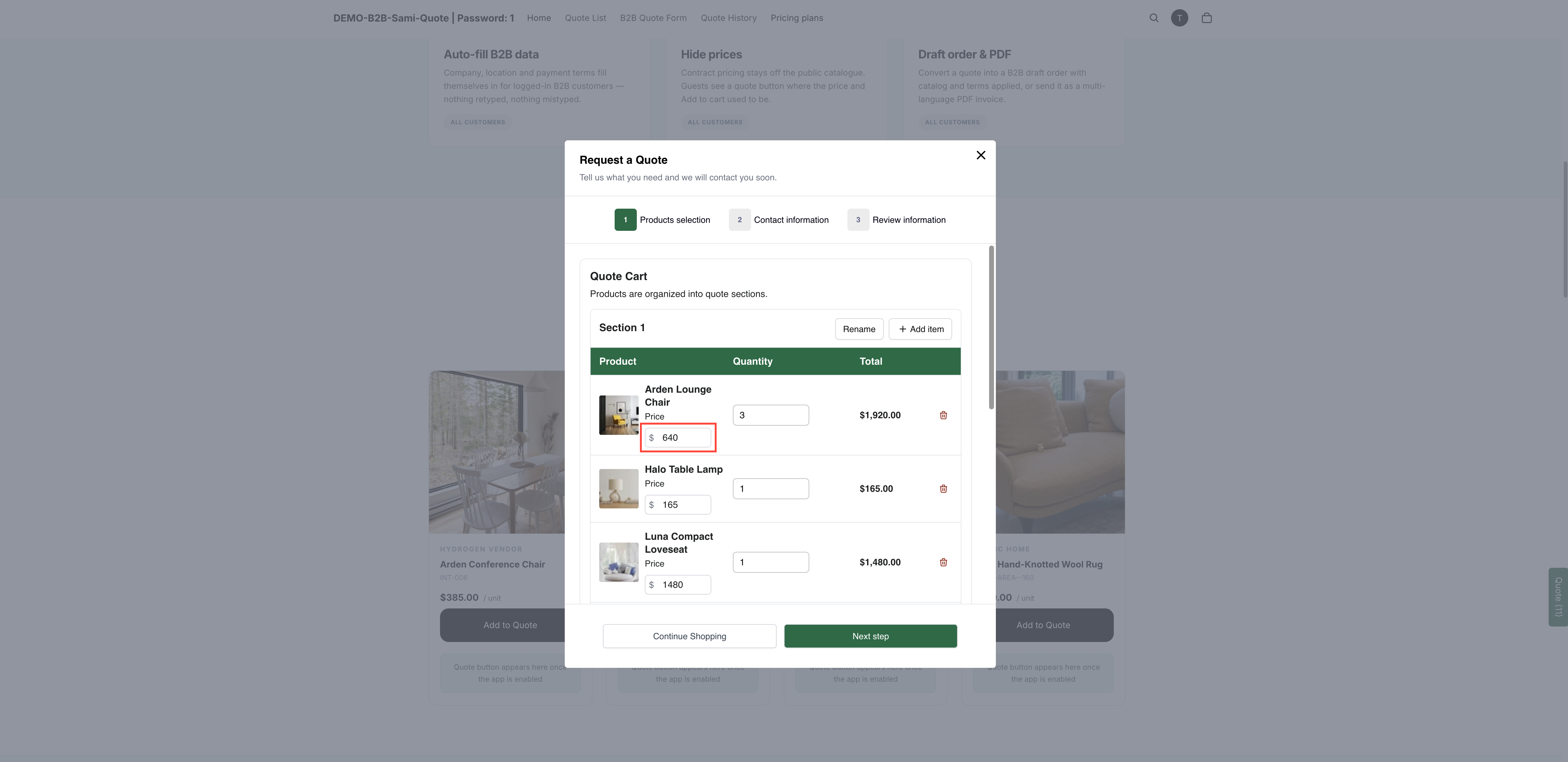
### They enter their own price
The quote cart lists each product with **Quantity**, **Price** and **Total**, so the price sits right next to the quantity the customer is asking for.
With customer pricing on, buyers name the figure they are after.
{% endstep %}
{% step %}
### They send the request
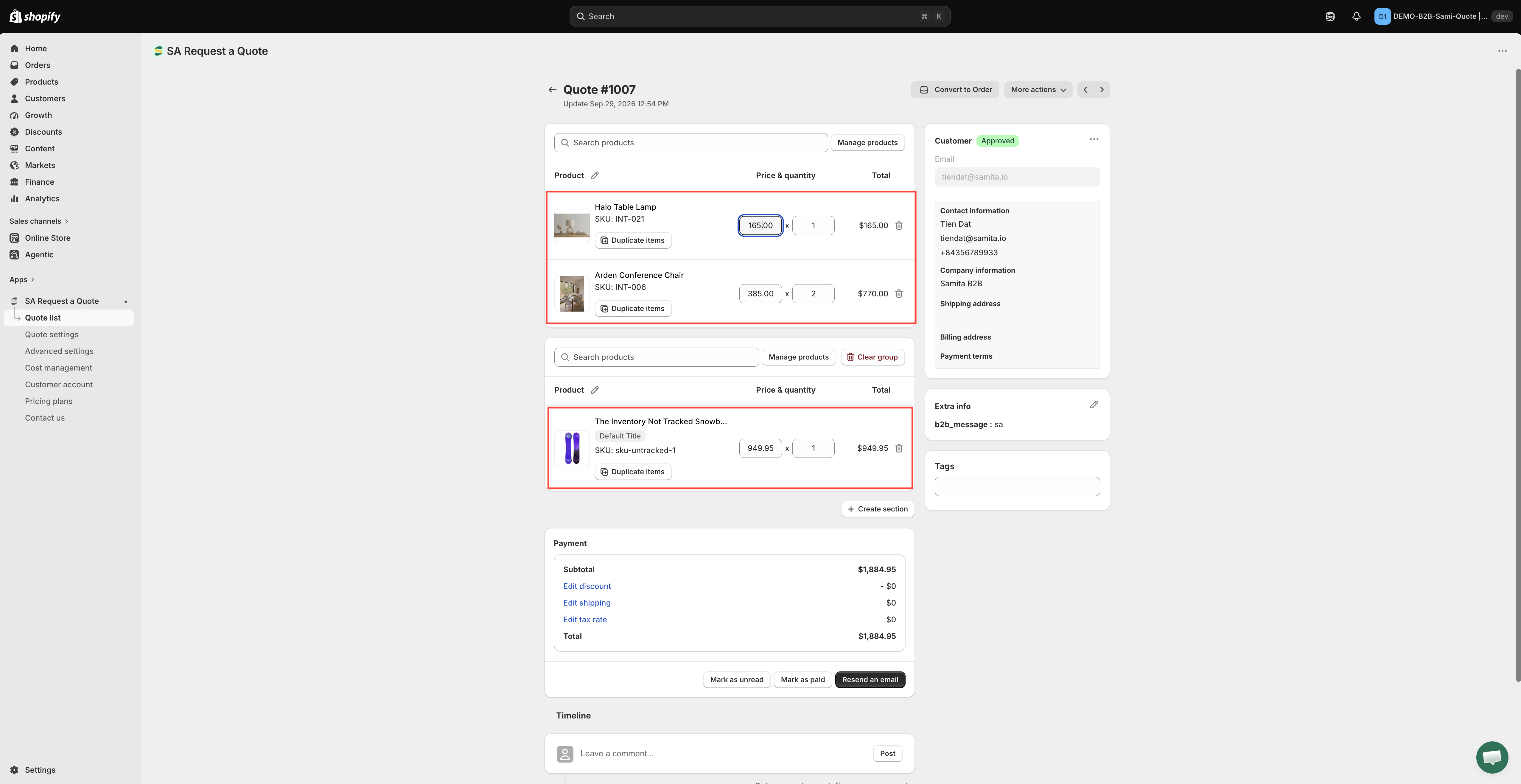
They fill in the rest of the form and submit. Their proposed price arrives with the quote in your **Quote list**.
{% endstep %}
{% endstepper %}
{% hint style="info" %}
A proposed price is an opening offer, not a commitment. You set the real price when you reply — see [View and edit a quote](/sa-request-a-quote/managing-quotes/view-and-edit.md).
{% endhint %}
## Should you turn it on?
It works well for trade buyers who are comparing suppliers and know the going rate. It works badly on a consumer-facing store, where it invites lowball offers you then have to turn down. If you are unsure, leave it off and let the quantity do the negotiating.
## Next steps
* [View and edit a quote](/sa-request-a-quote/managing-quotes/view-and-edit.md) — set your own price and reply
* [Set the after-click behavior](/sa-request-a-quote/collecting-quote-requests/after-click-behavior.md) — get customers to the quote cart in the first place
* [Request a Quote page](/sa-request-a-quote/storefront-quote-pages/request-a-quote-page.md) — the quote cart page these columns appear on
---
# Agent Instructions
This documentation is published with GitBook. GitBook is the documentation platform designed so that both humans and AI agents can read, navigate, and reason over technical content effectively. Learn more at gitbook.com.
## Querying This Documentation
If you need additional information that is not directly available in this page, you can query the documentation by asking a question.
Perform an HTTP GET request on the following URL with the `ask` and `goal` query parameters:
```
GET https://docs.samita.io/sa-request-a-quote/collecting-quote-requests/customer-price.md?ask=&goal=
```
`ask` is the immediate question: it should be specific, self-contained, and written in natural language.
`goal` is what the user is ultimately trying to achieve, the reason they need the answer. Sharing it helps GitBook give you a better, more relevant answer. A goal is most helpful when it describes the outcome the user wants rather than restating the question. For example, with `ask=how do I create an API token`, a goal like `automate deployments from our CI pipeline` lets GitBook tailor the answer to that use case.
The response will contain a direct answer to the question and relevant excerpts and sources from the documentation.
Use this mechanism when the answer is not explicitly present in the current page, you need clarification or additional context, or you want to retrieve related documentation sections.