> For the complete documentation index, see [llms.txt](https://docs.samita.io/llms.txt). Markdown versions of documentation pages are available by appending `.md` to page URLs; this page is available as [Markdown](https://docs.samita.io/sa-request-a-quote/hiding-prices/hide-buy-buttons.md).
# Hide Add to Cart and Buy now
Take away the Add to cart and Buy it now buttons on quotable products so the only way forward is to ask you for a price.
Hiding a price on its own doesn't stop a sale — a customer can still add the product to their cart and check out at a price they never saw. Taking the buy buttons away closes that gap, so the only route left is to ask you.
{% hint style="warning" %}
The section is named **Hide button when quote is enabled on product**, so set up which products can be quoted before you rely on it. That is **Select quote products** on **Quote settings** — see [Choose quotable products](/sa-request-a-quote/collecting-quote-requests/choose-products.md).
{% endhint %}
## Set it up
{% stepper %}
{% step %}
### Open the Hide price tab
In the app menu, open **Advanced settings** and select the **Hide price** tab.
{% endstep %}
{% step %}
### Find the buy button section
Scroll to **Hide button when quote is enabled on product**.
{% endstep %}
{% step %}
### Turn on both settings
Turn on **Hide Add To Cart button** and **Hide Buy Now button**.
Two switches decide whether quote products keep their buy buttons.
{% endstep %}
{% step %}
### Save and check your storefront
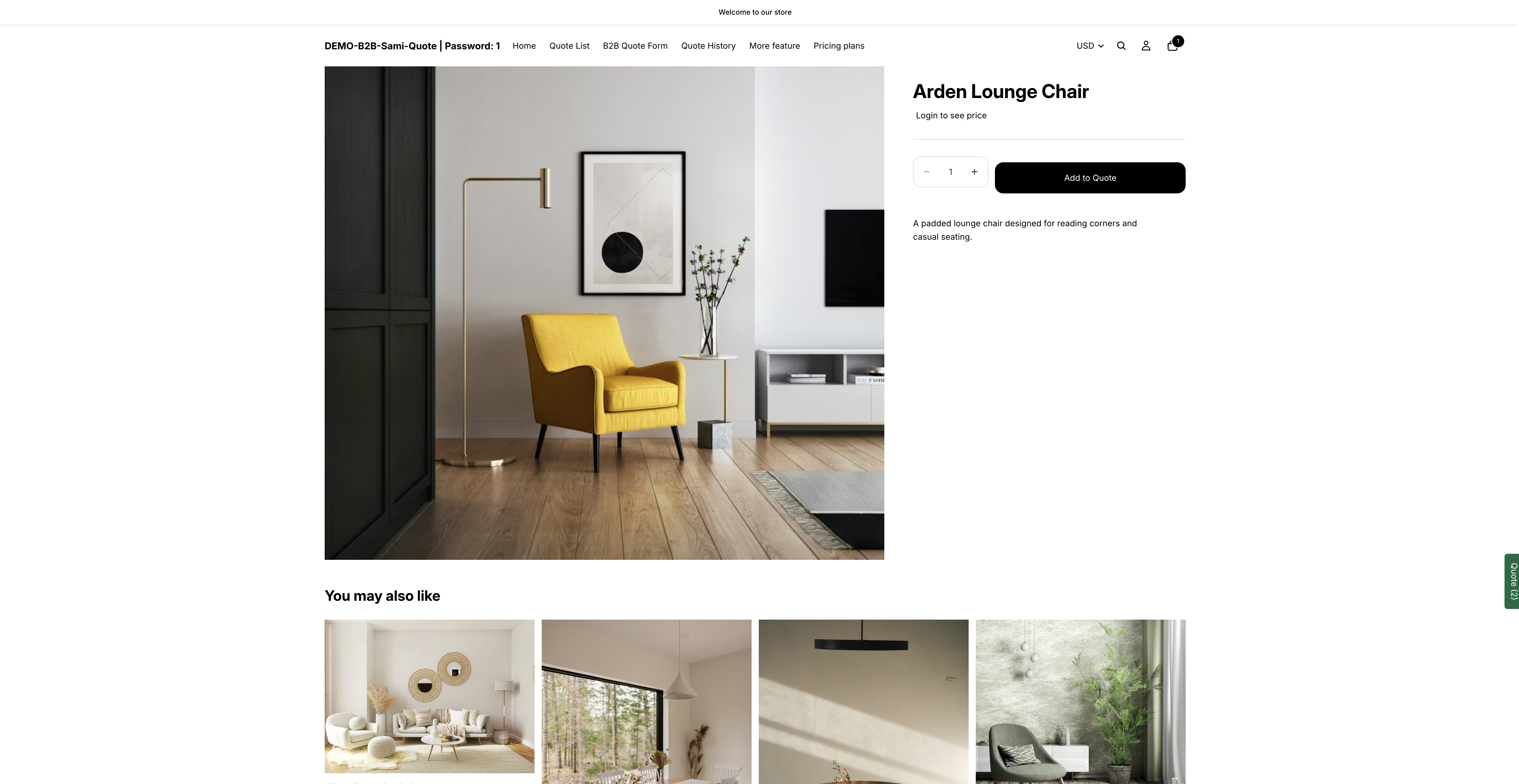
Select **Save** — or **Discard changes** to back out. Then open a quotable product in a private browser window and check that the buy buttons are gone.
The same product once the buy buttons are hidden.
{% endstep %}
{% endstepper %}
{% hint style="info" %}
**If the two settings look greyed out**, with a padlock line telling you which plan the feature is on, that is your plan rather than a fault. **Hide "Add to cart" button** is listed under the **PREMIUM** plan. See [Plan comparison](/sa-request-a-quote/reference/plan-comparison.md), or open **Pricing plans** in the app.
{% endhint %}
## What your customers see
On a quote-enabled product, **Add to cart** and **Buy it now** are gone. The page keeps everything else — photos, description, variant choices — and your quote button is the one thing left to act on.
## Check every place products appear
Themes show buy buttons in more places than the product page — quick-view popups, collection grid hover states, sticky bars at the bottom of the screen. Check:
* a product page
* a collection page
* a quick view, if your theme has one
* your storefront on a phone
{% hint style="info" %}
If a buy button survives somewhere, email with the page address. Themes vary, and the team can cover the spot yours uses.
{% endhint %}
## A common combination
Most quote-only stores turn on all three of these together:
1. Hide the price — **Advanced settings** > **Hide price**, see [Hiding prices overview](/sa-request-a-quote/hiding-prices/overview.md)
2. Hide the buy buttons — **Hide button when quote is enabled on product**, on the same tab
3. Show the quote button — **Quote settings** > **Customize**, see [Quote button on product pages](/sa-request-a-quote/collecting-quote-requests/button-on-product-pages.md)
If your prices should come back for account holders, add **Require login to show price** as a fourth step — see [Require login to show price](/sa-request-a-quote/hiding-prices/login-to-show-price.md).
The result is a catalogue customers browse and enquire about, but can't buy from directly.
{% hint style="warning" %}
If you sell to both trade and the public, don't do this store-wide. Enable quoting on your trade range only — see [Choose quotable products](/sa-request-a-quote/collecting-quote-requests/choose-products.md).
{% endhint %}
## Next steps
* [Add cart items to a quote](/sa-request-a-quote/collecting-quote-requests/add-cart-items.md) — for stores where customers can both buy and quote
* [Troubleshooting](/sa-request-a-quote/help/troubleshooting.md) — if a price or a buy button is still showing
* [Hiding prices overview](/sa-request-a-quote/hiding-prices/overview.md) — the five **Hide price** options
---
# Agent Instructions
This documentation is published with GitBook. GitBook is the documentation platform designed so that both humans and AI agents can read, navigate, and reason over technical content effectively. Learn more at gitbook.com.
## Querying This Documentation
If you need additional information that is not directly available in this page, you can query the documentation by asking a question.
Perform an HTTP GET request on the following URL with the `ask` and `goal` query parameters:
```
GET https://docs.samita.io/sa-request-a-quote/hiding-prices/hide-buy-buttons.md?ask=&goal=
```
`ask` is the immediate question: it should be specific, self-contained, and written in natural language.
`goal` is what the user is ultimately trying to achieve, the reason they need the answer. Sharing it helps GitBook give you a better, more relevant answer. A goal is most helpful when it describes the outcome the user wants rather than restating the question. For example, with `ask=how do I create an API token`, a goal like `automate deployments from our CI pipeline` lets GitBook tailor the answer to that use case.
The response will contain a direct answer to the question and relevant excerpts and sources from the documentation.
Use this mechanism when the answer is not explicitly present in the current page, you need clarification or additional context, or you want to retrieve related documentation sections.