> For the complete documentation index, see [llms.txt](https://docs.samita.io/llms.txt). Markdown versions of documentation pages are available by appending `.md` to page URLs; this page is available as [Markdown](https://docs.samita.io/sa-request-a-quote/quote-form/customer-info-fields.md).

# Customer information fields

Choose which contact and address details your quote form asks for, and let logged-in customers skip typing them.

Two sections of the **Form builder** handle the details you need about the person asking: **Contact information** and **Shipping address**. Both the **Detailed quote form** and the **B2B customer form** templates arrive with them, so this page applies whichever one you started from. The best thing about them is that a logged-in customer barely has to type anything.

## Set them up

{% stepper %}
{% step %}

### Open the Quote form tab

Go to **Quote settings**, click **Customize**, then open the **Quote form** tab.
{% endstep %}

{% step %}

### Expand Contact information

In the **Form builder**, expand **Contact information**. It holds First name, Last name, Email address, Phone number and Address.

Use **Add element** if you need another field in it.

<figure><img src="https://2993310686-files.gitbook.io/~/files/v0/b/gitbook-x-prod.appspot.com/o/spaces%2FIvNtDAMNVIdy5nl9kiOU%2Fuploads%2FV1VGVHVDXiHoXAgdX13L%2Fimage.png?alt=media&amp;token=acc33bf8-3454-4e05-8f42-64af52274d20" alt=""><figcaption><p>Every field you ask for is one more thing between a buyer and a request.</p></figcaption></figure>
{% endstep %}

{% step %}

### Expand Shipping address

**Shipping address** holds Country/region, First name, Last name, Company/attention, Address, Apartment suite etc, City, Postal code and Phone number.

Only keep it if where the goods go changes the price.
{% endstep %}

{% step %}

### Check it as a logged-in customer, without leaving the editor

You don't have to publish and go shopping to see what a signed-in buyer gets. The editor's **Preview** panel has a customer-state selector in its header — switch it to **Logged-in** and the preview redraws the form the way an account holder sees it.

Switch it back afterwards to check the version a first-time visitor meets. Those are your two audiences, and they do not see the same form.

<figure><img src="https://2993310686-files.gitbook.io/~/files/v0/b/gitbook-x-prod.appspot.com/o/spaces%2FIvNtDAMNVIdy5nl9kiOU%2Fuploads%2F6OKnqjR7ZNtKRJF7W8Mj%2Fimage.png?alt=media&amp;token=eaedc248-880c-44b1-a34f-5197ea4518fc" alt=""><figcaption></figcaption></figure>
{% endstep %}

{% step %}

### Save and check

Save your changes, then open the form on your storefront and read it as a customer would.
{% endstep %}
{% endstepper %}

## What each section holds

<table><thead><tr><th width="230">Section</th><th>Fields</th></tr></thead><tbody><tr><td><strong>Contact information</strong></td><td>First name, Last name, Email address, Phone number, Address</td></tr><tr><td><strong>Shipping address</strong></td><td>Country/region, First name, Last name, Company/attention, Address, Apartment suite etc, City, Postal code, Phone number</td></tr></tbody></table>

If you sell to businesses, **Company information** and **Billing address** cover the rest. They only appear on the **B2B customer form** template — the **Detailed quote form** has just **Contact information**, **Shipping address** and **Extra info**. See [Build a B2B form](/sa-request-a-quote/quote-form/build-b2b-form.md).

{% hint style="warning" %}
Your template owns this list. Use **Change** in **Form template** and the app replaces the current field list with the new template's own, so the contact and address fields you tuned here are swapped out with everything else. Settle the template before you spend time on the fields.
{% endhint %}

## How automatic filling works

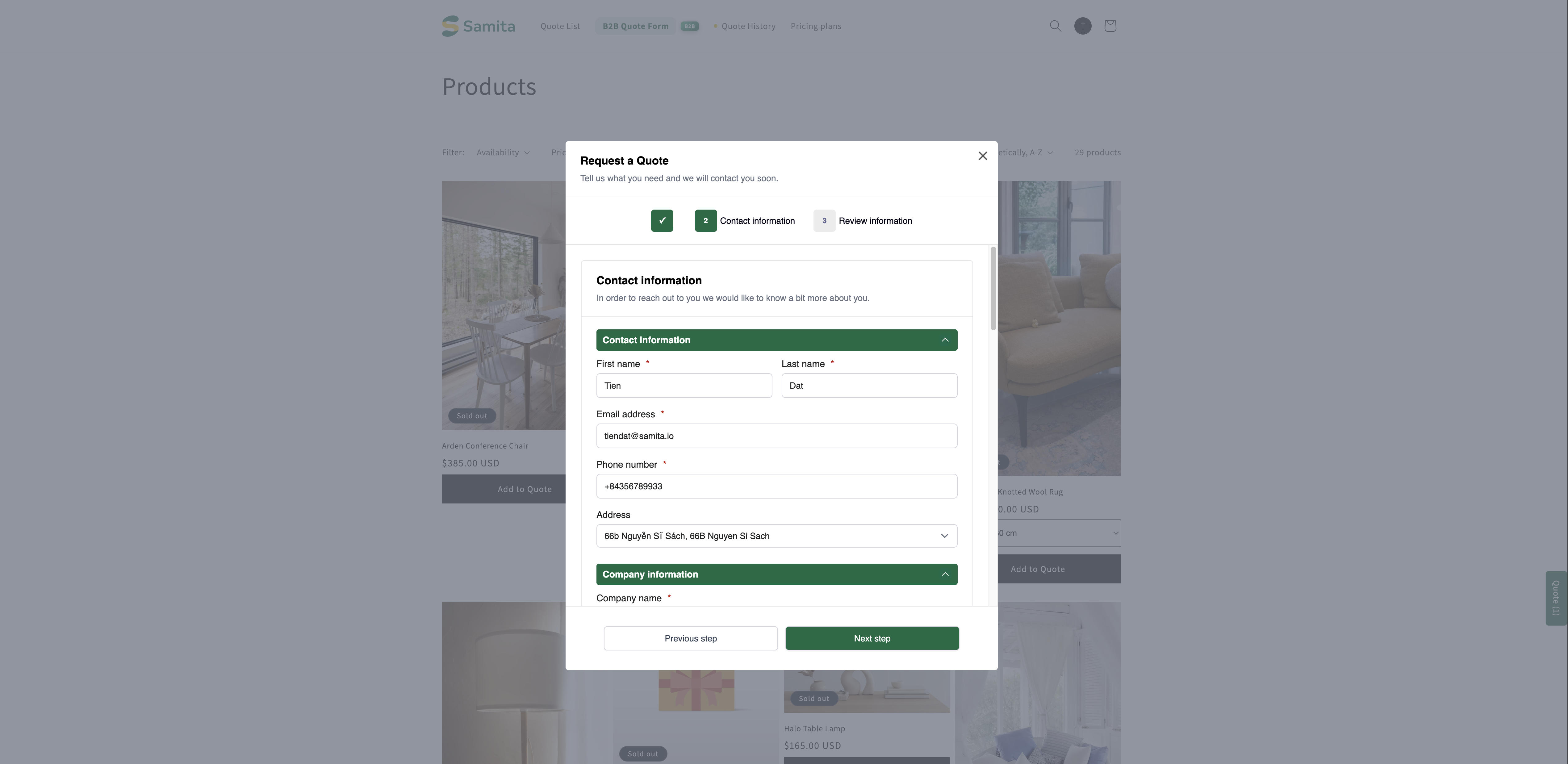
On the storefront the form offers customers a shortcut above the contact fields:

> Already have an account? Log in to auto-fill your contact and company information.

Next to it is a **Login** link.

<figure><img src="https://2993310686-files.gitbook.io/~/files/v0/b/gitbook-x-prod.appspot.com/o/spaces%2FIvNtDAMNVIdy5nl9kiOU%2Fuploads%2Fgit-blob-2976b596c3f61b6cabff854b0722778b7ee7e706%2Fscreenshot-storefront-quote-form-contact.png?alt=media" alt="Storefront quote form contact step with the log-in prompt above the Contact information, Company information and Shipping address fields"><figcaption><p>The contact step on the storefront, with the log-in shortcut above it.</p></figcaption></figure>

<figure><img src="https://2993310686-files.gitbook.io/~/files/v0/b/gitbook-x-prod.appspot.com/o/spaces%2FIvNtDAMNVIdy5nl9kiOU%2Fuploads%2Fgit-blob-d82dbe65ced7c4579320e0332f2b3e9544638f11%2FScreenshot%202026-09-30%20at%2022-56-52.png?alt=media" alt=""><figcaption></figcaption></figure>

### Where the values come from

The app doesn't invent the data. If the customer already has an account on your store, it reads their record in **Customers** in your Shopify admin and drops those values into the matching form fields. The fill happens after two things have both happened: the customer has **logged in**, and they have **added a product to their quote**.

Two useful consequences:

* **A field that stays blank is usually a blank customer record, not a bug.** If a buyer's phone number doesn't appear, open that customer in **Customers** in your Shopify admin and check whether the number is there at all.
* **Fixing the data in Shopify fixes the form.** There is nothing to correct inside the quote app.

{% hint style="warning" %}
Customers who have no account on your store, or who don't sign in, get nothing filled in for them. They type every one of these fields by hand, **every time they request a quote** — a returning buyer on their fifth request types them a fifth time. That is the real cost of a long contact section.
{% endhint %}

{% hint style="success" %}
This is a strong argument for encouraging accounts. A repeat buyer with an account can send a quote in seconds; without one they retype their details on every request. If you want the quote form itself to create those accounts, see [Create a Shopify customer after submit](/sa-request-a-quote/integrations/create-shopify-customer.md).
{% endhint %}

## Asking for the right things

<table><thead><tr><th width="220">Field</th><th>Worth asking?</th></tr></thead><tbody><tr><td>Email address</td><td>Always — without it you can't reply.</td></tr><tr><td>First name and Last name</td><td>Yes. Makes your reply personal and helps you find the quote later.</td></tr><tr><td>Phone number</td><td>Only if you actually call people. An unused required field costs you submissions.</td></tr><tr><td>Shipping address</td><td>Only if it changes the price — for freight or bulky goods it usually does.</td></tr></tbody></table>

{% hint style="warning" %}
Be careful with fields you make mandatory. Every one is somewhere a customer can give up. If you don't need it to produce a price, ask for it in your reply instead.
{% endhint %}

## Next steps

* [Build a B2B form](/sa-request-a-quote/quote-form/build-b2b-form.md) — company, billing and payment details for trade buyers
* [Create a Shopify customer after submit](/sa-request-a-quote/integrations/create-shopify-customer.md) — create accounts from quote submissions
* [Build a standard form](/sa-request-a-quote/quote-form/build-standard-form.md) — the rest of the form


---

# Agent Instructions
This documentation is published with GitBook. GitBook is the documentation platform designed so that both humans and AI agents can read, navigate, and reason over technical content effectively. Learn more at gitbook.com.

## Querying This Documentation
If you need additional information that is not directly available in this page, you can query the documentation by asking a question.

Perform an HTTP GET request on the following URL with the `ask` and `goal` query parameters:

```
GET https://docs.samita.io/sa-request-a-quote/quote-form/customer-info-fields.md?ask=<question>&goal=<user_goal>
```

`ask` is the immediate question: it should be specific, self-contained, and written in natural language.
`goal` is what the user is ultimately trying to achieve, the reason they need the answer. Sharing it helps GitBook give you a better, more relevant answer. A goal is most helpful when it describes the outcome the user wants rather than restating the question. For example, with `ask=how do I create an API token`, a goal like `automate deployments from our CI pipeline` lets GitBook tailor the answer to that use case.

The response will contain a direct answer to the question and relevant excerpts and sources from the documentation.

Use this mechanism when the answer is not explicitly present in the current page, you need clarification or additional context, or you want to retrieve related documentation sections.