> For the complete documentation index, see [llms.txt](https://docs.samita.io/llms.txt). Markdown versions of documentation pages are available by appending `.md` to page URLs; this page is available as [Markdown](https://docs.samita.io/sa-request-a-quote/quote-form/product-group.md).

# Quoted product group

Let customers group the products in their quote cart into named sections — by room, site, department or project phase.

A single quote sometimes covers several distinct things: three rooms, two branches, or separate departments with separate budgets. **Enable Quote Sections** lets customers split one request into named sections instead of sending you several quotes.

The app describes it as: "Lets customers group the products in their quote cart into named sections."

## Turn it on

{% stepper %}
{% step %}

### Open the Customize editor

Go to **Quote settings**. On the **Request a Quote** page, click **Customize**.
{% endstep %}

{% step %}

### Open the Quote cart page tab

This setting is on the **Quote cart page** tab, not **Quote form**.
{% endstep %}

{% step %}

### Switch on Enable Quote Sections

Turn on **Enable Quote Sections**.

<figure><img src="https://2993310686-files.gitbook.io/~/files/v0/b/gitbook-x-prod.appspot.com/o/spaces%2FIvNtDAMNVIdy5nl9kiOU%2Fuploads%2FLX4D50c0zI5p73eZumtY%2Fimage.png?alt=media&amp;token=574b2ae0-d147-4681-a1c3-7f15dee04855" alt=""><figcaption><p>Groups split a long quote into sections a buyer can follow.</p></figcaption></figure>
{% endstep %}

{% step %}

### Save and check

Save your changes, then add a couple of products to a quote on your storefront and open the quote cart page.
{% endstep %}
{% endstepper %}

## What customers experience

<figure><img src="https://2993310686-files.gitbook.io/~/files/v0/b/gitbook-x-prod.appspot.com/o/spaces%2FIvNtDAMNVIdy5nl9kiOU%2Fuploads%2Fgit-blob-48ff0ecea5620c5424ab1eca7a1bb09773002acd%2FScreenshot%202026-09-30%20at%2023-00-14.png?alt=media" alt=""><figcaption></figcaption></figure>

<figure><img src="https://2993310686-files.gitbook.io/~/files/v0/b/gitbook-x-prod.appspot.com/o/spaces%2FIvNtDAMNVIdy5nl9kiOU%2Fuploads%2Fgit-blob-af093ddcfd39a36aa0242083ce10e122b3dbef53%2FScreenshot%202026-09-30%20at%2023-01-36.png?alt=media" alt=""><figcaption></figcaption></figure>

<figure><img src="https://2993310686-files.gitbook.io/~/files/v0/b/gitbook-x-prod.appspot.com/o/spaces%2FIvNtDAMNVIdy5nl9kiOU%2Fuploads%2Fgit-blob-04cb7d1c3c6b46ddf46ee4681223b192df47732b%2FScreenshot%202026-09-30%20at%2023-02-24.png?alt=media" alt=""><figcaption></figcaption></figure>

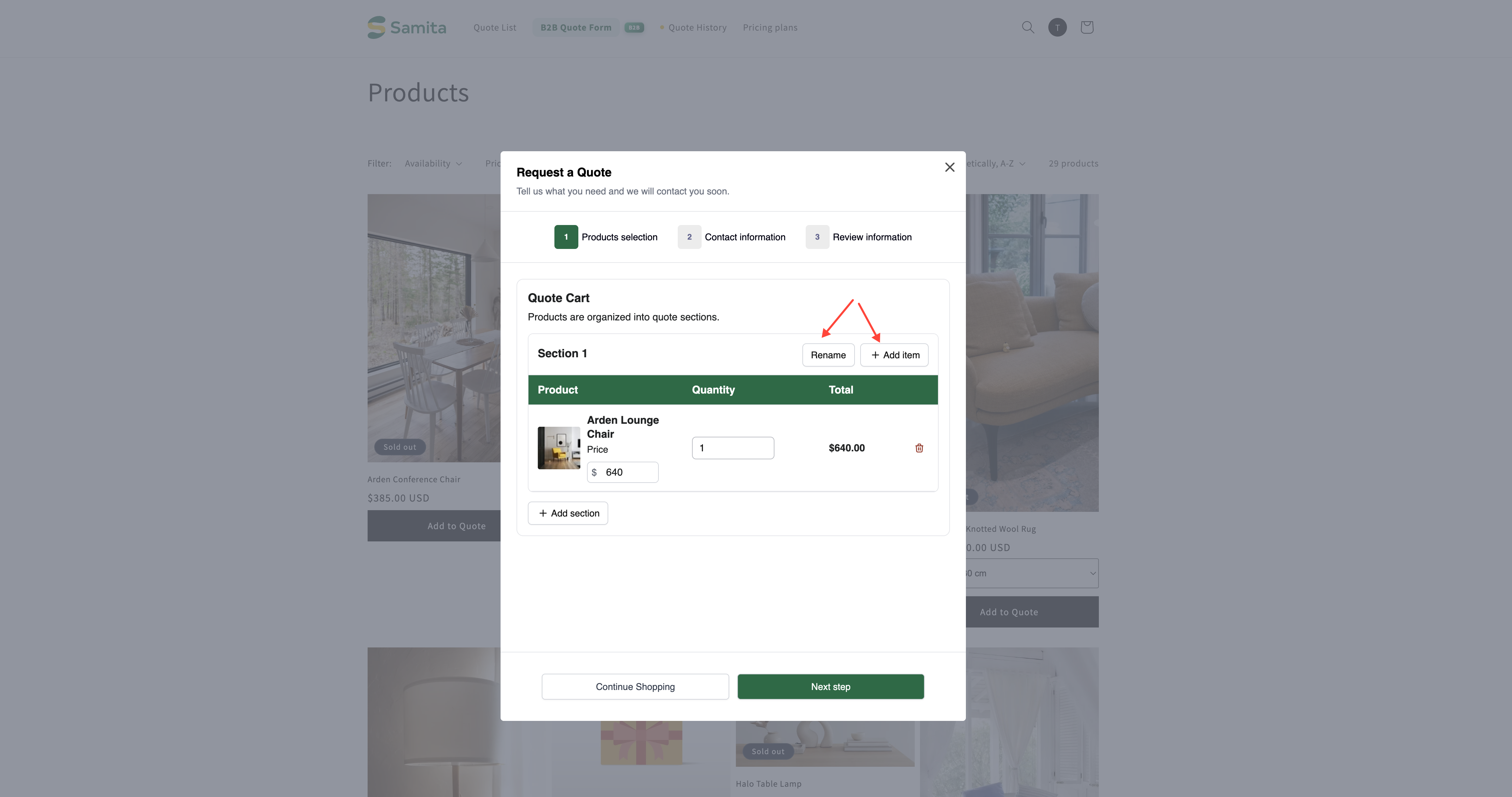
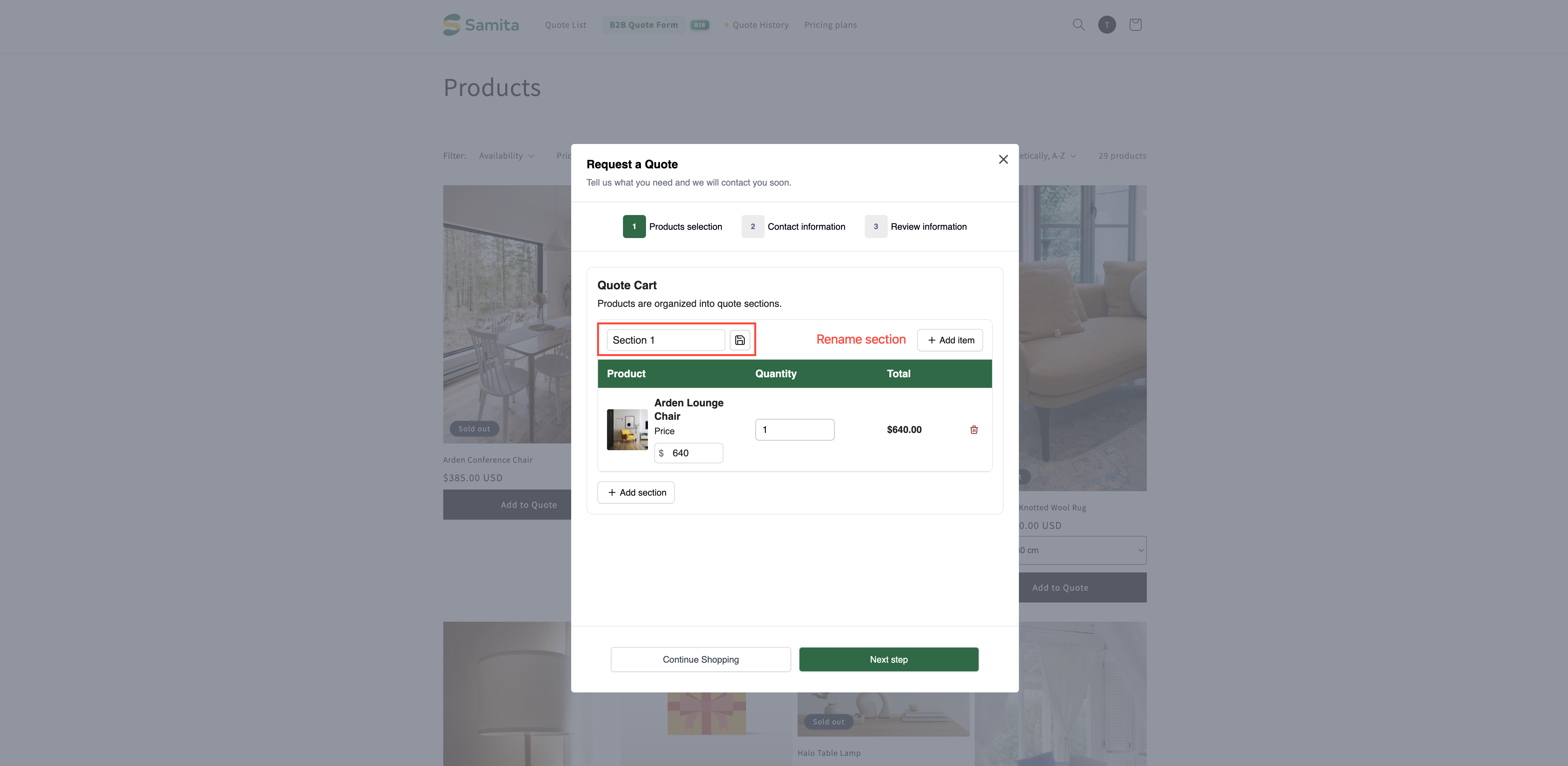
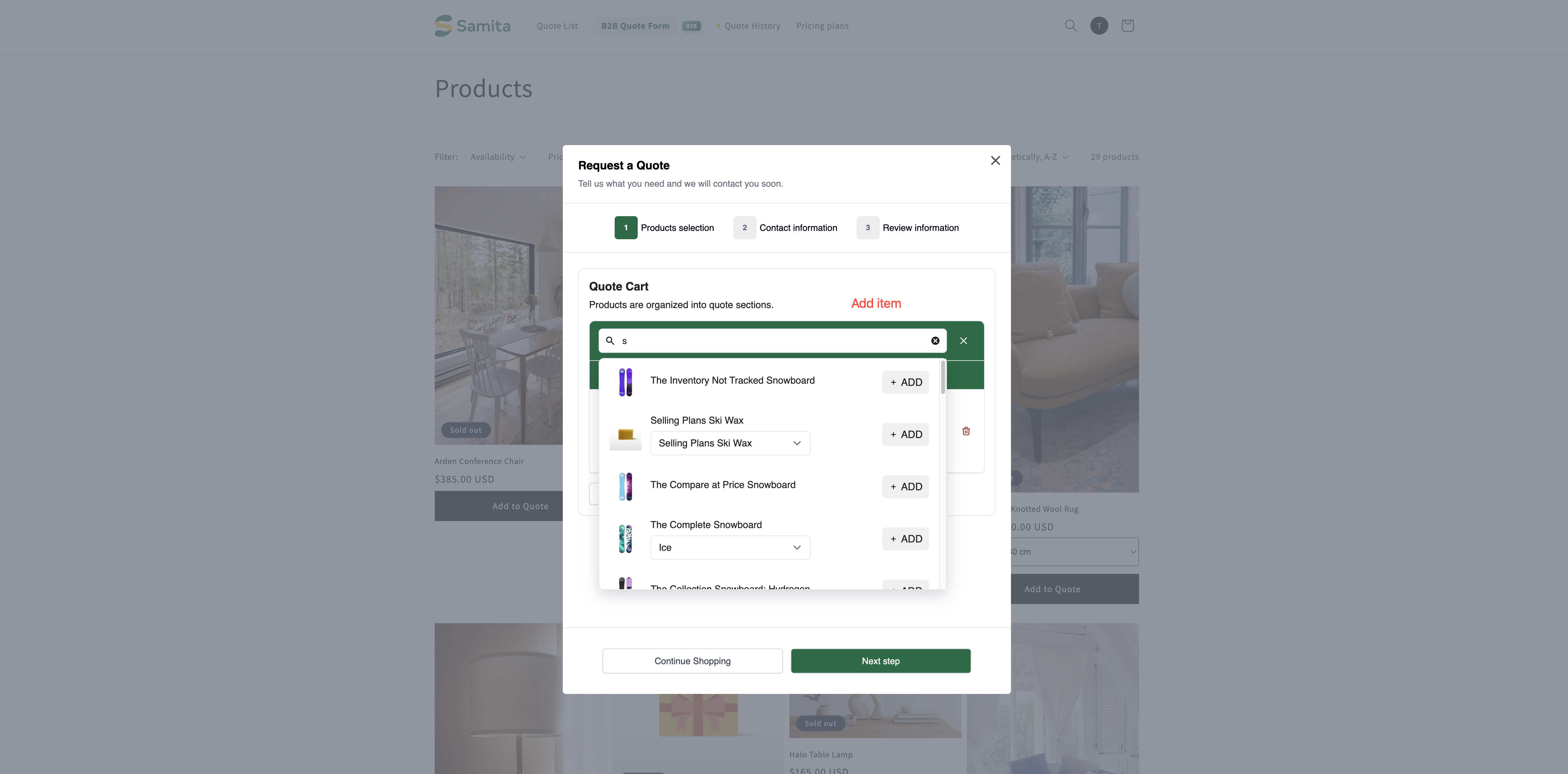
Customers see their sections on the quote cart page — the one called **Quote cart page** in the app, published as "Request for quote" at `/pages/request-for-quote`, which "Shows the quote form and the customer's quote cart."

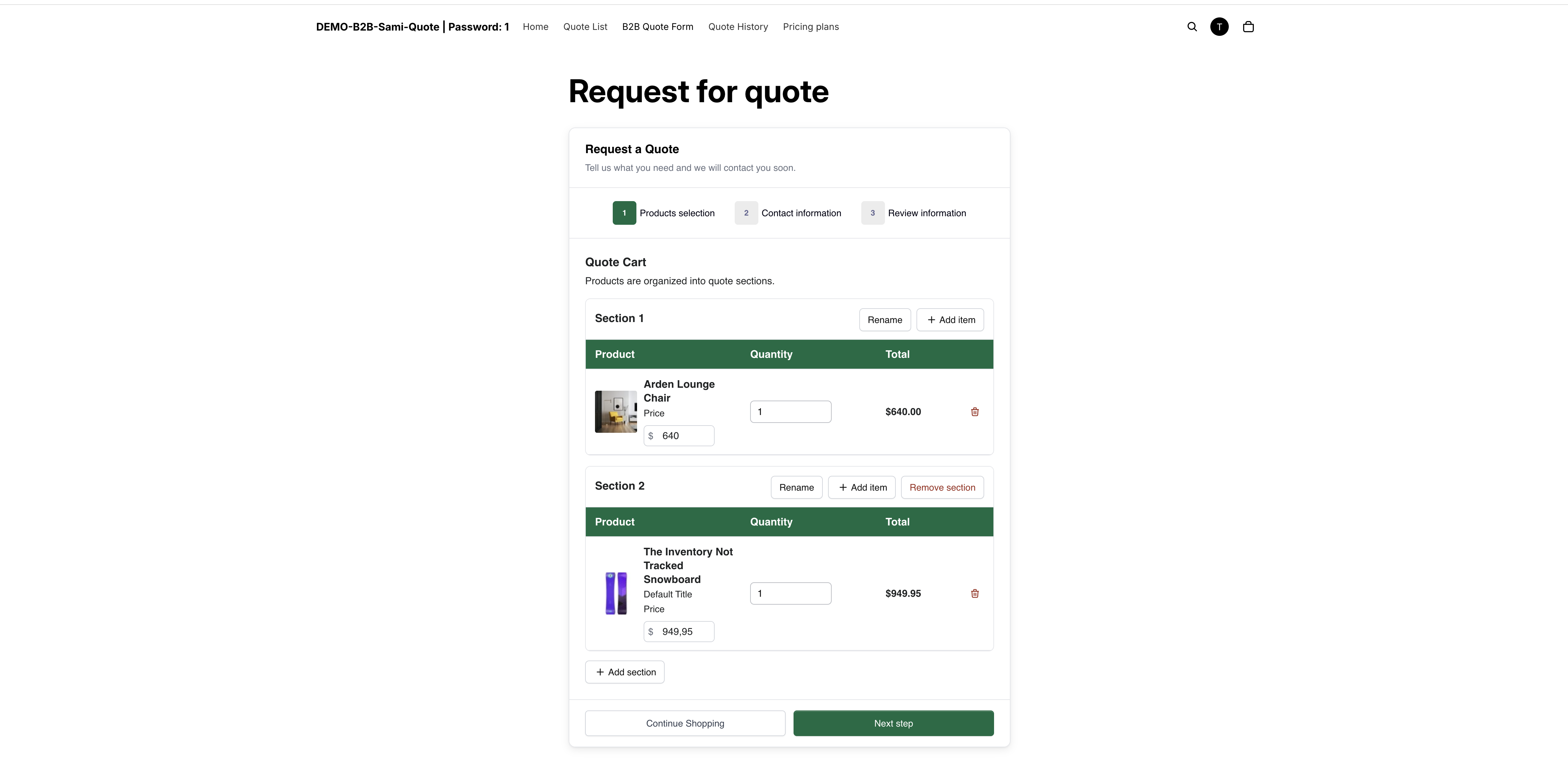
With the setting on, the **Quote Cart** there explains that "Products are organized into quote sections." and starts the customer off with **Section 1**. The grouping is theirs to do: they name their sections and sort their own products into them as they build the quote, which is the point — they know which room or site each item is for, and you don't.

<figure><img src="https://2993310686-files.gitbook.io/~/files/v0/b/gitbook-x-prod.appspot.com/o/spaces%2FIvNtDAMNVIdy5nl9kiOU%2Fuploads%2Fgit-blob-b300ec3e63ee4a017e3f2fcb6e261aff94f70269%2FScreenshot%202026-09-29%20at%2023-56-02.png?alt=media" alt="The storefront quote cart split into named sections, each with its own products"><figcaption><p>Sections keep a long request readable.</p></figcaption></figure>

## What you see when it arrives

A sectioned quote keeps its grouping when you open it. The quote detail page has its own **Create section** control alongside the line-item table, so the structure the customer sent is something you can read and adjust while you price the work.

<figure><img src="https://2993310686-files.gitbook.io/~/files/v0/b/gitbook-x-prod.appspot.com/o/spaces%2FIvNtDAMNVIdy5nl9kiOU%2Fuploads%2F9GeEQ7t7JAcNsiKRQFOt%2Fimage.png?alt=media&amp;token=3f4d70df-23d6-4c24-a012-f9c081ef688f" alt=""><figcaption><p>The sections survive into the quote you receive.</p></figcaption></figure>

## When it's worth using

<table><thead><tr><th width="250">Situation</th><th>Why sections help</th></tr></thead><tbody><tr><td>Furnishing several rooms or sites</td><td>You can price and deliver each section separately.</td></tr><tr><td>Multiple departments, one buyer</td><td>The buyer can split costs without sending separate requests.</td></tr><tr><td>Phased projects</td><td>Group by phase so you quote each stage on its own timeline.</td></tr></tbody></table>

{% hint style="info" %}
If your customers routinely order for one destination at a time, leave this off. An extra grouping step on a simple quote is friction with no payoff.
{% endhint %}

{% hint style="success" %}
Creating sections and titles in a quote is included on the FREE plan, so you can try it before committing to anything.
{% endhint %}

## Other settings on the same tab

<table><thead><tr><th width="260">Setting</th><th>What it does</th></tr></thead><tbody><tr><td><strong>Product list columns</strong></td><td>"The product details shown as columns in the customer's quote cart." Options include Option, Price and Total.</td></tr><tr><td><strong>Quote form appearance</strong></td><td>"Controls how the quote form looks on the quote cart page." Choose <strong>Multiple step</strong> or <strong>Single page</strong>.</td></tr><tr><td><strong>Enable Quote Cart Widget</strong></td><td>"Shows a floating button on your storefront so customers can open their quote cart from any page." Only <strong>Text color</strong> and <strong>Background color</strong> can be changed.</td></tr></tbody></table>

{% hint style="warning" %}
A long, sectioned quote reads badly as a wall of steps. If customers regularly quote for several rooms at once, try **Quote form appearance** set to **Single page** and check it on a phone.
{% endhint %}

## Next steps

* [Request a Quote page](/sa-request-a-quote/storefront-quote-pages/request-a-quote-page.md) — the page customers do this on
* [View and edit a quote](/sa-request-a-quote/managing-quotes/view-and-edit.md) — how a sectioned quote looks to you
* [Build a standard form](/sa-request-a-quote/quote-form/build-standard-form.md) — the rest of the form


---

# Agent Instructions
This documentation is published with GitBook. GitBook is the documentation platform designed so that both humans and AI agents can read, navigate, and reason over technical content effectively. Learn more at gitbook.com.

## Querying This Documentation
If you need additional information that is not directly available in this page, you can query the documentation by asking a question.

Perform an HTTP GET request on the following URL with the `ask` and `goal` query parameters:

```
GET https://docs.samita.io/sa-request-a-quote/quote-form/product-group.md?ask=<question>&goal=<user_goal>
```

`ask` is the immediate question: it should be specific, self-contained, and written in natural language.
`goal` is what the user is ultimately trying to achieve, the reason they need the answer. Sharing it helps GitBook give you a better, more relevant answer. A goal is most helpful when it describes the outcome the user wants rather than restating the question. For example, with `ask=how do I create an API token`, a goal like `automate deployments from our CI pipeline` lets GitBook tailor the answer to that use case.

The response will contain a direct answer to the question and relevant excerpts and sources from the documentation.

Use this mechanism when the answer is not explicitly present in the current page, you need clarification or additional context, or you want to retrieve related documentation sections.