> For the complete documentation index, see [llms.txt](https://docs.samita.io/llms.txt). Markdown versions of documentation pages are available by appending `.md` to page URLs; this page is available as [Markdown](https://docs.samita.io/sa-request-a-quote/reference/plan-comparison.md).

# Plan comparison

What FREE, PREMIUM and PRO each include, so you can tell whether a feature is missing or just not on your current plan.

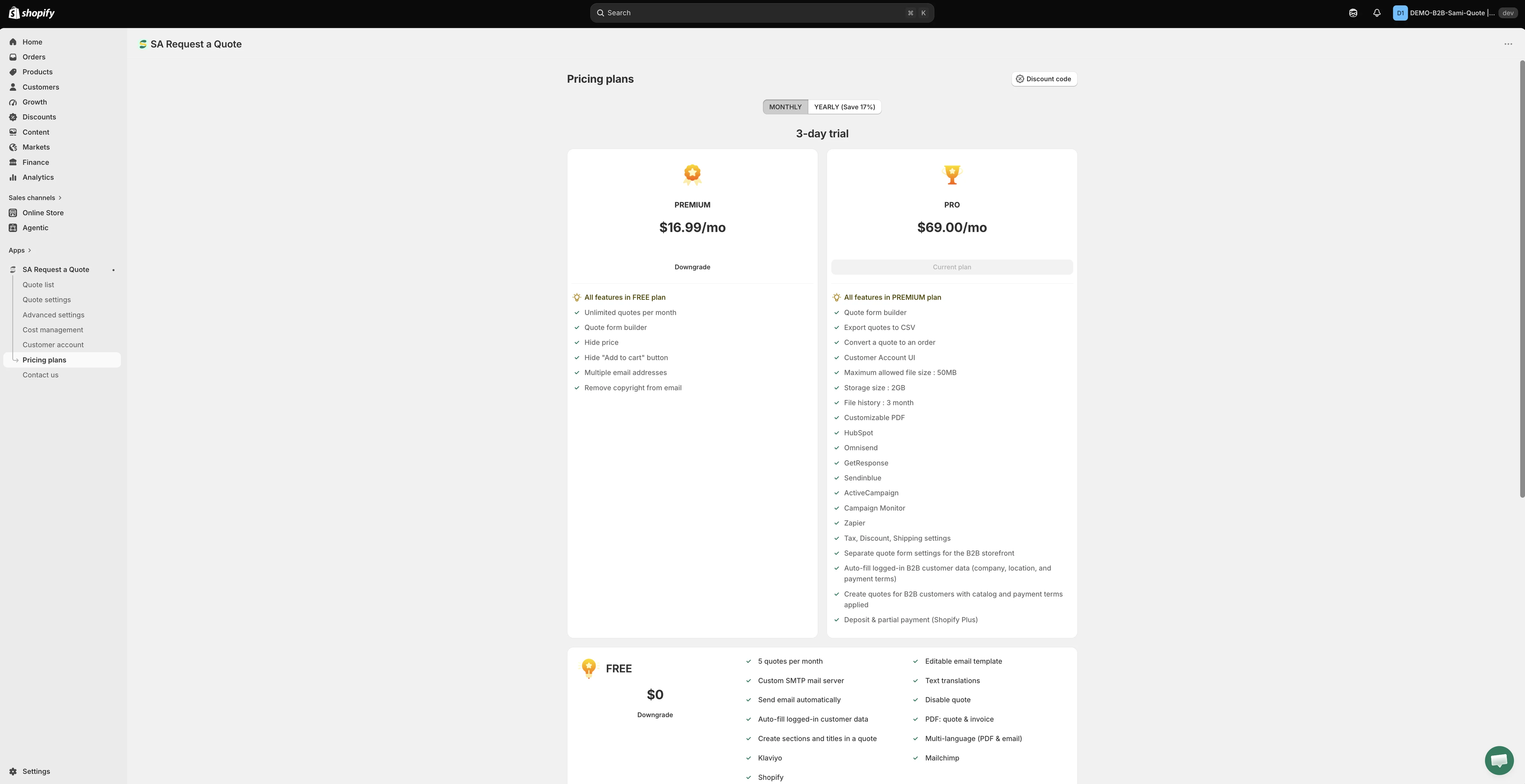
If a feature in this documentation doesn't appear in your app, the usual reason is that it belongs to a higher plan. This page lists what each plan includes, as the plan cards in **Pricing plans** describe them.

{% hint style="info" %}
**This page doesn't quote prices or trial lengths on purpose.** Both change with the billing period you pick, and both can change over time. Open **Pricing plans** in the app navigation to see the figures offered to your store, or check the [App Store listing](https://apps.shopify.com/request-for-quote). Compare the feature lists here, then compare the numbers there.
{% endhint %}

<figure><img src="https://2993310686-files.gitbook.io/~/files/v0/b/gitbook-x-prod.appspot.com/o/spaces%2FIvNtDAMNVIdy5nl9kiOU%2Fuploads%2Fgit-blob-5163b67077118599d6fa76c920169fa9d63704f1%2Fimage.png?alt=media" alt="The Pricing plans page in the app, showing the plans beside one another"><figcaption><p>What each plan includes, read from the app itself.</p></figcaption></figure>

## The three plans

<table><thead><tr><th width="150">Plan</th><th>Best for</th></tr></thead><tbody><tr><td><strong>FREE</strong></td><td>Trying the app out, or a store that takes a handful of requests a month.</td></tr><tr><td><strong>PREMIUM</strong></td><td>Selling by quote properly — unlimited requests, your own form, hidden prices.</td></tr><tr><td><strong>PRO</strong></td><td>Turning quotes into paid orders, and B2B selling.</td></tr></tbody></table>

The price sits on each plan card in the app. The billing toggle above the cards switches between **MONTHLY** and **YEARLY (Save 17%)**, and the figures on the cards move with it — the price and the trial length are both different between the two. Set the toggle the way you intend to pay before you compare, so you aren't reading a monthly figure against a yearly one.

## Greyed out means the plan, not a fault

When a feature isn't on your plan, the app doesn't hide it. It leaves the control on the page, disables it, and shows a padlock line reading "🔐 This feature is available on …" with a link to the plan that includes it.

So a switch you can't move, a radio you can't select or a button that won't respond is usually the plan talking — not a broken app, a broken theme or a bad setting. Follow the link in the padlock line, or open **Pricing plans**, before you raise a support ticket.

Merchants on **FREE** meet this most often on the **Hide price** tab and on the **Hide Add To Cart button** and **Hide Buy Now button** switches.

<figure><img src="https://2993310686-files.gitbook.io/~/files/v0/b/gitbook-x-prod.appspot.com/o/spaces%2FIvNtDAMNVIdy5nl9kiOU%2Fuploads%2Fgit-blob-fe7f5492404344cf07cc9e50600ba811fe9c30c3%2Fimage.png?alt=media" alt=""><figcaption></figcaption></figure>

{% hint style="info" %}
**Require login to show price** sits in its own **Login to show price** section on the **Hide price** tab, but it is not a way around the plan. The checkbox only appears once one of the four **Yes…** options is chosen, and those options are the part your plan locks — so on a plan without hide price, the tab stays on **No, don't hide prices** and the checkbox never appears. See [Require login to show price](/sa-request-a-quote/hiding-prices/login-to-show-price.md).
{% endhint %}

## FREE

The plan card lists:

* 5 quotes per month
* Editable email template
* Custom SMTP mail server
* Text translations
* Send email automatically
* Disable quote
* Auto-fill logged-in customer data
* PDF: quote & invoice
* Create sections and titles in a quote
* Multi-language (PDF & email)
* Klaviyo
* Mailchimp
* Shopify

{% hint style="info" %}
The monthly quote allowance is the thing most stores hit first. **FREE** caps it; **PREMIUM** and **PRO** are unlimited. Your own count sits on the dashboard, under **Pricing plan details** — see "Checking what your own plan allows" below.
{% endhint %}

## PREMIUM

* All features in FREE plan
* Unlimited quotes per month
* Quote form builder
* Hide price
* Hide "Add to cart" button
* Multiple email addresses
* Remove copyright from email

## PRO

* All features in PREMIUM plan
* Quote form builder
* Export quotes to CSV
* Convert a quote to an order
* Customer Account UI
* Maximum allowed file size: 50MB
* Storage size: 2GB
* File history: 3 month
* Customizable PDF
* HubSpot
* Omnisend
* GetResponse
* Sendinblue
* ActiveCampaign
* Campaign Monitor
* Zapier
* Tax, Discount, Shipping settings
* Separate quote form settings for the B2B storefront
* Auto-fill logged-in B2B customer data (company, location, and payment terms)
* Create quotes for B2B customers with catalog and payment terms applied
* Deposit & partial payment (Shopify Plus)

{% hint style="info" %}
**Tax, Discount, Shipping settings** is the **Cost management** page and its three tabs — **Discount**, **Shipping** and **Tax**. Those are also what the **Edit discount**, **Edit shipping** and **Edit tax rate** links on a quote work from.
{% endhint %}

## What every plan gets you

* 24/7 email support
* Smart B2B solution
* Help docs
* Customizable style

## Integrations by plan

Not all integrations are paid-only, which surprises people.

<table><thead><tr><th width="330">Integration</th><th>Plan</th></tr></thead><tbody><tr><td>Klaviyo, Mailchimp, Shopify</td><td>Named in the <strong>FREE</strong> plan list, so they are available on every plan</td></tr><tr><td>HubSpot, Omnisend, GetResponse, Sendinblue, ActiveCampaign, Campaign Monitor, Zapier</td><td>Named in the <strong>PRO</strong> plan list</td></tr><tr><td>Google reCAPTCHA</td><td>Named in no plan list at all — see below</td></tr></tbody></table>

**Google reCAPTCHA** appears on the **Integrations** tab in **Advanced settings** like the others, but it is not listed as a feature of FREE, PREMIUM or PRO. Because no plan claims it, this page won't tell you which plan it needs — if that decides your choice, ask <support@samita.io> before you subscribe.

See [Integrations overview](/sa-request-a-quote/integrations/overview.md) for how to connect each one.

## Which plan do I need?

<table><thead><tr><th width="360">If you want to…</th><th>You need</th></tr></thead><tbody><tr><td>Try the app and collect a few quote requests each month</td><td><strong>FREE</strong></td></tr><tr><td>Take more quote requests in a month than <strong>FREE</strong> allows, build your own form, or hide prices and the <strong>Add to cart</strong> button</td><td><strong>PREMIUM</strong></td></tr><tr><td>Convert a quote to an order, export to CSV, or sell B2B</td><td><strong>PRO</strong></td></tr></tbody></table>

## Checking what your own plan allows

The plan cards describe the plans in general. To see the allowance your own store actually has, open the app dashboard and look at **Pricing plan details**. It shows **Current plan**, **Quote number**, **Storage size**, **Used storage** and **Maximum file size**, with **View plan** to jump straight to **Pricing plans**.

That card is the quickest answer to "have I run out of quotes this month?" or "why was my customer's file rejected?" — no arithmetic against this page needed.

## Trials and billing

Paid plans are offered with a free trial, so you can use the features before the first charge. The trial length is shown on the plan card, and it isn't the same for both billing periods — check it with the toggle set the way you intend to pay.

You pick and change your plan on the **Pricing plans** page in the app navigation. Shopify handles billing for apps, so you approve any charge in your Shopify admin before it is taken.

The same page carries a **Discount code** button, if you've been given one, a **Pricing details** button for the full breakdown, and a **Frequently asked questions** section further down.

{% hint style="warning" %}
Check what a downgrade costs you before you switch. **Hide price** and **Hide "Add to cart" button** are PREMIUM features, and **Convert a quote to an order**, **Export quotes to CSV** and **Customer Account UI** are PRO ones — all of them things your storefront or your workflow may already depend on. After a downgrade those controls don't disappear; they grey out with the padlock line described above.
{% endhint %}

## Next steps

* [Pricing plans](/sa-request-a-quote/settings/pricing-plans.md) — change your plan inside the app
* [How it works](/sa-request-a-quote/reference/how-it-works.md) — where each feature sits in the quote journey
* [Contact support](/sa-request-a-quote/help/contact-support.md) — ask which plan fits your setup


---

# Agent Instructions
This documentation is published with GitBook. GitBook is the documentation platform designed so that both humans and AI agents can read, navigate, and reason over technical content effectively. Learn more at gitbook.com.

## Querying This Documentation
If you need additional information that is not directly available in this page, you can query the documentation by asking a question.

Perform an HTTP GET request on the following URL with the `ask` and `goal` query parameters:

```
GET https://docs.samita.io/sa-request-a-quote/reference/plan-comparison.md?ask=<question>&goal=<user_goal>
```

`ask` is the immediate question: it should be specific, self-contained, and written in natural language.
`goal` is what the user is ultimately trying to achieve, the reason they need the answer. Sharing it helps GitBook give you a better, more relevant answer. A goal is most helpful when it describes the outcome the user wants rather than restating the question. For example, with `ask=how do I create an API token`, a goal like `automate deployments from our CI pipeline` lets GitBook tailor the answer to that use case.

The response will contain a direct answer to the question and relevant excerpts and sources from the documentation.

Use this mechanism when the answer is not explicitly present in the current page, you need clarification or additional context, or you want to retrieve related documentation sections.
