> For the complete documentation index, see [llms.txt](https://docs.samita.io/llms.txt). Markdown versions of documentation pages are available by appending `.md` to page URLs; this page is available as [Markdown](https://docs.samita.io/sa-request-a-quote/settings/pricing-plans.md).

# Pricing plans

Compare the FREE, PREMIUM and PRO plans, switch between monthly and yearly billing, and see what a downgrade would change on your storefront.

Your plan decides which features are available. If something described in this documentation isn't in your app, check here first.

**Pricing plans** is a top-level item in the app's navigation, alongside **Quote list**, **Quote settings**, **Advanced settings**, **Cost management**, **Customer account** and **Contact us**.

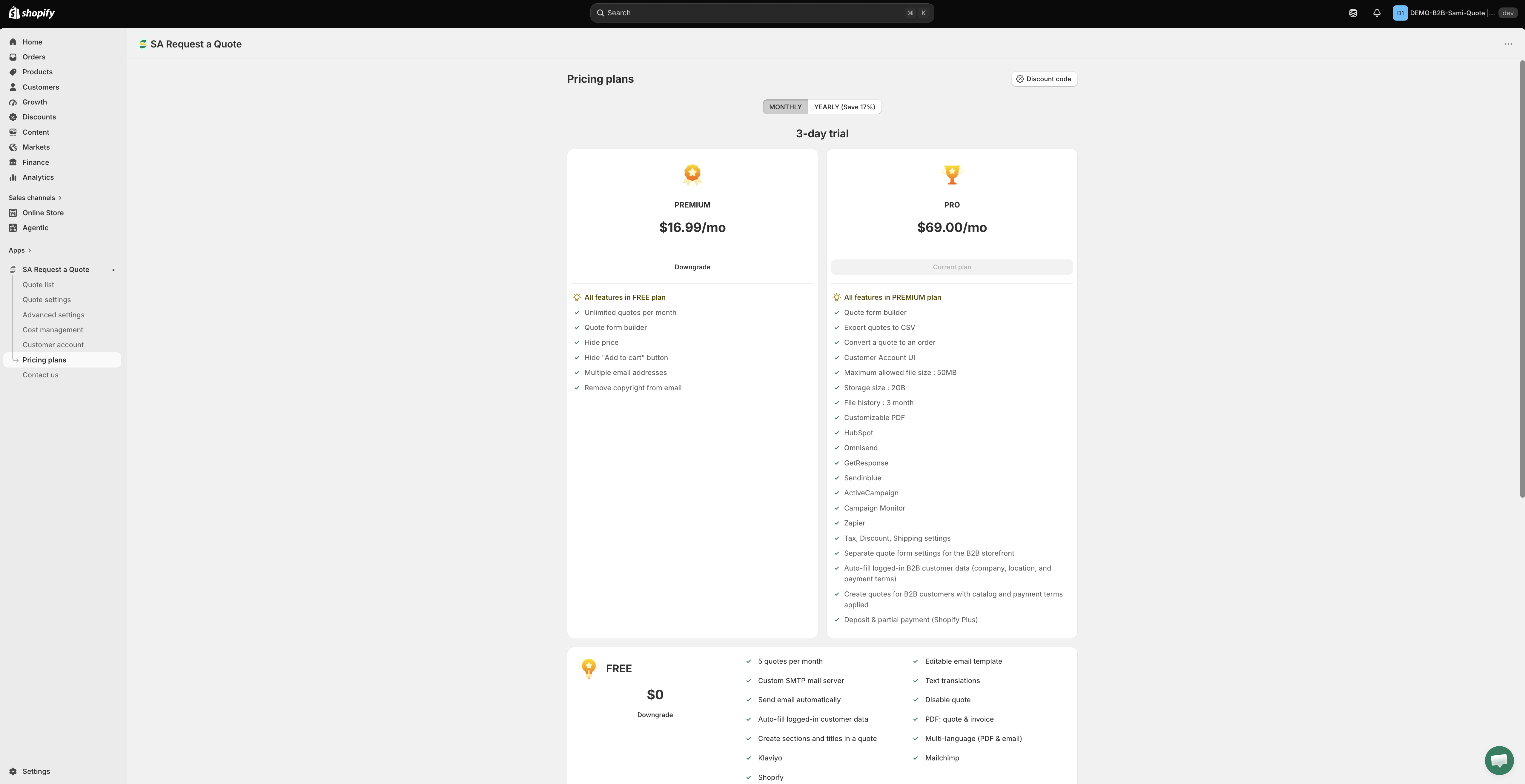
<figure><img src="https://2993310686-files.gitbook.io/~/files/v0/b/gitbook-x-prod.appspot.com/o/spaces%2FIvNtDAMNVIdy5nl9kiOU%2Fuploads%2Fgit-blob-a35284fcad46915c3196a1061fd3c80220583858%2FScreenshot%202026-09-30%20at%2000-37-55.png?alt=media" alt="The Pricing plans page in the app, showing the plans side by side with what each includes"><figcaption><p>Read the current prices and trial from this page — it is always up to date.</p></figcaption></figure>

{% hint style="info" %}
**This page doesn't print prices or trial lengths on purpose.** Both sit on the plan cards in the app, both change when you switch the billing toggle, and both can change over time. Read the figures offered to your store on the **Pricing plans** page itself, or on [the App Store listing](https://apps.shopify.com/request-for-quote). Compare the feature lists here, then compare the numbers there.
{% endhint %}

## Choose a plan

{% stepper %}
{% step %}

### Open Pricing plans

In the app, go to **Pricing plans**. You can also reach it from **Pricing plan details** on the dashboard, using **View plan**.
{% endstep %}

{% step %}

### Pick monthly or yearly

The billing toggle at the top switches between **MONTHLY** and **YEARLY (Save 17%)**. The plan cards change with it, so compare like for like before you decide.
{% endstep %}

{% step %}

### Check the trial on the card

Paid plans are offered with a free trial. The length is shown on the plan card and it is not the same for both billing periods, so read it with the toggle set the way you intend to pay.
{% endstep %}

{% step %}

### Choose the plan you want

Compare the feature lists below against what you actually need — the storefront-facing ones, **Hide price** and **Hide "Add to cart" button**, are the ones customers notice.
{% endstep %}
{% endstepper %}

{% hint style="info" %}
This page also has a **Discount code** button, for a code if you have one, and a **Pricing details** button.
{% endhint %}

## The three plans

<table><thead><tr><th width="140">Plan</th><th>Who it suits</th></tr></thead><tbody><tr><td><strong>FREE</strong></td><td>Stores testing quote requests, or handling a handful a month.</td></tr><tr><td><strong>PREMIUM</strong></td><td>Stores taking quotes regularly, or hiding prices.</td></tr><tr><td><strong>PRO</strong></td><td>B2B stores converting quotes to orders, using the wider integrations, or handling larger files.</td></tr></tbody></table>

### FREE

* 5 quotes per month
* Editable email template
* Custom SMTP mail server
* Text translations
* Send email automatically
* Disable quote
* Auto-fill logged-in customer data
* PDF: quote & invoice
* Create sections and titles in a quote
* Multi-language (PDF & email)
* Klaviyo
* Mailchimp
* Shopify

{% hint style="success" %}
Klaviyo, Mailchimp and Shopify are on the **FREE** plan. You do not need to pay to send quote contacts to your email platform or to create a Shopify customer after a submission — see [Integrations overview](/sa-request-a-quote/integrations/overview.md).
{% endhint %}

### PREMIUM

* All features in FREE plan
* Unlimited quotes per month
* Quote form builder
* Hide price
* Hide "Add to cart" button
* Multiple email addresses
* Remove copyright from email

The two that change your storefront most are **Hide price** and **Hide "Add to cart" button** — see [Hiding prices overview](/sa-request-a-quote/hiding-prices/overview.md).

### PRO

* All features in PREMIUM plan
* Quote form builder
* Export quotes to CSV
* Convert a quote to an order
* Customer Account UI
* Maximum allowed file size: 50MB
* Storage size: 2GB
* File history: 3 month
* Customizable PDF
* HubSpot
* Omnisend
* GetResponse
* Sendinblue
* ActiveCampaign
* Campaign Monitor
* Zapier
* Tax, Discount, Shipping settings
* Separate quote form settings for the B2B storefront
* Auto-fill logged-in B2B customer data (company, location, and payment terms)
* Create quotes for B2B customers with catalog and payment terms applied
* Deposit & partial payment (Shopify Plus)

{% hint style="info" %}
**Tax, Discount, Shipping settings** are the three tabs on the **Cost management** page — **Discount**, **Shipping** and **Tax**.
{% endhint %}

## What every plan gets you

* 24/7 email support
* Smart B2B solution
* Help docs
* Customizable style

## Greyed out means the plan, not a fault

When a feature isn't on your plan, the app leaves the control where it is, disables it, and shows a padlock line reading "🔐 This feature is available on …" with a link to the plan that includes it.

So a switch you can't move or a radio you can't select is usually the plan talking, not a broken app or a broken theme. On the **FREE** plan you meet this most often on the **Hide price** tab and on the **Hide Add To Cart button** and **Hide Buy Now button** switches.

{% hint style="info" %}
**Require login to show price** is not a way around that. It sits in its own **Login to show price** section on the **Hide price** tab, but the checkbox only appears once one of the four **Yes…** options is chosen — and those options are the part a plan locks. On a plan without hide price the tab stays on **No, don't hide prices**, so the checkbox never appears. See [Require login to show price](/sa-request-a-quote/hiding-prices/login-to-show-price.md).
{% endhint %}

## Questions about billing

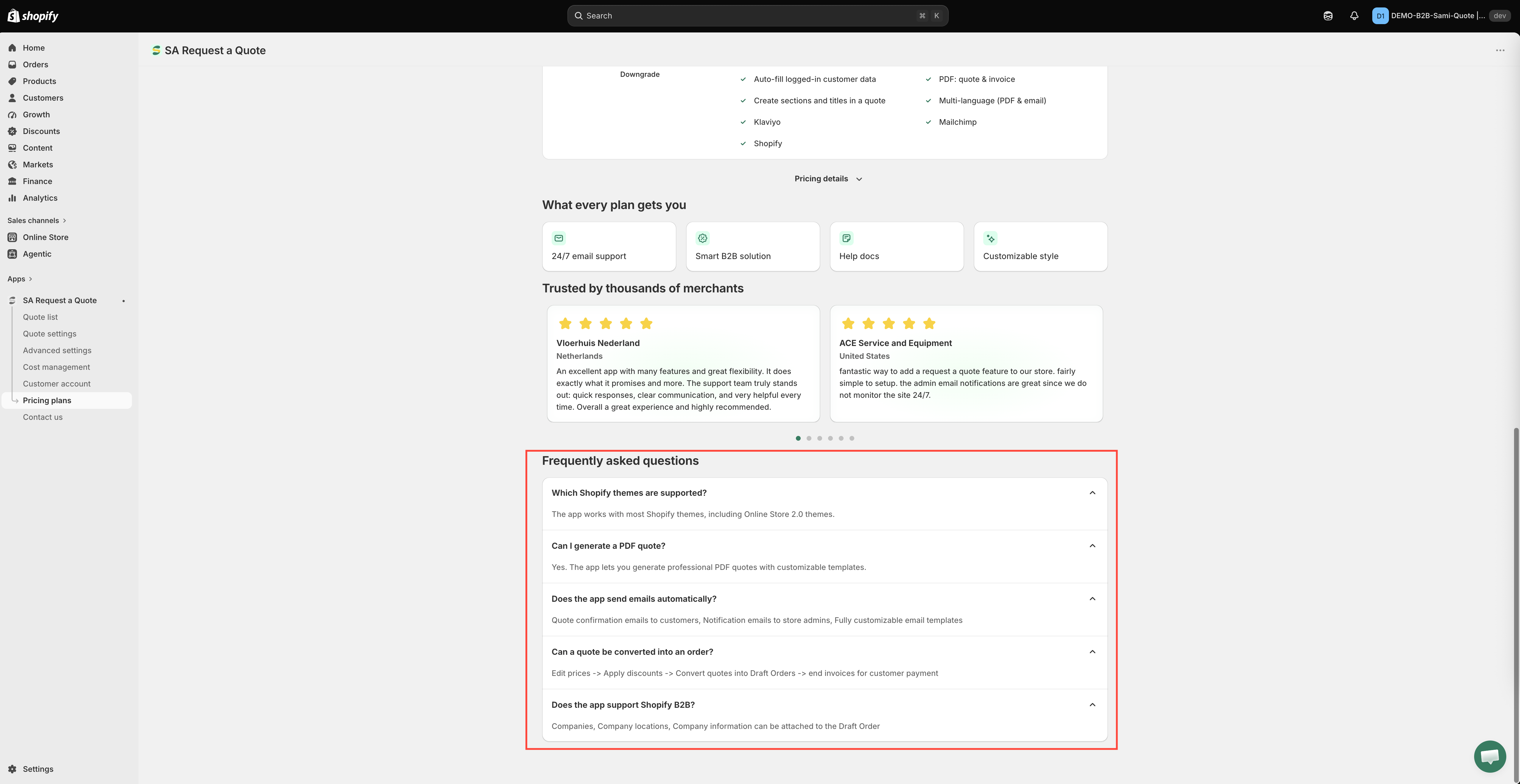
The **Pricing plans** page carries a **Frequently asked questions** section below the plan cards. Read it there rather than here — it answers billing questions against the figures your store is actually being offered.

<figure><img src="https://2993310686-files.gitbook.io/~/files/v0/b/gitbook-x-prod.appspot.com/o/spaces%2FIvNtDAMNVIdy5nl9kiOU%2Fuploads%2Fgit-blob-414311f4b7b6dc6b52278a2128a9e9cb0727d33b%2FScreenshot%202026-10-01%20at%2000-29-16.png?alt=media" alt=""><figcaption></figcaption></figure>

If it doesn't cover your case, ask before you switch — see [Contact support](/sa-request-a-quote/help/contact-support.md).

## Checking your usage

You don't have to open **Pricing plans** to see where you stand. The **Pricing plan details** card on the dashboard shows your **Current plan** together with **Quote number**, **Storage size**, **Used storage** and **Maximum file size**, and **View plan** takes you to the full page.

<figure><img src="https://2993310686-files.gitbook.io/~/files/v0/b/gitbook-x-prod.appspot.com/o/spaces%2FIvNtDAMNVIdy5nl9kiOU%2Fuploads%2Fgit-blob-7217adaee7417a2c1a4b60d846fb3de5a2dd5e13%2Fscreenshot-dashboard-overview.png?alt=media" alt="The app dashboard with the Pricing plan details card showing Current plan, Quote number, Storage size, Used storage and Maximum file size"><figcaption><p><strong>Pricing plan details</strong> on the dashboard, with <strong>View plan</strong>.</p></figcaption></figure>

Storage matters if you accept file uploads with quote requests — see [Allow file uploads](/sa-request-a-quote/quote-form/file-uploads.md).

## Before you downgrade

{% hint style="warning" %}
**Hide price** and **Hide "Add to cart" button** are PREMIUM features, so check what your storefront does after you downgrade.
{% endhint %}

Worth doing first:

* **Export your quotes** if you rely on the history — **Export quotes to CSV** is a PRO feature, so do it while you still have it. See [Export quotes to CSV](/sa-request-a-quote/managing-quotes/export-csv.md).
* **Check what else is PRO** — **Convert a quote to an order** and **Customer Account UI** are on that plan too, so the workflows built on them stop being available.
* **Check your storefront** afterwards, logged out, to confirm it still behaves the way you intend.

After a downgrade, the controls for features your new plan doesn't include are disabled and carry the padlock line described above.

## Next steps

* [Plan comparison](/sa-request-a-quote/reference/plan-comparison.md) — the feature-by-feature breakdown
* [General settings](/sa-request-a-quote/settings/general-settings.md) — where each setting lives in the app
* [Contact support](/sa-request-a-quote/help/contact-support.md) — ask which plan fits your setup


---

# Agent Instructions
This documentation is published with GitBook. GitBook is the documentation platform designed so that both humans and AI agents can read, navigate, and reason over technical content effectively. Learn more at gitbook.com.

## Querying This Documentation
If you need additional information that is not directly available in this page, you can query the documentation by asking a question.

Perform an HTTP GET request on the following URL with the `ask` and `goal` query parameters:

```
GET https://docs.samita.io/sa-request-a-quote/settings/pricing-plans.md?ask=<question>&goal=<user_goal>
```

`ask` is the immediate question: it should be specific, self-contained, and written in natural language.
`goal` is what the user is ultimately trying to achieve, the reason they need the answer. Sharing it helps GitBook give you a better, more relevant answer. A goal is most helpful when it describes the outcome the user wants rather than restating the question. For example, with `ask=how do I create an API token`, a goal like `automate deployments from our CI pipeline` lets GitBook tailor the answer to that use case.

The response will contain a direct answer to the question and relevant excerpts and sources from the documentation.

Use this mechanism when the answer is not explicitly present in the current page, you need clarification or additional context, or you want to retrieve related documentation sections.