> For the complete documentation index, see [llms.txt](https://docs.samita.io/llms.txt). Markdown versions of documentation pages are available by appending `.md` to page URLs; this page is available as [Markdown](https://docs.samita.io/sami-b2b-onboarding/companies/sync-from-shopify.md).
# Sync companies from Shopify
Bring the companies you already have in Shopify into the Companies list, and refresh their details later.
Companies you created in Shopify's own admin, or before you installed Sami B2B Onboarding, aren't in the app's **Companies** list until you sync. **Sync from Shopify** reads your Shopify companies and adds them to the list, so you can give them a sales rep, put them on hold and keep notes about them.
A sync only reads. Nothing is changed in Shopify.
{% hint style="info" %}
Only admins can run a sync. Your store needs B2B companies in Shopify for a sync to find anything.
{% endhint %}
## Run a sync
{% stepper %}
{% step %}
### Open the Companies tab
In the Shopify admin, open **Sami B2B Onboarding**, click **Companies** in the app menu, then click the **Companies** tab.
{% endstep %}
{% step %}
### Click Sync from Shopify
Click **Sync from Shopify** at the top of the page. If the list is empty, the button is in the middle of the page instead.
A **Sync started** message appears, then a blue **Syncing companies from Shopify** banner that counts the companies read so far. The sync runs in the background, so you can leave the page.
{% endstep %}
{% step %}
### Check the result
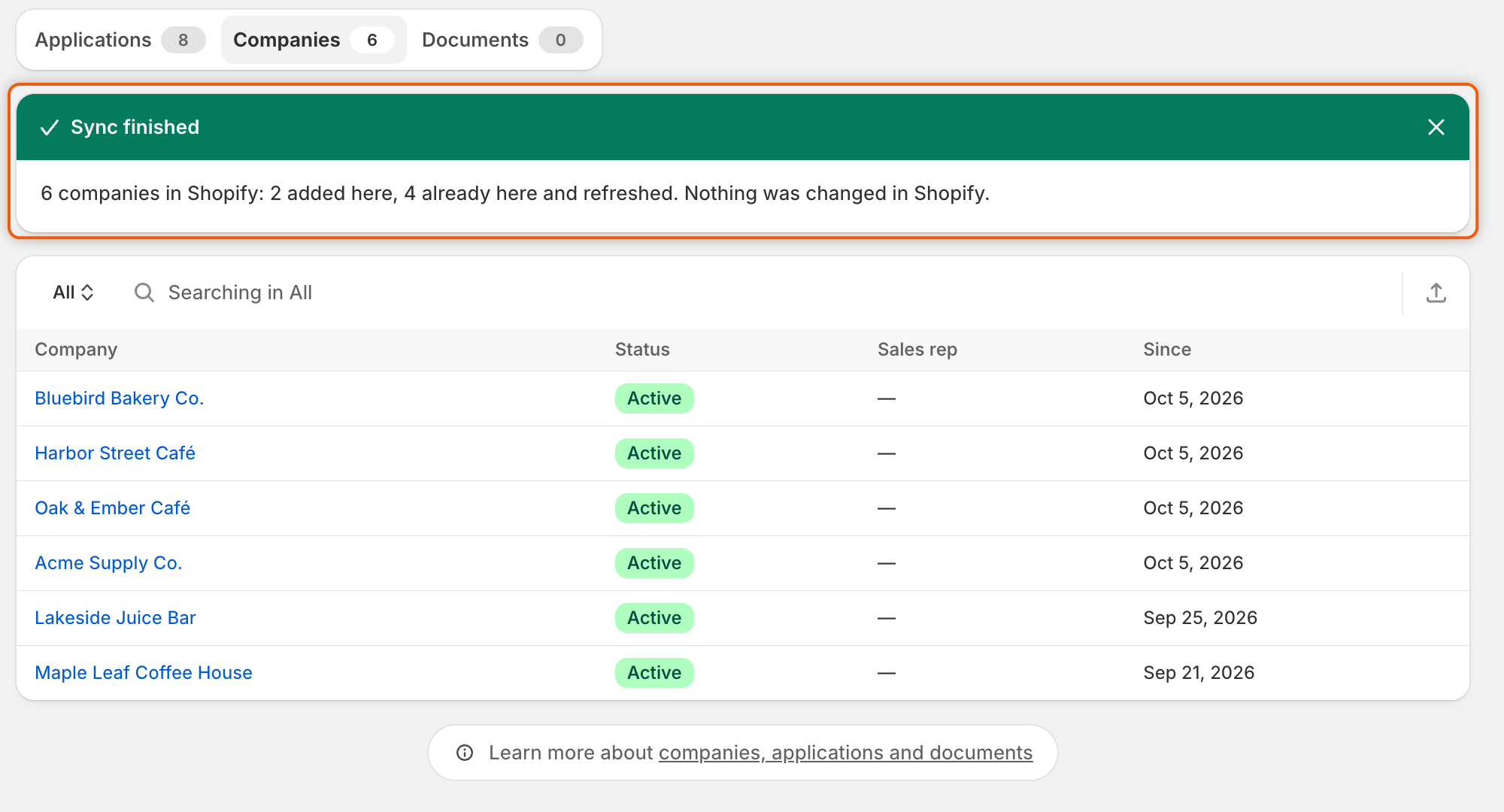
When the sync is done, a green **Sync finished** banner says how many companies were found in Shopify, how many were added and how many were already in the list and refreshed. The list reloads with the new companies.
{% endstep %}
{% endstepper %}
The banner tells you how many companies were added and how many were refreshed.
You can also start a sync from **Companies › Import companies**: click **Sync from Shopify** at the top of the page, or in the **Already in Shopify?** card.
## What a sync reads
For each company in Shopify, the sync reads:
| Detail | Where it comes from in Shopify |
| ---------------------- | ---------------------------------------------------- |
| Company name | The company |
| External ID | The company |
| Customer since | The company |
| Contact name and email | The company's main contact |
| Country | The shipping address of the company's first location |
| Tax ID | The tax settings of the company's first location |
| Payment terms | The payment terms of the company's first location |
Run a sync again whenever you want these details refreshed in the app. A company's page doesn't need it: its figures, locations, members, orders and custom data are read from Shopify each time you open it.
## What a sync keeps
* **Status and sales rep stay yours.** A company that's already in the list keeps its status and sales rep. A sync never puts a company on hold or lifts a hold.
* **New companies start as Active**, with no sales rep.
* **Details are only added or updated.** If a detail is empty in Shopify, the detail already in the app stays.
* **Companies imported from a CSV file are left alone.** They're never matched to a Shopify company by name, so the same company can appear twice. You'll see both in the list.
## One sync at a time
While your sync runs, the **Sync from Shopify** button is greyed out. If someone else on your team clicks it while a sync is running, they join the sync that's already running. It isn't started twice.
One sync reads up to 25,000 companies.
## Check past syncs
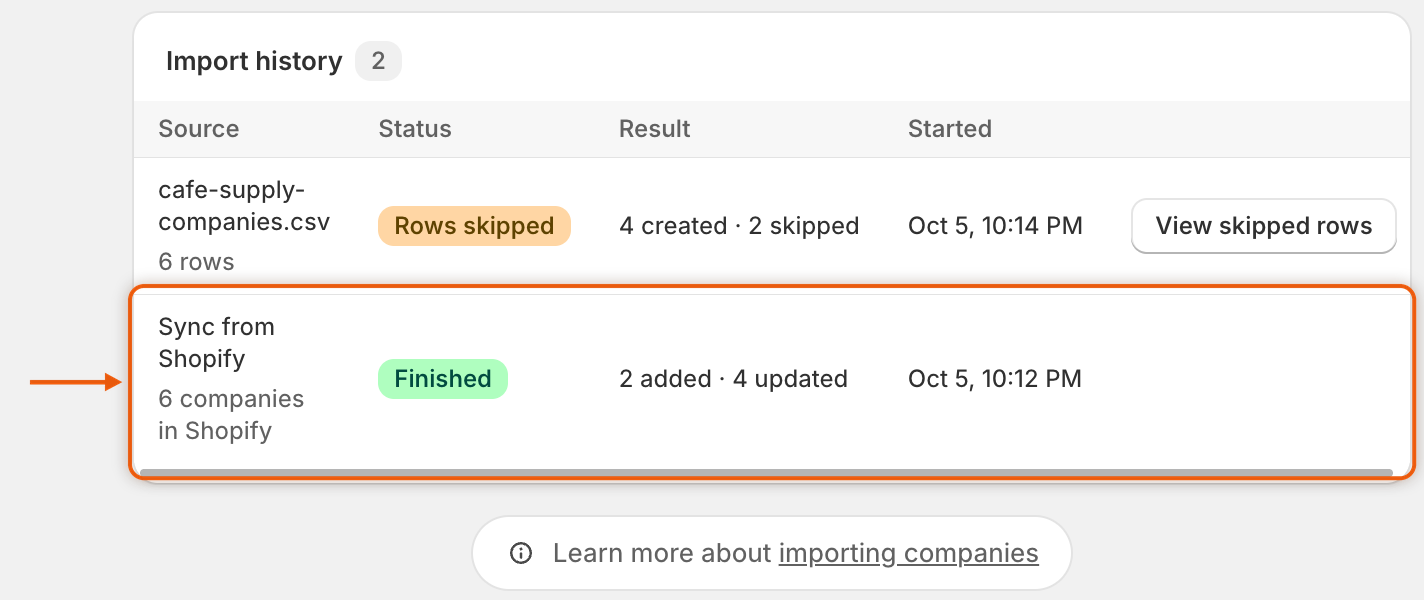
Every sync is listed in **Import history** on the **Import companies** page, beside your CSV imports. Open **Companies**, click **Import companies** at the top of the page, and look for rows named **Sync from Shopify**.
| Column | What it shows for a sync |
| ----------- | -------------------------------------------------------------------------- |
| **Source** | **Sync from Shopify**, and how many companies were found in Shopify. |
| **Status** | **Queued**, **Syncing**, **Finished** or **Failed**. |
| **Result** | How many companies were added and updated, or **No companies in Shopify**. |
| **Started** | When the sync started. |
Syncs and CSV imports share the Import history, newest first.
## If a sync fails
The run shows **Failed** in **Import history**. If you started it from the **Companies** tab, a red **Sync failed** banner also appears there. The companies read before it stopped are kept. Click **Sync from Shopify** to try again. If it keeps failing, click **Contact support** in the banner, or [contact support](/sami-b2b-onboarding/help/contact-support.md).
## Next steps
* [Manage a company](/sami-b2b-onboarding/companies/manage-a-company.md) — set a sales rep and read the company's orders.
* [Import companies from a CSV file](/sami-b2b-onboarding/companies/import-companies-from-csv.md) — add companies that aren't in Shopify.
* [Put a company on hold or remove it from B2B](/sami-b2b-onboarding/companies/hold-or-remove-a-company.md) — stop a company's buyers at checkout.
---
# Agent Instructions
This documentation is published with GitBook. GitBook is the documentation platform designed so that both humans and AI agents can read, navigate, and reason over technical content effectively. Learn more at gitbook.com.
## Querying This Documentation
If you need additional information that is not directly available in this page, you can query the documentation dynamically by asking a question.
Perform an HTTP GET request on the current page URL with the `ask` query parameter, and the optional `goal` query parameter:
```
GET https://docs.samita.io/sami-b2b-onboarding/companies/sync-from-shopify.md?ask=&goal=
```
`ask` is the immediate question: it should be specific, self-contained, and written in natural language.
`goal` is optional and describes the broader end goal you are ultimately trying to accomplish on behalf of the user. GitBook uses it to tailor the answer towards what is most useful for that goal.
The response will contain a direct answer to the question and relevant excerpts and sources from the documentation.
Use this mechanism when the answer is not explicitly present in the current page, you need clarification or additional context, or you want to retrieve related documentation sections.