> For the complete documentation index, see [llms.txt](https://docs.samita.io/llms.txt). Markdown versions of documentation pages are available by appending `.md` to page URLs; this page is available as [Markdown](https://docs.samita.io/sami-b2b-onboarding/store-access/block-checkout-until-approved.md).

# Block checkout until approved

Stop anyone who isn't an approved buyer from completing an order at checkout.

**Block checkout while pending** stops visitors who aren't approved from paying. Shopify runs the check inside its own checkout, so it holds even when someone gets past hidden prices or the store lock. It also works without the app embed.

## Who can check out

| Buyer                                                     | At checkout   |
| --------------------------------------------------------- | ------------- |
| Logged in and buying for a company in Shopify             | Can check out |
| Logged in, with **B2B approved** on in Shopify            | Can check out |
| Logged in, not approved yet (whether they applied or not) | Blocked       |
| Guest                                                     | Blocked       |

Sami B2B Onboarding turns on **B2B approved** for a customer when you approve their application. Companies you put on hold are blocked at checkout whether or not this switch is on. See [Put a company on hold or remove it from B2B](/sami-b2b-onboarding/companies/hold-or-remove-a-company.md).

## Turn on the checkout block

{% stepper %}
{% step %}

### Open Access

In the app, click **Settings**. **Access** opens first. If another section opens, click **Access** in the settings menu.
{% endstep %}

{% step %}

### Choose the visibility

Under **Storefront visibility**, set **Who can browse, who can buy** to **Public catalog, private purchasing** or **Private wholesale store**.

**Public catalog, public purchasing** means everyone can buy. It turns the checkout block off, whatever the switch was set to, and hides the switch.
{% endstep %}

{% step %}

### Turn on the switch

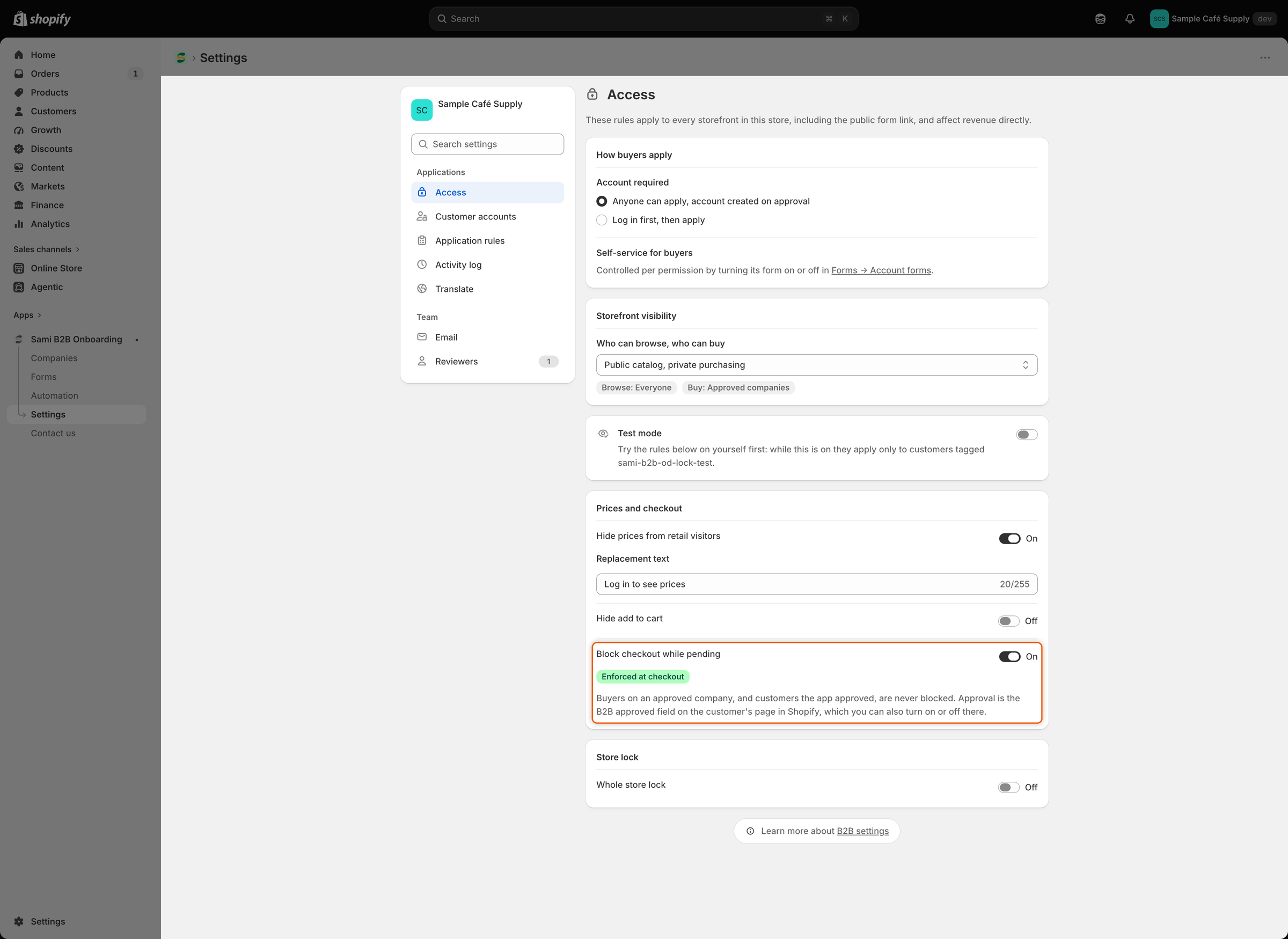
Under **Prices and checkout**, turn on **Block checkout while pending**. A badge appears under it:

* **Enforced at checkout**: the block is working. The note below it says that buyers on an approved company, and customers the app approved, are never blocked.
* **Not enforced**: the checkout rule isn't installed in your store yet. See [If the badge says Not enforced](#if-the-badge-says-not-enforced).

<figure><img src="https://3844812229-files.gitbook.io/~/files/v0/b/gitbook-x-prod.appspot.com/o/spaces%2FRrf4pQPgjvb3GW7IN3Ci%2Fuploads%2Fgit-blob-3a235105d2459aa9b44748866c5b3fe7b201c7d5%2Fscreenshot-access-checkout-block-enforced.png?alt=media" alt="The Block checkout while pending switch turned on, with a green Enforced at checkout badge and a note about who is never blocked."><figcaption><p>The Enforced at checkout badge confirms that Shopify blocks checkout for buyers who aren't approved.</p></figcaption></figure>
{% endstep %}

{% step %}

### Save

Click **Save** in the save bar. **Settings saved** appears.
{% endstep %}
{% endstepper %}

{% hint style="warning" %}
On a new install, the switch already shows on, but checkout isn't blocked until you save **Access** (or another settings section) for the first time. The badge can already say **Enforced at checkout**. If the switch was already on, no save bar appears. If you're not sure you've saved before, turn the switch off and click **Save**, then turn it on and click **Save** again.
{% endhint %}

## What the buyer sees

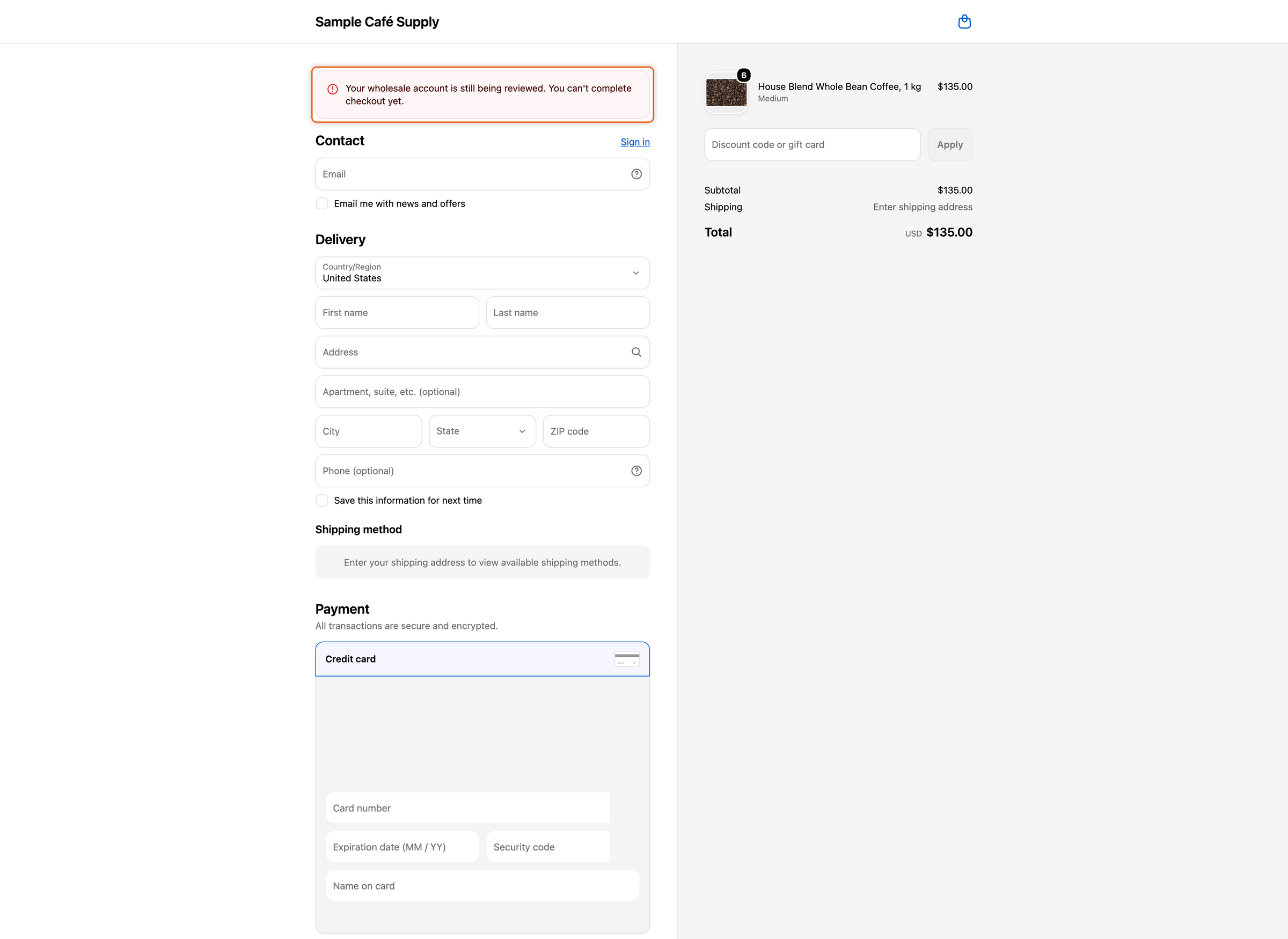
Buyers who aren't approved can still add products to the cart and open the cart. When they go to checkout, Shopify shows this message and won't let them complete the order:

> Your wholesale account is still being reviewed. You can't complete checkout yet.

<figure><img src="https://3844812229-files.gitbook.io/~/files/v0/b/gitbook-x-prod.appspot.com/o/spaces%2FRrf4pQPgjvb3GW7IN3Ci%2Fuploads%2Fgit-blob-1d3d1dc7d19b1790c401171b7dd4f317cfad9878%2Fscreenshot-storefront-checkout-block-message.png?alt=media" alt="Shopify checkout showing an error message that says the wholesale account is still being reviewed and checkout can&#x27;t be completed."><figcaption><p>A buyer who isn't approved sees your message at checkout and can't place the order.</p></figcaption></figure>

## Change or translate the message

{% stepper %}
{% step %}

### Open Translate

Go to **Settings › Translate**.

* To change the English message, click **Edit** next to your default language.
* To translate it, click **Translate** next to the language. If the language isn't listed, click **Add language** first.
  {% endstep %}

{% step %}

### Edit the message

In the list on the left, under **Storefront**, click **Storefront messages**. In the **Checkout** card, change **Checkout blocked**.
{% endstep %}

{% step %}

### Save

Click **Save** in the save bar.
{% endstep %}
{% endstepper %}

Buyers see the message in the language of their checkout. In a language you haven't translated, they see your English message.

## Approve a customer by hand

Approving an application turns on **B2B approved** for the buyer. To let a customer check out without an application, for example a wholesale customer you already know, turn it on yourself.

**B2B approved** appears on customer pages only after the app approves its first application. A customer who is a contact of a company in Shopify doesn't need it: they can check out when they buy for that company.

{% stepper %}
{% step %}

### Open the customer

In Shopify admin, go to **Customers** and click the customer.
{% endstep %}

{% step %}

### Turn on B2B approved

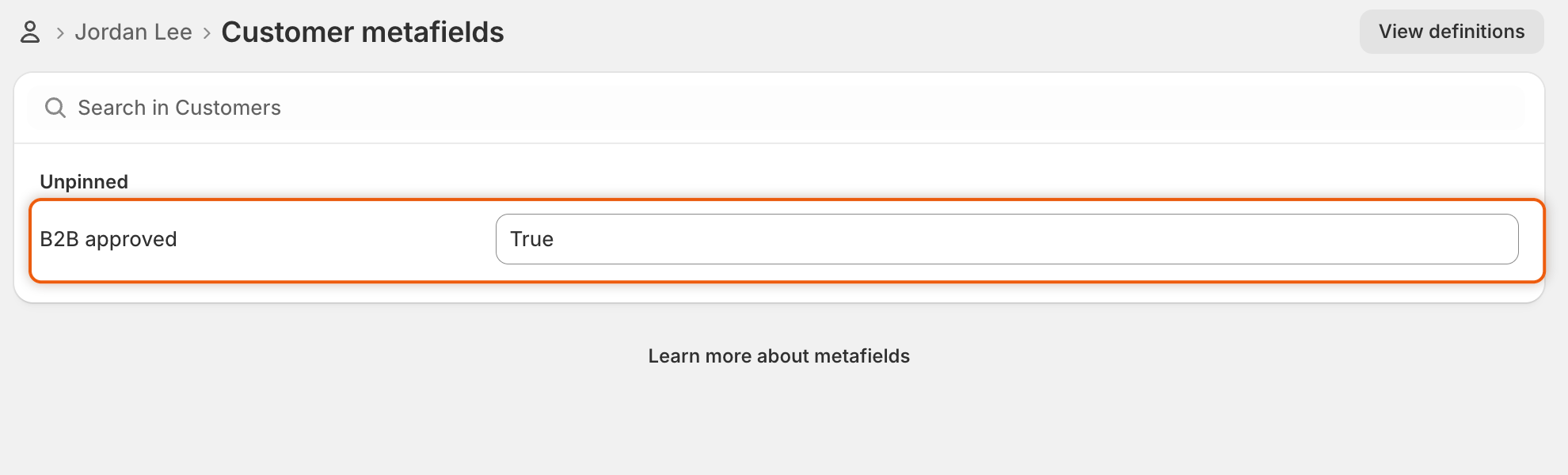
In the customer's **Metafields** card, click **View all metafields**. On the **Customer metafields** page, find **B2B approved**, set it to **True** and click **Save**. If you pinned **B2B approved**, you can also set it straight from the card.

<figure><img src="https://3844812229-files.gitbook.io/~/files/v0/b/gitbook-x-prod.appspot.com/o/spaces%2FRrf4pQPgjvb3GW7IN3Ci%2Fuploads%2Fgit-blob-07f132cacb58a55e11ff9312faff6562564f7a72%2Fscreenshot-shopify-checkout-block-b2b-approved.png?alt=media" alt="The Customer metafields page for Jordan Lee in Shopify admin, with B2B approved set to True under Unpinned."><figcaption><p>Set B2B approved to True to let a customer check out without an application.</p></figcaption></figure>
{% endstep %}
{% endstepper %}

The customer can now check out, see prices and pass the store lock when they're logged in. To take that away, set **B2B approved** to false and save.

## If the badge says Not enforced

The app installs the checkout rule in your store by itself. While it isn't installed, **Access** shows **Not enforced** and the note **The checkout rule isn't installed in this store yet.** Reopen **Access** later to check again. If the badge still says **Not enforced**, [contact support](/sami-b2b-onboarding/help/contact-support.md).

{% hint style="info" %}
In Shopify admin, the rule shows under **Settings › Checkout**, in **Checkout rules**, as **B2B checkout lock**. Leave it on. If it's turned off or deleted there, Shopify doesn't run it and checkout isn't blocked, even if **Access** still says **Enforced at checkout**.
{% endhint %}

## Test it

1. Open your store in a private browser window, so you're a guest.
2. Add a product to the cart and click **Check out**. The message appears and you can't pay.
3. Log in as an approved buyer and check out again. Checkout works as normal.

With **Hide add to cart** or the store lock on, a guest can't add products from your store's pages, so there's nothing to check out. If your store already takes orders, test with test mode instead: only your tagged account is blocked, and you can switch the other rules off while you try it. See [Test your access rules](/sami-b2b-onboarding/store-access/test-mode.md).

## Next steps

* [Approve an application](/sami-b2b-onboarding/reviewing-applications/approve-an-application.md) — approving a buyer lets them check out.
* [Test your access rules](/sami-b2b-onboarding/store-access/test-mode.md) — try the block on your own account first.
* [Hide prices and add to cart](/sami-b2b-onboarding/store-access/hide-prices-and-add-to-cart.md) — also hide what visitors can't buy yet.
* [Translate](/sami-b2b-onboarding/settings/translate.md) — translate the checkout message and other buyer wording.


---

# Agent Instructions
This documentation is published with GitBook. GitBook is the documentation platform designed so that both humans and AI agents can read, navigate, and reason over technical content effectively. Learn more at gitbook.com.

## Querying This Documentation
If you need additional information that is not directly available in this page, you can query the documentation dynamically by asking a question.

Perform an HTTP GET request on the current page URL with the `ask` query parameter, and the optional `goal` query parameter:

```
GET https://docs.samita.io/sami-b2b-onboarding/store-access/block-checkout-until-approved.md?ask=<question>&goal=<endgoal>
```

`ask` is the immediate question: it should be specific, self-contained, and written in natural language.
`goal` is optional and describes the broader end goal you are ultimately trying to accomplish on behalf of the user. GitBook uses it to tailor the answer towards what is most useful for that goal.

The response will contain a direct answer to the question and relevant excerpts and sources from the documentation.

Use this mechanism when the answer is not explicitly present in the current page, you need clarification or additional context, or you want to retrieve related documentation sections.