> For the complete documentation index, see [llms.txt](https://docs.samita.io/llms.txt). Markdown versions of documentation pages are available by appending `.md` to page URLs; this page is available as [Markdown](https://docs.samita.io/samita-countdown-timer-bar/banners/animation.md).
# Animation and groups
How the bar arrives, how it scrolls, and how it cycles between groups.
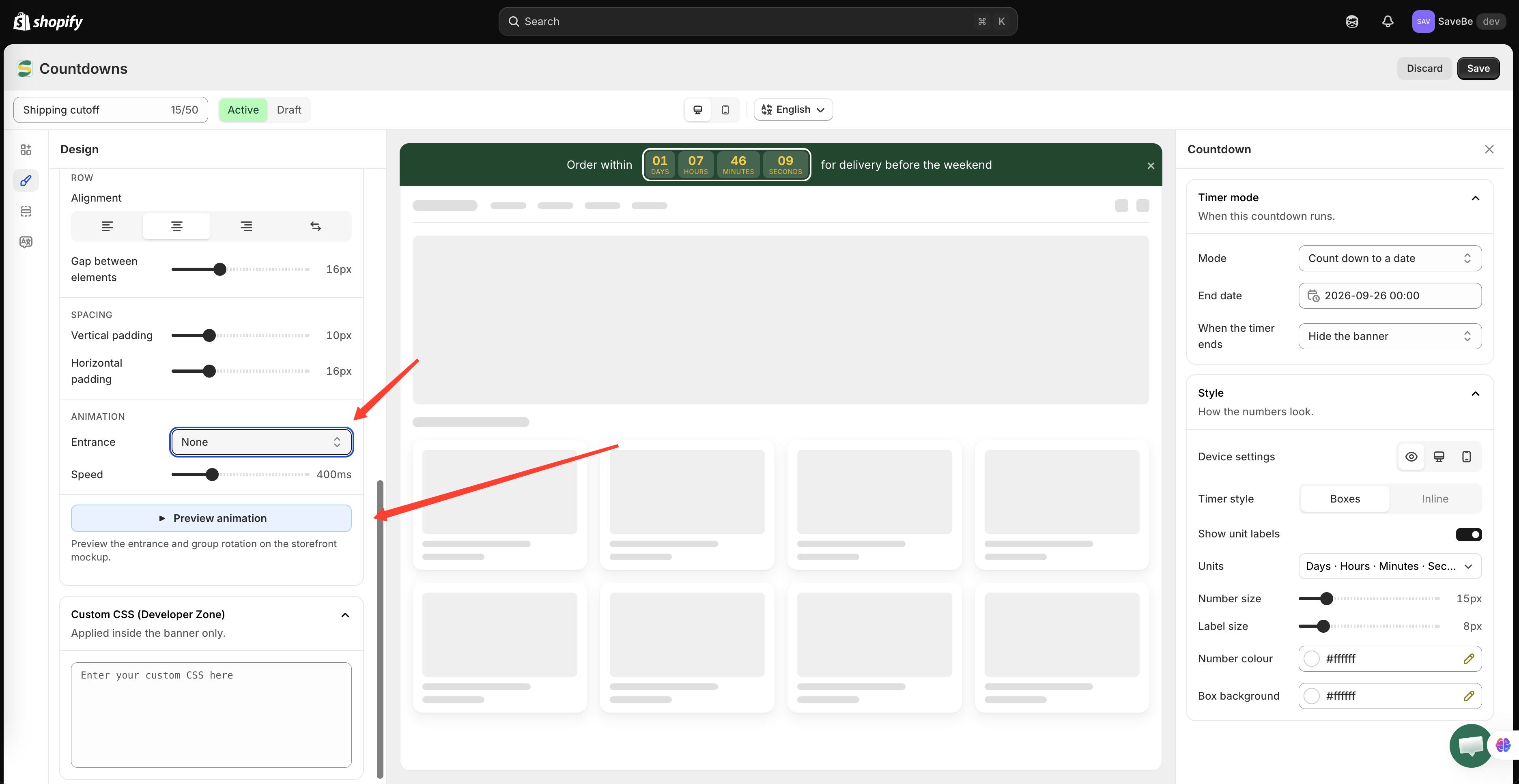
Animation lives at the foot of the **Design** panel. It covers two separate things: how the bar arrives on the page, and how it changes between groups.
Entrance happens once; group transitions repeat.
## Entrance
What the bar does when the page loads.
| Entrance | What it looks like |
| ----------------------- | ------------------------------------------------- |
| **None** | The bar is simply there |
| **Fade in** | It appears |
| **Slide down** | It drops in from above |
| **Slide in from left** | It comes in from the left edge |
| **Slide in from right** | It comes in from the right edge |
| **Continuous scroll** | The message travels across the bar, over and over |
**Speed** sets how long the entrance takes. For continuous scroll it becomes **Scrolling speed**, in how fast the words move rather than how long they take.
### Continuous scroll
Worth its own note. The message crosses the bar from one side to the other, and when it has gone, the next group starts its own pass. It never stops.
Two things follow from that:
* It suits a long message that wouldn't fit on one line
* It pauses while the shopper's pointer is over the bar, so a button in it is still clickable
{% hint style="warning" %}
Continuous scroll and group transitions don't combine. A marquee is already carrying each group across the bar, so the group settings below are hidden while it's on.
{% endhint %}
## Changing between groups
These settings only appear when the banner has [more than one group](/samita-countdown-timer-bar/banners/content.md).
**Change group every** is the number of seconds each group stays on screen.
**Group transition** is how one becomes the next:
| Transition | What it looks like |
| -------------- | ---------------------------------------- |
| **Cross-fade** | One fades out as the next fades in |
| **Slide** | The bar slides sideways, like a carousel |
### Slide
Choosing slide adds one more option: **Arrows**. Turn it on and small **‹** and **›** controls appear at the ends of the bar, so a shopper can move between groups themselves.
Shoppers can also swipe or drag the bar sideways, arrows or not.
The loop has no seam. Past the last group it carries straight on to the first, without rewinding through everything in between.
{% hint style="info" %}
Automatic changing pauses while the shopper's pointer is over the bar, and while they're dragging it. It picks up again when they move away.
{% endhint %}
## Preview animation
**Preview animation** at the foot of the section plays the entrance and the group rotation on the storefront mockup in the middle of the builder, so you don't have to save and reload to judge it.
Click it again to stop. The mockup returns to whichever group you were editing.
## A word on restraint
{% hint style="success" %}
Shoppers came to buy something. An entrance that plays once is a nudge; a bar that moves the whole time is something to scroll past. **None** or **Fade in** is the right answer more often than it looks.
{% endhint %}
Shoppers who have asked their device to reduce motion get the bar without the movement — the entrance doesn't play, the marquee doesn't scroll, and groups don't change by themselves. The arrows and swiping still work.
## Next steps
* [Bar content and elements](/samita-countdown-timer-bar/banners/content.md)
* [Design a banner](/samita-countdown-timer-bar/banners/design.md)
---
# Agent Instructions
This documentation is published with GitBook. GitBook is the documentation platform designed so that both humans and AI agents can read, navigate, and reason over technical content effectively. Learn more at gitbook.com.
## Querying This Documentation
If you need additional information that is not directly available in this page, you can query the documentation by asking a question.
Perform an HTTP GET request on the following URL with the `ask` and `goal` query parameters:
```
GET https://docs.samita.io/samita-countdown-timer-bar/banners/animation.md?ask=&goal=
```
`ask` is the immediate question: it should be specific, self-contained, and written in natural language.
`goal` is what the user is ultimately trying to achieve, the reason they need the answer. Sharing it helps GitBook give you a better, more relevant answer. A goal is most helpful when it describes the outcome the user wants rather than restating the question. For example, with `ask=how do I create an API token`, a goal like `automate deployments from our CI pipeline` lets GitBook tailor the answer to that use case.
The response will contain a direct answer to the question and relevant excerpts and sources from the documentation.
Use this mechanism when the answer is not explicitly present in the current page, you need clarification or additional context, or you want to retrieve related documentation sections.