> For the complete documentation index, see [llms.txt](https://docs.samita.io/llms.txt). Markdown versions of documentation pages are available by appending `.md` to page URLs; this page is available as [Markdown](https://docs.samita.io/samita-countdown-timer-bar/banners/translate.md).
# Translate banner text
Write the bar in each of your store's languages, and let untranslated text fall back on its own.
If your Shopify store sells in more than one language, a banner can say something different in each of them.
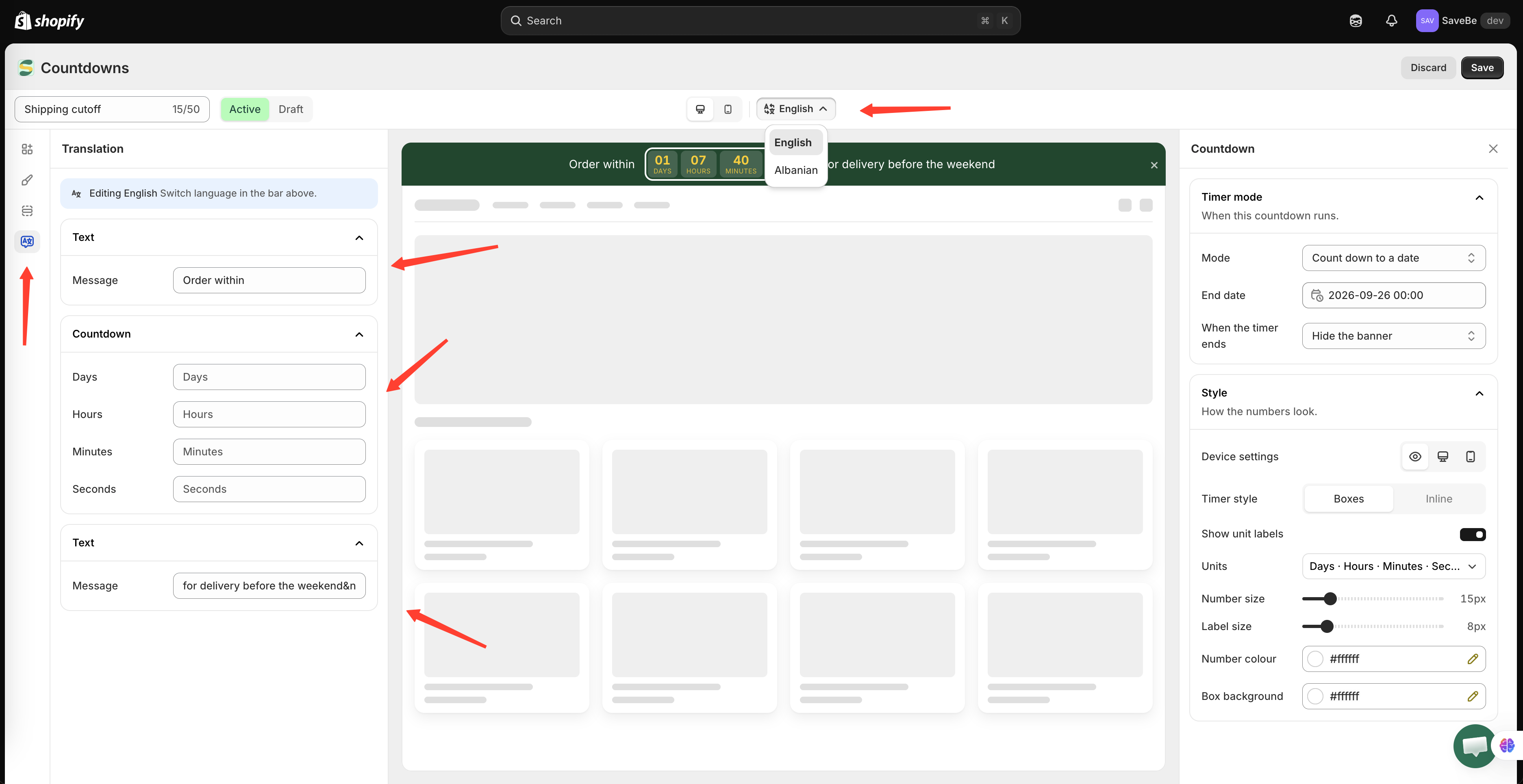
The picker lists your store's languages. The code under each name is what the translation is filed under.
## How it works
The picker in the builder's top bar chooses which language you're editing. Your store's primary language is marked **Default**.
Switch to another language and the text fields change with it. Type there and you're writing that language's version — the primary text is untouched.
{% stepper %}
{% step %}
### Write the banner in your primary language first
Everything else falls back on it, so it has to be right before the rest makes sense.
{% endstep %}
{% step %}
### Switch languages
Click the picker in the top bar and choose one. Each row shows the language name and its code — `fr`, `ja`, `ko`. The code is what matters, because the storefront asks for the translation by code.
{% endstep %}
{% step %}
### Fill in what changes
The fields are empty, with the primary text showing greyed out behind them. That greyed text is what a shopper would get if you leave the field alone.
Fill in the ones that need translating. Leave the rest.
{% endstep %}
{% step %}
### Save
One **Save** covers every language.
{% endstep %}
{% endstepper %}
## What can be translated
| Element | Fields |
| ------------- | ------------------------------------------------- |
| **Text** | The message |
| **Button** | The label, and the link |
| **Image** | The image itself, and the alt text |
| **Countdown** | The unit captions — days, hours, minutes, seconds |
The button's link is there because a multi-language store usually sends shoppers somewhere different: `/fr/collections/soldes` rather than `/collections/sale`.
The image is there because a picture with words baked into it is the wrong picture in another language.
{% hint style="info" %}
A **discount code** is never translated. It's the same string at the checkout whatever language the shopper is reading.
{% endhint %}
Colours, sizes, spacing, and the schedule aren't translated either — they're the same in every language.
## What a shopper actually sees
The storefront asks for the language they're browsing in.
* A translation exists — they get it
* The field was left empty — they get the primary language
* The store runs a regional variant like `pt-BR` and only `pt` was filled in — they get `pt`
So a half-translated banner still reads properly. It just reads in the primary language where you haven't got to yet.
{% hint style="warning" %}
Check the **code** in the picker, not just the name. A translation filed under the wrong language is invisible to everyone — the shoppers reading that language never see it, and the ones you meant it for fall back to the primary text. Nothing errors; the bar simply looks untranslated.
{% endhint %}
## A shortcut worth knowing
If a field is empty in your primary language and you type into a translation, the app fills the primary in as well. A banner built while a translation was selected still has something to fall back on.
## Next steps
* [Bar content and elements](/samita-countdown-timer-bar/banners/content.md)
* [Translate countdown text](/samita-countdown-timer-bar/design-and-translation/translate.md)
* [App language](/samita-countdown-timer-bar/settings/app-language.md)
---
# Agent Instructions
This documentation is published with GitBook. GitBook is the documentation platform designed so that both humans and AI agents can read, navigate, and reason over technical content effectively. Learn more at gitbook.com.
## Querying This Documentation
If you need additional information that is not directly available in this page, you can query the documentation by asking a question.
Perform an HTTP GET request on the following URL with the `ask` and `goal` query parameters:
```
GET https://docs.samita.io/samita-countdown-timer-bar/banners/translate.md?ask=&goal=
```
`ask` is the immediate question: it should be specific, self-contained, and written in natural language.
`goal` is what the user is ultimately trying to achieve, the reason they need the answer. Sharing it helps GitBook give you a better, more relevant answer. A goal is most helpful when it describes the outcome the user wants rather than restating the question. For example, with `ask=how do I create an API token`, a goal like `automate deployments from our CI pipeline` lets GitBook tailor the answer to that use case.
The response will contain a direct answer to the question and relevant excerpts and sources from the documentation.
Use this mechanism when the answer is not explicitly present in the current page, you need clarification or additional context, or you want to retrieve related documentation sections.