> For the complete documentation index, see [llms.txt](https://docs.samita.io/llms.txt). Markdown versions of documentation pages are available by appending `.md` to page URLs; this page is available as [Markdown](https://docs.samita.io/samita-countdown-timer-bar/cart-countdown/overview.md).

# Cart countdown overview

Put a timer on the cart so shoppers finish checking out instead of drifting away.

A cart countdown is a timer that appears in the shopper's cart, counting down the minutes their items are "held". It's aimed squarely at cart abandonment: a shopper with items sitting in the cart and a clock running is more likely to finish than one with neither.

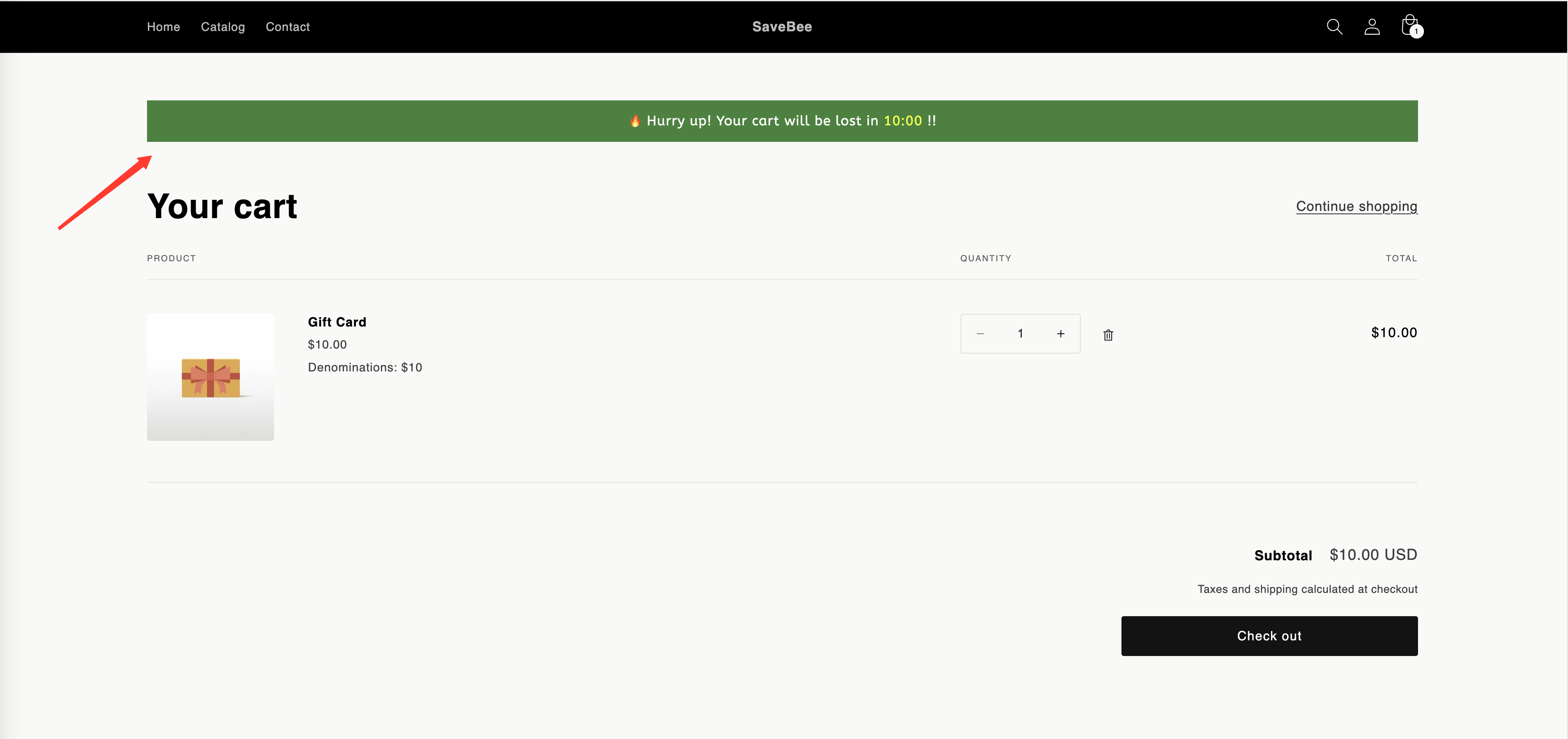
A new cart countdown reads:

> 🔥 Hurry up! Your cart will be lost in {timer} !!

<figure><img src="https://855148666-files.gitbook.io/~/files/v0/b/gitbook-x-prod.appspot.com/o/spaces%2FaOJwtwIUCsbYLCDqZD0u%2Fuploads%2Fgit-blob-d4e6802b8c34146abd32246c5571b9bf2ded069a%2Fscreenshot-storefront-cart-countdown.png?alt=media" alt="A storefront cart page with the cart countdown message and timer at the top"><figcaption><p>A cart countdown at the top of the cart.</p></figcaption></figure>

## What makes it different

|                    | Cart countdown                           | The other three types                      |
| ------------------ | ---------------------------------------- | ------------------------------------------ |
| **Where it shows** | Cart page and cart drawer, automatically | Product pages, or anywhere via shortcode   |
| **Timing**         | A duration in minutes, per shopper       | A date, a per-visitor window, or inventory |
| **Appears when**   | The cart has at least one item           | Whenever conditions match                  |
| **Builder tabs**   | Settings · Display                       | Timers and delivery dates also get Design  |
| **At zero**        | Runs an action you choose                | Stays, hides, or repeats                   |

## It places itself

You don't tick **Product page** or paste a shortcode for a cart countdown. When the shopper's cart has items in it, the app puts the timer at the top of the cart form — on the cart page and in the cart drawer, if your theme has one.

Because of that, the **Display** tab for a cart countdown doesn't offer page placement or device targeting. What it offers instead is the **Action after time expired** setting — see [When the cart timer expires](/samita-countdown-timer-bar/cart-countdown/when-time-expires.md).

## Where to start

<table data-view="cards"><thead><tr><th></th><th></th><th></th><th data-hidden data-card-target data-type="content-ref"></th></tr></thead><tbody><tr><td><i class="fa-wand-magic-sparkles">:wand-magic-sparkles:</i></td><td><strong>Create a cart countdown</strong></td><td>The full setup, from template to a live cart page.</td><td><a href="/samita-countdown-timer-bar/cart-countdown/create.md">Create a cart countdown</a></td></tr><tr><td><i class="fa-hourglass-end">:hourglass-end:</i></td><td><strong>When the cart timer expires</strong></td><td>The three things that can happen at zero — and which to pick.</td><td><a href="/samita-countdown-timer-bar/cart-countdown/when-time-expires.md">When the cart timer expires</a></td></tr></tbody></table>

{% hint style="warning" %}
The app does not reserve stock. The timer is a prompt, not a hold on inventory — nothing stops another shopper buying the last unit while the clock runs. Word the message so it doesn't promise more than that.
{% endhint %}

## Next steps

* [Create a cart countdown](/samita-countdown-timer-bar/cart-countdown/create.md)
* [When the cart timer expires](/samita-countdown-timer-bar/cart-countdown/when-time-expires.md)
* [Countdown types](/samita-countdown-timer-bar/countdowns/overview.md)
* [Countdown not showing](/samita-countdown-timer-bar/help/countdown-not-showing.md)


---

# Agent Instructions
This documentation is published with GitBook. GitBook is the documentation platform designed so that both humans and AI agents can read, navigate, and reason over technical content effectively. Learn more at gitbook.com.

## Querying This Documentation
If you need additional information that is not directly available in this page, you can query the documentation by asking a question.

Perform an HTTP GET request on the following URL with the `ask` and `goal` query parameters:

```
GET https://docs.samita.io/samita-countdown-timer-bar/cart-countdown/overview.md?ask=<question>&goal=<user_goal>
```

`ask` is the immediate question: it should be specific, self-contained, and written in natural language.
`goal` is what the user is ultimately trying to achieve, the reason they need the answer. Sharing it helps GitBook give you a better, more relevant answer. A goal is most helpful when it describes the outcome the user wants rather than restating the question. For example, with `ask=how do I create an API token`, a goal like `automate deployments from our CI pipeline` lets GitBook tailor the answer to that use case.

The response will contain a direct answer to the question and relevant excerpts and sources from the documentation.

Use this mechanism when the answer is not explicitly present in the current page, you need clarification or additional context, or you want to retrieve related documentation sections.
