> For the complete documentation index, see [llms.txt](https://docs.samita.io/llms.txt). Markdown versions of documentation pages are available by appending `.md` to page URLs; this page is available as [Markdown](https://docs.samita.io/samita-countdown-timer-bar/countdown-timer/content.md).
# Timer text and button
Set the heading, subtitle, unit labels, and call-to-action button on a countdown timer.
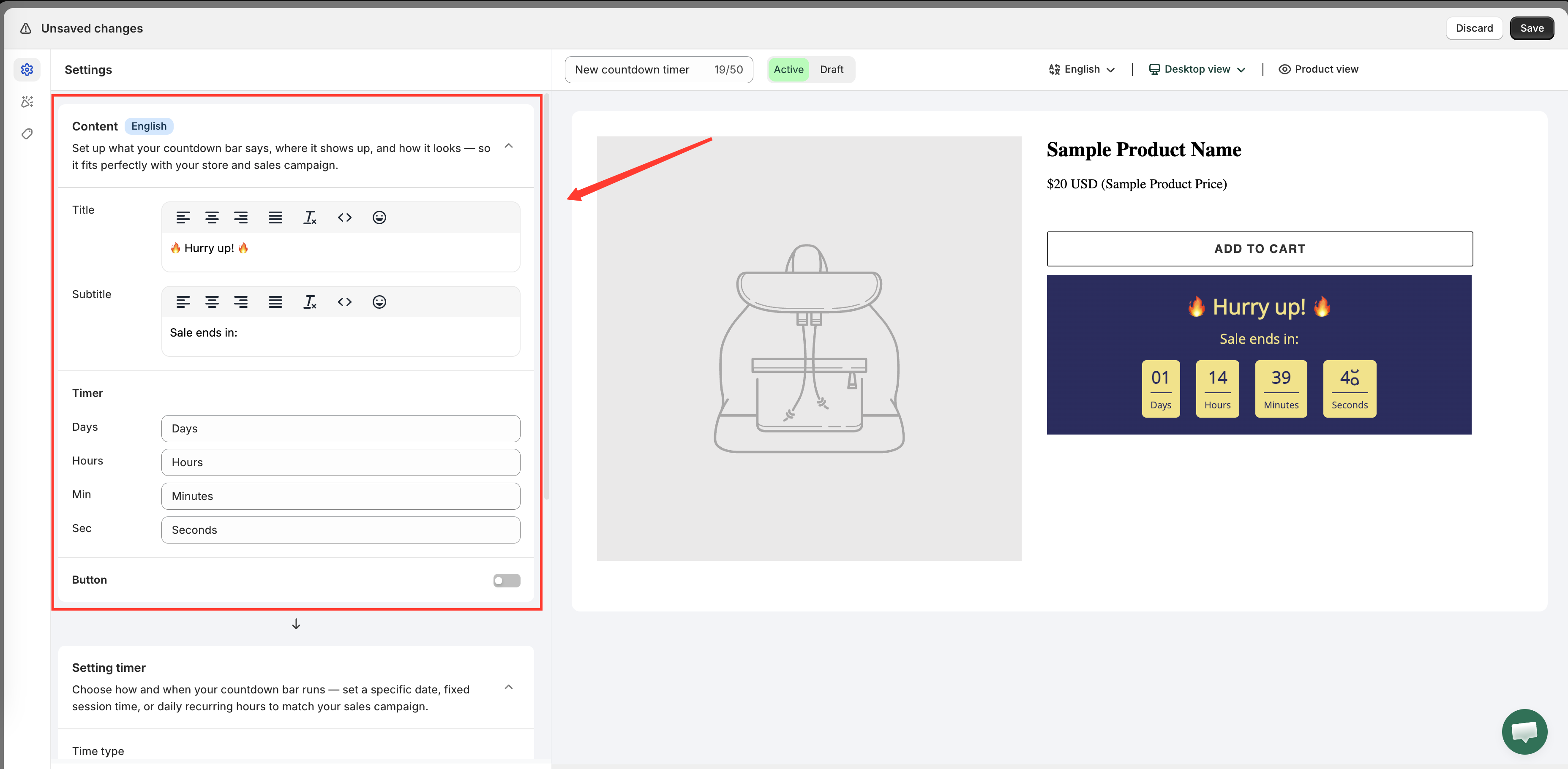
Everything a shopper reads on a countdown timer comes from the **Content** section on the **Settings** tab. The app describes the section as "Set up what your countdown bar says, where it shows up, and how it looks — so it fits perfectly with your store and sales campaign."
The Content section holds every piece of text on the timer.
## Title
The largest line, usually above the digits. A new timer starts with `🔥 Hurry up! 🔥`.
Emoji work here — there's an emoji picker beside the field — and so does plain text. Keep it short: the title competes with your product name for attention, and a long one wraps awkwardly on mobile.
## Subtitle
The smaller line, usually between the title and the numbers. A new timer starts with `Sale ends in:`.
This is where the timer explains itself. Match it to the [Time type](/samita-countdown-timer-bar/countdown-timer/overview.md) you chose:
| Time type | Subtitle that fits |
| --------------------- | ------------------------ |
| Countdown to a date | `Sale ends in:` |
| Fixed minutes | `Your offer expires in:` |
| Daily recurring timer | `Today's deal ends in:` |
## Timer labels
Four separate fields set the words under each number: **Days**, **Hours**, **Min**, and **Sec**.
Change them to shorten a cramped layout (`D` `H` `M` `S`), to spell them out in full, or to word them the way your store's voice would. To show different labels per storefront language, see [Translate countdown text](/samita-countdown-timer-bar/design-and-translation/translate.md).
{% hint style="info" %}
The days unit disappears on its own when the remaining time is under a day, so a timer set for a two-hour sale shows hours, minutes, and seconds rather than a permanent `00 Days`.
{% endhint %}
## Button
A timer can carry an optional call-to-action button. Open the **Button** group in the Content section to set it up:
| Field | What it does |
| ------------------- | -------------------------------------------------------------- |
| Enable | Turns the button on. It's off on a new timer |
| **Text** | The button's label, for example `Shop` |
| **URL** | Where it goes — a collection, a product, a landing page |
| **Open in new tab** | Opens the link in a new browser tab instead of navigating away |
A button is worth adding when the timer sits somewhere that isn't already a buying page — a homepage bar or a landing page, where "Sale ends in 2 days" should lead somewhere. On a product page, where the Add to cart button is right there, a second button usually competes rather than helps.
{% hint style="info" %}
Paste a full URL, or a path starting with `/` for a page on your own store — `/collections/sale`, for example.
{% endhint %}
## Styling the text
Content is *what it says*; the **Design** tab is *how it looks*. Font, size, color, margins, and the styling of the title, subtitle, and timer digits all live there. See [Design a countdown](/samita-countdown-timer-bar/design-and-translation/design.md).
## Next steps
* [Design a countdown](/samita-countdown-timer-bar/design-and-translation/design.md)
* [Translate countdown text](/samita-countdown-timer-bar/design-and-translation/translate.md)
* [Countdown timer overview](/samita-countdown-timer-bar/countdown-timer/overview.md)
* [Display position](/samita-countdown-timer-bar/where-countdowns-appear/position.md)
---
# Agent Instructions
This documentation is published with GitBook. GitBook is the documentation platform designed so that both humans and AI agents can read, navigate, and reason over technical content effectively. Learn more at gitbook.com.
## Querying This Documentation
If you need additional information that is not directly available in this page, you can query the documentation by asking a question.
Perform an HTTP GET request on the following URL with the `ask` and `goal` query parameters:
```
GET https://docs.samita.io/samita-countdown-timer-bar/countdown-timer/content.md?ask=&goal=
```
`ask` is the immediate question: it should be specific, self-contained, and written in natural language.
`goal` is what the user is ultimately trying to achieve, the reason they need the answer. Sharing it helps GitBook give you a better, more relevant answer. A goal is most helpful when it describes the outcome the user wants rather than restating the question. For example, with `ask=how do I create an API token`, a goal like `automate deployments from our CI pipeline` lets GitBook tailor the answer to that use case.
The response will contain a direct answer to the question and relevant excerpts and sources from the documentation.
Use this mechanism when the answer is not explicitly present in the current page, you need clarification or additional context, or you want to retrieve related documentation sections.