> For the complete documentation index, see [llms.txt](https://docs.samita.io/llms.txt). Markdown versions of documentation pages are available by appending `.md` to page URLs; this page is available as [Markdown](https://docs.samita.io/samita-countdown-timer-bar/countdown-timer/fixed-minutes.md).
# Fixed minutes per visitor
Give each visitor their own short timer that starts the moment they arrive.
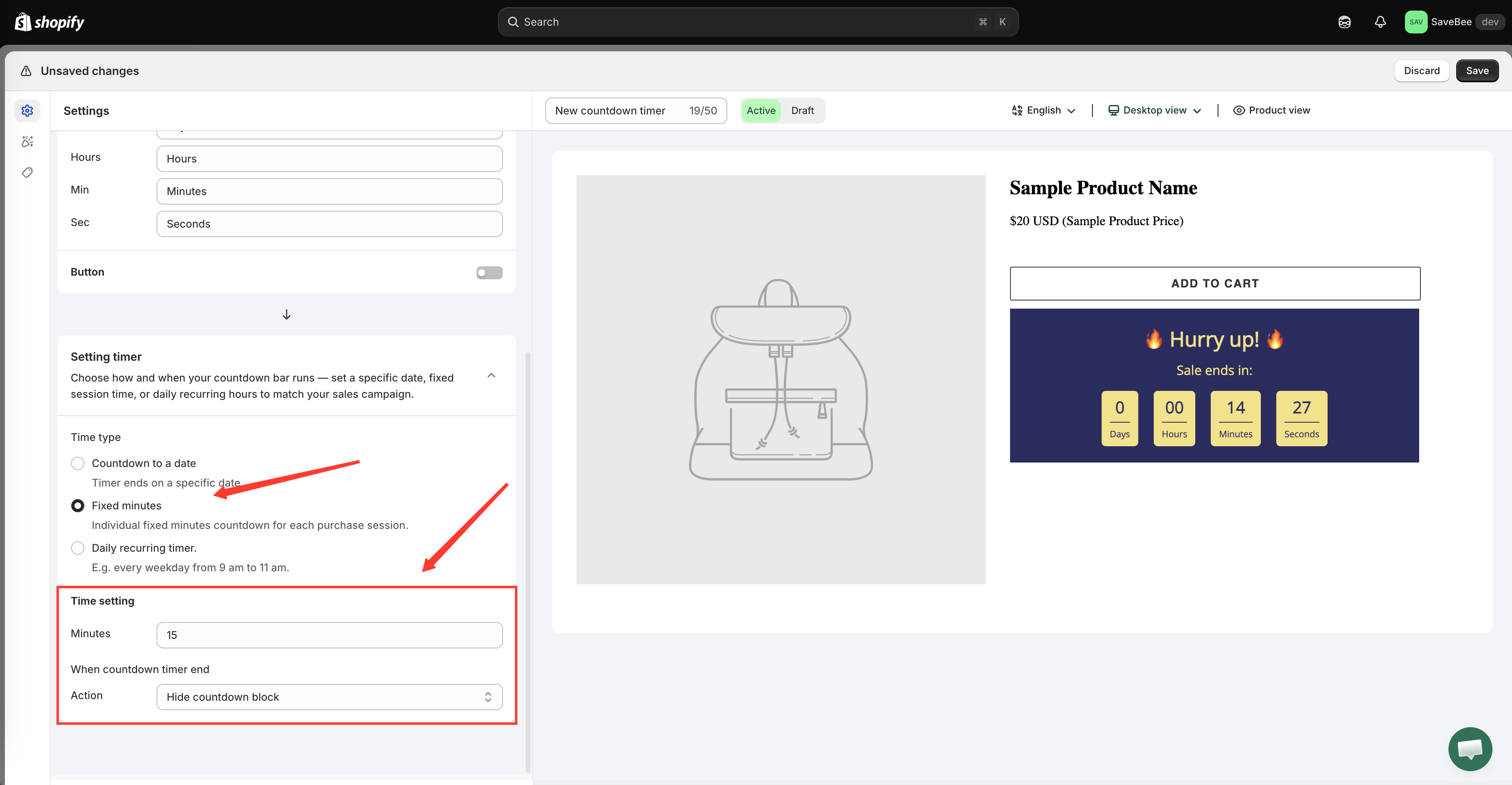
**Fixed minutes** gives every shopper their own personal countdown. Instead of one shared deadline, the timer starts at the number of minutes you set the first time that shopper sees it, and runs down from there — the app describes it as "Individual fixed minutes countdown for each purchase session."
Use it when you want urgency without a real end date: a "reserved for you" offer, a first-visit discount window, or a nudge on a high-consideration product.
{% hint style="warning" %}
Because every visitor has their own clock, two people looking at the same product at the same moment see different numbers. Don't pair this mode with copy that implies a shared, storewide deadline.
{% endhint %}
## Steps to set it up
{% stepper %}
{% step %}
### Create the countdown
Click **Create countdown** from the dashboard or the **Countdowns** page.
{% endstep %}
{% step %}
### Pick a Countdown timer template
Leave the type tab on **Countdown timer**, pick a design, and click **Select**.
{% endstep %}
{% step %}
### Name it
Name it something that tells you the mode later, like "15-minute offer timer".
{% endstep %}
{% step %}
### Write the text
On the **Settings** tab, open **Content** and set the **Title**, **Subtitle**, and timer labels. Wording that fits this mode talks about the shopper, not the shop — "Your offer expires in:" rather than "Sale ends in:". See [Timer text and button](/samita-countdown-timer-bar/countdown-timer/content.md).
{% endstep %}
{% step %}
### Choose Fixed minutes
In **Setting timer**, set **Time type** to **Fixed minutes**.
Fixed minutes replaces the date fields with a single Minutes value.
{% endstep %}
{% step %}
### Set the number of minutes
Enter the length of the window in the **Minutes** field. The default is 15.
Keep it short enough to feel urgent and long enough to be plausible — most stores land between 10 and 30 minutes.
{% endstep %}
{% step %}
### Choose what happens at zero
Set **When countdown timer end**:
* **Hide countdown block** — the timer disappears once their window closes.
* **Repeat the timer** — it immediately restarts for another full window, so the shopper always sees a running clock.
* **Do nothing** — it sits at zero.
See [When the timer ends](/samita-countdown-timer-bar/countdown-timer/when-the-timer-ends.md).
{% endstep %}
{% step %}
### Style it on the Design tab
Adjust colors, fonts, and spacing on the **Design** tab, or keep the template's look. See [Design a countdown](/samita-countdown-timer-bar/design-and-translation/design.md).
{% endstep %}
{% step %}
### Choose where it shows
On the **Display** tab, tick **Product page**, or copy the **Shortcode** for a custom position. Narrow it with **Conditions** if it should only apply to some products — see [Display conditions](/samita-countdown-timer-bar/where-countdowns-appear/conditions.md).
{% endstep %}
{% step %}
### Save it as Active and check your storefront
Save with the status set to **Active**, then open a matching page on your live storefront. The timer starts at the full number of minutes.
To see what a returning shopper sees, reload the page — the timer picks up where it left off rather than restarting. To see a brand-new visitor's view again, open the page in a private or incognito window.
{% endstep %}
{% endstepper %}
## How each visitor's timer is remembered
The first time a shopper sees the timer, the app records their personal end time in a cookie in their browser. On every later page view it reads that cookie back, so the countdown continues instead of starting over.
What follows from that:
* **Per browser, per device.** The same person on their phone and their laptop gets two separate timers.
* **Clearing cookies resets it.** So does a private window, or a browser set to block site data.
* **Changing the Minutes value resets everyone.** If you edit the number and save, every visitor's timer restarts at the new length the next time they load a page. Decide on a length before a campaign rather than tuning it mid-flight.
{% hint style="info" %}
Testing repeatedly in the same browser will keep showing you your own expired timer. Use a private window for each fresh test.
{% endhint %}
## Next steps
* [When the timer ends](/samita-countdown-timer-bar/countdown-timer/when-the-timer-ends.md)
* [Count down to a date](/samita-countdown-timer-bar/countdown-timer/count-down-to-a-date.md)
* [Timer text and button](/samita-countdown-timer-bar/countdown-timer/content.md)
* [How it works](/samita-countdown-timer-bar/reference/how-it-works.md)
---
# Agent Instructions
This documentation is published with GitBook. GitBook is the documentation platform designed so that both humans and AI agents can read, navigate, and reason over technical content effectively. Learn more at gitbook.com.
## Querying This Documentation
If you need additional information that is not directly available in this page, you can query the documentation by asking a question.
Perform an HTTP GET request on the following URL with the `ask` and `goal` query parameters:
```
GET https://docs.samita.io/samita-countdown-timer-bar/countdown-timer/fixed-minutes.md?ask=&goal=
```
`ask` is the immediate question: it should be specific, self-contained, and written in natural language.
`goal` is what the user is ultimately trying to achieve, the reason they need the answer. Sharing it helps GitBook give you a better, more relevant answer. A goal is most helpful when it describes the outcome the user wants rather than restating the question. For example, with `ask=how do I create an API token`, a goal like `automate deployments from our CI pipeline` lets GitBook tailor the answer to that use case.
The response will contain a direct answer to the question and relevant excerpts and sources from the documentation.
Use this mechanism when the answer is not explicitly present in the current page, you need clarification or additional context, or you want to retrieve related documentation sections.