> For the complete documentation index, see [llms.txt](https://docs.samita.io/llms.txt). Markdown versions of documentation pages are available by appending `.md` to page URLs; this page is available as [Markdown](https://docs.samita.io/samita-countdown-timer-bar/quick-start/dashboard.md).
# Dashboard tour
Every part of the app dashboard explained — search, record counts, setup cards, templates, and the language picker.
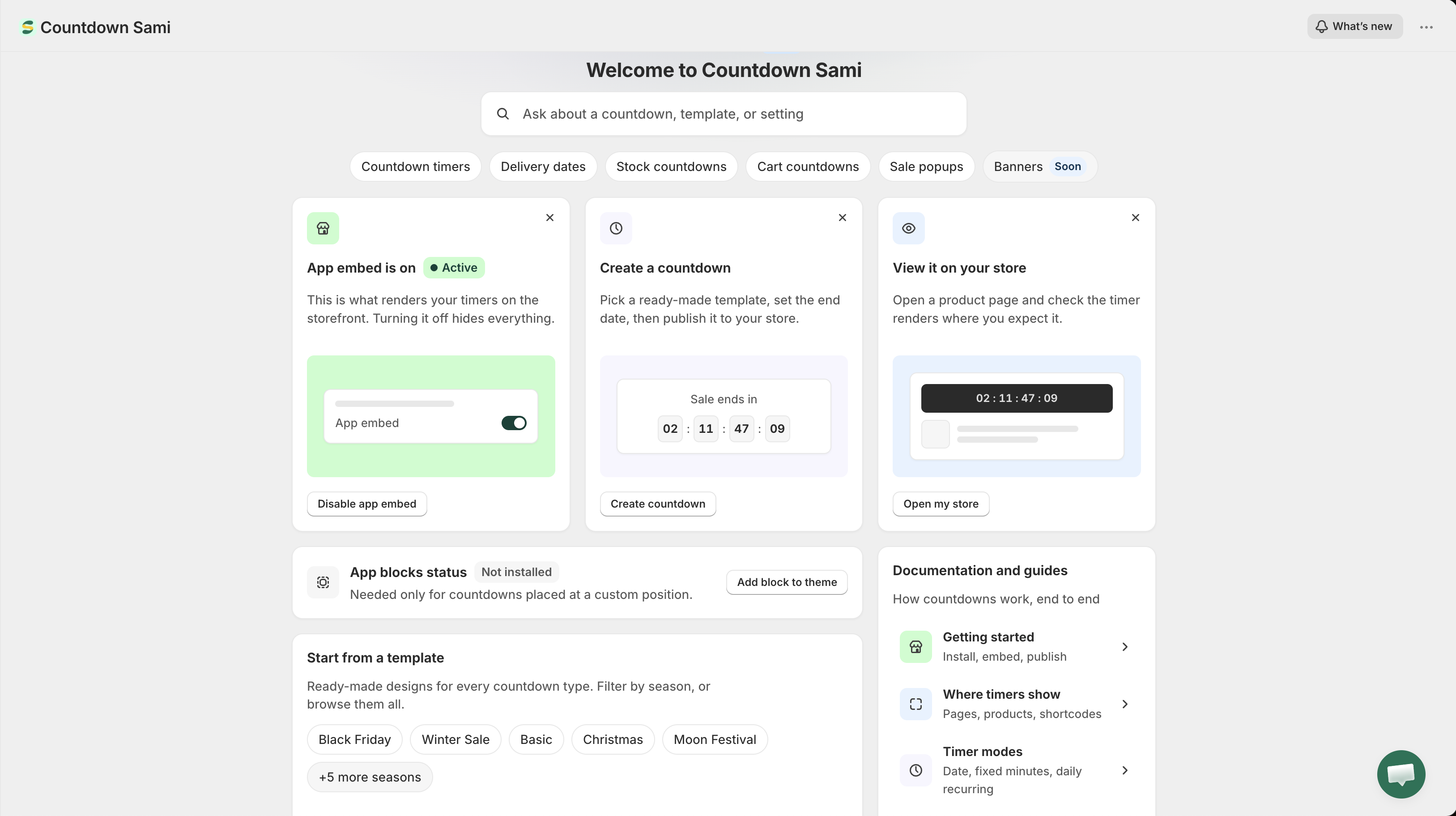
The dashboard is the app's home screen. It's built to answer three questions at a glance: is the app actually running on my storefront, what have I already made, and what should I do next.
The app dashboard.
## What's new
A **What's new** button sits in the top bar, beside your store name. It opens the release notes for the current version without leaving the page. The same notes are published at [What's new](/samita-countdown-timer-bar/whats-new.md).
## Search
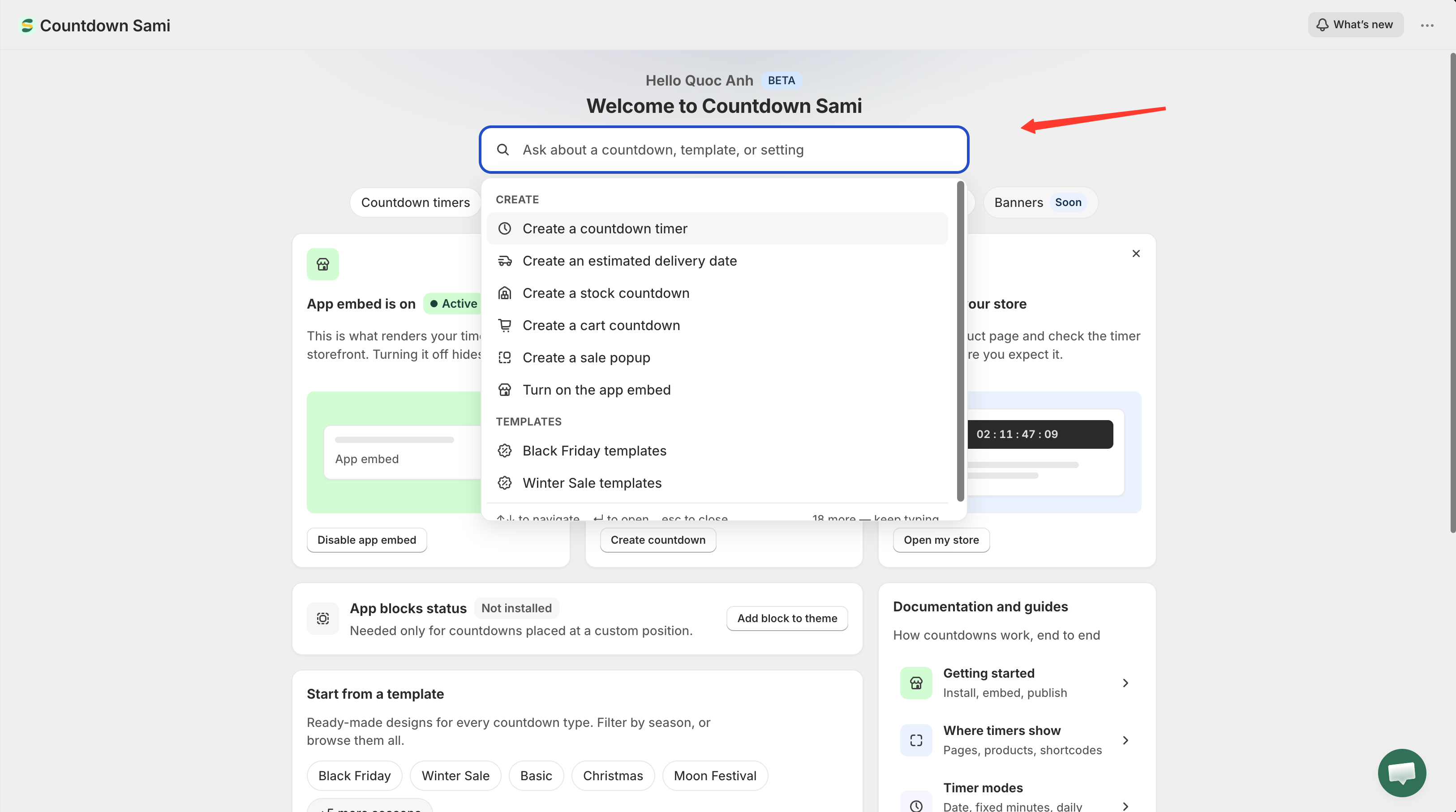
The search field under the greeting is the fastest way around the app. Type what you want to do rather than where you think it lives — "not showing", "black friday", "delivery", "shortcode" all land somewhere sensible.
It searches two things at once:
* **Tasks** — grouped as **Create**, **Templates**, **Timer behaviour**, and **Fix and manage**. Picking one either opens the right screen or opens the matching documentation page.
* **Your own records** — your countdowns and sale popups by name. These only appear once you start typing, and picking one opens that record's editor directly.
Use ↑ ↓ to move through results, Enter to open the highlighted one, and Esc to close the panel.
Search covers both app tasks and the records you've already created.
## Record counts
The row of chips under the search field shows how many of each type you've created: **Countdown timers**, **Delivery dates**, **Stock countdowns**, **Cart countdowns**, and **Sale popups**.
Clicking a chip takes you somewhere useful rather than always the same place. A type you already use opens the [Countdowns list](/samita-countdown-timer-bar/countdowns/manage.md) filtered to it; a type you haven't used yet opens the template picker on that tab, since an empty filtered list would be a dead end.
The **Banners** chip is marked **Soon** — that feature isn't available yet.
## Setup cards
Three cards cover everything needed before a countdown is visible:
| Card | What it does |
| ------------------------- | --------------------------------------------------------------------------------------------------------------------------------------------------------------------- |
| **App embed** | Reports **Active** or **Inactive** and opens the theme editor to switch it. See [Turn on the app embed](/samita-countdown-timer-bar/quick-start/enable-app-embed.md). |
| **Create a countdown** | Opens the template picker. See [Choose a template](/samita-countdown-timer-bar/countdowns/templates.md). |
| **View it on your store** | Opens your live storefront in a new tab so you can check the result. |
These cards stay on the dashboard rather than disappearing once you've done them — the app embed card in particular is worth keeping, because it's the one switch that hides every countdown at once.
You can dismiss any card with the **✕** in its corner, and the remaining cards widen to fill the row. Dismissing the app embed card doesn't lose its status: the theme integration panel below picks it up instead.
{% hint style="info" %}
Dismissals are remembered in the browser you're using, not on your store. Open the app in a different browser and the cards come back.
{% endhint %}
## Theme integration
Below the setup cards, a panel reports what the app has active on your current theme:
* **App embed status** — **Active** or **Inactive**. This is the switch that renders countdowns and sale popups.
* **App blocks status** — **Installed** or **Not installed**. Only needed for countdowns placed at a custom position with a shortcode.
If the app can't read the status — it happens occasionally — the panel says so rather than sitting on a spinner. Reload the page to try again.
Full detail is on the [Theme integration](https://github.com/samita-baoan/doc-timer/tree/restructure/docs-v2/settings/theme-integration.md) page.
## Start from a template
A shortcut into the template picker, with chips for the first few occasions — Black Friday, Winter Sale, Basic, Christmas, Moon Festival — and **Browse all templates** for everything else. Picking a season chip opens the picker already filtered to it.
## Documentation and guides
The documentation panel links out to the five guides that answer most questions:
| Row | Goes to |
| ------------------------------------------------------ | ----------------------------------------------------------------------------------- |
| **Getting started** — install, embed, publish | [Getting started](/samita-countdown-timer-bar/getting-started.md) |
| **Where timers show** — pages, products, shortcodes | [Display overview](/samita-countdown-timer-bar/where-countdowns-appear/overview.md) |
| **Timer modes** — date, fixed minutes, daily recurring | [Countdown timer overview](/samita-countdown-timer-bar/countdown-timer/overview.md) |
| **Design and translate** — colors, fonts, label text | [Design a countdown](/samita-countdown-timer-bar/design-and-translation/design.md) |
| **Timer not showing?** — the five things to check | [Countdown not showing](/samita-countdown-timer-bar/help/countdown-not-showing.md) |
## Footer: documentation, support, and app language
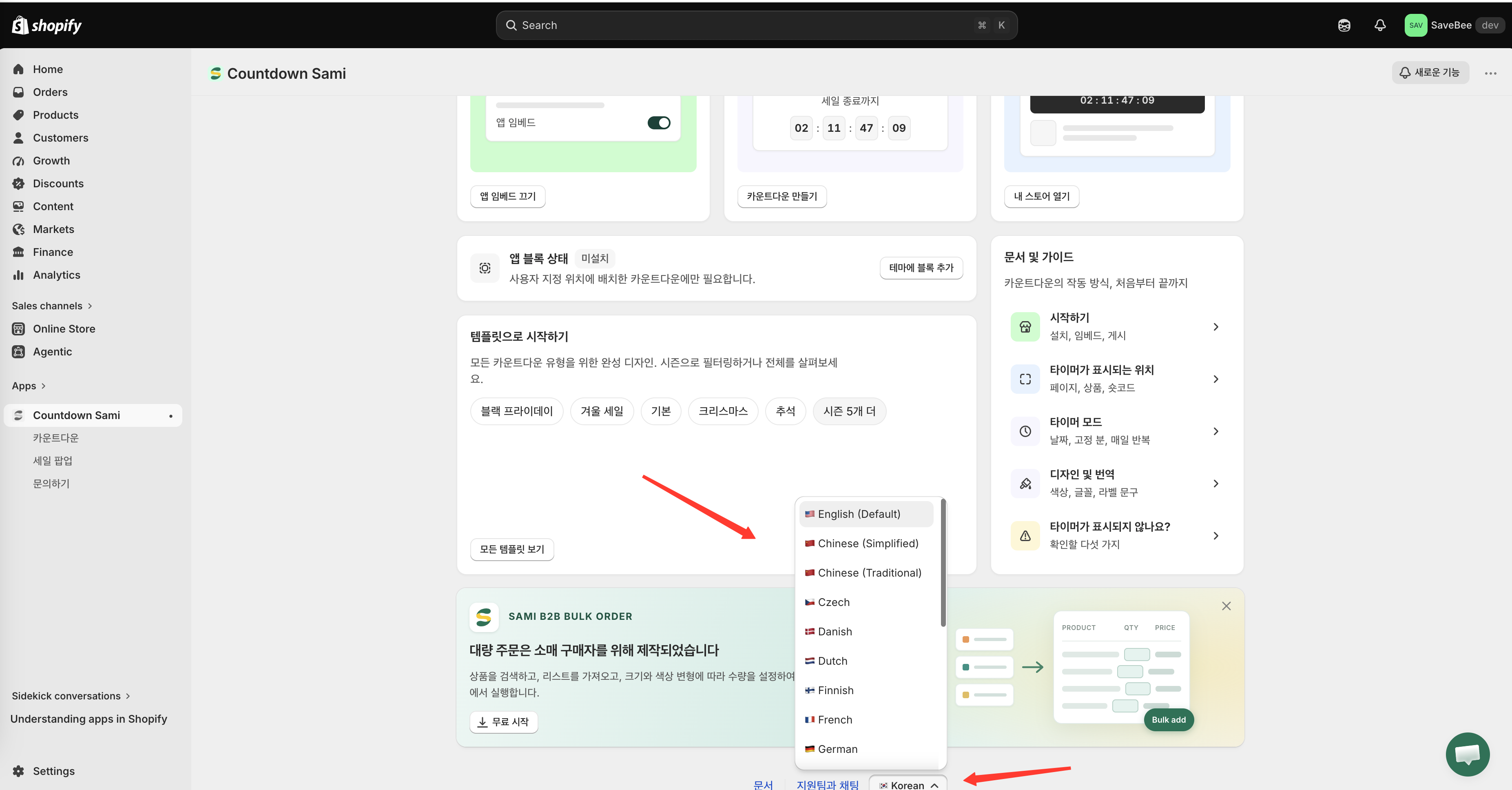
The footer carries a link to these docs, a **Chat with support** link that opens the [Contact us](/samita-countdown-timer-bar/help/contact-support.md) form, and the **app language** picker.
The language picker changes the language of the app's own admin interface — nothing on your storefront. Your choice is saved to your store, so it's still there next time you open the app. See [App language](/samita-countdown-timer-bar/settings/app-language.md).
The footer language picker changes the admin interface language only.
## Navigation
The app's main menu — in the Shopify admin sidebar under the app name — has four entries: **Dashboard**, **Countdowns**, **Sale Popups**, and **Contact us**.
## Next steps
* [Create your first countdown](/samita-countdown-timer-bar/quick-start/quickstart.md)
* [Countdown types](/samita-countdown-timer-bar/countdowns/overview.md)
* [Theme integration](https://github.com/samita-baoan/doc-timer/tree/restructure/docs-v2/settings/theme-integration.md)
* [App language](/samita-countdown-timer-bar/settings/app-language.md)
---
# Agent Instructions
This documentation is published with GitBook. GitBook is the documentation platform designed so that both humans and AI agents can read, navigate, and reason over technical content effectively. Learn more at gitbook.com.
## Querying This Documentation
If you need additional information that is not directly available in this page, you can query the documentation by asking a question.
Perform an HTTP GET request on the following URL with the `ask` and `goal` query parameters:
```
GET https://docs.samita.io/samita-countdown-timer-bar/quick-start/dashboard.md?ask=&goal=
```
`ask` is the immediate question: it should be specific, self-contained, and written in natural language.
`goal` is what the user is ultimately trying to achieve, the reason they need the answer. Sharing it helps GitBook give you a better, more relevant answer. A goal is most helpful when it describes the outcome the user wants rather than restating the question. For example, with `ask=how do I create an API token`, a goal like `automate deployments from our CI pipeline` lets GitBook tailor the answer to that use case.
The response will contain a direct answer to the question and relevant excerpts and sources from the documentation.
Use this mechanism when the answer is not explicitly present in the current page, you need clarification or additional context, or you want to retrieve related documentation sections.