> For the complete documentation index, see [llms.txt](https://docs.samita.io/llms.txt). Markdown versions of documentation pages are available by appending `.md` to page URLs; this page is available as [Markdown](https://docs.samita.io/samita-countdown-timer-bar/whats-new.md).
# What's new
Product updates and new features in Countdown Timer Bar Samita.
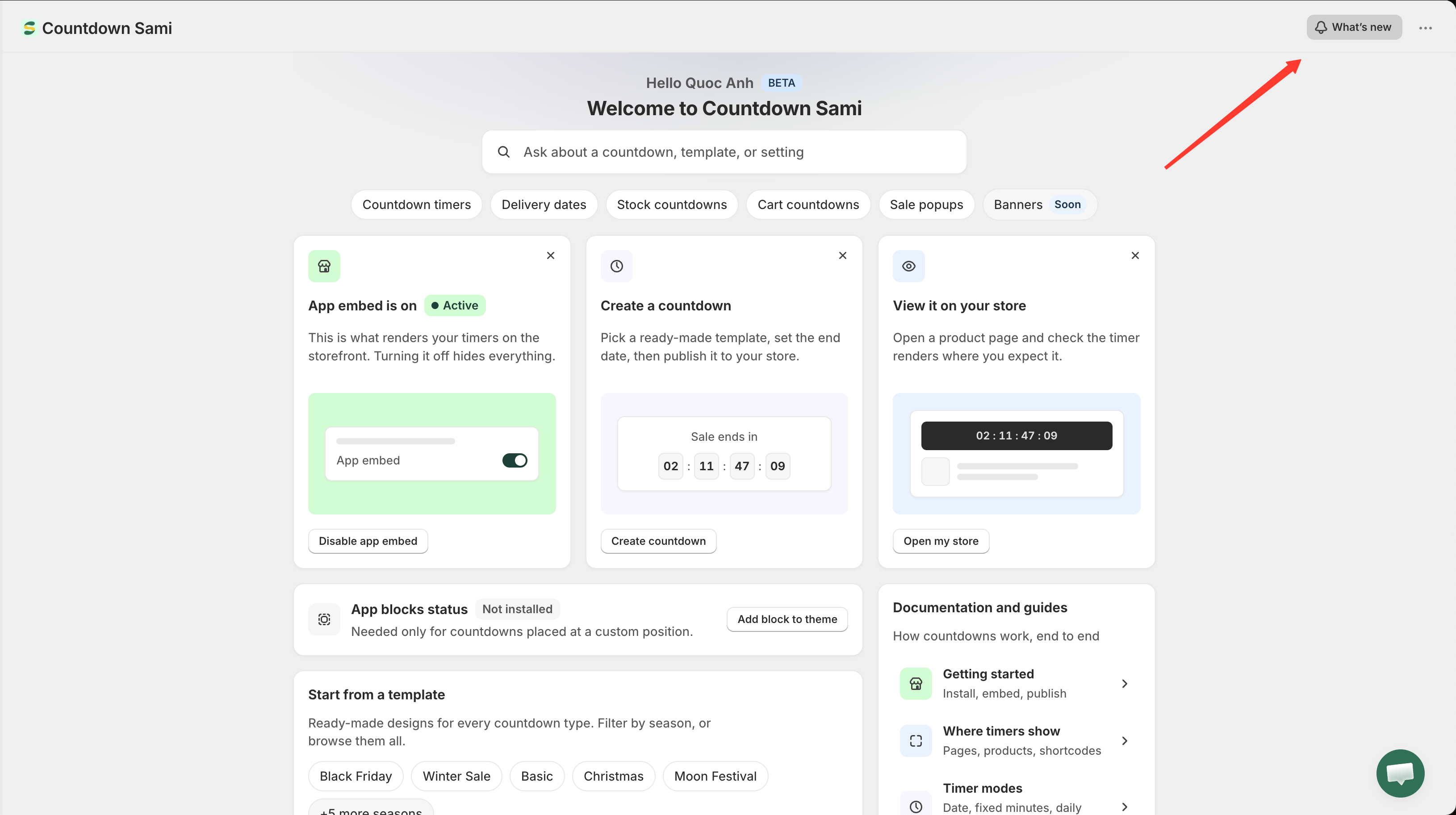
The newest release is at the top. You can also read these notes inside the app: open the **Dashboard** and click **What's new** in the top bar.
The What's new panel, opened from the button in the app's top bar.
{% updates format="full" %}
{% update date="2026-09-22" tags="feature" %}
## Banner bar
**A new campaign type.** Announce free shipping, a sale, or a discount code in a bar across the top or foot of your storefront — no theme editing. Banners have their own list page and their own editor, reached from **Banners** in the app's menu. See [Banners overview](/samita-countdown-timer-bar/banners/overview.md).
**Ten starter templates**, grouped by what they're for — sale and urgency, discount codes, shipping, announcements — plus a blank one. See [Create a banner](/samita-countdown-timer-bar/banners/create.md).
**Six kinds of element**: text, a live countdown, a button, a discount code shoppers copy with a click, an image, and a line break. Each can be styled per screen, or hidden on one of them. See [Bar content and elements](/samita-countdown-timer-bar/banners/content.md).
**Groups that cycle.** Add a second group and the bar alternates between them, cross-fading or sliding — with optional arrows, and swiping on a phone. See [Animation and groups](/samita-countdown-timer-bar/banners/animation.md).
**Per-page and per-shopper targeting.** Show a banner on chosen page types or URLs, for chosen products, collections, tags, customers, languages, or countries — and schedule when it starts and stops. See [Where a banner appears](/samita-countdown-timer-bar/banners/placement.md).
**Translated with your store.** Messages, button labels and links, images, and countdown captions can each be written per language, falling back to your primary language where they aren't. See [Translate banner text](/samita-countdown-timer-bar/banners/translate.md).
{% endupdate %}
{% update date="2025-10-09" tags="feature,design,templates" %}
## Version 2.0
**Sale popup feature** — a new campaign type that shows recent purchases from your store as small notifications on the storefront, with its own list page, editor, and general settings. See [Sale popups overview](/samita-countdown-timer-bar/sale-popups/overview.md).
**Enhanced UI/UX** — a redesigned dashboard with search, record counts, setup cards, a template shortcut, and a documentation panel, plus a rebuilt template picker. See [Dashboard tour](/samita-countdown-timer-bar/quick-start/dashboard.md).
**New countdown templates** — additional ready-made timer designs, grouped by occasion: Black Friday, Winter Sale, Christmas, New Year, Moon Festival, Summer Sale, Halloween, Valentine, April Fool's Day, and Basic. See [Choose a template](/samita-countdown-timer-bar/countdowns/templates.md).
{% endupdate %}
{% endupdates %}
{% hint style="info" %}
Some features depend on your plan or on what your Shopify store supports. Open the feature in the app to see whether it's available for your store.
{% endhint %}
## Related docs
* [Create your first countdown](/samita-countdown-timer-bar/quick-start/quickstart.md)
* [Countdown types](/samita-countdown-timer-bar/countdowns/overview.md)
* [Sale popups overview](/samita-countdown-timer-bar/sale-popups/overview.md)
* [Choose a template](/samita-countdown-timer-bar/countdowns/templates.md)
* [Banners overview](/samita-countdown-timer-bar/banners/overview.md)
---
# Agent Instructions
This documentation is published with GitBook. GitBook is the documentation platform designed so that both humans and AI agents can read, navigate, and reason over technical content effectively. Learn more at gitbook.com.
## Querying This Documentation
If you need additional information that is not directly available in this page, you can query the documentation by asking a question.
Perform an HTTP GET request on the following URL with the `ask` and `goal` query parameters:
```
GET https://docs.samita.io/samita-countdown-timer-bar/whats-new.md?ask=&goal=
```
`ask` is the immediate question: it should be specific, self-contained, and written in natural language.
`goal` is what the user is ultimately trying to achieve, the reason they need the answer. Sharing it helps GitBook give you a better, more relevant answer. A goal is most helpful when it describes the outcome the user wants rather than restating the question. For example, with `ask=how do I create an API token`, a goal like `automate deployments from our CI pipeline` lets GitBook tailor the answer to that use case.
The response will contain a direct answer to the question and relevant excerpts and sources from the documentation.
Use this mechanism when the answer is not explicitly present in the current page, you need clarification or additional context, or you want to retrieve related documentation sections.