> For the complete documentation index, see [llms.txt](https://docs.samita.io/llms.txt). Markdown versions of documentation pages are available by appending `.md` to page URLs; this page is available as [Markdown](https://docs.samita.io/samita-wholesale-b2b/add-on-features/create-a-shipping-rate.md).
# Shipping Rate
Set a custom shipping fee for a chosen group of wholesale customers or products.
Shipping Rate lets you charge a custom shipping fee — different from your store's default rates — to specific customers or products.
## Steps to manage
{% stepper %}
{% step %}
### Open Shipping rate
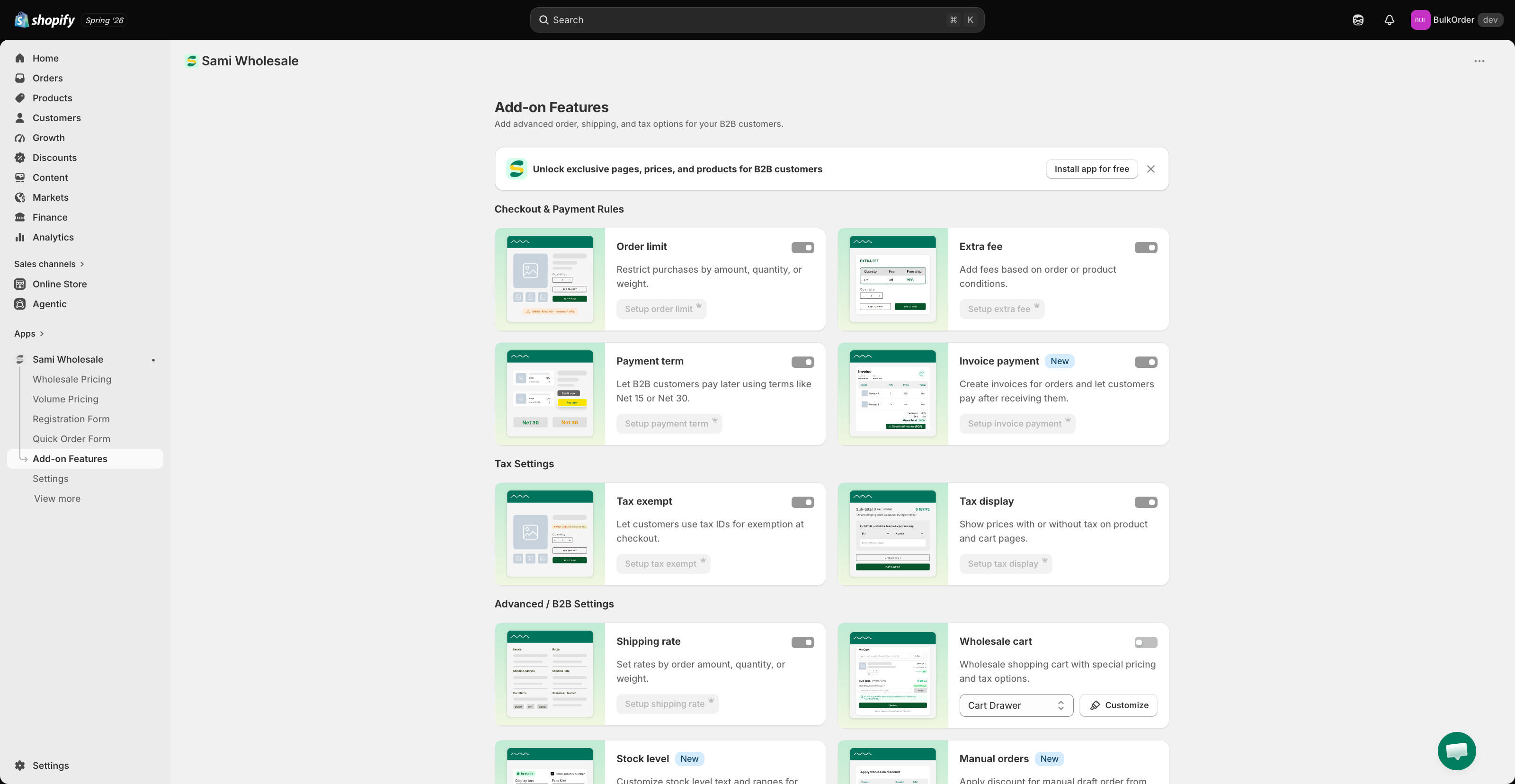
Open the app, go to **Add-on Features**, then click **Shipping rate > Setup shipping rate**.
{% endstep %}
{% step %}
### Start a new rule
Click **Create new shipping rate**.
{% endstep %}
{% step %}
### Name the rule
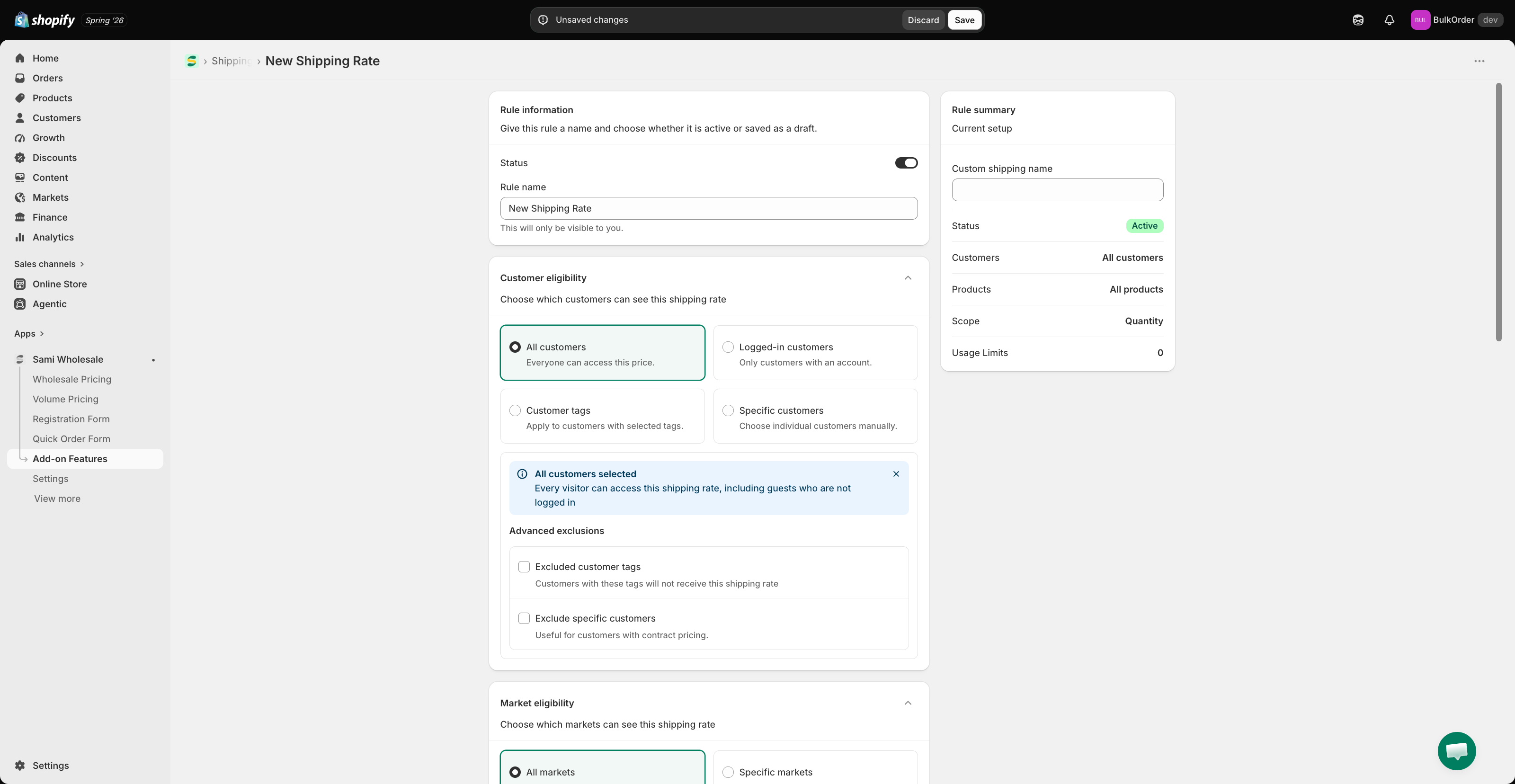
Give the rule a title and set its status to active or draft. In **Rule summary**, set the shipping fee name that customers see at checkout.
{% endstep %}
{% step %}
### Choose which customers it applies to
In **Customer condition**, choose:
* **All customers** — everyone.
* **Logged-in customers** — only customers logged in to your store.
* **Specific customers** — one or a few chosen customer accounts.
* **Customer tags** — only logged-in customers with the tag you specify.
You can also **exclude** specific customers.
{% endstep %}
{% step %}
### Choose a market
In **Market eligibility**, choose **Specific markets** and tick the ones you want, or choose **All markets**.
{% hint style="info" %}
The app pulls market data directly from **Shopify Markets**. Any market you've created in Shopify will automatically be available here. If a market is missing, make sure it's been created and configured in your Shopify Markets settings first.
{% endhint %}
{% endstep %}
{% step %}
### Choose which products it applies to
In **Product eligibility**, choose **All products**, **Specific products**, **Specific collections**, or **Product tag** — and optionally **exclude** specific products.
{% endstep %}
{% step %}
### Configure the shipping fee
In **Shipping rate general**, you can add as many fee ranges as you want.
{% hint style="info" %}
If two shipping rate rules could both apply to the same order, the lower shipping fee wins.
{% endhint %}
* Choose the scope: **Quantity**, **Amount**, or **Weight**.
* Enter the range the app should use to decide which fee applies at checkout.
* Choose the fee format: **Percentage of applied items' subtotal** (a percentage of the order total) or **Flat rate** (a fixed price, regardless of order total).
{% endstep %}
{% step %}
### Save
Click **Save**.
{% endstep %}
{% endstepper %}
{% hint style="info" %}
**Important:** make sure the app embed is activated in your theme, or this data won't show on your storefront. See [Activate/Deactivate app in the theme](/samita-wholesale-b2b/mandatory-steps/activate-deactivate-app-in-the-theme.md).
{% endhint %}
> ### **Need support?**
>
> If you do encounter any difficulty while proceeding these steps, don’t show any hesitation to contact us promptly via the email address [support@samita.io](https://help.samita.io/support@samita.io)
---
# Agent Instructions
This documentation is published with GitBook. GitBook is the documentation platform designed so that both humans and AI agents can read, navigate, and reason over technical content effectively. Learn more at gitbook.com.
## Querying This Documentation
If you need additional information that is not directly available in this page, you can query the documentation by asking a question.
Perform an HTTP GET request on the following URL with the `ask` and `goal` query parameters:
```
GET https://docs.samita.io/samita-wholesale-b2b/add-on-features/create-a-shipping-rate.md?ask=&goal=
```
`ask` is the immediate question: it should be specific, self-contained, and written in natural language.
`goal` is what the user is ultimately trying to achieve, the reason they need the answer. Sharing it helps GitBook give you a better, more relevant answer. A goal is most helpful when it describes the outcome the user wants rather than restating the question. For example, with `ask=how do I create an API token`, a goal like `automate deployments from our CI pipeline` lets GitBook tailor the answer to that use case.
The response will contain a direct answer to the question and relevant excerpts and sources from the documentation.
Use this mechanism when the answer is not explicitly present in the current page, you need clarification or additional context, or you want to retrieve related documentation sections.
.png?alt=media)
.png?alt=media)
.png?alt=media)
.png?alt=media)