> For the complete documentation index, see [llms.txt](https://docs.samita.io/llms.txt). Markdown versions of documentation pages are available by appending `.md` to page URLs; this page is available as [Markdown](https://docs.samita.io/settings/pricing-plans.md).
# Pricing plans
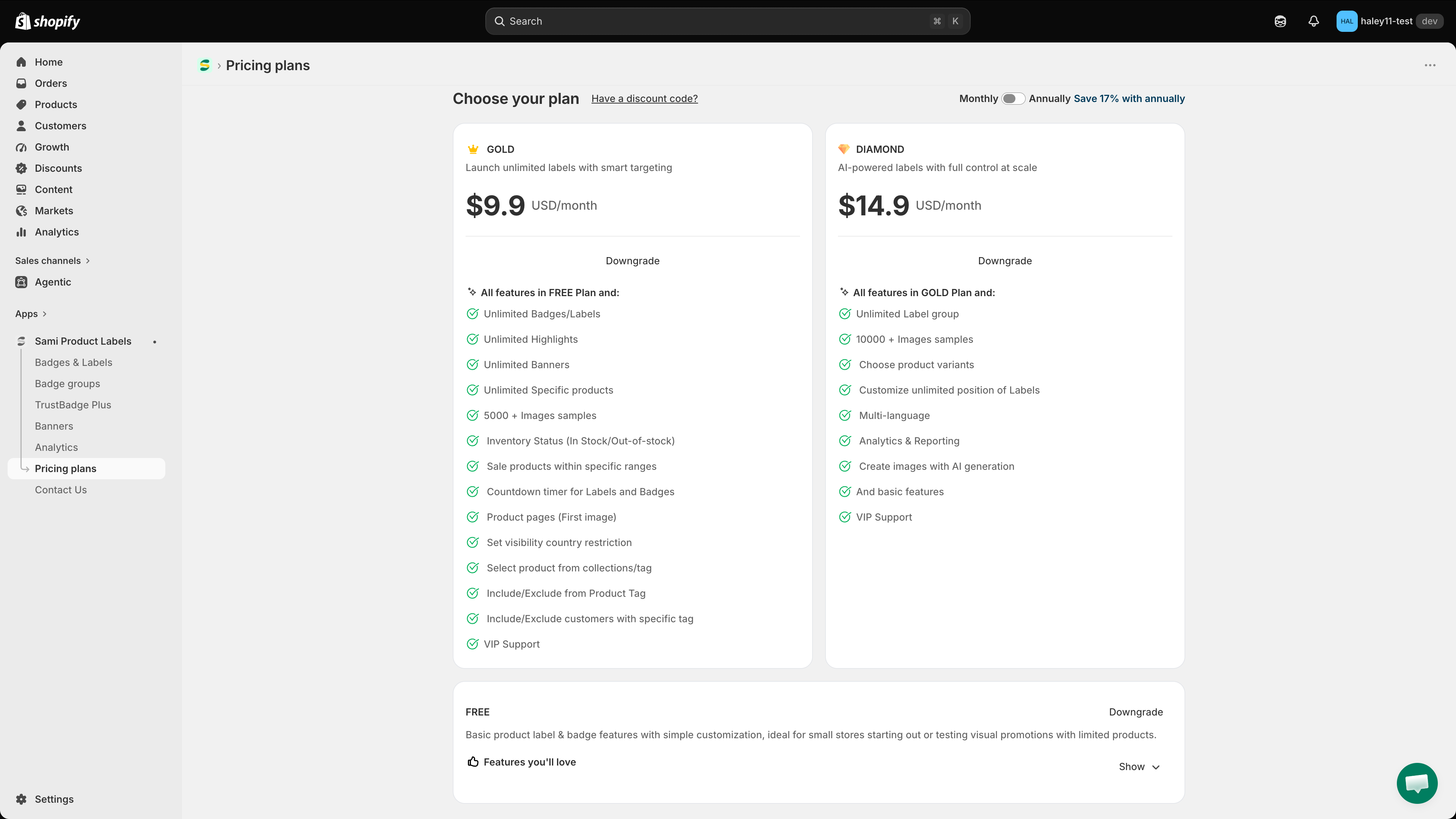
Compare the FREE, GOLD, and DIAMOND plans, switch between them, and apply a discount code.
**Sami Product Labels** offers three plans. Start on FREE, then upgrade as your store grows.
| Plan | Price | Best for |
| ----------- | --------------- | ----------------------------------------------------------------------------------------------------------------------------- |
| **FREE** | $0 | Basic labels and badges with simple customization — small stores starting out or testing visual promotions on a few products. |
| **GOLD** | $9.9 USD/month | Unlimited labels with smart targeting. |
| **DIAMOND** | $14.9 USD/month | AI-powered labels with full control at scale. |
{% hint style="info" %}
Use the **Monthly / Annually** toggle at the top of the page to switch billing periods — annual billing saves 17%.
{% endhint %}
## Plan comparison
Click **Show Pricing Details** at the bottom of the Pricing plans page to expand the full comparison table. It is grouped into five sections.
### Limits & Resources
| Feature | FREE | GOLD | DIAMOND |
| --------------------------------------- | --------- | --------- | --------- |
| **Number of Badges/Labels** | 5 | Unlimited | Unlimited |
| **Number of Label groups** | 1 | 1 | Unlimited |
| **Number of Highlights** | 2 | Unlimited | Unlimited |
| **Number of Banners** | 2 | Unlimited | Unlimited |
| **Number of Trust Badges** | Unlimited | Unlimited | Unlimited |
| **Images samples** | 1000 + | 5000 + | 10000 + |
| **Select product from collections/tag** | — | ✓ | ✓ |
| **Choose product variants** | — | — | ✓ |
| **Create images with AI generation** | — | — | ✓ |
{% hint style="warning" %}
Deleted items still count toward the FREE limits on badges, label groups, highlights, and banners.
{% endhint %}
### Badge/Label Design
| Feature | FREE | GOLD | DIAMOND |
| ------------------------------------------ | ---- | ---- | ------- |
| **Add custom text Badges/Labels** | ✓ | ✓ | ✓ |
| **Design your images with the editor** | ✓ | ✓ | ✓ |
| **Adjust dimensions of Labels** | ✓ | ✓ | ✓ |
| **Display in 9 predefined positions** | ✓ | ✓ | ✓ |
| **Animation for Badge/Label/Trust Badge** | ✓ | ✓ | ✓ |
| **Countdown timer for Labels and Badges** | — | ✓ | ✓ |
| **Text hover for Badges/Labels** | — | ✓ | ✓ |
| **Customize unlimited position of Labels** | — | — | ✓ |
| **Multi-language** | — | — | ✓ |
### Label Display On
| Page | FREE | GOLD | DIAMOND |
| ------------------------------- | ---- | ---- | ------- |
| **Related products block** | ✓ | ✓ | ✓ |
| **Collection pages** | ✓ | ✓ | ✓ |
| **Search page** | ✓ | ✓ | ✓ |
| **Home page** | ✓ | ✓ | ✓ |
| **Article Page** | ✓ | ✓ | ✓ |
| **Cart page** | ✓ | ✓ | ✓ |
| **Product pages (All images)** | ✓ | ✓ | ✓ |
| **Product pages (First image)** | — | ✓ | ✓ |
### Display Conditions
| Condition | FREE | GOLD | DIAMOND |
| ----------------------------------------------- | ---- | --------- | --------- |
| **All products** | ✓ | ✓ | ✓ |
| **Specific products** | 50 | Unlimited | Unlimited |
| **Include/Exclude from Product Tag** | — | ✓ | ✓ |
| **Inventory Status** (in stock / out of stock) | — | ✓ | ✓ |
| **Sale products within specific ranges** | — | ✓ | ✓ |
| **Include/Exclude customers with specific tag** | — | ✓ | ✓ |
| **Products Created/Published** | — | ✓ | ✓ |
| **Set visibility date time** | — | ✓ | ✓ |
| **Set visibility country restriction** | — | ✓ | ✓ |
| **Specific languages** | — | — | ✓ |
| **Specific metafields** | — | — | ✓ |
### Analytics & Reporting
| Feature | FREE | GOLD | DIAMOND |
| ----------------------- | ---- | ---- | ------- |
| **Analytics dashboard** | — | — | ✓ |
## Change your plan
{% stepper %}
{% step %}
## Open the Pricing plans page
In your Shopify admin, open the **Sami Product Labels** app, then click **Pricing plans** in the app sidebar.
The Pricing plans page lists every tier with its headline features.
{% endstep %}
{% step %}
## Pick a billing period
Use the **Monthly / Annually** toggle in the top-right corner. Annual billing is 17% cheaper, and the prices on the cards update as you switch.
{% endstep %}
{% step %}
## Choose a plan
Each plan card carries a button telling you what that choice would do:
* **Current plan** — greyed out; this is the plan you are on.
* **Downgrade** — moves you to a cheaper tier.
* The equivalent button on a higher tier starts an upgrade.
{% endstep %}
{% step %}
## Confirm through Shopify billing
Shopify takes over from here and shows its own billing confirmation page. Review the charges and approve them to activate the new plan.
{% endstep %}
{% endstepper %}
## Apply a discount code
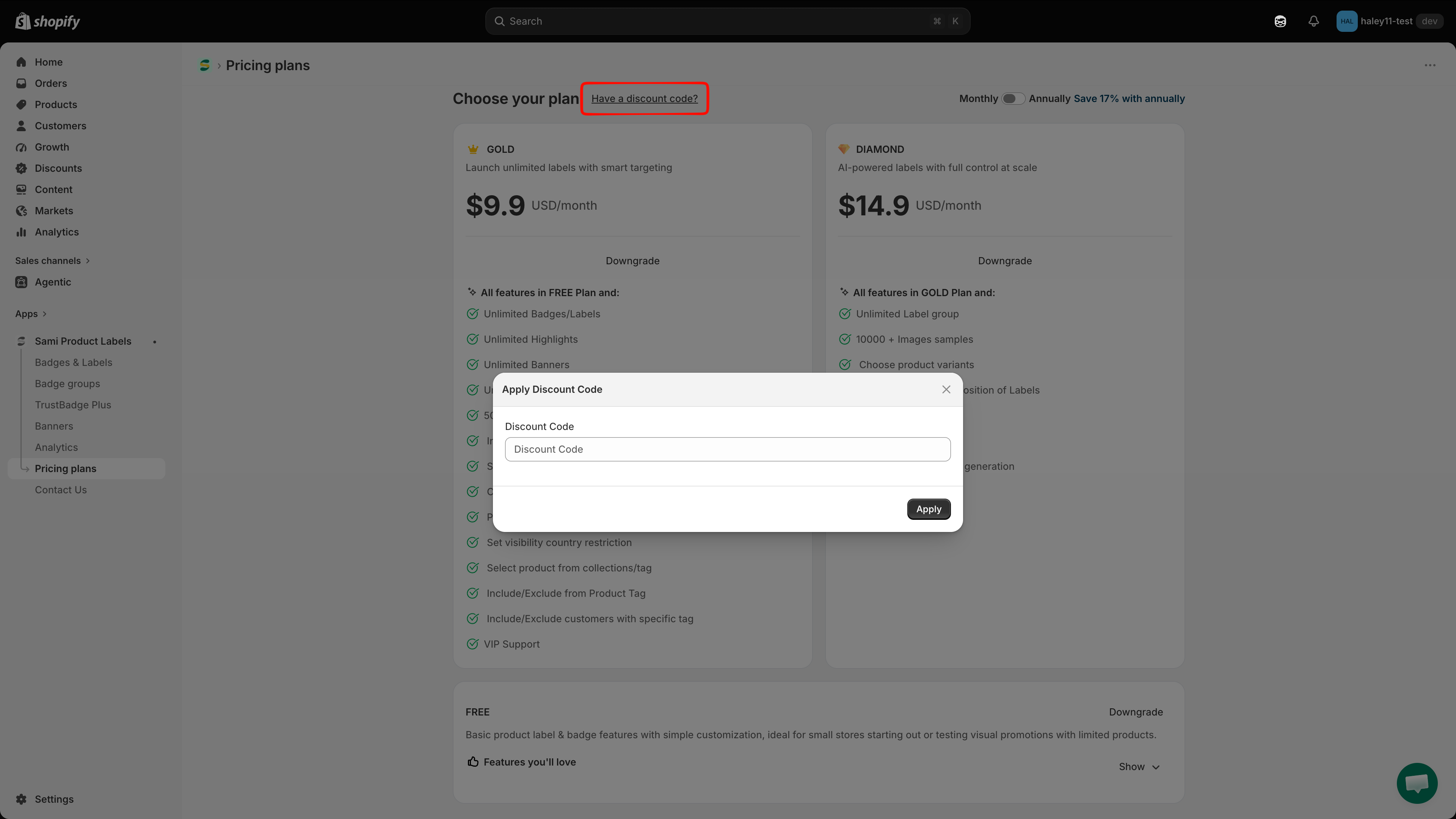
Click **Have a discount code?** beside the **Choose your plan** heading. Enter your code in the **Apply Discount Code** dialog and click **Apply** — do this *before* you select a plan so the reduced price is used.
Apply a discount code before selecting a plan.
## What every plan gets you
Regardless of tier, every plan includes 24/7 email support, live edit previews, help docs, and access to the image sample library.
## Next steps
* [Badges & Labels overview](/badges-and-labels/overview.md) — start creating badges.
* [Quickstart guide](/getting-started/quickstart.md) — get your first badge live in minutes.
{% hint style="success" %}
**Need support?**
If you run into any difficulty while following these steps, contact us at .
{% endhint %}
---
# Agent Instructions
This documentation is published with GitBook. GitBook is the documentation platform designed so that both humans and AI agents can read, navigate, and reason over technical content effectively. Learn more at gitbook.com.
## Querying This Documentation
If you need additional information that is not directly available in this page, you can query the documentation dynamically by asking a question.
Perform an HTTP GET request on the current page URL with the `ask` query parameter, and the optional `goal` query parameter:
```
GET https://docs.samita.io/settings/pricing-plans.md?ask=&goal=
```
`ask` is the immediate question: it should be specific, self-contained, and written in natural language.
`goal` is optional and describes the broader end goal you are ultimately trying to accomplish on behalf of the user. GitBook uses it to tailor the answer towards what is most useful for that goal.
The response will contain a direct answer to the question and relevant excerpts and sources from the documentation.
Use this mechanism when the answer is not explicitly present in the current page, you need clarification or additional context, or you want to retrieve related documentation sections.