> For the complete documentation index, see [llms.txt](https://docs.samita.io/llms.txt). Markdown versions of documentation pages are available by appending `.md` to page URLs; this page is available as [Markdown](https://docs.samita.io/translation/auto-translate.md).
# Auto-translate with AI
Translate every text of a badge, trust badge, highlight, or banner in one click with AI, then review and save.
**Auto-translate** fills in every translation field of the selected item at once. AI writes the first draft; you review it, adjust anything that doesn't sound right, and save.
{% hint style="info" %}
Auto-translate is available on the **Diamond** plan and uses **AI tokens** — 100,000 per month, reset on the 1st. A typical badge uses only a small part of that.
{% endhint %}
## Auto-translate an item
{% stepper %}
{% step %}
## Select the item
On the **Translation** page, open a language, pick a tab, and click the item in the list on the left. See [Translate your content](/translation/translate-content.md) if you're new to the page.
{% endstep %}
{% step %}
## Click Auto-translate
Click **Auto-translate** at the top right of the item. A progress bar runs at the top of the page while AI works — usually a few seconds.
Click Auto-translate to fill in every field of the item.
{% endstep %}
{% step %}
## Review the translations
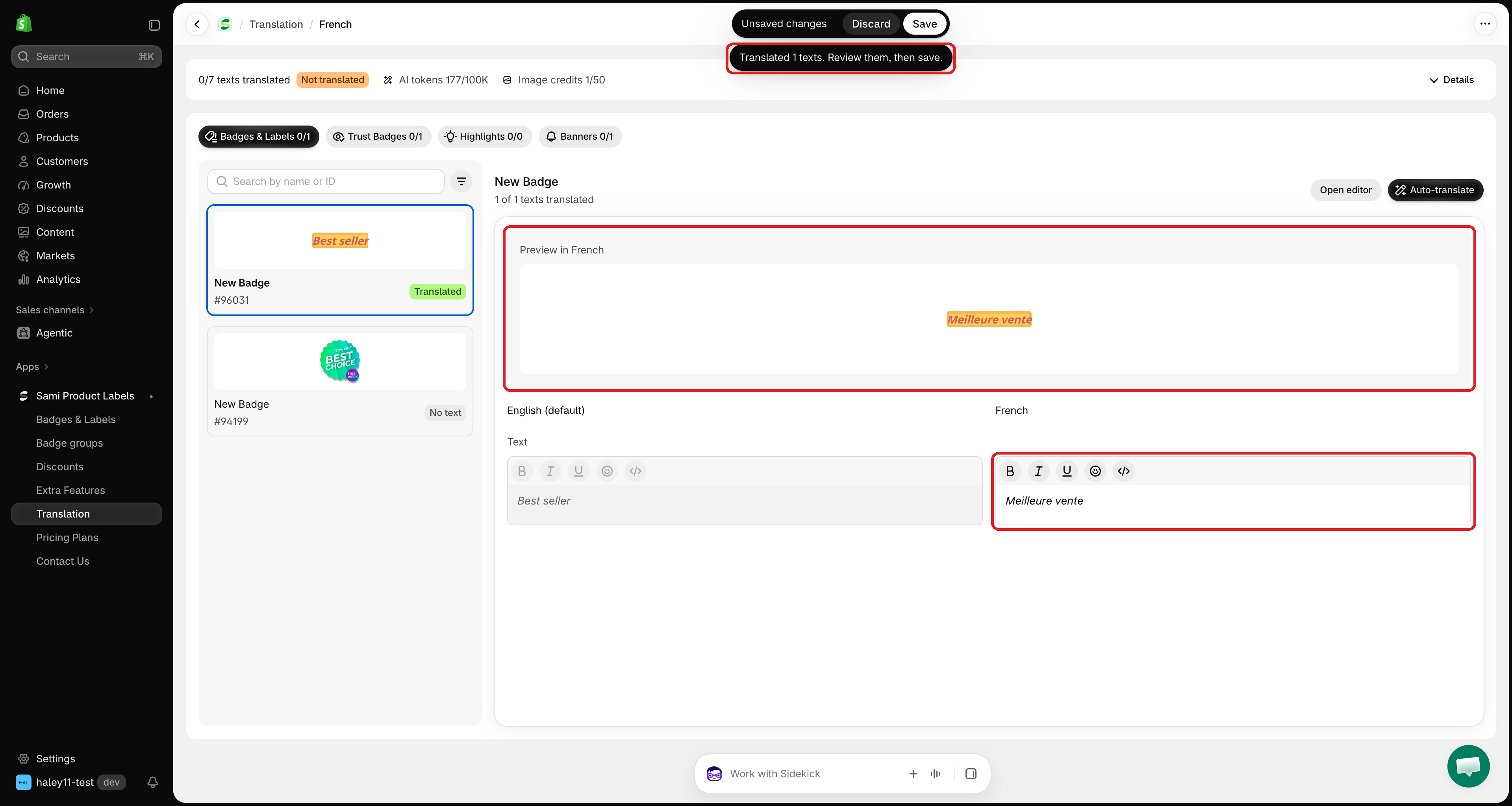
When it finishes, a message such as **Translated 4 texts. Review them, then save.** appears, and the translation fields are filled in. Check each one in the fields and in **Preview in \[language]**, and edit anything you want to change.
AI fills in the fields. Review them before you save.
{% endstep %}
{% step %}
## Save
Click **Save** in the save bar at the top of the screen. Nothing is published until you save — click **Discard** to throw the AI translations away.
{% endstep %}
{% endstepper %}
## What Auto-translate does
| Field | What happens |
| ------------------------------------------------------------------------------------------------------- | ----------------------------------------------------------------------------------------------------------------------------------------------------------------------------------------------------------------- |
| **Texts** (text, tooltip, title, description, message, button, countdown, copied message, SEO alt text) | Translated into the language of the page. **Existing translations are replaced** with the new ones. |
| **Placeholders** such as `{sale}`, `{countdown}`, `{sami_discount_code}` | Kept as they are, so dynamic values keep working. |
| **Link** | Not translated. If the link field is empty, the original URL is copied in; a link you already set for this language is kept. |
| **Image** (image badges) | Translated with **Translate text in image** at the same time, if you have an AI image credit left and the image hasn't been translated yet. See [Translate image badges](/translation/translate-image-badges.md). |
{% hint style="warning" %}
Auto-translate overwrites the translations already in the fields of this item. If you have hand-written translations you want to keep, click **Discard** after it runs, or copy them before you click.
{% endhint %}
## Check your AI token usage
The bar at the top of the translation page shows **AI tokens**, for example **12K/100K**. Click **Details** to see the **Auto-translate text** meter and the date it resets.
When you reach the limit, Auto-translate shows **You've used all AI translation tokens for this month.** You can still type translations yourself until the limit resets on the 1st of next month.
Details shows the AI tokens used this month and when they reset.
## Troubleshooting
| Message | What to do |
| ---------------------------------------------------- | ------------------------------------------------------------------------------------------- |
| **This item has no text to translate.** | The item has no original text. Add text in the editor with **Open editor**, then try again. |
| **Couldn't auto-translate. Try again.** | The AI service didn't answer. Wait a moment and click **Auto-translate** again. |
| **Auto-translate is available on the Diamond plan.** | Upgrade from **Pricing Plans**. |
## Next steps
* [Translate image badges](/translation/translate-image-badges.md) — translate the words inside an image badge.
* [Translate your content](/translation/translate-content.md) — the full translation workflow.
{% hint style="success" %}
**Need support?**
If you run into any difficulty while following these steps, contact us at .
{% endhint %}
---
# Agent Instructions
This documentation is published with GitBook. GitBook is the documentation platform designed so that both humans and AI agents can read, navigate, and reason over technical content effectively. Learn more at gitbook.com.
## Querying This Documentation
If you need additional information that is not directly available in this page, you can query the documentation by asking a question.
Perform an HTTP GET request on the following URL with the `ask` and `goal` query parameters:
```
GET https://docs.samita.io/translation/auto-translate.md?ask=&goal=
```
`ask` is the immediate question: it should be specific, self-contained, and written in natural language.
`goal` is what the user is ultimately trying to achieve, the reason they need the answer. Sharing it helps GitBook give you a better, more relevant answer. A goal is most helpful when it describes the outcome the user wants rather than restating the question. For example, with `ask=how do I create an API token`, a goal like `automate deployments from our CI pipeline` lets GitBook tailor the answer to that use case.
The response will contain a direct answer to the question and relevant excerpts and sources from the documentation.
Use this mechanism when the answer is not explicitly present in the current page, you need clarification or additional context, or you want to retrieve related documentation sections.