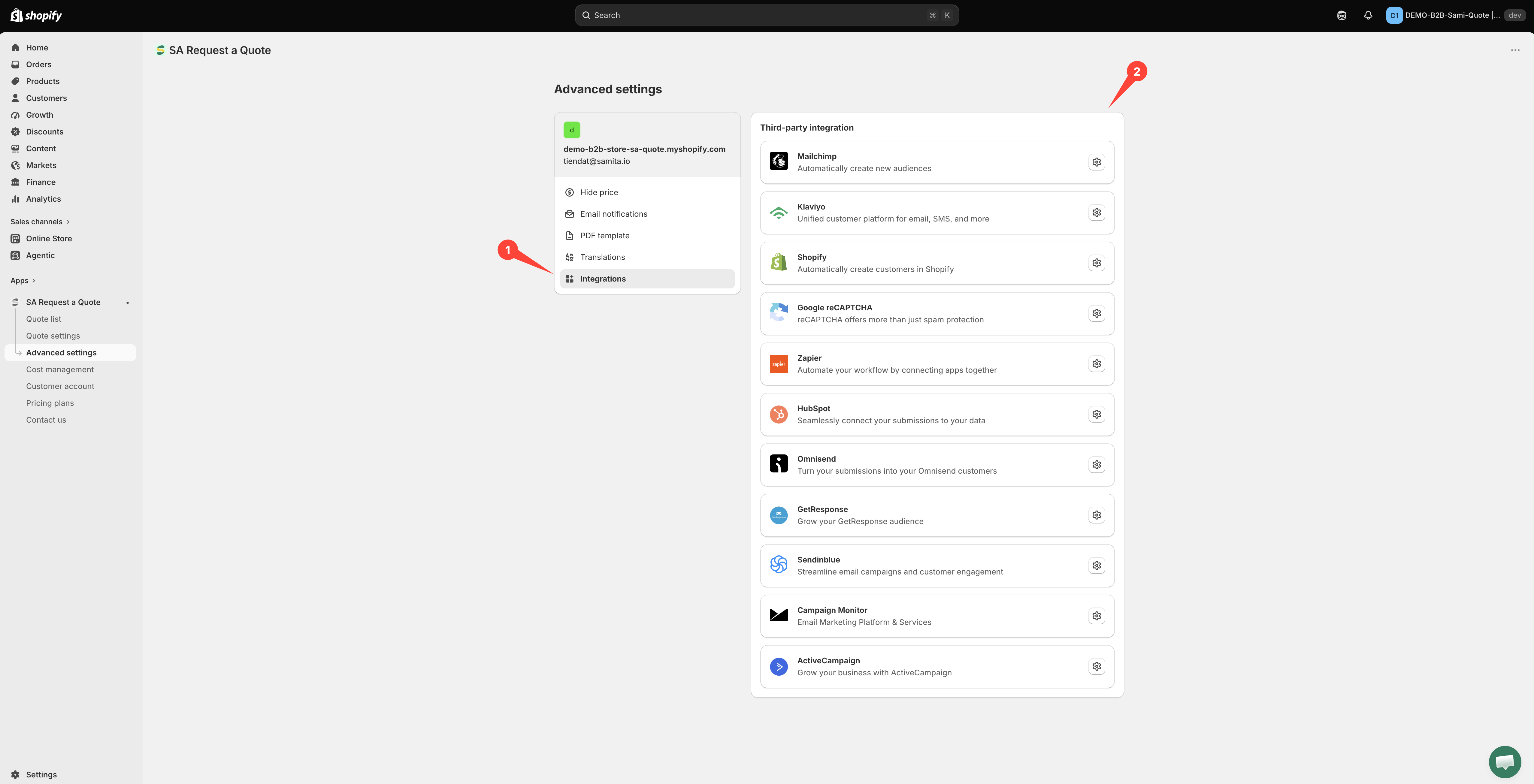
Integrations overview
Send quote form data to your email marketing, CRM and automation tools from the Integrations tab in Advanced settings.
Every quote request contains a qualified lead — someone who told you what they want and how to reach them. Integrations push that straight into the tools you already use, so nobody has to copy details by hand.
All of them live in one place: Advanced settings > Integrations, under the heading Third-party integration.

What you can connect
Automatically create new audiences
Unified customer platform for email, SMS, and more
Automatically create customers in Shopify
reCAPTCHA offers more than just spam protection
Automate your workflow by connecting apps together
Seamlessly connect your submissions to your data
Turn your submissions into your Omnisend customers
Grow your GetResponse audience
Streamline email campaigns and customer engagement
Email Marketing Platform & Services
Grow your business with ActiveCampaign
What your plan includes
FREE lists Klaviyo, Mailchimp and Shopify — so you can start without upgrading.
PRO lists HubSpot, Omnisend, GetResponse, Sendinblue, ActiveCampaign, Campaign Monitor and Zapier.

See Plan comparison for everything else each plan covers.
How connecting works
Most providers ask for an API key and a list. The steps below are the real ones from the Mailchimp page — other list-based providers follow the same shape, with their own wording.
Three of them ask for a second credential alongside the key, and the list dropdown stays empty until both are filled in: ActiveCampaign needs an API URL, Campaign Monitor needs a Client ID, and HubSpot needs a Portal ID. Follow those pages rather than this outline.
Match your form fields
The mapping rows appear on their own once the list is chosen — there is no separate control to open. Line your quote form fields up with the provider's, reading left to right. On Mailchimp, Merge fields does not open the mapping; it reloads the list from your account.
Email address is the one mapping you cannot skip: without it the provider has no contact to create. The rest are optional.
Three that work differently
Not every page looks the same. Three of them have almost nothing to set up.
One field — Zapier Webhook URL — and Save. No API key, no list, no field mapping.
One switch — Create customer account after submit. No API key and no list, but switching it on reveals a short Email / First name / Last name mapping you do need to set.
Spam protection for your quote form rather than a place to send leads.
Which should I use?
Already using one of these? Connect that one. Do not add a new tool just for this.
Want quotes in a CRM? HubSpot, or Zapier to whatever CRM you use.
Want a spreadsheet, a Slack message or something unusual? Zapier.
Just want the customer in your store? Create a Shopify customer after submit — no third-party tool needed, and it is on the FREE plan.
Next steps
Mailchimp — the connect flow in full
Create a Shopify customer after submit — keep it all inside Shopify
Zapier — the most flexible option
Last updated
Was this helpful?