> For the complete documentation index, see [llms.txt](https://docs.samita.io/llms.txt). Markdown versions of documentation pages are available by appending `.md` to page URLs; this page is available as [Markdown](https://docs.samita.io/sa-request-a-quote/integrations/overview.md).

# Integrations overview

Send quote form data to your email marketing, CRM and automation tools from the Integrations tab in Advanced settings.

Every quote request contains a qualified lead — someone who told you what they want and how to reach them. Integrations push that straight into the tools you already use, so nobody has to copy details by hand.

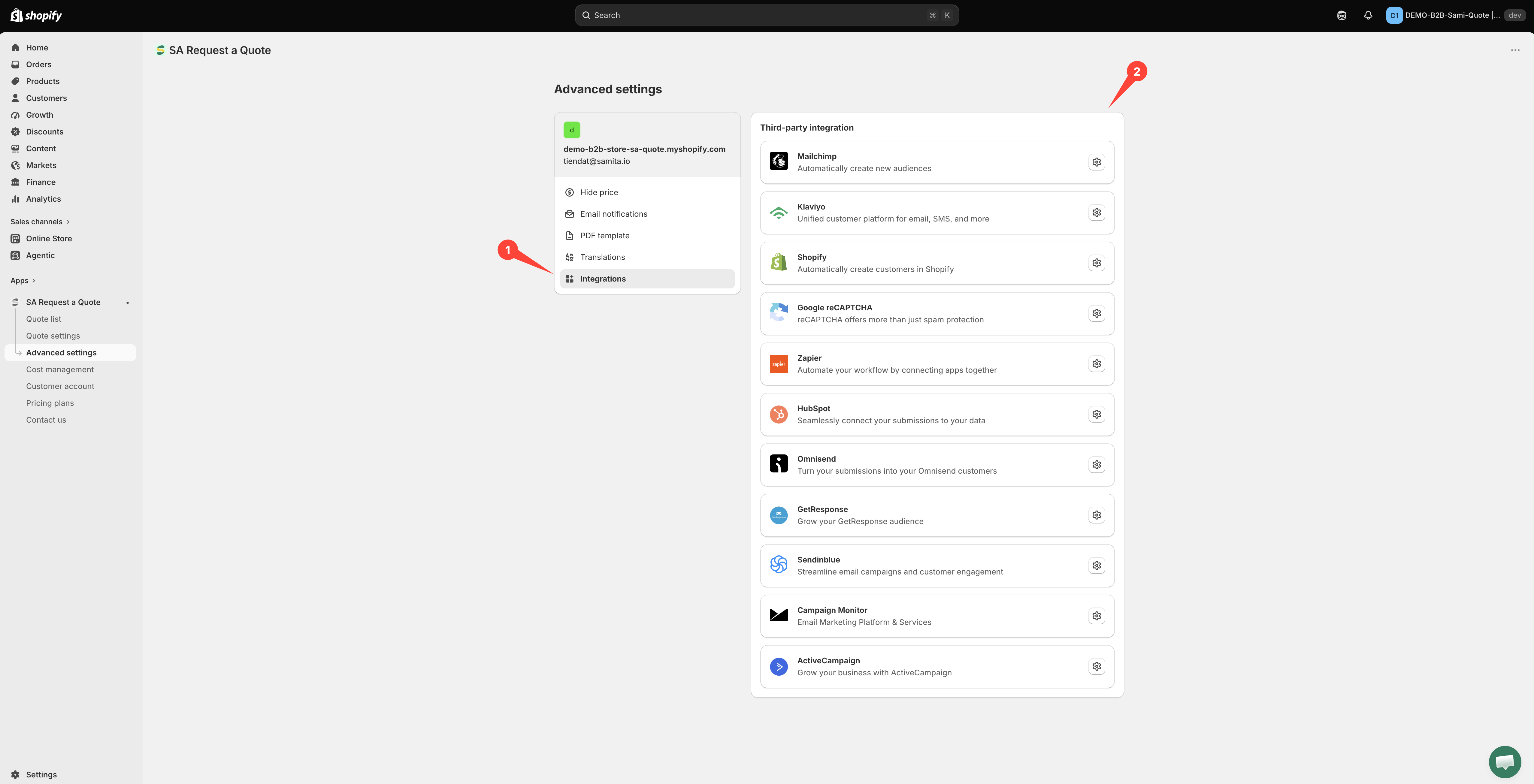
All of them live in one place: **Advanced settings** > **Integrations**, under the heading **Third-party integration**.

<figure><img src="https://2993310686-files.gitbook.io/~/files/v0/b/gitbook-x-prod.appspot.com/o/spaces%2FIvNtDAMNVIdy5nl9kiOU%2Fuploads%2Fgit-blob-a8b2e0325f96841da0988498c26d8f65ddfa26e3%2FScreenshot%202026-09-30%20at%2000-22-09.png?alt=media" alt="The Integrations tab of Advanced settings listing every service, with arrows pointing to the tab and the list"><figcaption><p>Everything the app can forward a quote request to.</p></figcaption></figure>

## What you can connect

<table><thead><tr><th width="230">Integration</th><th>What the app says it does</th></tr></thead><tbody><tr><td><a href="/sa-request-a-quote/integrations/mailchimp.md">Mailchimp</a></td><td>Automatically create new audiences</td></tr><tr><td><a href="/sa-request-a-quote/integrations/klaviyo.md">Klaviyo</a></td><td>Unified customer platform for email, SMS, and more</td></tr><tr><td><a href="/sa-request-a-quote/integrations/create-shopify-customer.md">Shopify</a></td><td>Automatically create customers in Shopify</td></tr><tr><td><a href="/sa-request-a-quote/quote-form/recaptcha.md">Google reCAPTCHA</a></td><td>reCAPTCHA offers more than just spam protection</td></tr><tr><td><a href="/sa-request-a-quote/integrations/zapier.md">Zapier</a></td><td>Automate your workflow by connecting apps together</td></tr><tr><td><a href="/sa-request-a-quote/integrations/hubspot.md">HubSpot</a></td><td>Seamlessly connect your submissions to your data</td></tr><tr><td><a href="/sa-request-a-quote/integrations/omnisend.md">Omnisend</a></td><td>Turn your submissions into your Omnisend customers</td></tr><tr><td><a href="/sa-request-a-quote/integrations/getresponse.md">GetResponse</a></td><td>Grow your GetResponse audience</td></tr><tr><td><a href="/sa-request-a-quote/integrations/sendinblue.md">Sendinblue</a></td><td>Streamline email campaigns and customer engagement</td></tr><tr><td><a href="/sa-request-a-quote/integrations/campaign-monitor.md">Campaign Monitor</a></td><td>Email Marketing Platform &#x26; Services</td></tr><tr><td><a href="/sa-request-a-quote/integrations/activecampaign.md">ActiveCampaign</a></td><td>Grow your business with ActiveCampaign</td></tr></tbody></table>

## What your plan includes

* **FREE** lists Klaviyo, Mailchimp and Shopify — so you can start without upgrading.
* **PRO** lists HubSpot, Omnisend, GetResponse, Sendinblue, ActiveCampaign, Campaign Monitor and Zapier.

<figure><img src="https://2993310686-files.gitbook.io/~/files/v0/b/gitbook-x-prod.appspot.com/o/spaces%2FIvNtDAMNVIdy5nl9kiOU%2Fuploads%2Fgit-blob-d3a21ba033f7b981497679fafcd64c6fcc90f822%2FScreenshot%202026-09-29%20at%2016-57-07.png?alt=media" alt="The Integrations tab of Advanced settings listing every third-party service the app connects to"><figcaption><p>Everything the app can forward a quote request to.</p></figcaption></figure>

See [Plan comparison](/sa-request-a-quote/reference/plan-comparison.md) for everything else each plan covers.

{% hint style="info" %}
If your plan does not include a provider, its row shows a disabled **Upgrade** button instead of the settings icon, with a padlock beside it — you cannot open the provider's page at all until you upgrade. Selecting the padlock explains which plan the feature needs and links to **Pricing plans** in the app. That is your plan, not a fault.
{% endhint %}

## How connecting works

Most providers ask for an API key and a list. The steps below are the real ones from the **Mailchimp** page — other list-based providers follow the same shape, with their own wording.

Three of them ask for a **second credential** alongside the key, and the list dropdown stays empty until both are filled in: **ActiveCampaign** needs an **API URL**, **Campaign Monitor** needs a **Client ID**, and **HubSpot** needs a **Portal ID**. Follow those pages rather than this outline.

{% stepper %}
{% step %}

### Get an API key from the tool

Each provider issues you a key from their own account settings. Keep it to hand.
{% endstep %}

{% step %}

### Create the list first

Create the list, audience or campaign you want quote leads to join inside the provider, before you start in the app. The app can only offer lists that already exist.
{% endstep %}

{% step %}

### Open the Integrations tab

In your Shopify admin, open **SA Request a Quote**, select **Advanced settings**, then open the **Integrations** tab.
{% endstep %}

{% step %}

### Choose your provider

Under **Third-party integration**, select the provider you want. It opens on its own page, with a **Third-party** breadcrumb to take you back to the list.
{% endstep %}

{% step %}

### Turn on Enable

Switch on **Enable** on the provider's page. Nothing is sent until you do.
{% endstep %}

{% step %}

### Paste your API key

Paste the key into the **API key** field. The help text **Find or generate your API key** links to the provider's own instructions.
{% endstep %}

{% step %}

### Choose the list

Pick the list your new contacts should join. On Mailchimp this is the **Select a Mailchimp list to integrate** dropdown.
{% endstep %}

{% step %}

### Match your form fields

The mapping rows appear on their own once the list is chosen — there is no separate control to open. Line your quote form fields up with the provider's, reading left to right. On Mailchimp, **Merge fields** does not open the mapping; it reloads the list from your account.

Email address is the one mapping you cannot skip: without it the provider has no contact to create. The rest are optional.
{% endstep %}

{% step %}

### Save

Select **Save**. Nothing is stored until you do, and an unsaved page sends nothing.
{% endstep %}
{% endstepper %}

{% hint style="info" %}
Once a key is saved, the app shows it masked rather than displaying it again. Keep your own copy of any key you may need later.
{% endhint %}

## Three that work differently

Not every page looks the same. Three of them have almost nothing to set up.

<table><thead><tr><th width="230">Integration</th><th>What is on the page</th></tr></thead><tbody><tr><td><a href="/sa-request-a-quote/integrations/zapier.md">Zapier</a></td><td>One field — <strong>Zapier Webhook URL</strong> — and <strong>Save</strong>. No API key, no list, no field mapping.</td></tr><tr><td><a href="/sa-request-a-quote/integrations/create-shopify-customer.md">Shopify</a></td><td>One switch — <strong>Create customer account after submit</strong>. No API key and no list, but switching it on reveals a short <strong>Email</strong> / <strong>First name</strong> / <strong>Last name</strong> mapping you do need to set.</td></tr><tr><td><a href="/sa-request-a-quote/quote-form/recaptcha.md">Google reCAPTCHA</a></td><td>Spam protection for your quote form rather than a place to send leads.</td></tr></tbody></table>

## Which should I use?

* **Already using one of these?** Connect that one. Do not add a new tool just for this.
* **Want quotes in a CRM?** HubSpot, or Zapier to whatever CRM you use.
* **Want a spreadsheet, a Slack message or something unusual?** Zapier.
* **Just want the customer in your store?** [Create a Shopify customer after submit](/sa-request-a-quote/integrations/create-shopify-customer.md) — no third-party tool needed, and it is on the **FREE** plan.

{% hint style="warning" %}
Whichever you pick, submit a test quote afterwards and look at the record that arrives. A connection can be switched on and still deliver nothing useful.
{% endhint %}

{% hint style="info" %}
Integrations are one of five tabs in **Advanced settings**, alongside **Hide price**, **Email notifications**, **PDF template** and **Translations**.
{% endhint %}

## Next steps

* [Mailchimp](/sa-request-a-quote/integrations/mailchimp.md) — the connect flow in full
* [Create a Shopify customer after submit](/sa-request-a-quote/integrations/create-shopify-customer.md) — keep it all inside Shopify
* [Zapier](/sa-request-a-quote/integrations/zapier.md) — the most flexible option


---

# Agent Instructions
This documentation is published with GitBook. GitBook is the documentation platform designed so that both humans and AI agents can read, navigate, and reason over technical content effectively. Learn more at gitbook.com.

## Querying This Documentation
If you need additional information that is not directly available in this page, you can query the documentation by asking a question.

Perform an HTTP GET request on the following URL with the `ask` and `goal` query parameters:

```
GET https://docs.samita.io/sa-request-a-quote/integrations/overview.md?ask=<question>&goal=<user_goal>
```

`ask` is the immediate question: it should be specific, self-contained, and written in natural language.
`goal` is what the user is ultimately trying to achieve, the reason they need the answer. Sharing it helps GitBook give you a better, more relevant answer. A goal is most helpful when it describes the outcome the user wants rather than restating the question. For example, with `ask=how do I create an API token`, a goal like `automate deployments from our CI pipeline` lets GitBook tailor the answer to that use case.

The response will contain a direct answer to the question and relevant excerpts and sources from the documentation.

Use this mechanism when the answer is not explicitly present in the current page, you need clarification or additional context, or you want to retrieve related documentation sections.
