> For the complete documentation index, see [llms.txt](https://docs.samita.io/llms.txt). Markdown versions of documentation pages are available by appending `.md` to page URLs; this page is available as [Markdown](https://docs.samita.io/sami-b2b-onboarding/integrations/integrations.md).

# Integrations overview

See which services an application form can work with, where to set them up, and how store-wide keys and form settings fit together.

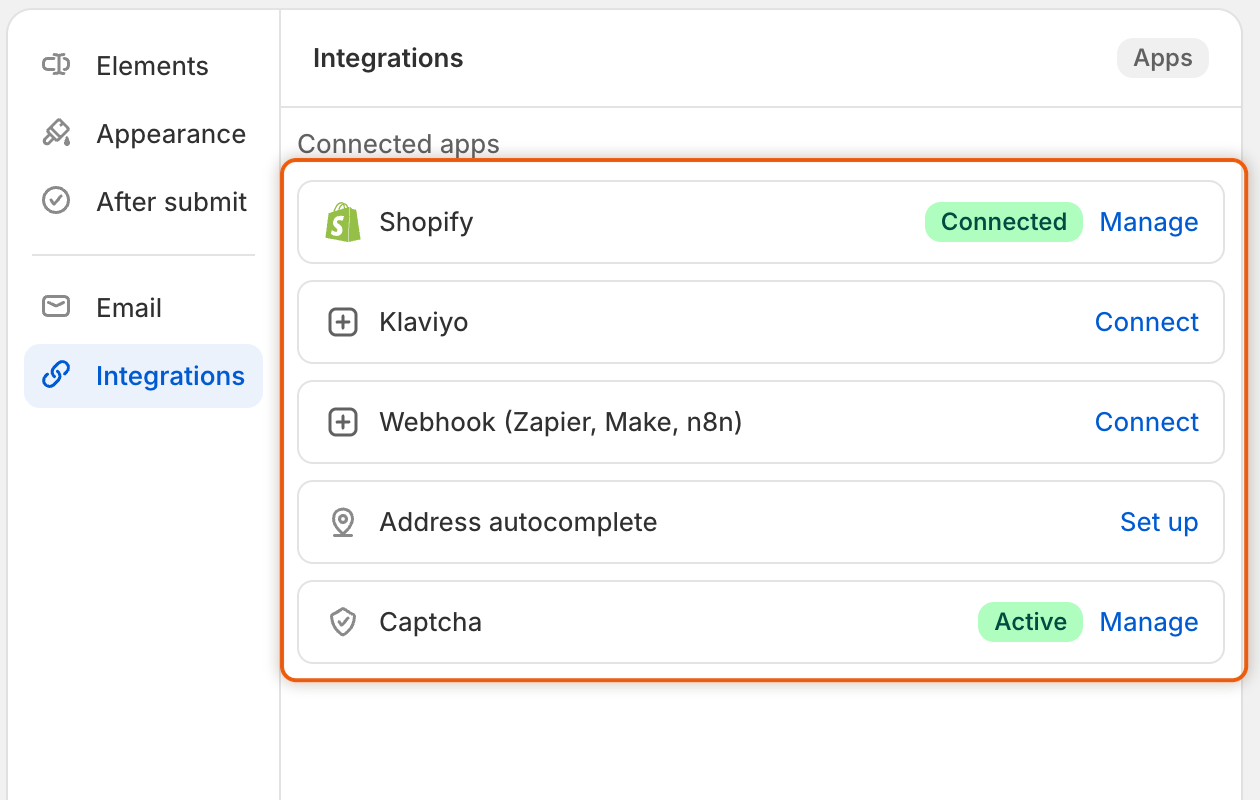
Integrations connect your application forms to Shopify customers and to other services. In Sami B2B Onboarding they live in each form's builder: open a form, click **Integrations** in the rail on the left, and the **Connected apps** list shows every service the form can use.

<figure><img src="https://3844812229-files.gitbook.io/~/files/v0/b/gitbook-x-prod.appspot.com/o/spaces%2FRrf4pQPgjvb3GW7IN3Ci%2Fuploads%2Fgit-blob-10e0f98aac8304e59f511b0468cc3c290146d9a5%2Fscreenshot-integrations-hub-connected-apps.png?alt=media" alt="The Connected apps list in the form builder&#x27;s Integrations section, with Shopify marked Connected and Captcha marked Active (each with Manage), Klaviyo and Webhook (Zapier, Make, n8n) showing Connect, and Address autocomplete showing Set up."><figcaption><p>A badge shows which services are on for this form, and each row has a button to set it up or manage it.</p></figcaption></figure>

## What each integration does

| Integration                     | What it does                                                                                                                                                                       | What it needs from you       |
| ------------------------------- | ---------------------------------------------------------------------------------------------------------------------------------------------------------------------------------- | ---------------------------- |
| **Shopify**                     | Decides what an approval does when the buyer's email already belongs to a Shopify customer, and which tags the customer gets. Also holds the mapping of answers to Shopify fields. | Nothing. It's always on.     |
| **Klaviyo**                     | Adds buyers to a Klaviyo list when they apply or when you approve them, with their answers on their profile.                                                                       | A Klaviyo private API key    |
| **Webhook (Zapier, Make, n8n)** | Sends an event to an automation tool when an application is submitted, approved or rejected.                                                                                       | A webhook URL from your tool |
| **Address autocomplete**        | Suggests addresses from Google Maps as the buyer types, and fills in the rest of the address.                                                                                      | A Google Maps API key        |
| **Captcha**                     | Asks guests to pass a Google reCAPTCHA or hCaptcha check before they can send the form.                                                                                            | A site key and a secret key  |

## Keys belong to the store, settings belong to the form

Klaviyo, the webhook, address autocomplete and captcha each need a key or a URL from the other service. You add it once, under **Account** in that service's panel, and every form in the store uses the same one. The panel says so: **Used by every form in this store.**

* **Keys save straight away.** Saving them in their dialog shows **Keys saved**. Removing them stops every form that uses them at once.
* **Form settings save with the form.** The list, the events, the language and the **Connect** or **Enable** button only apply to the form you're editing, and only after you click **Save** in the save bar.

So you can use the same Klaviyo account on two forms, with a different list on each. Or you can turn captcha on for one form and leave it off on another.

Only staff with the admin role can edit forms, so only admins can set up integrations. See [Team and roles](/sami-b2b-onboarding/settings/team-and-roles.md).

Each delivery to Klaviyo or a webhook appears on the application's **Timeline**, under **Recent runs** on the **Automations** tab of **Automation**, and in **Settings › Activity log** on its **Emails** view.

{% hint style="info" %}
Shopify Flow isn't set up here. Its triggers and actions are on the **Automation** screen. See [Automations and Shopify Flow](/sami-b2b-onboarding/automation/automations-and-shopify-flow.md).
{% endhint %}

<table data-view="cards"><thead><tr><th></th><th></th><th data-hidden data-card-target data-type="content-ref"></th></tr></thead><tbody><tr><td><strong>Existing Shopify customers</strong></td><td>Keep or update a customer who already exists, and tag every customer a form approves.</td><td><a href="/sami-b2b-onboarding/integrations/existing-shopify-customers.md">Existing Shopify customers</a></td></tr><tr><td><strong>Klaviyo</strong></td><td>Add applicants or approved buyers to a Klaviyo list.</td><td><a href="/sami-b2b-onboarding/integrations/klaviyo.md">Klaviyo</a></td></tr><tr><td><strong>Webhooks (Zapier, Make, n8n)</strong></td><td>Start a Zap, scenario or workflow for each application event.</td><td><a href="/sami-b2b-onboarding/integrations/webhooks.md">Webhooks (Zapier, Make, n8n)</a></td></tr><tr><td><strong>Captcha (reCAPTCHA, hCaptcha)</strong></td><td>Stop bots from sending applications.</td><td><a href="/sami-b2b-onboarding/integrations/captcha.md">Captcha (reCAPTCHA, hCaptcha)</a></td></tr><tr><td><strong>Address autocomplete (Google Maps)</strong></td><td>Fill in addresses from Google Maps suggestions.</td><td><a href="/sami-b2b-onboarding/integrations/address-autocomplete.md">Address autocomplete (Google Maps)</a></td></tr></tbody></table>

## Next steps

* [Map answers to Shopify](/sami-b2b-onboarding/application-forms/map-answers-to-shopify.md) — choose which customer, company and address field each answer fills on approval.
* [Existing Shopify customers](/sami-b2b-onboarding/integrations/existing-shopify-customers.md) — decide what approval does to buyers who already shop with you.
* [Captcha (reCAPTCHA, hCaptcha)](/sami-b2b-onboarding/integrations/captcha.md) — protect a form that's open to everyone.


---

# Agent Instructions
This documentation is published with GitBook. GitBook is the documentation platform designed so that both humans and AI agents can read, navigate, and reason over technical content effectively. Learn more at gitbook.com.

## Querying This Documentation
If you need additional information that is not directly available in this page, you can query the documentation dynamically by asking a question.

Perform an HTTP GET request on the current page URL with the `ask` query parameter, and the optional `goal` query parameter:

```
GET https://docs.samita.io/sami-b2b-onboarding/integrations/integrations.md?ask=<question>&goal=<endgoal>
```

`ask` is the immediate question: it should be specific, self-contained, and written in natural language.
`goal` is optional and describes the broader end goal you are ultimately trying to accomplish on behalf of the user. GitBook uses it to tailor the answer towards what is most useful for that goal.

The response will contain a direct answer to the question and relevant excerpts and sources from the documentation.

Use this mechanism when the answer is not explicitly present in the current page, you need clarification or additional context, or you want to retrieve related documentation sections.
