💡What's New
A changelog of new features and improvements released for Samita Wholesale Pricing, newest first.
August, 2026
Version 4.2.0
🎉 NEW FEATURES
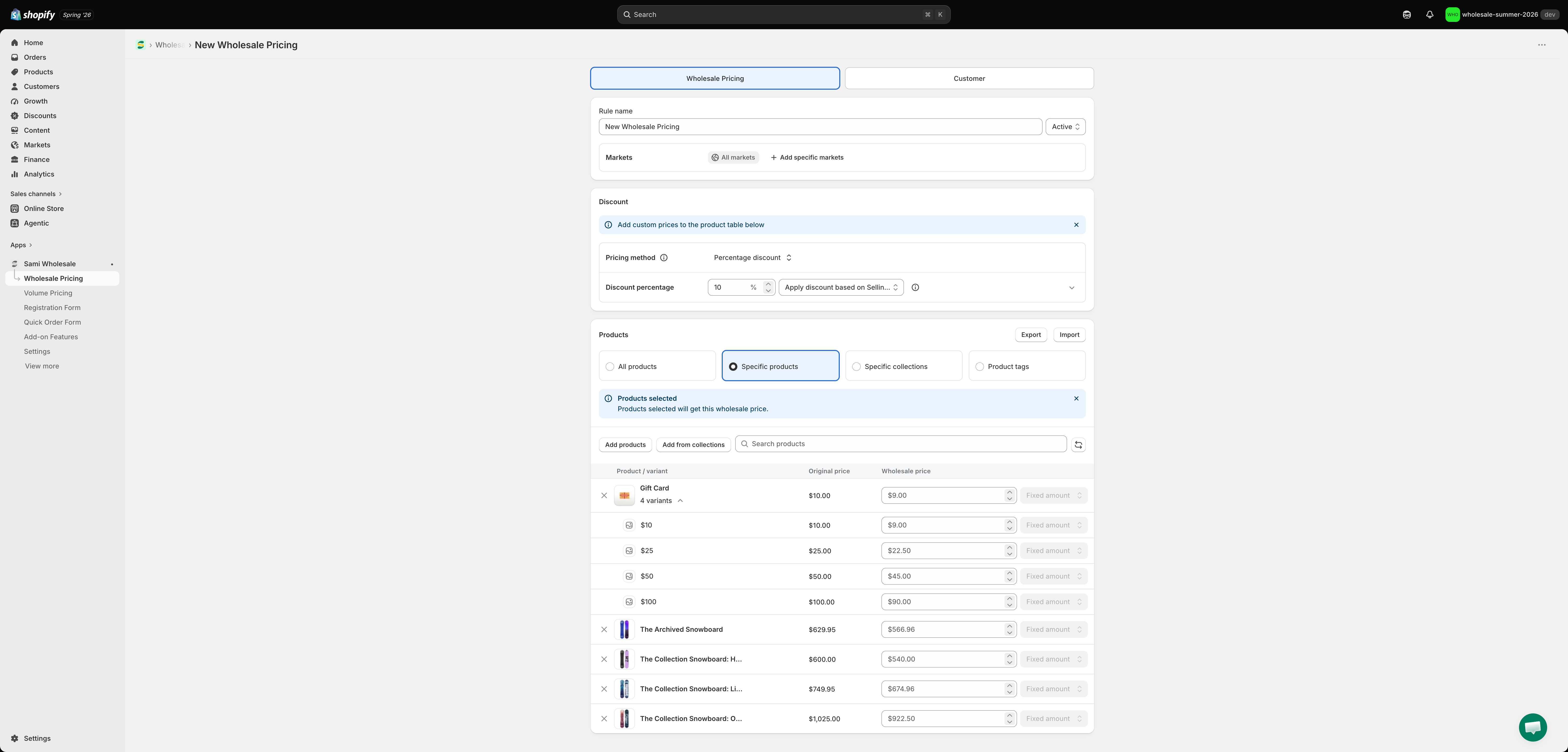
Import products into an existing pricing rule: A new Import action inside a Wholesale Pricing or Volume Pricing rule's Products section (shown when Specific products is selected) lets you add a batch of products, variants, and their custom prices directly into the rule you have open — without creating extra rules or leaving the page. Just upload a CSV/XLSX with a product/variant list, and for Volume Pricing, quantity or amount tiers. See Import products into a wholesale pricing rule and Import products into a volume pricing rule.

🛠️ IMPROVEMENTS
Simplified, name-driven bulk import format: The CSV/XLSX format for the existing Import button on the Wholesale Pricing and Volume Pricing list pages (which creates new rules) has been reworked to a header-name-driven format — columns can be reordered or left out, and optional columns like Start/End Date, Exclude Products/Collections, Apply Market, and Pricing Source are now supported alongside the required ones. See the updated Import multiple products for Wholesale pricing setup and Import multiple products for Volume pricing setup.
July, 2026
Version 4.1.9
🎉 NEW FEATURES
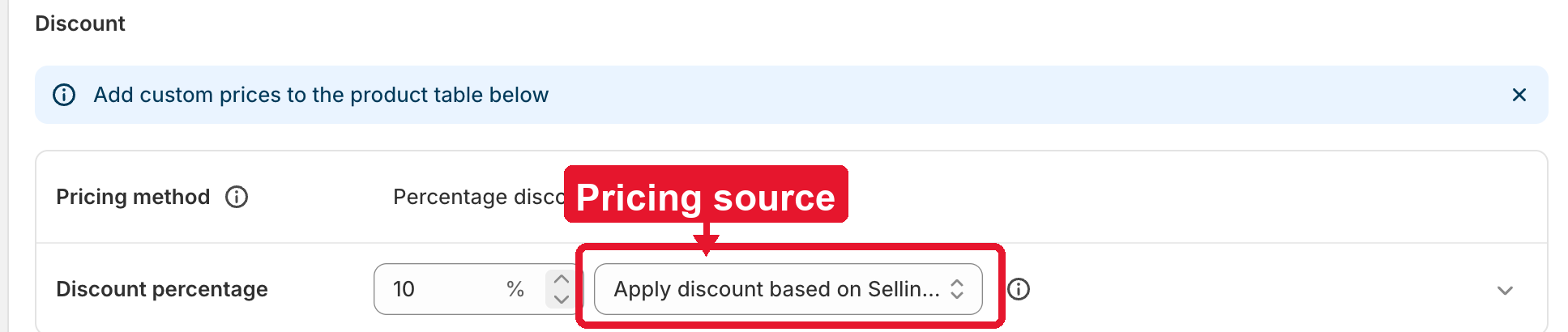
Pricing Source for Wholesale & Volume Pricing: You can now choose which Shopify price — Selling price or Compare-at price — is used as the base for calculating a rule's discount. Look for the new Pricing source field in the Discount section when creating or editing a Wholesale Pricing or Volume Pricing rule.

Note: This setting only changes what the discount is calculated from. It doesn't automatically show the compare-at price as a crossed-out price — turn on Show original price separately in Settings > General > Wholesale pricing if you want that too. See Choose pricing source for details.
May, 2026
Version 4.0.1
🎉 NEW FEATURES
Priority Order for Payment Terms & Invoice Payment: You can now configure the priority order for Payment Terms and Invoice Payment settings, giving you more flexibility when multiple configurations match the same customer or product.

There are 3 Priority modes:
The configuration with the highest priority will be applied.
The configuration with the lowest priority will be applied.
The app will automatically select the most suitable configuration based on customer and product conditions. This mode is recommended for stores with multiple setups targeting different customers or products, and works similarly to the app's Wholesale and Volume Pricing priority logic.
Note:
When using Auto Priority, the app prioritizes configurations in the following order:
Specific Customer > Customer Tags > Logged-in Customers
Specific Products > Product Tags > Collections > All Products
Priority Order for Tax Display: The app now also supports configuring priority order for Tax Display settings.

The priority behavior and logic work the same way as the Payment Terms & Invoice Payment feature above. This helps stores manage multiple tax display configurations more accurately and flexibly.
April, 2026
Version 4.0.0
🎉 NEW FEATURES
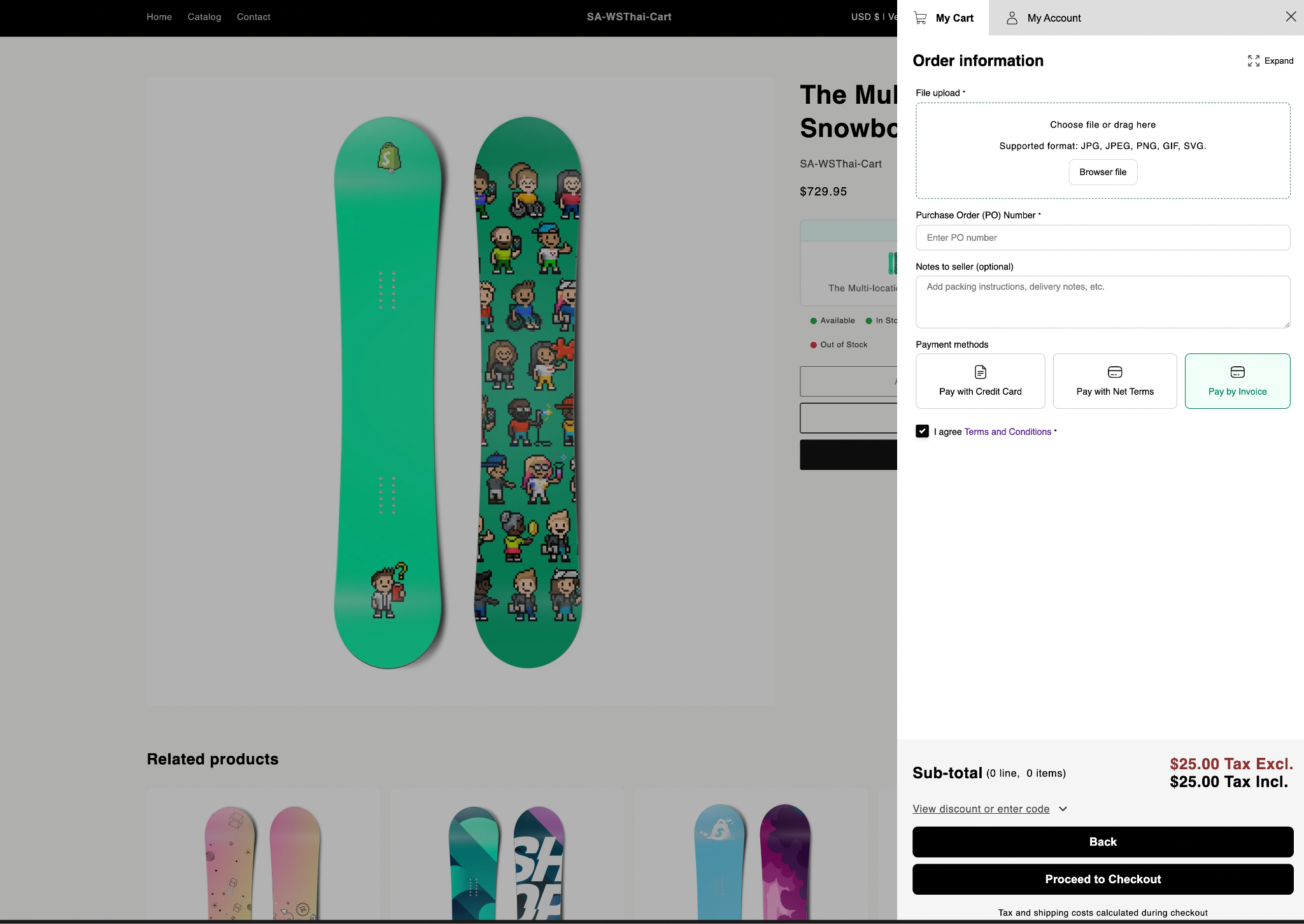
Invoice Payment: This feature allows customers to place orders without making an immediate payment. Instead, an invoice will be generated and sent to the customer, who can complete the payment at a later time. This helps improve conversion rates by offering more flexible payment options.


March, 2026
Version 3.8.4
🎉 NEW FEATURES
Upload file to create Cart: The app now allows customers to quickly generate a shopping cart by uploading a file containing product information to our Wholesale cart. Instead of adding items manually, customers can upload a supported file format and the system will automatically extract product data and create the cart accordingly.

Public API: The Public API allows interaction with the main features of the Wholesale app, including:
Core Features: Wholesale Pricing, Volume Pricing, Registration form, Quick Order Form, Quick Buy Collection, Quick Buy Variant
Addon Features: Order Limit, Shipping Rate, Extra Fee, Payment Term (Coming soon)
January, 2026
Version 3.8.2
🎉 NEW FEATURES
Quantity Increment x Order Limit: The app now supports quantity increments, allowing you to set fixed ordering steps (e.g. 3, 6, 9). Product quantities automatically adjust based on your configuration when items are added to the cart.

Version 3.8.1
🎉 NEW FEATURES
Sort options in Quick Order Form: The app now supports sorting products in the Quick Order Form by Best Selling or Price. Please note that these sorting options are only available for Quick Order Forms that are applied to a Collection.

Version 3.8.0
🎉 NEW FEATURES
Variants table: Enable B2B customers to quickly add products to their orders based on flexible conditions such as customers and products. The UI is rendered directly on the storefront, B2B-optimized, and fully customizable. Supports both simple products and complex products with multiple variants, covering essential B2B ordering needs.

🛠️ IMPROVEMENTS
Improving & optimizing performance and features: Continued improvements for the best user experience.
December, 2025
Version 3.7.6
🎉 NEW FEATURES
Quick Buy Collections: In addition to displaying discounted prices directly on the storefront, the app allows customers to quickly select quantities and purchase products in bulk right from collection pages or product card items — without needing to open the product page. The discounted price is applied instantly, streamlining the wholesale buying experience.

Stock levels: You can choose to show exact remaining quantities (e.g. "Only 12 items left"), low-stock warnings, or custom stock labels such as "In stock", "Low stock", or "Out of stock". This helps create urgency, improve transparency, and guide customers' purchasing decisions — especially for wholesale and bulk orders (multi-language supported).

🛠️ IMPROVEMENTS
Improving & optimizing performance and features: Continued improvements for the best user experience.
Version 3.7.5
🎉 NEW FEATURES
Mail SMTP + API: With SMTP, you can configure your own email provider as the sender, allowing emails to be delivered directly from your official business address, helping you build trust and present a more professional image to your customers. The app now supports additional email providers such as Outlook, Amazon SES, and more — instead of being limited to Google as before.

Version 3.7.4
🎉 NEW FEATURES
Apply Discounts to Manual Draft Order: In addition to displaying discounts on the storefront for customers to view and purchase directly at the reduced price, the app now also allows admins to create draft orders with the discounted price already applied. This makes it much easier for you to manage wholesale orders on behalf of your customers from the admin side.


🛠️ IMPROVEMENTS
Improving & optimizing performance and features: Continued improvements for the best user experience.
November, 2025
Version 3.7.3
🎉 NEW FEATURES
Registration form with multi-language: The registration form can automatically display in the customer's preferred language. You can customize the text for each supported language to ensure a consistent and localized experience for all users.
New UI with Registration:

Edit Customer Registration Form

🛠️ IMPROVEMENTS
Improving & optimizing performance and features: Continued improvements for the best user experience.
October, 2025
Version 3.5.0
🎉 NEW FEATURES
Cart drawer: download order invoice, add items to cart, create new cart: Once you activate the app's cart, it will be displayed for all customers (retail and wholesale). Using the app's cart is optional — you can skip it if you prefer to keep using your theme's default cart.

Build cart form: With Sami's Wholesale cart, you can collect additional information from customers before they proceed to checkout by enabling a form in the cart.

🛠️ IMPROVEMENTS
Improving & optimizing performance and features: Continued improvements for the best user experience.
September, 2025
Version 3.5.0
🎉 NEW FEATURES
Discount box & cart discount combination: With Sami Wholesale, you can let customers apply an additional discount code when proceeding to checkout. Enable the Box Discount feature in the app to display the discount box on your theme's cart page.

August, 2025
Version 3.4.0
🎉 NEW FEATURES
Tax exemption feature: This feature allows you to exclude taxes from a customer's order. The app displays a tax section in the cart (cart drawer and cart page of your theme) as well as in our Quick Order Form, where customers can enter their tax ID before checkout to receive a tax exemption.

Tax display feature: This feature lets you display product prices either with tax included or without tax. By default, the app uses the tax settings from Shopify, but you can also override them with settings in the app.

July, 2025
Version 3.2.0
🎉 NEW FEATURES
Power your retail growth with a POS system: Easily integrate the POS system with existing platforms for smooth operations.

Payment term: With the Payment term feature, Sami Wholesale Pricing allows your B2B customers to pay for an order later or on a specific date on the invoice you send them, instead of paying immediately at checkout.

🛠️ IMPROVEMENTS
Improved UI and UX for the Quick Order Form: Streamlined design enhances the user experience and reduces the learning curve.
Added a pricing plan for the app.

Last updated
Was this helpful?