
使用 API 创建 Wholesale Pricing
通过公共 API 创建新的 Wholesale Pricing 规则,包含完整的请求体参考。
本文介绍如何使用公共 API 创建新的 Wholesale Pricing 规则。
要创建新的 Wholesale Pricing 记录,请使用以下端点:
POST - https://wholesale.samita.io/api/v1/wholesale-pricings2. 请求头
Section titled “2. 请求头”所有 API 请求都必须包含以下必填请求头:
| 请求头 | 说明 | 是否必填 |
|---|---|---|
X-SAMITA-API-KEY |
Wholesale 应用中提供的 API 密钥 | 是 |
X-SAMITA-SHOP-URL |
Shopify 商店域名,格式为 xxx.myshopify.com | 是 |
CONTENT-TYPE |
必须为 application/json |
是 |
如果缺少任何必填请求头,请求将被拒绝。
3. 请求体
Section titled “3. 请求体”a. 通用格式
Section titled “a. 通用格式”用于创建 Wholesale Pricing 的数据必须以 JSON 格式发送。
本文末尾提供了示例 JSON 结构。
请求 JSON 示例:
{ "title": "New Wholesale Pricing", "status": true, "apply_customer": { "type": "all", "tags": [] }, "exclude_customer": { "type": "none", "tags": [] }, "apply_product": { "type": "all", "product_ids": [], "product_tags": [], "collection_ids": [], "apply_for_variants": false }, "exclude_product": { "type": "none", "product_ids": [], "collection_ids": [] }, "discount_for_variants": [ { "id": 8516448190631, "variant_pricing": true, "variants": [ { "id": 46747346763943, "discount_groups": [ { "name": "all", "type": "percent", "value": "10" } ] } ] } ], "apply_market": { "type": "all", "handle": [] }, "discount_group": { "type": "percent", "value": "10" }, "active_date": { "types": ["start_date", "end_date"], "start_at": "2026-01-15 10:00:00", "end_at": "2026-01-15 10:00:00" }}b. title(必填)
Section titled “b. title(必填)”- 用于标识 Wholesale Pricing 记录的名称
- 必须为字符串
- 最大长度:255 个字符
c. status(必填)
Section titled “c. status(必填)”- 定义该记录是否启用
- 仅接受以下值:
| 值 | 说明 |
|---|---|
true |
定价规则已启用 |
false |
定价规则未启用 |
d. apply_customer(必填)
Section titled “d. apply_customer(必填)”定义哪些客户适用此定价规则。
结构:
"apply_customer": { "type": "all", "tags": []}type
可接受的值(仅可选择以下其中之一):
all– 适用于所有客户logged– 仅适用于已登录的客户non-logged– 仅适用于访客客户customer-tags– 仅适用于带有特定标签的客户
tags
- 仅当
type == customer-tags时必填 - 必须为以逗号分隔的数组
- 示例:
["wholesale","b2b"]
如果 type 不是 customer-tags,可以忽略此字段。
e. exclude_customer
Section titled “e. exclude_customer”用于将特定客户排除在定价规则之外。
结构:
"exclude_customer": { "type": "none", "tags": []}type
- 默认值:
none - 可接受的值:
| 值 | 说明 |
|---|---|
none |
不排除任何客户 |
customer-tags |
按标签排除客户 |
tags
- 仅当
type == customer-tags时必填 - 以逗号分隔的数组
- 示例:
["vip","wholesale"]
f. apply_product(必填)
Section titled “f. apply_product(必填)”定义定价规则适用于哪些产品。
结构:
"apply_product": { "type": "all", "product_ids": [], "product_tags": [], "collection_ids": [], "apply_for_variants": false}type
可接受的值:
allproductscollectionsproduct-tags
product_ids
- 仅当
type == products时必填 - 以逗号分隔的产品 ID 列表
- 示例:
[1,2,3]
product_tags
- 仅当
type == product-tags时必填 - 示例:
["tag1","tag2"]
collection_ids
- 仅当
type == collections时必填 - 示例:
[1,2,3]
apply_for_variants
- 决定是否可以按多属性配置折扣
- 可接受的值:
true或false - 默认值:
false
g. exclude_product
Section titled “g. exclude_product”定义要从规则中排除的产品。
结构:
"exclude_product": { "type": "none", "product_ids": [], "collection_ids": []}type
- 默认值:
none - 可接受的值:
| 值 | 说明 |
|---|---|
none |
不排除任何产品 |
products |
排除特定产品 |
collections |
排除特定产品系列 |
其他字段是否必填取决于所选的 type。
h. discount_for_variants
Section titled “h. discount_for_variants”用于按多属性应用折扣。
- 如果
apply_product.apply_for_variants == false,则必须为空 - 当
apply_product.apply_for_variants == true时必填
结构示例:
"discount_for_variants": [ { "id": 8516448190631, "variant_pricing": true, "variants": [ { "id": 46747346763943, "discount_groups": [ { "name": "all", "type": "percent", "value": "10" } ] } ] }]结构:
- 产品数组
- 每个产品包含:
id– 产品 IDvariant_pricing– 必须为truevariants– 多属性数组
每个多属性包含:
id– 多属性 IDdiscount_groups– 折扣设置数组
discount_groups 规则
- 如果
apply_customer.type为all、logged或non-logged:
→ Only one item is allowed in the array - 如果
apply_customer.type == customer-tags:
→ Multiple discount groups can be provided
discount_groups 中的字段:
| 字段 | 说明 |
|---|---|
name |
必须与客户类型或客户标签一致 |
type |
折扣类型 |
value |
折扣值 |
可接受的折扣类型:
percentamountfixed-amount
值的规则:
- 必须是大于 0 的数字
- 如果 type 为
percent,值必须小于 100
i. apply_market(必填)
Section titled “i. apply_market(必填)”定义规则适用于哪些 Shopify 市场。
结构:
"apply_market": { "type": "all", "handle": []}type
可接受的值:
allspecific-market
handle
- 仅当
type == specific-market时必填 - 以逗号分隔的市场 handle 列表
- 示例:
["japan","us"]
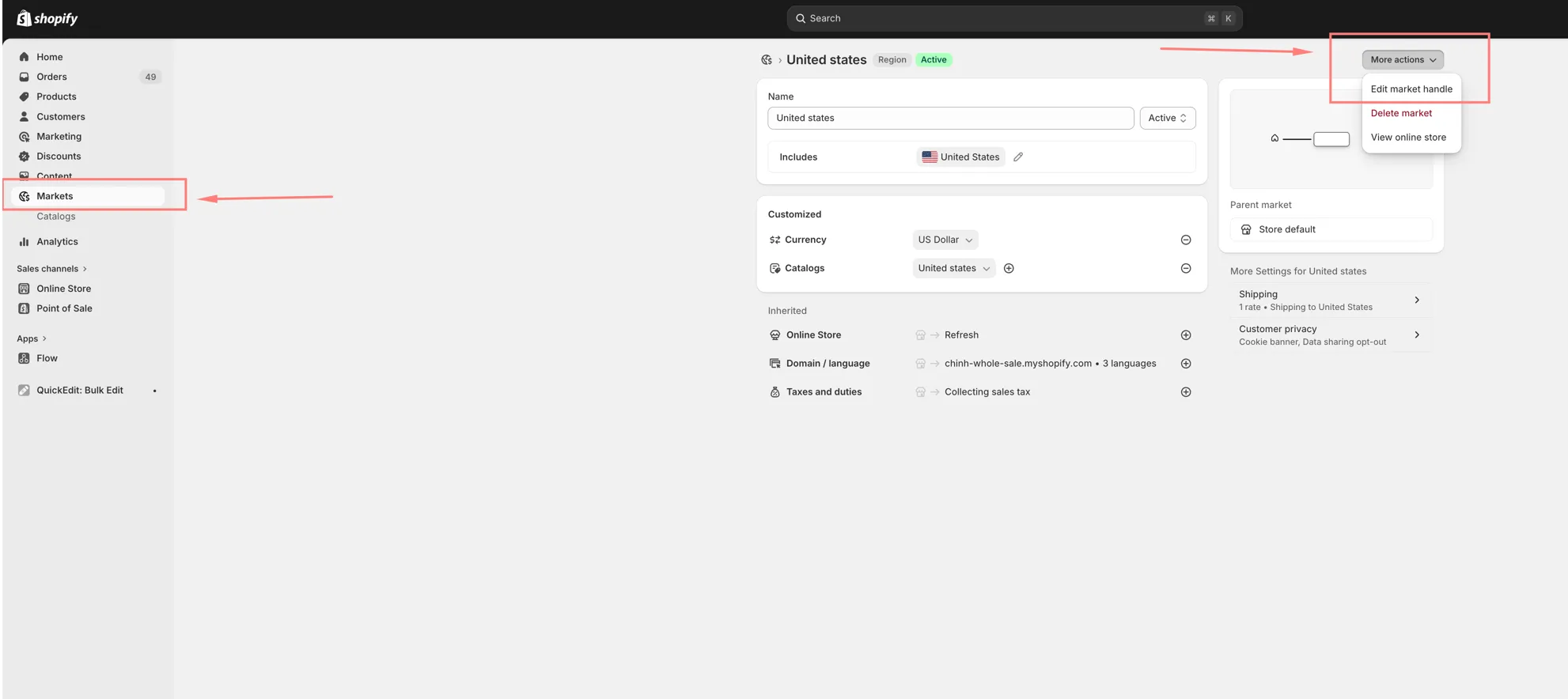
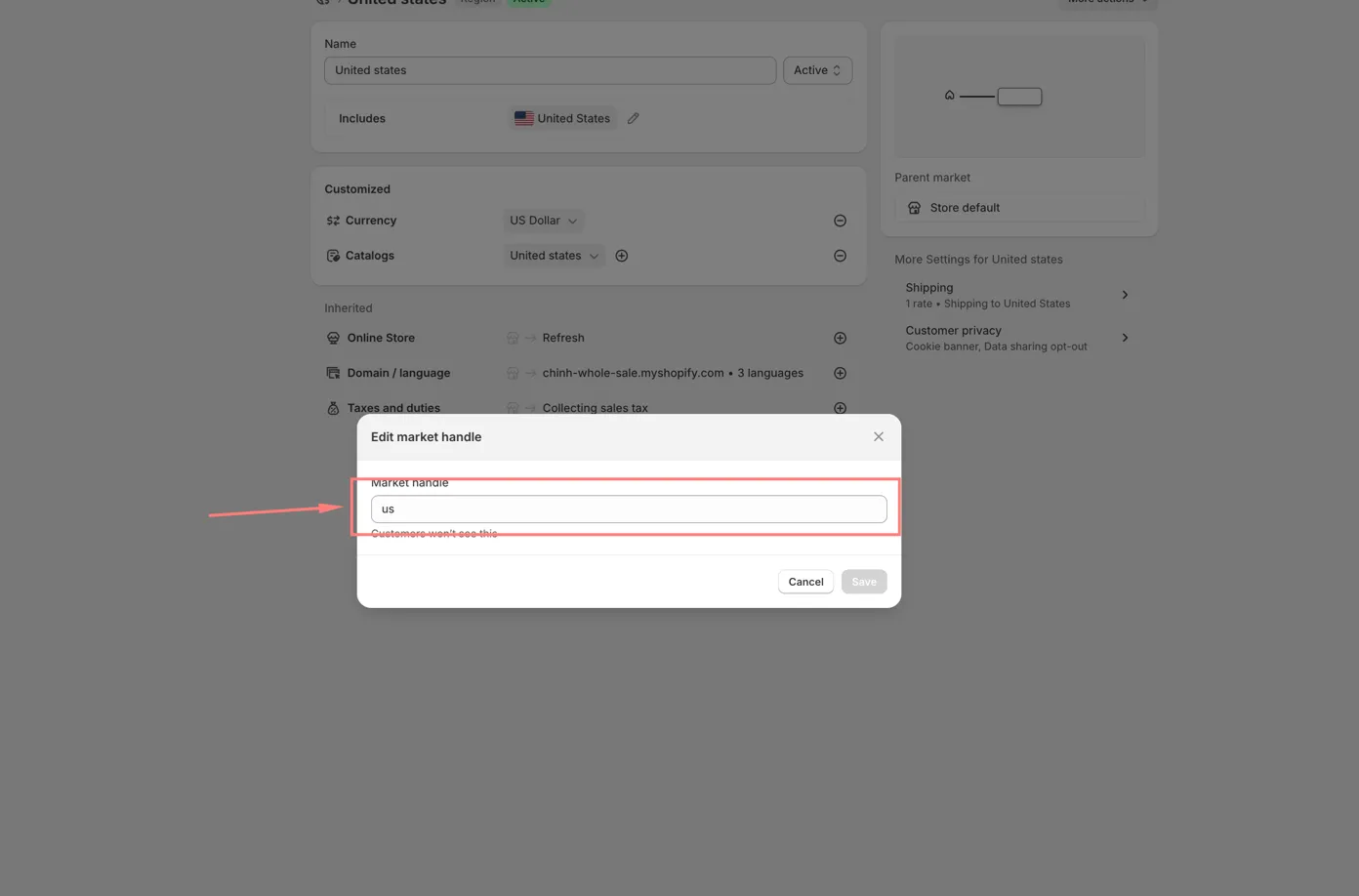
要获取市场 handle,请按以下步骤操作:
- 在 Shopify 后台中,前往 市场 部分 > 点击 更多操作 > 选择 编辑市场 handle > 复制显示的 handle:
j. discount_group
Section titled “j. discount_group”用于未按多属性配置折扣的情况。
在以下情况下必填:
apply_product.type不是products,或者apply_product.type == products且未应用多属性
结构:
"discount_group": { "type": "percent", "value": "10"}折扣类型和值的规则与上文所述相同。
k. active_date
Section titled “k. active_date”用于配置定价规则的开始和结束时间。
结构:
"active_date": { "types": ["start_date", "end_date"], "start_at": "2026-01-15 10:00:00", "end_at": "2026-01-15 10:00:00"}types
- 可选
- 可接受的值:
start_date、end_date - 可以包含其中一个或两个,以逗号分隔
- 示例:
["start_date","end_date"]
start_at
- 如果
types包含start_date,则必填 - 格式:
YYYY-MM-DD HH:MM:SS
end_at
- 如果
types包含end_date,则必填 - 格式:
YYYY-MM-DD HH:MM:SS
4. API 响应
Section titled “4. API 响应”a. 错误响应
Section titled “a. 错误响应”401 – 未授权
可能的原因:
- 缺少商店 URL
- 缺少 API 密钥
- 商店 URL 无效
- API 密钥无效
- API 密钥与商店不匹配
403 – 此操作未获授权
- API 密钥没有 Create 权限
- 每个 API 密钥可拥有 View、Create、Update、Delete 权限
- 此 API 需要 Create 权限
- 当提供的 ID 不存在时也会返回此错误
429 – 请求过多
- 超出速率限制
- 允许的上限:
| 限制 | 值 |
|---|---|
| 请求频率 | 每 5 分钟 1 次请求 |
| 每日上限 | 每天 50 次请求 |
b. 成功响应
Section titled “b. 成功响应”200 – API 调用成功
- Wholesale Pricing 记录创建成功
- 响应以 JSON 格式返回
{ "id": 1, "title": "New Wholesale Pricing", "status": true, "apply_customer": { "type": "all", "tags": [] }, "exclude_customer": { "type": "none", "tags": [] }, "apply_product": { "type": "all", "product_ids": [], "product_tags": [], "collection_ids": [], "apply_for_variants": false }, "exclude_product": { "type": "none", "product_ids": [], "collection_ids": [] }, "discount_for_variants": [ { "id": 8516448190631, "variant_pricing": true, "variants": [ { "id": 46747346763943, "discount_groups": [ { "name": "all", "type": "percent", "value": "10" } ] } ] } ], "apply_market": { "type": "all", "handle": [] }, "discount_group": { "type": "percent", "value": "10" }, "active_date": { "types": ["start_date", "end_date"], "start_at": "2026-01-15 10:00:00", "end_at": "2026-01-15 10:00:00" }, "created_at": "2026-01-15T10:00:00", "updated_at": "2026-01-15T10:00:00"}