> For the complete documentation index, see [llms.txt](https://docs.samita.io/llms.txt). Markdown versions of documentation pages are available by appending `.md` to page URLs; this page is available as [Markdown](https://docs.samita.io/b2b-lock-password-protect/access-rules/combining-rules.md).
# Combining rules
How multiple conditions inside one access key are evaluated together.
A single access rule is often all you need, but a lock can hold several conditions inside one **access key**. Understanding how those conditions combine helps you describe an audience that requires more than one requirement.
## How conditions combine
**Conditions inside an access key combine with AND.** A visitor must satisfy every condition in the key before it opens. Adding a condition therefore makes a lock *stricter*, never looser.
| You want | How to build it |
| ------------------------------------------ | --------------------------------------------------------------------------------------------------- |
| Must be logged in **AND** tagged wholesale | One access key, with a Logged-in customers condition and a Customer tags condition both added to it |
| Must hold two different tags | One access key, with a separate Customer tags condition for each required tag |
{% hint style="info" %}
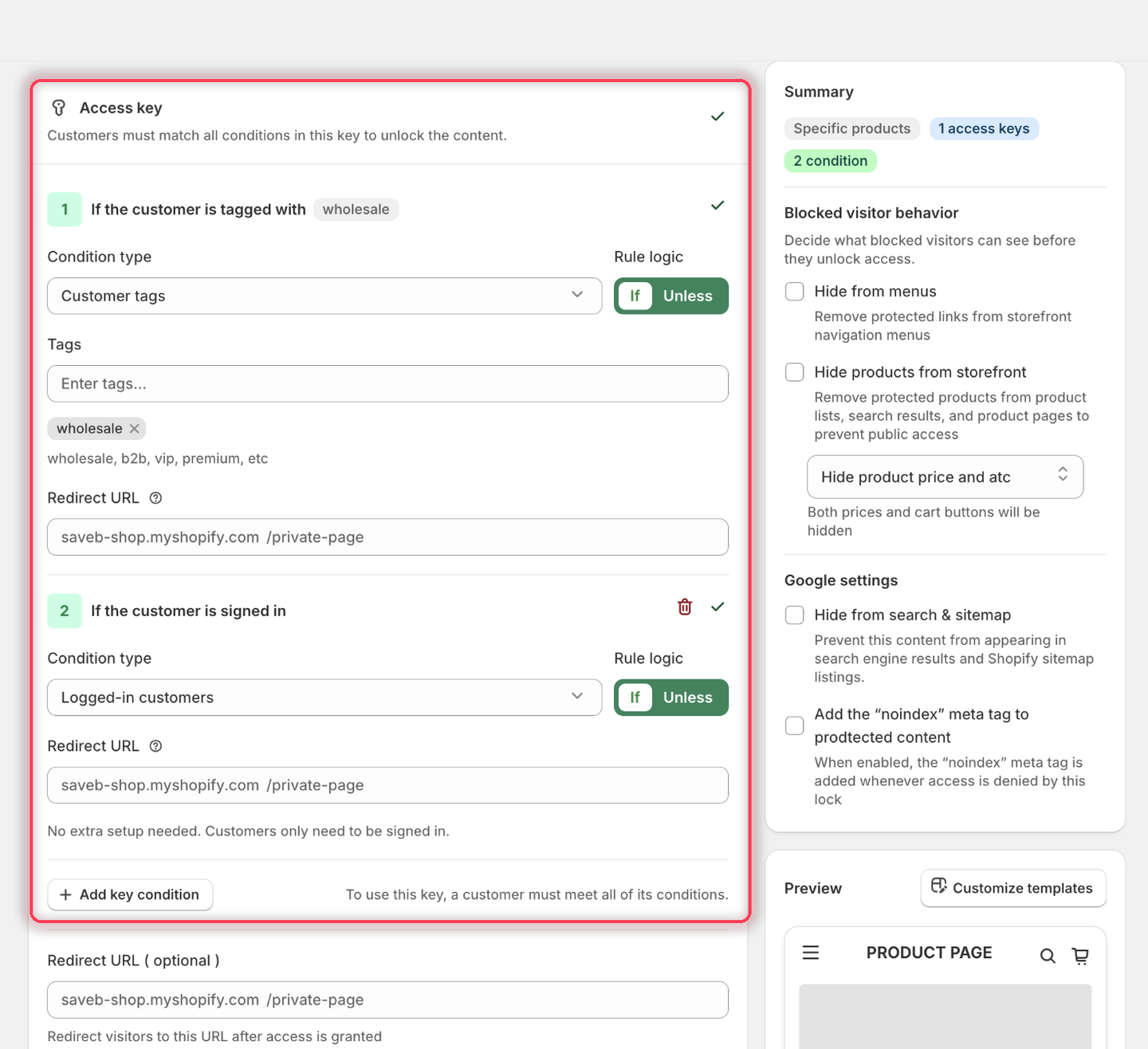
Inside the lock editor, the helper text reminds you: "Customers must match all conditions in this key to unlock the content." Treat every condition added to the key as required.
{% endhint %}
## Worked example: logged-in wholesale customers
Say you want a members-style lock where only signed-in wholesale customers can get in. That audience needs two conditions in the same access key.
1. Open the lock you want to protect and click the **Unlock rules** tab.
2. In the access key, set **Condition type** to **Customer tags** and enter your wholesale tag (for example `wholesale`). Leave **Rule logic** set to **If**. Condition 1 now reads: *If the customer is tagged with wholesale*.
3. Click **Add key condition** to add a second condition to the *same* key, and set its **Condition type** to **Logged-in customers**. Condition 2 reads: *If the customer is signed in*. It needs no further setup — the app notes "No extra setup needed. Customers only need to be signed in."
Both conditions live inside the same access key, so a visitor has to satisfy both.
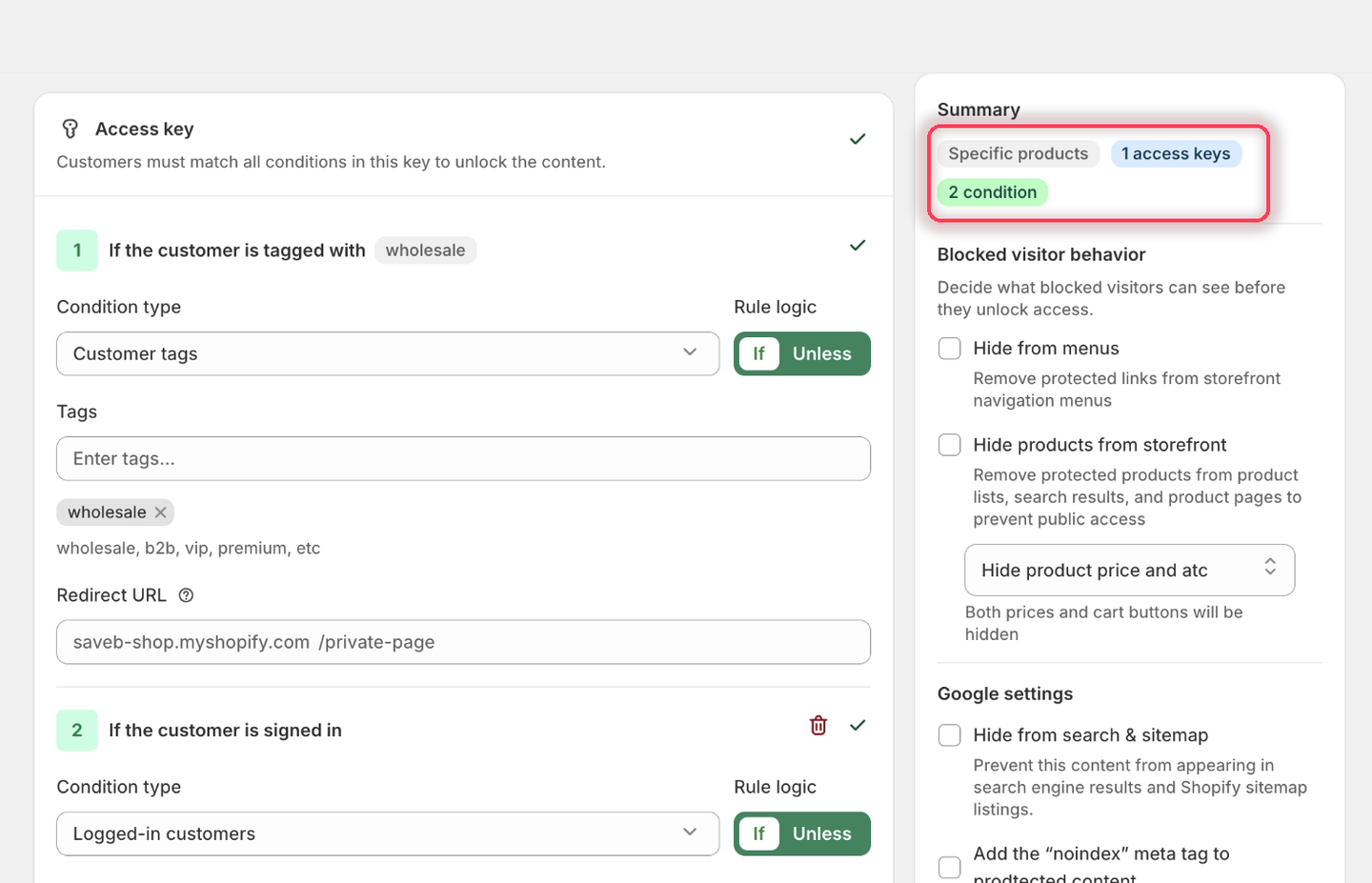
4. Save the lock. The **Summary** panel confirms the shape of what you built: one access key holding two conditions.
The Summary panel counts the access keys and conditions on the lock.
With this setup, the visitor must be signed in **and** have the `wholesale` customer tag. A visitor who satisfies only one of the conditions remains blocked.
{% hint style="warning" %}
Don't add unrelated rules to the same key. Every condition in that key is required, so adding a condition makes the access requirement more restrictive.
{% endhint %}
## Adding, editing, and removing access keys
* To add a rule to the key you're currently editing, use the add-rule control inside that key — this adds another AND condition to the same key.
* Add conditions to the access key when every requirement must be met together.
* Configure the key's **Redirect URL** and optional **Customer auto tags** when those post-access actions are needed.
## Related docs
* [Access rules overview](/b2b-lock-password-protect/access-rules/overview.md)
* [Passcode](/b2b-lock-password-protect/access-rules/passcode.md)
* [Secret link](/b2b-lock-password-protect/access-rules/secret-link.md)
* [Lock behavior overview](/b2b-lock-password-protect/lock-behavior/overview.md)
---
# Agent Instructions
This documentation is published with GitBook. GitBook is the documentation platform designed so that both humans and AI agents can read, navigate, and reason over technical content effectively. Learn more at gitbook.com.
## Querying This Documentation
If you need additional information that is not directly available in this page, you can query the documentation dynamically by asking a question.
Perform an HTTP GET request on the current page URL with the `ask` query parameter, and the optional `goal` query parameter:
```
GET https://docs.samita.io/b2b-lock-password-protect/access-rules/combining-rules.md?ask=&goal=
```
`ask` is the immediate question: it should be specific, self-contained, and written in natural language.
`goal` is optional and describes the broader end goal you are ultimately trying to accomplish on behalf of the user. GitBook uses it to tailor the answer towards what is most useful for that goal.
The response will contain a direct answer to the question and relevant excerpts and sources from the documentation.
Use this mechanism when the answer is not explicitly present in the current page, you need clarification or additional context, or you want to retrieve related documentation sections.