> For the complete documentation index, see [llms.txt](https://docs.samita.io/llms.txt). Markdown versions of documentation pages are available by appending `.md` to page URLs; this page is available as [Markdown](https://docs.samita.io/b2b-lock-password-protect/lock-behavior/hide-price-and-add-to-cart.md).

# Hide price and Add to cart

Hide a locked product or collection's price, Add to cart button, or the whole item, until a visitor passes your access rules.

This behavior is available on locks whose content type is **Products and variants** or **Collections**. Instead of blocking the whole page, it lets a blocked visitor keep browsing the product or collection while hiding the specific parts you choose — the price, the Add to cart button, or both — until they meet your access rules.

## Reach this setting

1. Open **Locks** and create a new lock, or open an existing one to edit it.
2. On the **Lock setup** tab, choose **Products and variants** or **Collections** as the content type, then select the products or collections you want to protect.
3. Click the **Unlock rules** tab to continue.
4. In the main column, add one or more access rules that decide who is allowed to see price and Add to cart.
5. On the same **Unlock rules** tab, the right-hand sidebar shows the **Blocked visitor behavior** panel — configure the price/Add to cart options there, alongside your rule.

<figure><img src="https://27754559-files.gitbook.io/~/files/v0/b/gitbook-x-prod.appspot.com/o/spaces%2FF4qMYopXntYz9YgUqZSo%2Fuploads%2Fgit-blob-efc0fb0ee01a55c948461273ceb518e77087eab3%2Fscreenshot-lock-behavior-price-atc-settings.png?alt=media" alt="The Blocked visitor behavior section showing the choose lock settings dropdown with price, Add to cart, and both options."><figcaption><p>Choose whether to hide price only, Add to cart only, or both for the selected products or collections.</p></figcaption></figure>

## Choosing what to hide

Use the dropdown to pick one of:

* **Hide product price** — the price is replaced by your message or button; Add to cart still works.
* **Hide product atc** — the Add to cart button is replaced; the price still shows.
* **Hide product price and atc** — both are hidden. When you pick this option, a note confirms that both prices and cart buttons will be hidden.

## What shoppers see instead

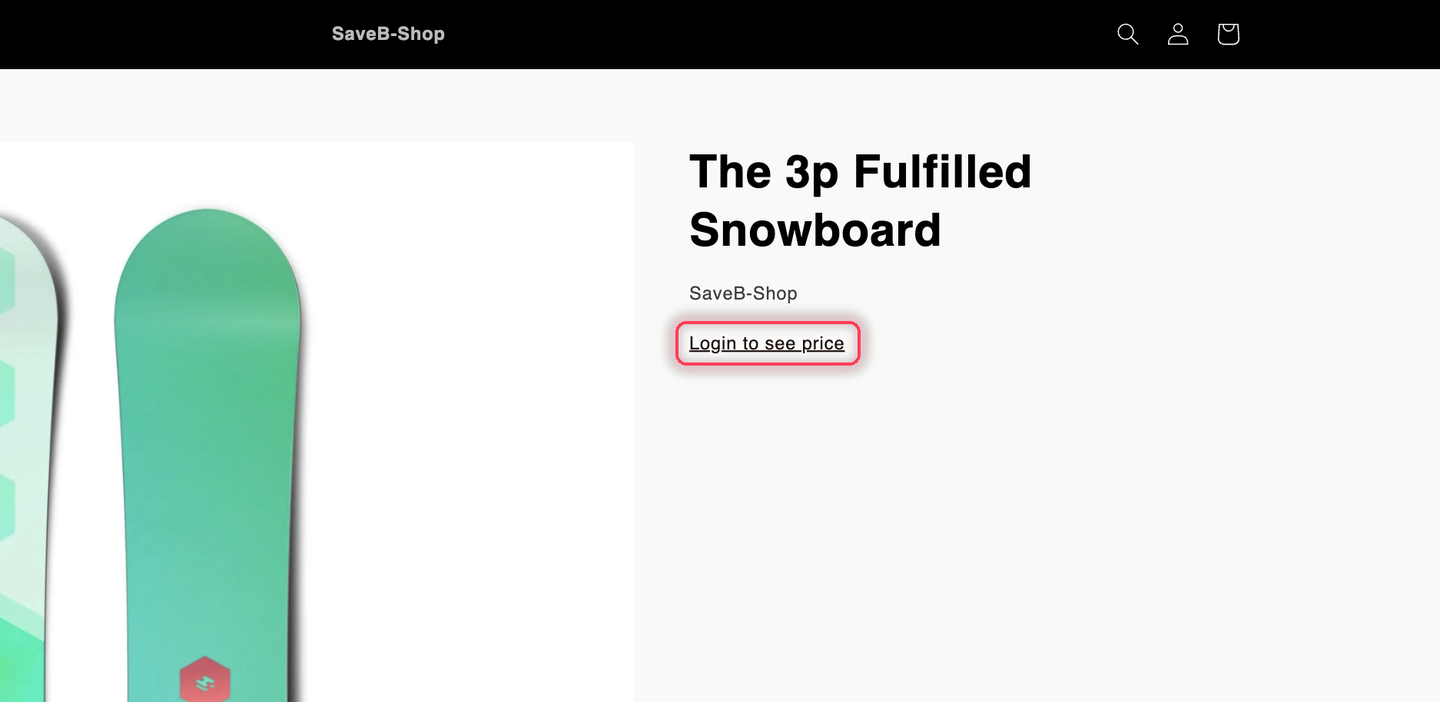
In place of the hidden price or button, a blocked shopper sees either a plain-text message or a styled button — you choose the style in the lock's design settings (see [Colors and templates](/b2b-lock-password-protect/design-and-customization/colors-and-templates.md)). Either way, the default English copy is:

* Hidden price: **"Login to see price"**
* Hidden Add to cart: **"Login to Add to cart."**

Both strings are editable per lock and per language from the lock's translation settings.

<figure><img src="https://27754559-files.gitbook.io/~/files/v0/b/gitbook-x-prod.appspot.com/o/spaces%2FF4qMYopXntYz9YgUqZSo%2Fuploads%2Fgit-blob-06d840945bb105ca934794c3a0fef8a5463c84be%2Fscreenshot-storefront-hide-price-guest.png?alt=media" alt="A live storefront product page seen by a signed-out visitor: the product image and title are visible, and a Login to see price link sits where the price would be, with no Add to cart or Buy it now button."><figcaption><p>The result on a live storefront — the product stays browsable, only the price and buy buttons are replaced.</p></figcaption></figure>

{% hint style="info" %}
"Login" in the default copy is just the default wording — the actual requirement is whatever access rules you've added to the lock, not necessarily being logged in. Edit the text if your rule isn't about signing in (for example, a passcode or a customer tag).
{% endhint %}

## Hiding the product or collection entirely

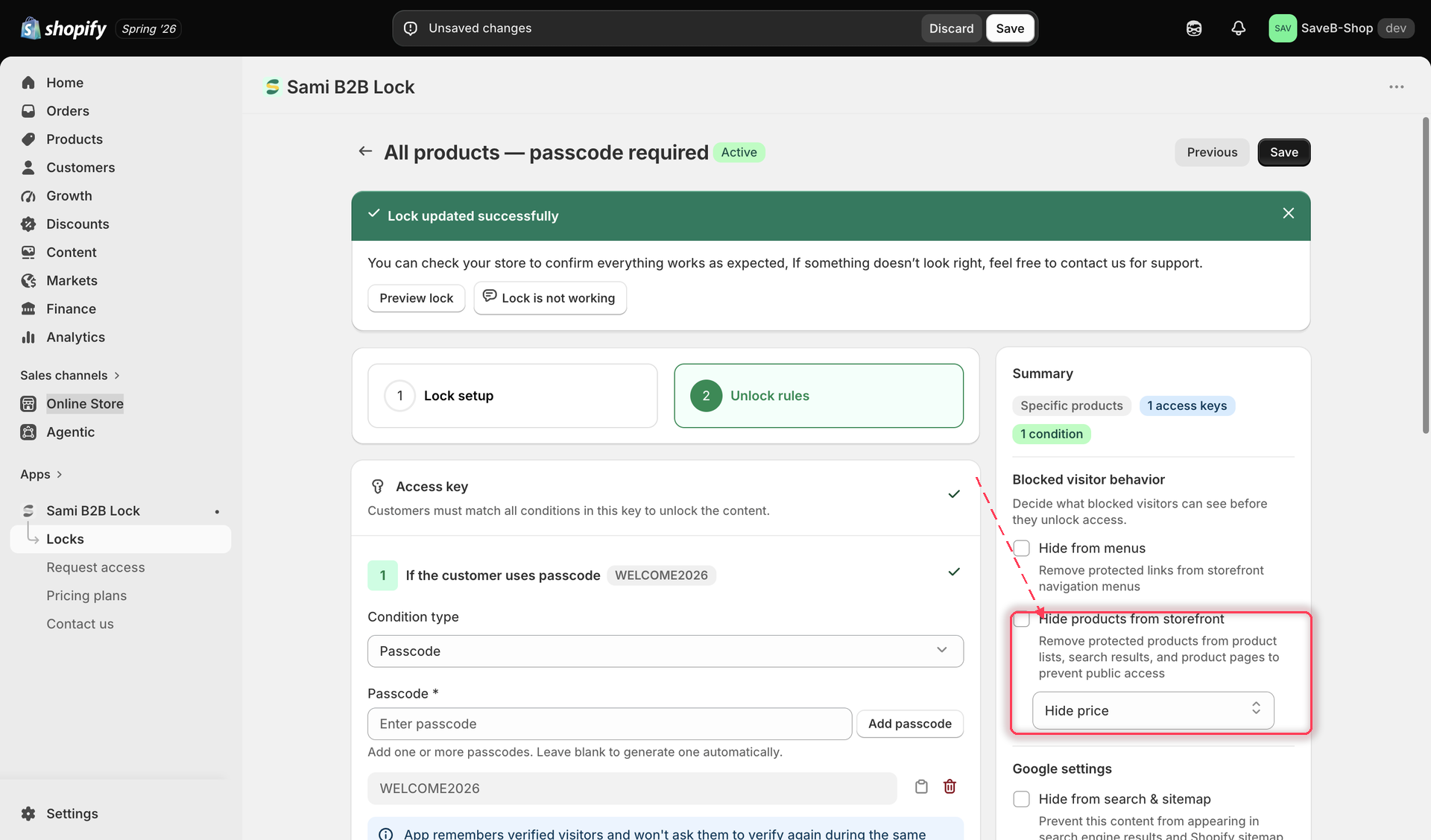
If hiding just the price and button isn't enough, turn on **Hide products from storefront**. This is a stronger option: instead of showing the product with its price/Add to cart hidden, it removes the protected products or collections from product lists, search results, and product pages entirely, so blocked visitors can't find them at all. When this is on, the price/Add to cart dropdown above no longer applies, since there's nothing left to show.

<figure><img src="https://27754559-files.gitbook.io/~/files/v0/b/gitbook-x-prod.appspot.com/o/spaces%2FF4qMYopXntYz9YgUqZSo%2Fuploads%2Fgit-blob-2596ea3f3e01fba4052b6b771f905d7b27b736d0%2Fscreenshot-lock-behavior-hide-products-storefront.png?alt=media" alt="The Hide products from storefront checkbox in the Blocked visitor behavior section."><figcaption><p>Turning on Hide products from storefront removes the protected items from listings and search instead of just hiding price and Add to cart.</p></figcaption></figure>

{% hint style="warning" %}
This setting and the price/Add to cart options above may require a paid plan. If your current plan doesn't include it, the app shows an upgrade prompt instead of the toggle.
{% endhint %}

## Save your lock

Click **Save** once you've chosen your settings. The behavior applies immediately to any matching products or collections on your live storefront.

## Video walkthrough

Prefer to watch it done end to end? This walkthrough covers the same setup:

{% embed url="<https://www.youtube.com/watch?v=wUhZ6eq2kYQ>" %}

## Related docs

* [Lock behavior overview](/b2b-lock-password-protect/lock-behavior/overview.md)
* [Products and variants](/b2b-lock-password-protect/content-to-lock/overview.md)
* [Colors and templates](/b2b-lock-password-protect/design-and-customization/colors-and-templates.md)
* [Access rules overview](/b2b-lock-password-protect/access-rules/overview.md)


---

# Agent Instructions
This documentation is published with GitBook. GitBook is the documentation platform designed so that both humans and AI agents can read, navigate, and reason over technical content effectively. Learn more at gitbook.com.

## Querying This Documentation
If you need additional information that is not directly available in this page, you can query the documentation dynamically by asking a question.

Perform an HTTP GET request on the current page URL with the `ask` query parameter, and the optional `goal` query parameter:

```
GET https://docs.samita.io/b2b-lock-password-protect/lock-behavior/hide-price-and-add-to-cart.md?ask=<question>&goal=<endgoal>
```

`ask` is the immediate question: it should be specific, self-contained, and written in natural language.
`goal` is optional and describes the broader end goal you are ultimately trying to accomplish on behalf of the user. GitBook uses it to tailor the answer towards what is most useful for that goal.

The response will contain a direct answer to the question and relevant excerpts and sources from the documentation.

Use this mechanism when the answer is not explicitly present in the current page, you need clarification or additional context, or you want to retrieve related documentation sections.