
动态变量
在文本编辑中插入来自其他产品和多属性字段的值。
显示 Add dynamic variables 链接的文本输入框可以包含占位符。任务运行时,每个占位符都会被替换为该产品或多属性的值。
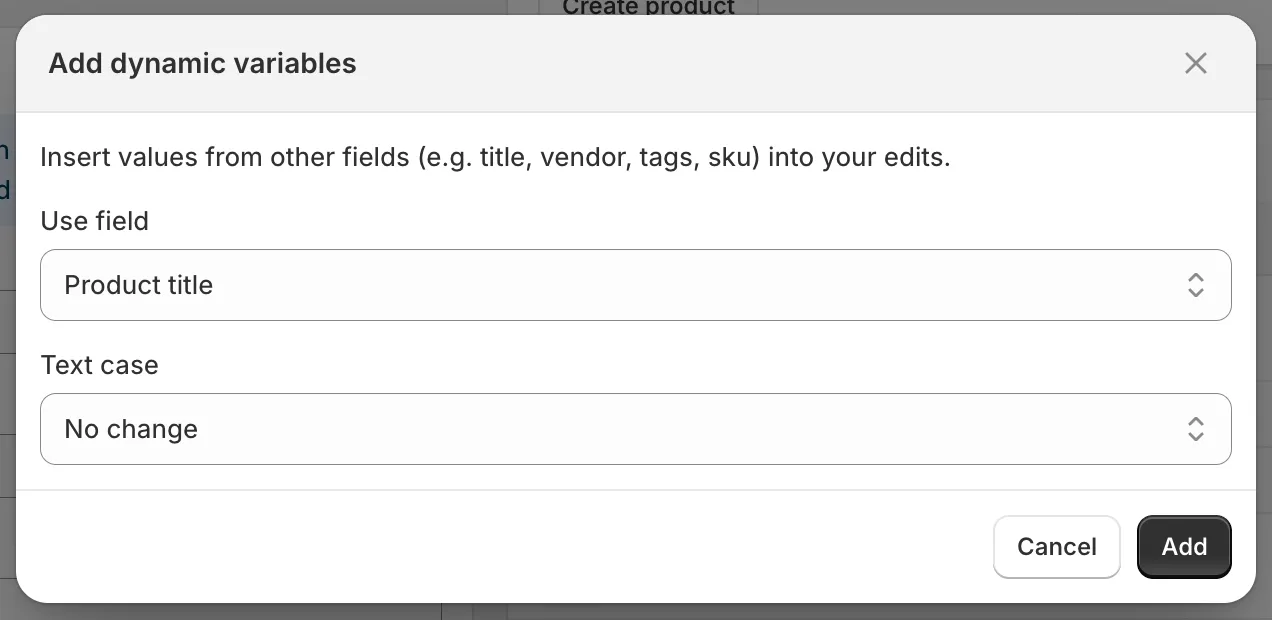
Add dynamic variables
- 点击输入框上方的 Add dynamic variables。
- 选择 Use field。
- 选择 Text case:No change、UPPERCASE、lowercase 或 Title Case。
- 点击 Add。占位符(例如
{{ product.vendor | upcase }})会被追加到输入框中。您也可以手动输入占位符。
| 产品字段 | 占位符 |
|---|---|
| Product title | {{ product.title }} |
| Product ID | {{ product.id }} |
| Product handle | {{ product.handle }} |
| Product type | {{ product.type }} |
| Product vendor | {{ product.vendor }} |
| SEO title | {{ product.seo_title }} |
| SEO description | {{ product.seo_description }} |
| Product URL | {{ product.url }} |
| Product status | {{ product.status }} |
| Product tags | {{ product.tags }} |
| Product category | {{ product.category }} |
| Product category full name | {{ product.category_full_name }} |
| 多属性字段(仅限多属性任务) | 占位符 |
|---|---|
| Variant ID | {{ variant.id }} |
| Variant title | {{ variant.title }} |
| Variant sku | {{ variant.sku }} |
| Variant barcode | {{ variant.barcode }} |
| Variant tax code | {{ variant.tax_code }} |
| Variant country code of origin | {{ variant.country_code_of_origin }} |
| Variant province code of origin | {{ variant.province_code_of_origin }} |
| Variant HS code | {{ variant.hs_code }} |
文本大小写通过过滤器应用:| upcase、| downcase 或 | titlecase。ID 没有文本大小写选项。
可以在哪里使用
Section titled “可以在哪里使用”Title、Description、Handle、Vendor、Product type、Theme template、SEO title、SEO description、SKU、Barcode、HS code、Tags、Option value 1 to 3、Google Shopping 文本字段,以及自定义元字段的查找/替换输入框。
数字字段(Price、Compare at price、Cost price、Weight)、选择类字段、产品系列、销售渠道和选择器不接受变量。
| 目标 | 字段和方式 | 值 |
|---|---|---|
| 将供应商添加到每个标题中 | Title, Add text at end | by {{ product.vendor }} |
| 生成 SEO 标题 | SEO title, Replace entire text | {{ product.title }} | {{ product.vendor }} |
| 用产品类型为产品添加标签 | Tags, Add tags | {{ product.type | downcase }} |
| 构建唯一的 SKU | SKU, Replace entire text | {{ product.vendor | upcase }}-{{ variant.id }} |
预览会解析这些变量,方便您在保存前检查结果。