
标题、handle、供应商、类型和 SEO
使用查找替换、前缀、后缀等方式批量编辑标题、handle、供应商、产品类型、SEO 标题和 SEO 描述。
以下产品字段共用同一组文本编辑方式:
- Title
- Handle(产品网址的最后一部分)
- Vendor
- Product type
- SEO title 和 SEO description(搜索引擎列表)
- Theme template(请参阅类别、模板和可见性)
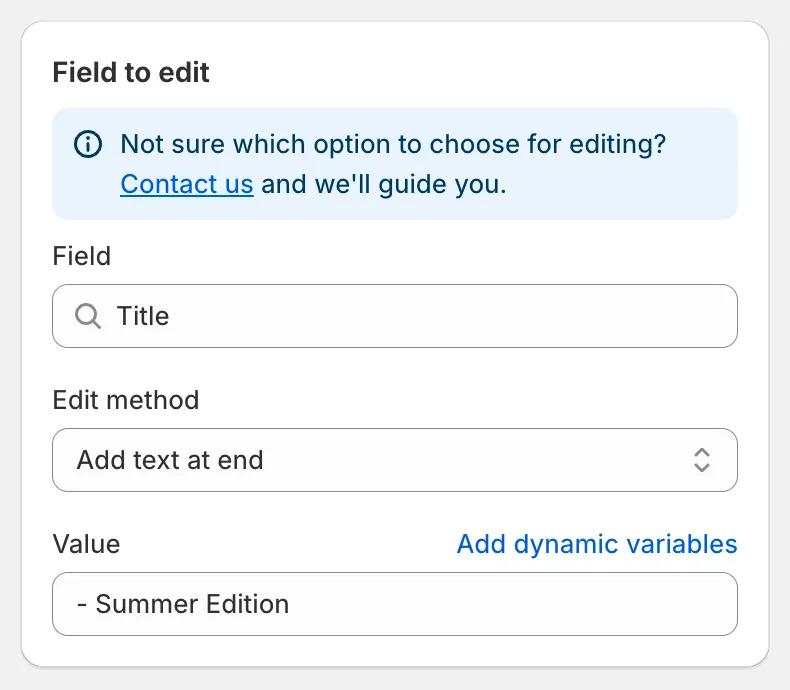
为标题添加后缀
| 编辑方式 | 输入 | 在 “Classic Cotton Tee” 上的示例 |
|---|---|---|
| Find and replace(默认) | Find value、Replace value | 查找 Classic,替换为 Premium → “Premium Cotton Tee” |
| Replace entire text | Value | New Arrival → “New Arrival” |
| Add text at beginning | Value | [Sale] → “[Sale] Classic Cotton Tee” |
| Add text at end | Value | - Summer Edition → “Classic Cotton Tee - Summer Edition” |
| Remove from beginning | Value | Classic → “Cotton Tee” |
| Remove from end | Value | Tee → “Classic Cotton” |
| Remove up to (and including) word | Value | Cotton → “Tee” |
| Remove from word to end | Value | Cotton → “Classic” |
需要了解的细节:
- Find and replace 区分大小写,并按输入的文本精确匹配。每一处出现都会被替换。将 Replace value 留空可删除找到的文本。
- Add text at beginning 和 Add text at end 始终会在您的文本与现有文本之间插入一个空格。
- Remove from beginning 仅在字段以该值开头时才会生效。Remove from end 仅在该值是最后一个词时才会生效。
- 如果结果为空,则保留原始值。
- 所有输入框都接受动态变量,例如
{{ product.vendor }} {{ product.title }}。
Handle
Section titled “Handle”Handle 必须唯一,且符合网址规范。编辑后,应用会将结果转换为有效的 handle:小写、去除重音符号,并将空格和符号替换为连字符。Shopify 会自动创建从旧网址到新网址的重定向,因此现有链接仍然有效。
Vendor 和 Product type
Section titled “Vendor 和 Product type”使用 Replace entire text 来统一值,例如对符合条件 Product vendor equals sami apparel 的产品,将供应商 sami apparel 重命名为 Sami Apparel。
SEO title 和 SEO description
Section titled “SEO title 和 SEO description”这些字段用于更新产品的搜索引擎列表。结合动态变量,您可以根据其他字段生成列表,例如对 SEO title 使用 Replace entire text 并输入 {{ product.title }} | {{ product.vendor }}。
预览会为每个产品显示一行 Original 和一行 Update。点击眼睛图标可并排对比较长的文本。撤销任务会恢复原始文本。