
价格和原价
批量提高、降低或设置价格和原价,支持舍入和关联的原价。
Price 是多属性的售价。Compare at price 是显示在促销价旁边、带删除线的原始价格。两者都是多属性字段,因此您可以使用 Apply to variants 将更改限制在特定的多属性上。
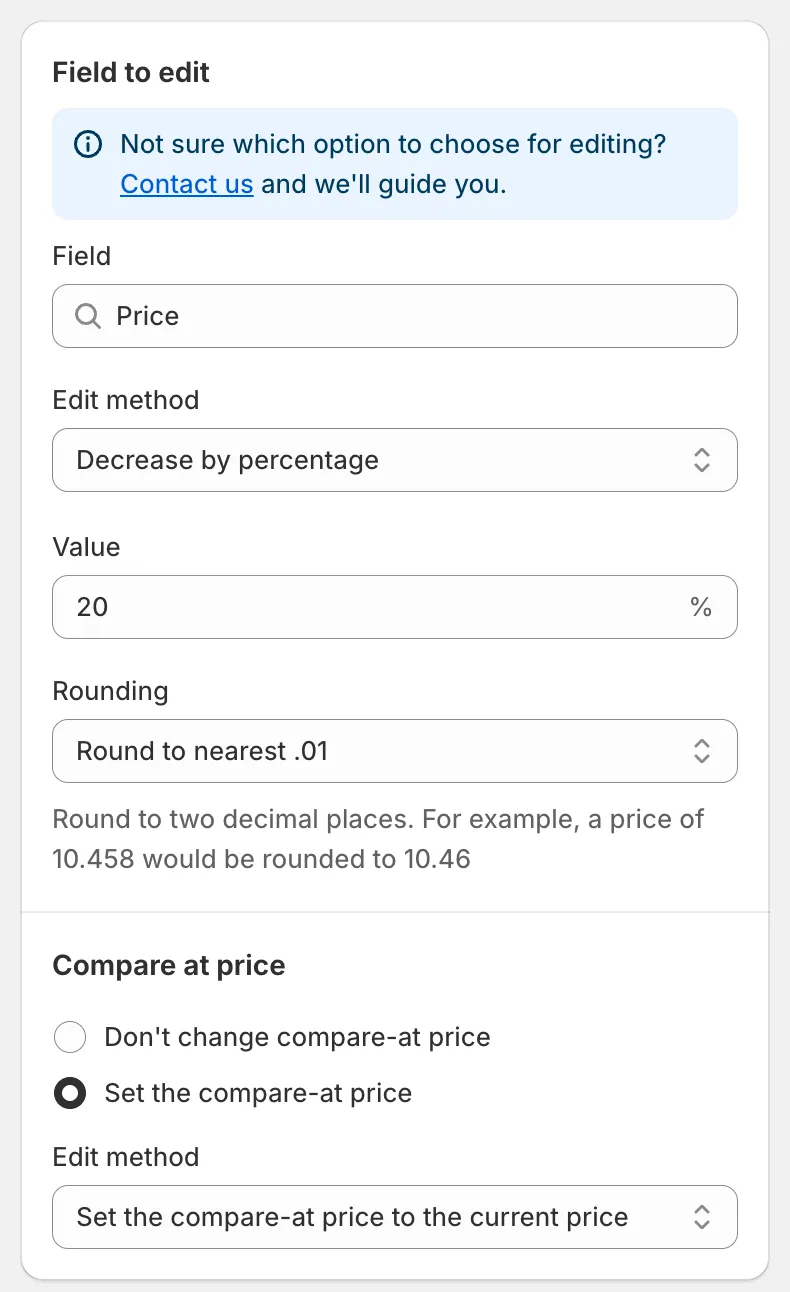
Price 字段
Price 的编辑方式
Section titled “Price 的编辑方式”| 编辑方式 | 结果 | 示例(价格 50.00) |
|---|---|---|
| Decrease by percentage | 价格 − n% | 20 → 40.00 |
| Increase by percentage | 价格 + n% | 20 → 60.00 |
| Set to fixed value | 您输入的值 | 45 → 45.00 |
| Decrease by amount | 价格 − n | 5 → 45.00 |
| Increase by amount | 价格 + n | 5 → 55.00 |
| Set as percentage of price | 价格 × n% | 80 → 40.00 |
| Set the price to the current compare-at price | 复制原价 | 原价 70.00 → 70.00 |
| Set as percentage of compare at price | 原价 × n% | 原价 70.00,50 → 35.00 |
| Set the price to the current cost price | 复制单件成本 | 成本 30.00 → 30.00 |
| Set as percentage of cost price | 成本 × n% | 成本 30.00,150 → 45.00 |
| Decrease by percentage of cost price | 成本 − n% | 成本 30.00,10 → 27.00 |
| Increase by percentage of cost price | 成本 + n% | 成本 30.00,50 → 45.00 |
说明:
- Value 输入框接受正数。基于原价或成本的方式会跳过该来源值为空的多属性。
- 结果低于零时会被设为 0。
- 除了两个 Set the price to the current … 选项之外,每种方式都有 Rounding 规则。请参阅舍入规则。
在价格设置下方,Compare at price 部分允许您在同一个任务中更改原价:
- Don’t change compare-at price(默认)。
- Set the compare-at price:会打开其自己的 Edit method、Value 和 Rounding。默认方式 Set the compare-at price to the current price 会将您更改之前的价格存为原价,这是展示折扣的常用方法。
Compare at price 的编辑方式
Section titled “Compare at price 的编辑方式”当您针对 Compare at price 字段创建任务时,可用的方式有:
Set the compare-at price to the current price(默认)、Set to fixed value、Decrease by amount、Increase by amount、Decrease by percentage、Increase by percentage、Set as percentage of price、Set as percentage of compare at price、Set the compare-at price to the current cost price、Set as percentage of cost price、Decrease by percentage of cost price、Increase by percentage of cost price、Set to null/blank。
Set to null/blank 会移除原价,使店面不再显示删除线。
此字段上的关联部分是 Price:Don’t change price 或 Set the price,并附有完整的价格方式列表。
Quick Discount Campaign Setup
Section titled “Quick Discount Campaign Setup”仪表板卡片 Quick Discount Campaign Setup 会为您创建价格任务:
- 输入 Discount 并选择 Percentage 或 Amount。
- 如果您想保留当前价格,而是提高原价以使店面显示折扣,请勾选 Update compare-at price only。
- 点击 Quick Create。任务表单会打开并已预先填好;请检查产品和计划,然后保存。
撤销价格任务会恢复其更新的每个多属性的原始价格,如果任务更改了原价,也会恢复原始原价。请参阅撤销更改。