
標題、網址代稱、供應商、類型和 SEO
透過尋找並取代、前綴、後綴等方式,批次編輯標題、網址代稱、供應商、商品類型、SEO 標題和 SEO 說明。
下列商品欄位使用相同的文字編輯方式:
- Title
- Handle(商品網址的最後一段)
- Vendor
- Product type
- SEO title 和 SEO description(搜尋引擎中的列表資訊)
- Theme template(請參閱分類、範本和可見度)
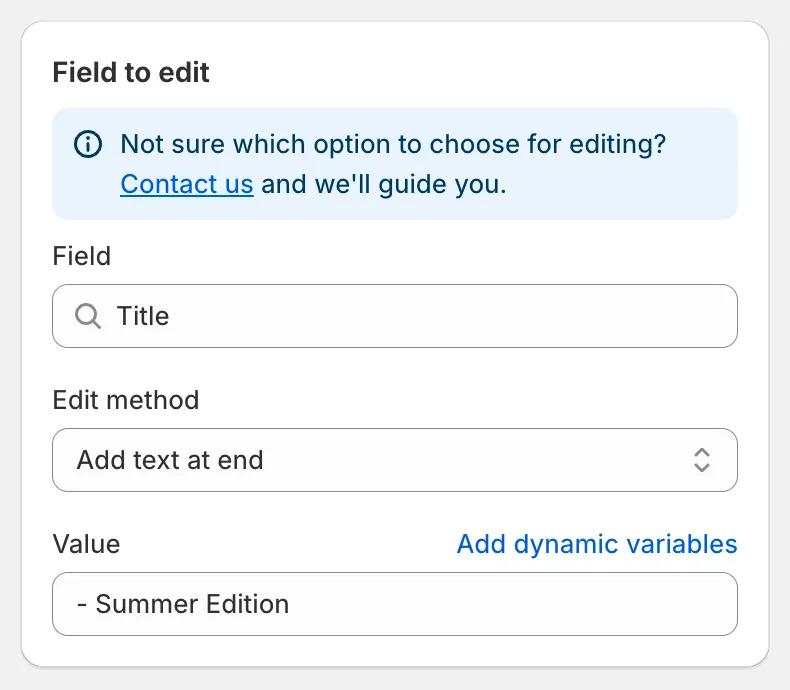
為標題加上後綴
| 編輯方式 | 輸入內容 | 以「Classic Cotton Tee」為例 |
|---|---|---|
| Find and replace(預設) | Find value、Replace value | 尋找 Classic,取代為 Premium → “Premium Cotton Tee” |
| Replace entire text | Value | New Arrival → “New Arrival” |
| Add text at beginning | Value | [Sale] → “[Sale] Classic Cotton Tee” |
| Add text at end | Value | - Summer Edition → “Classic Cotton Tee - Summer Edition” |
| Remove from beginning | Value | Classic → “Cotton Tee” |
| Remove from end | Value | Tee → “Classic Cotton” |
| Remove up to (and including) word | Value | Cotton → “Tee” |
| Remove from word to end | Value | Cotton → “Classic” |
需要注意的細節:
- Find and replace 區分大小寫,且會完全依照輸入的文字比對。所有符合的內容都會被取代。將 Replace value 留空即可刪除找到的文字。
- Add text at beginning 和 Add text at end 一律會在您輸入的文字與原有文字之間插入一個空格。
- Remove from beginning 僅在欄位以該值開頭時才會執行。Remove from end 僅在該值是最後一個字詞時才會執行。
- 如果結果會是空白,則會保留原始值。
- 所有輸入欄位都支援動態變數,例如
{{ product.vendor }} {{ product.title }}。
Handle
Section titled “Handle”Handle 必須是唯一的,且適用於網址。編輯後,應用程式會將結果轉換為有效的 handle:改為小寫、移除重音符號,並將空格和符號替換為連字號。Shopify 會自動建立從舊網址到新網址的重新導向,因此現有連結仍可正常使用。
Vendor 和 Product type
Section titled “Vendor 和 Product type”使用 Replace entire text 來統一數值,例如在符合條件 Product vendor equals sami apparel 的商品上,將供應商 sami apparel 重新命名為 Sami Apparel。
SEO title 和 SEO description
Section titled “SEO title 和 SEO description”這些欄位會更新商品在搜尋引擎中的列表資訊。結合動態變數,您可以根據其他欄位來建立列表資訊,例如將 SEO title 以 Replace entire text 設定為 {{ product.title }} | {{ product.vendor }}。
預覽會為每項商品顯示一列 Original 和一列 Update。點擊眼睛圖示即可並排比較較長的文字。還原任務會恢復原始文字。