
API로 도매 가격 업데이트/편집하기
전체 요청 본문 레퍼런스를 포함해, Public API로 기존 도매 가격 규칙을 업데이트하는 방법을 안내합니다.
이 문서는 Public API를 사용해 기존 도매 가격 규칙을 업데이트하는 방법을 설명합니다.
1. 엔드포인트
섹션 제목: “1. 엔드포인트”기존 도매 가격 레코드를 업데이트하려면 다음 엔드포인트를 사용하세요.
PUT https://wholesale.samita.io/api/v1/wholesale-pricings/{id}{id}는 도매 가격 레코드의 ID입니다.- ID는 앱 화면에서 확인할 수 있습니다(“#” 기호 제외).
- 참고 예시:
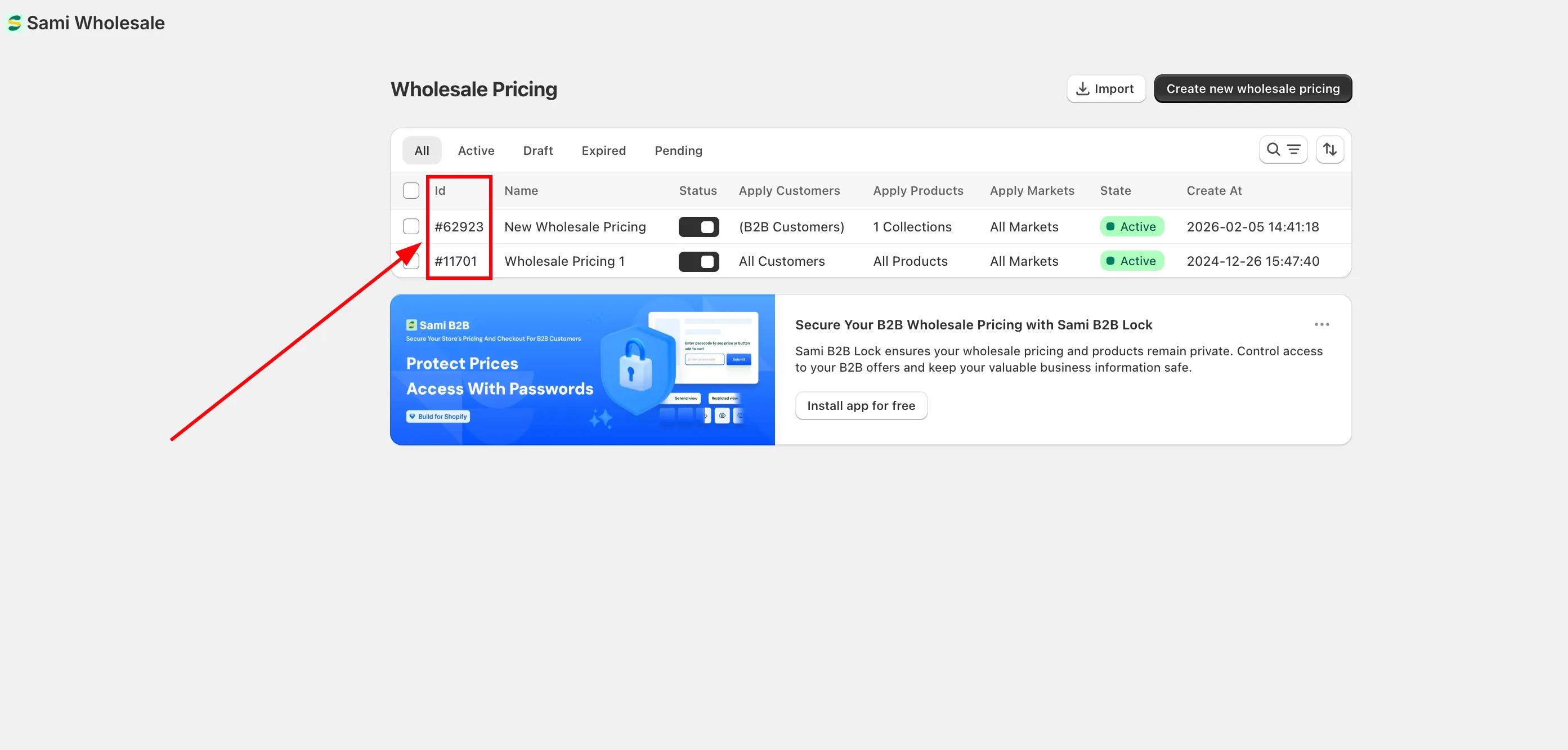
예시:
섹션 제목: “예시:”PUT https://wholesale.samita.io/api/v1/wholesale-pricings/12. 요청 헤더
섹션 제목: “2. 요청 헤더”모든 API 요청에는 다음 필수 헤더가 포함되어야 합니다.
| 헤더 | 설명 | 필수 |
|---|---|---|
X-SAMITA-API-KEY |
Wholesale 앱에서 제공하는 API 키 | 예 |
X-SAMITA-SHOP-URL |
xxx.myshopify.com 형식의 Shopify 스토어 도메인 | 예 |
CONTENT-TYPE |
application/json이어야 합니다 |
예 |
필수 헤더가 하나라도 없으면 요청이 거부됩니다.
3. 요청 본문
섹션 제목: “3. 요청 본문”_ 도매 가격을 업데이트하는 데 사용하는 데이터는 JSON 형식으로 전송해야 합니다. 샘플 JSON 구조는 이 문서 끝부분에 있습니다.
_ 요청에는 업데이트할 필드만 포함하면 됩니다. Create API 방식처럼 모든 필드를 보낼 필요는 없습니다.
_ 지정하지 않은 필드는 변경되지 않습니다.
샘플 요청 JSON:
{ "title": "New Wholesale Pricing", "status": true, "apply_customer": { "type": "all", "tags": [] }, "exclude_customer": { "type": "none", "tags": [] }, "apply_product": { "type": "all", "product_ids": [], "product_tags": [], "collection_ids": [], "apply_for_variants": false }, "exclude_product": { "type": "none", "product_ids": [], "collection_ids": [] }, "discount_for_variants": [ { "id": 8516448190631, "variant_pricing": true, "variants": [ { "id": 46747346763943, "discount_groups": [ { "name": "all", "type": "percent", "value": "10" } ] } ] } ], "apply_market": { "type": "all", "handle": [] }, "discount_group": { "type": "percent", "value": "10" }, "active_date": { "types": ["start_date", "end_date"], "start_at": "2026-01-15 10:00:00", "end_at": "2026-01-15 10:00:00" }}c. title
섹션 제목: “c. title”- 도매 가격 레코드를 식별하는 이름입니다.
- Update API에서는 선택 사항입니다.
- 문자열이어야 합니다.
- 최대 길이: 255자
d. status
섹션 제목: “d. status”- 레코드의 활성화 여부를 정의합니다.
- Update API에서는 선택 사항입니다.
- 다음 값만 사용할 수 있습니다.
| 값 | 설명 |
|---|---|
true |
가격 규칙이 활성 상태 |
false |
가격 규칙이 비활성 상태 |
e. apply_customer
섹션 제목: “e. apply_customer”이 가격 규칙을 적용할 고객을 정의합니다.
구조:
"apply_customer": { "type": "all", "tags": []}type
사용 가능한 값:
allloggednon-loggedcustomer-tags
tags
type == customer-tags일 때만 필수입니다.- 쉼표로 구분한 배열이어야 합니다.
- 예:
["wholesale","b2b"]
f. exclude_customer
섹션 제목: “f. exclude_customer”특정 고객을 가격 규칙에서 제외할 때 사용합니다.
구조:
"exclude_customer": { "type": "none", "tags": []}type
- 기본값:
none - 사용 가능한 값:
| 값 | 설명 |
|---|---|
none |
제외할 고객 없음 |
customer-tags |
태그로 고객 제외 |
tags
type == customer-tags일 때만 필수입니다.- 예:
["vip","wholesale"]
g. apply_product (필수)
섹션 제목: “g. apply_product (필수)”가격 규칙을 적용할 제품을 정의합니다.
구조:
"apply_product": { "type": "all", "product_ids": [], "product_tags": [], "collection_ids": [], "apply_for_variants": false}type
사용 가능한 값:
allproductscollectionsproduct-tags
나머지 필드는 선택한 type에 따라 필수입니다.
product_ids→type == products이면 필수product_tags→type == product-tags이면 필수collection_ids→type == collections이면 필수
apply_for_variants
- 사용 가능한 값:
true또는false - 기본값:
false
h. exclude_product
섹션 제목: “h. exclude_product”규칙에서 제외할 제품을 정의합니다.
구조:
"exclude_product": { "type": "none", "product_ids": [], "collection_ids": []}사용 가능한 type:
noneproductscollections
i. discount_for_variants
섹션 제목: “i. discount_for_variants”옵션별로 할인을 설정할 때 사용합니다.
apply_product.apply_for_variants == false이면 비어 있어야 합니다.apply_product.apply_for_variants == true이면 필수입니다.
구조 예시:
"discount_for_variants": [
  {
    "id": 8516448190631,
    "variant_pricing": true,
    "variants": [
      {
        "id": 46747346763943,
        "discount_groups": [
          {
            "name": "all",
            "type": "percent",
            "value": "10"
          }
        ]
      }
    ]
  }
]
구조:
- 제품의 배열
- 각 제품에는 다음이 포함됩니다.
id– 제품 IDvariant_pricing– 반드시true여야 합니다variants– 옵션의 배열
각 옵션에는 다음이 포함됩니다.
id– 옵션 IDdiscount_groups– 할인 설정의 배열
discount_groups 규칙
apply_customer.type이all,logged또는non-logged인 경우
→ 항목을 하나만 넣을 수 있습니다apply_customer.type == customer-tags인 경우
→ 할인 그룹을 여러 개 제공할 수 있습니다
discount_groups 안의 필드:
| 필드 | 설명 |
|---|---|
name |
고객 유형 또는 고객 태그와 일치해야 함 |
type |
할인 유형 |
value |
할인 값 |
사용 가능한 할인 유형:
percentamountfixed-amount
값 규칙:
- 0보다 큰 숫자여야 합니다.
- type이
percent이면 값은 100 미만이어야 합니다.
j. apply_market (필수)
섹션 제목: “j. apply_market (필수)”규칙을 적용할 Shopify 시장을 정의합니다.
구조:
"apply_market": { "type": "all", "handle": []}type
사용 가능한 값:
allspecific-market
handle
type == specific-market일 때만 필수입니다.- 쉼표로 구분한 시장 핸들 목록
- 예:
["japan","us"]
k. discount_group
섹션 제목: “k. discount_group”옵션별로 할인을 설정하지 않을 때 사용합니다.
다음 경우에 필수입니다.
apply_product.type이products가 아닌 경우, 또는apply_product.type == products이면서 옵션을 적용하지 않는 경우
구조:
"discount_group": { "type": "percent", "value": "10"}규칙:
type은 다음 중 하나여야 합니다.percentamountfixed-amount
value- 0보다 커야 합니다.
- type이
percent이면 값은 100 미만이어야 합니다.
l. active_date
섹션 제목: “l. active_date”가격 규칙의 시작 및 종료 시간을 설정할 때 사용합니다.
구조:
"active_date": { "types": ["start_date", "end_date"], "start_at": "2026-01-15T10:00:00", "end_at": "2026-01-15T10:00:00"}types
- 선택 사항
- 사용 가능한 값:
start_date,end_date - 예:
["start_date","end_date"]
start_at
types에start_date가 포함되면 필수입니다.- 형식:
YYYY-MM-DD HH:MM:SS
end_at
types에end_date가 포함되면 필수입니다.- 형식:
YYYY-MM-DD HH:MM:SS
4. API 응답
섹션 제목: “4. API 응답”a. 오류 응답
섹션 제목: “a. 오류 응답”401 – Unauthorized
가능한 원인:
- 스토어 URL 누락
- API 키 누락
- 잘못된 스토어 URL
- 잘못된 API 키
- API 키가 스토어와 일치하지 않음
403 – This action is unauthorized
- API 키에 Update 권한이 없습니다.
- 각 API 키에는 View, Create, Update, Delete 권한을 부여할 수 있습니다.
- 이 API에는 Update 권한이 필요합니다.
- 제공한 ID가 존재하지 않을 때도 반환됩니다.
429 – Too Many Requests
요청 한도를 초과했습니다.
- 최대 5분당 1회 요청
- 최대 하루 50회 요청
b. 성공 응답
섹션 제목: “b. 성공 응답”200 – API Success
- 도매 가격 레코드가 업데이트되었습니다.
- 응답은 JSON 형식으로 반환됩니다.
샘플 응답 JSON:
{ "id": 1, "title": "New Wholesale Pricing", "status": true, "apply_customer": { "type": "all", "tags": [] }, "exclude_customer": { "type": "none", "tags": [] }, "apply_product": { "type": "all", "product_ids": [], "product_tags": [], "collection_ids": [], "apply_for_variants": false }, "exclude_product": { "type": "none", "product_ids": [], "collection_ids": [] }, "discount_for_variants": [ { "id": 8516448190631, "variant_pricing": true, "variants": [ { "id": 46747346763943, "discount_groups": [ { "name": "all", "type": "percent", "value": "10" } ] } ] } ], "apply_market": { "type": "all", "handle": [] }, "discount_group": { "type": "percent", "value": "10" }, "active_date": { "types": [], "start_at": "", "end_at": "" }, "created_at": "2026-01-15T10:00:00", "updated_at": "2026-01-15T10:00:00"}