
APIで卸売価格を更新・編集する
公開APIで既存の卸売価格ルールを更新する方法です。リクエストボディの全項目リファレンスも掲載しています。
このドキュメントでは、公開APIを使って既存の卸売価格ルールを更新する方法を説明します。
1. エンドポイント
Section titled “1. エンドポイント”既存の卸売価格レコードを更新するには、次のエンドポイントを使用します。
PUT https://wholesale.samita.io/api/v1/wholesale-pricings/{id}{id}は卸売価格レコードのIDです- IDはアプリの画面で確認できます(「#」記号は含めません)
- 参考例:
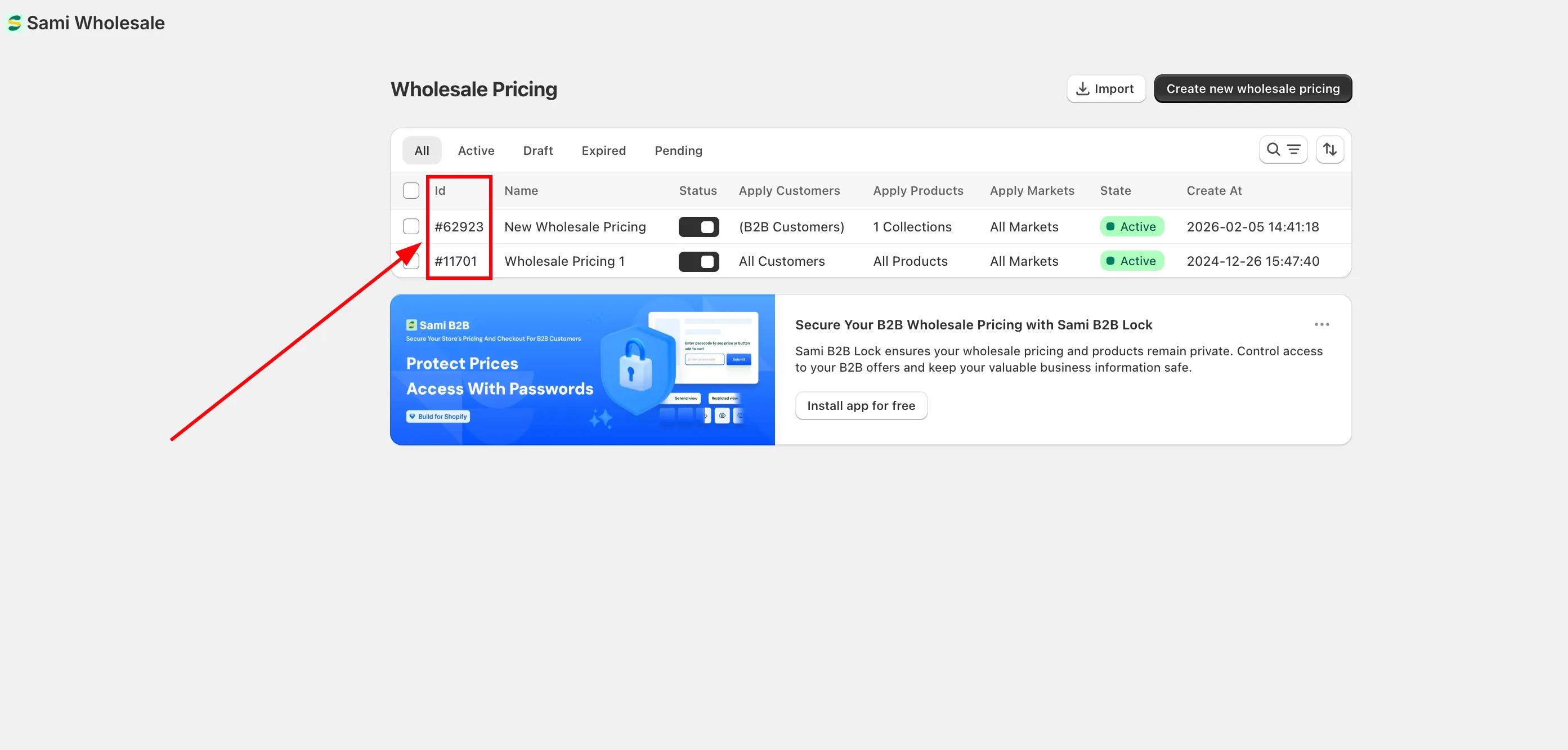
PUT https://wholesale.samita.io/api/v1/wholesale-pricings/12. リクエストヘッダー
Section titled “2. リクエストヘッダー”すべてのAPIリクエストに、次の必須ヘッダーを含める必要があります。
| ヘッダー | 説明 | 必須 |
|---|---|---|
X-SAMITA-API-KEY |
Wholesaleアプリで発行されたAPIキー | はい |
X-SAMITA-SHOP-URL |
xxx.myshopify.com形式のShopifyストアドメイン | はい |
CONTENT-TYPE |
application/jsonを指定する必要があります |
はい |
必須ヘッダーが1つでも欠けている場合、リクエストは拒否されます。
3. リクエストボディ
Section titled “3. リクエストボディ”_ 卸売価格の更新に使用するデータは、JSON形式で送信する必要があります。サンプルのJSON構造は、このドキュメントの末尾に掲載しています。
_ リクエストには、更新するフィールドのみを含めれば問題ありません。作成APIのように、すべてのフィールドを送信する必要はありません。
_ 指定していないフィールドは変更されません
リクエストJSONのサンプル:
{ "title": "New Wholesale Pricing", "status": true, "apply_customer": { "type": "all", "tags": [] }, "exclude_customer": { "type": "none", "tags": [] }, "apply_product": { "type": "all", "product_ids": [], "product_tags": [], "collection_ids": [], "apply_for_variants": false }, "exclude_product": { "type": "none", "product_ids": [], "collection_ids": [] }, "discount_for_variants": [ { "id": 8516448190631, "variant_pricing": true, "variants": [ { "id": 46747346763943, "discount_groups": [ { "name": "all", "type": "percent", "value": "10" } ] } ] } ], "apply_market": { "type": "all", "handle": [] }, "discount_group": { "type": "percent", "value": "10" }, "active_date": { "types": ["start_date", "end_date"], "start_at": "2026-01-15 10:00:00", "end_at": "2026-01-15 10:00:00" }}c. title
Section titled “c. title”- 卸売価格レコードを識別するための名前
- 更新APIでは任意
- 文字列である必要があります
- 最大文字数: 255文字
d. status
Section titled “d. status”- レコードが有効かどうかを指定します
- 更新APIでは任意
- 指定できる値は次のとおりです。
| 値 | 説明 |
|---|---|
true |
価格ルールが有効 |
false |
価格ルールが無効 |
e. apply_customer
Section titled “e. apply_customer”この価格ルールの対象となる顧客を指定します。
構造:
"apply_customer": { "type": "all", "tags": []}type
指定できる値:
allloggednon-loggedcustomer-tags
tags
type == customer-tagsの場合にのみ必須- カンマ区切りの配列である必要があります
- 例:
["wholesale","b2b"]
f. exclude_customer
Section titled “f. exclude_customer”特定の顧客を価格ルールの対象から除外する場合に使用します。
構造:
"exclude_customer": { "type": "none", "tags": []}type
- デフォルト値:
none - 指定できる値:
| 値 | 説明 |
|---|---|
none |
顧客を除外しない |
customer-tags |
タグで顧客を除外する |
tags
type == customer-tagsの場合にのみ必須- 例:
["vip","wholesale"]
g. apply_product(必須)
Section titled “g. apply_product(必須)”価格ルールを適用する商品を指定します。
構造:
"apply_product": { "type": "all", "product_ids": [], "product_tags": [], "collection_ids": [], "apply_for_variants": false}type
指定できる値:
allproductscollectionsproduct-tags
その他のフィールドは、選択したtypeに応じて必須となります。
product_ids→type == productsの場合は必須product_tags→type == product-tagsの場合は必須collection_ids→type == collectionsの場合は必須
apply_for_variants
- 指定できる値:
trueまたはfalse - デフォルト値:
false
h. exclude_product
Section titled “h. exclude_product”ルールから除外する商品を指定します。
構造:
"exclude_product": { "type": "none", "product_ids": [], "collection_ids": []}指定できるtype:
noneproductscollections
i. discount_for_variants
Section titled “i. discount_for_variants”バリエーションごとに割引を設定する場合に使用します。
apply_product.apply_for_variants == falseの場合は空にする必要がありますapply_product.apply_for_variants == trueの場合は必須
構造の例:
"discount_for_variants": [
  {
    "id": 8516448190631,
    "variant_pricing": true,
    "variants": [
      {
        "id": 46747346763943,
        "discount_groups": [
          {
            "name": "all",
            "type": "percent",
            "value": "10"
          }
        ]
      }
    ]
  }
]
構造:
- 商品の配列
- 各商品には次の項目が含まれます。
id– 商品IDvariant_pricing–trueにする必要がありますvariants– バリエーションの配列
各バリエーションには次の項目が含まれます。
id– バリエーションIDdiscount_groups– 割引設定の配列
discount_groupsのルール
apply_customer.typeがall、logged、non-loggedのいずれかの場合:
→ 指定できるのは1件のみですapply_customer.type == customer-tagsの場合:
→ 複数の割引グループを指定できます
discount_groups内のフィールド:
| フィールド | 説明 |
|---|---|
name |
顧客タイプまたは顧客タグと一致する必要があります |
type |
割引タイプ |
value |
割引の値 |
指定できる割引タイプ:
percentamountfixed-amount
値のルール:
- 0より大きい数値である必要があります
- typeが
percentの場合、値は100未満にする必要があります
j. apply_market(必須)
Section titled “j. apply_market(必須)”ルールを適用するShopifyのマーケットを指定します。
構造:
"apply_market": { "type": "all", "handle": []}type
指定できる値:
allspecific-market
handle
type == specific-marketの場合にのみ必須- マーケットハンドルのカンマ区切りリスト
- 例:
["japan","us"]
k. discount_group
Section titled “k. discount_group”バリエーションごとに割引を設定しない場合に使用します。
次の場合に必須です。
apply_product.typeがproductsではない場合、またはapply_product.type == productsで、バリエーションを適用しない場合
構造:
"discount_group": { "type": "percent", "value": "10"}ルール:
typeは次のいずれかにする必要があります。percentamountfixed-amount
value- 0より大きい値にする必要があります
- typeが
percentの場合、値は100未満にする必要があります
l. active_date
Section titled “l. active_date”価格ルールの開始日時と終了日時を設定する場合に使用します。
構造:
"active_date": { "types": ["start_date", "end_date"], "start_at": "2026-01-15T10:00:00", "end_at": "2026-01-15T10:00:00"}types
- 任意
- 指定できる値:
start_date、end_date - 例:
["start_date","end_date"]
start_at
typesにstart_dateが含まれる場合は必須- 形式:
YYYY-MM-DD HH:MM:SS
end_at
typesにend_dateが含まれる場合は必須- 形式:
YYYY-MM-DD HH:MM:SS
4. APIレスポンス
Section titled “4. APIレスポンス”a. エラーレスポンス
Section titled “a. エラーレスポンス”401 – Unauthorized(認証エラー)
考えられる原因:
- ストアURLが指定されていない
- APIキーが指定されていない
- ストアURLが無効
- APIキーが無効
- APIキーがストアと一致しない
403 – This action is unauthorized(この操作は許可されていません)
- APIキーに更新(Update)権限がない
- 各APIキーには、表示(View)、作成(Create)、更新(Update)、削除(Delete)の権限を設定できます
- このAPIにはUpdate権限が必要です
- 指定したIDが存在しない場合にも返されます
429 – Too Many Requests(リクエストが多すぎます)
レート制限を超過しました。
- 最大5分あたり1リクエスト
- 最大1日あたり50リクエスト
b. 成功レスポンス
Section titled “b. 成功レスポンス”200 – API Success(成功)
- 卸売価格レコードが正常に更新されました
- レスポンスはJSON形式で返されます
レスポンスJSONのサンプル:
{ "id": 1, "title": "New Wholesale Pricing", "status": true, "apply_customer": { "type": "all", "tags": [] }, "exclude_customer": { "type": "none", "tags": [] }, "apply_product": { "type": "all", "product_ids": [], "product_tags": [], "collection_ids": [], "apply_for_variants": false }, "exclude_product": { "type": "none", "product_ids": [], "collection_ids": [] }, "discount_for_variants": [ { "id": 8516448190631, "variant_pricing": true, "variants": [ { "id": 46747346763943, "discount_groups": [ { "name": "all", "type": "percent", "value": "10" } ] } ] } ], "apply_market": { "type": "all", "handle": [] }, "discount_group": { "type": "percent", "value": "10" }, "active_date": { "types": [], "start_at": "", "end_at": "" }, "created_at": "2026-01-15T10:00:00", "updated_at": "2026-01-15T10:00:00"}