
Test your access rules
Try your access rules on your own tagged customer account before they reach your buyers.
Test mode lets you try your access rules on your own customer account before your buyers meet them. While it’s on, the rules apply only to logged-in customers tagged sami-b2b-od-lock-test. Everyone else, guests included, sees and buys from your store as normal.
What test mode covers
Section titled “What test mode covers”| Narrowed to tagged customers while test mode is on | Not affected by test mode |
|---|---|
| Hide prices from retail visitors | Account required: it applies to everyone as soon as you save. |
| Hide add to cart | Companies you put on hold: they’re always blocked at checkout. |
| Whole store lock, including a private wholesale store | |
| Block checkout while pending |
A tagged customer gets the rules even if they’re approved or buy for a company. You can test on your own account even if it’s already approved.
Turn on test mode
Section titled “Turn on test mode”-
Open Access
Section titled “Open Access”In Sami B2B Onboarding, click Settings. Access opens first. If another section opens, click Access in the settings menu.
-
Choose a visibility with rules
Section titled “Choose a visibility with rules”Under Storefront visibility, set Who can browse, who can buy to Public catalog, private purchasing or Private wholesale store. With Public catalog, public purchasing, there are no rules to test, and Test mode is hidden.
-
Turn on Test mode
Section titled “Turn on Test mode”Turn on Test mode, in the card below Storefront visibility. A Test mode is on banner appears above it.
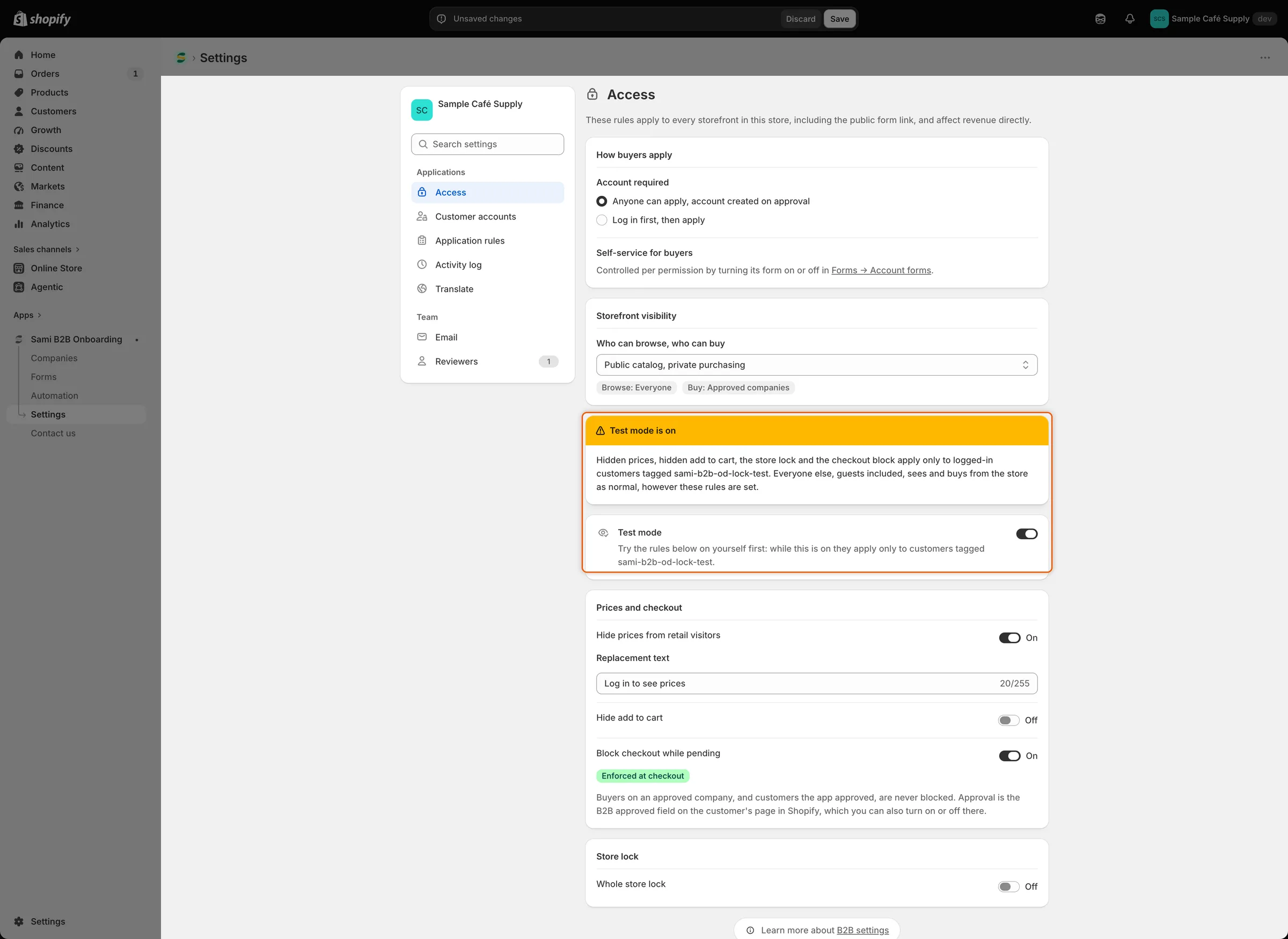
While test mode is on, the banner reminds you that the rules apply only to tagged customers.
-
Set the rules to test
Section titled “Set the rules to test”Turn on the rules you want to try under Prices and checkout and Store lock. Turn on test mode in the same save as your rule changes, or before them. Rules saved without test mode reach your buyers straight away.
-
Click Save in the save bar. Settings saved appears.
Tag your customer account
Section titled “Tag your customer account”-
Open your customer
Section titled “Open your customer”In Shopify admin, go to Customers and click the customer you’ll log in with. If you don’t have one, click Add customer and use an email address you can open.
-
Add the tag
Section titled “Add the tag”In the Tags box, type
sami-b2b-od-lock-testexactly as shown, then pressEnter. Click Save.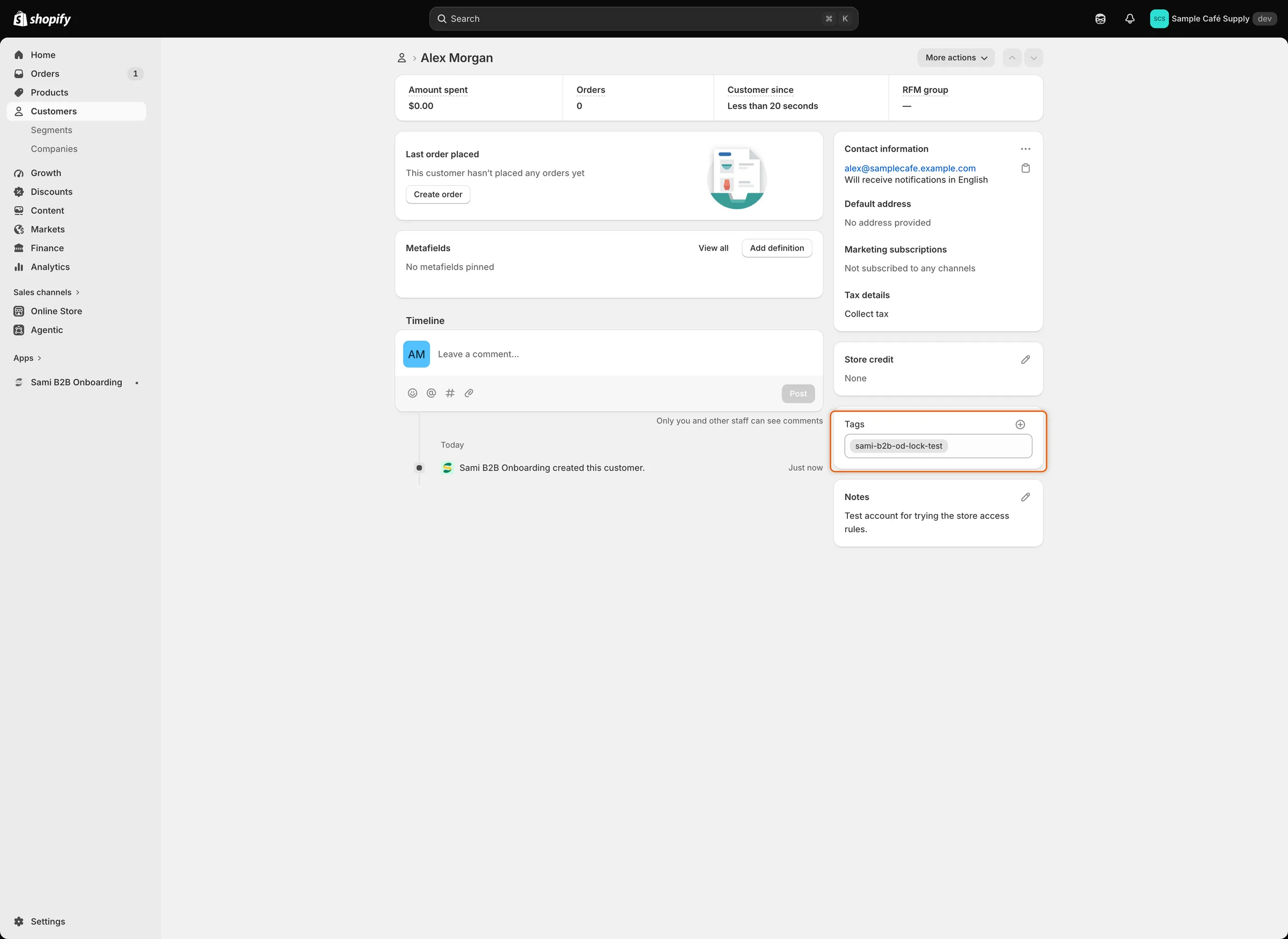
Only logged-in customers with this tag meet your rules while test mode is on.
Test on your storefront
Section titled “Test on your storefront”Open your store and log in as the tagged customer. Then check each rule you turned on:
| Rule | What you should see |
|---|---|
| Hide prices from retail visitors | Your replacement text where prices were. Because you’re logged in, the text links to your account. |
| Hide add to cart | No Add to cart or Buy it now buttons on product pages. |
| Whole store lock | The lock screen with Your account is waiting for approval, a View account button and an Apply for an account button. Pages in Always allow these pages open as normal. |
| Block checkout while pending | At checkout, the message Your wholesale account is still being reviewed. You can’t complete checkout yet. You can’t place the order. |
To test the checkout block, you need a product in your cart. With Hide add to cart or the store lock on, switch them off for a moment. A private wholesale store is always locked, so pick Public catalog, private purchasing for this test. While test mode is on, these changes reach only tagged customers.
Then open your store in a private browser window, as a guest. Prices, buy buttons and checkout work as normal, and there’s no lock screen.
Go live
Section titled “Go live”-
Turn off test mode
Section titled “Turn off test mode”In Settings › Access, turn off Test mode. The banner goes away. If you switched a rule off or changed Who can browse, who can buy to test checkout, set it back now.
-
Click Save in the save bar. The rules now apply to every visitor who isn’t approved, guests included.
-
Check as a guest
Section titled “Check as a guest”Open your store in a private browser window. You meet the rules the way a new visitor does.
-
Remove the tag when you’re done
Section titled “Remove the tag when you’re done”The tag does nothing while test mode is off. If you turn test mode on again later, tagged customers get the rules again, even when they’re approved. To keep a customer out of future tests, remove
sami-b2b-od-lock-testfrom them in Shopify admin and click Save.
Next steps
Section titled “Next steps”- Hide prices and add to cart — set what visitors who aren’t approved see.
- Lock the store — customize the lock screen before you go live.
- Block checkout until approved — check that the block shows Enforced at checkout.
- Troubleshooting — what to check when a rule doesn’t show.