
價格與原價
批次調高、調低或設定價格和原價,可搭配四捨五入及連動的原價。
Price 是款式的售價。Compare at price 是顯示在特價旁、加上刪除線的原始價格。兩者都是款式欄位,因此您可以使用 Apply to variants 將變更限制在特定款式。
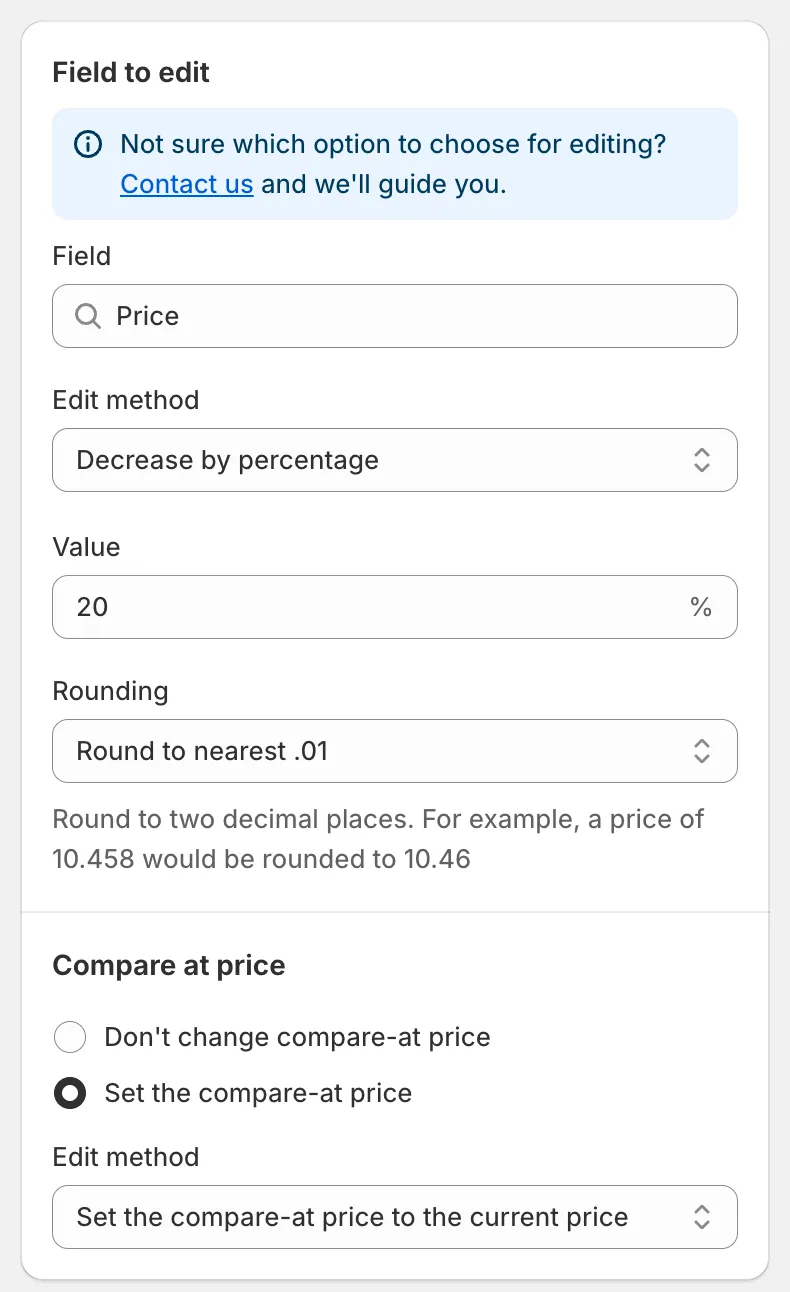
Price 欄位
Price 的編輯方式
Section titled “Price 的編輯方式”| 編輯方式 | 結果 | 範例(價格 50.00) |
|---|---|---|
| Decrease by percentage | 價格 − n% | 20 → 40.00 |
| Increase by percentage | 價格 + n% | 20 → 60.00 |
| Set to fixed value | 您輸入的值 | 45 → 45.00 |
| Decrease by amount | 價格 − n | 5 → 45.00 |
| Increase by amount | 價格 + n | 5 → 55.00 |
| Set as percentage of price | 價格 × n% | 80 → 40.00 |
| Set the price to the current compare-at price | 複製原價 | 原價 70.00 → 70.00 |
| Set as percentage of compare at price | 原價 × n% | 原價 70.00,50 → 35.00 |
| Set the price to the current cost price | 複製每件商品成本 | 成本 30.00 → 30.00 |
| Set as percentage of cost price | 成本 × n% | 成本 30.00,150 → 45.00 |
| Decrease by percentage of cost price | 成本 − n% | 成本 30.00,10 → 27.00 |
| Increase by percentage of cost price | 成本 + n% | 成本 30.00,50 → 45.00 |
備註:
- Value 方塊接受正數。以原價或成本為基礎的方式,會略過該來源值為空白的款式。
- 低於零的結果會設為 0。
- 除了兩個 Set the price to the current … 選項之外,每種方式都有 Rounding 規則。請參閱四捨五入規則。
在價格設定下方,Compare at price 區段可讓您在同一個任務中變更原價:
- Don’t change compare-at price(預設)。
- Set the compare-at price:會開啟自己的 Edit method、Value 和 Rounding。預設方式 Set the compare-at price to the current price 會將變更前的價格儲存為原價,這是顯示折扣的常見做法。
Compare at price 的編輯方式
Section titled “Compare at price 的編輯方式”當您針對 Compare at price 欄位開始任務時,可用的方式如下:
Set the compare-at price to the current price (default)、Set to fixed value、Decrease by amount、Increase by amount、Decrease by percentage、Increase by percentage、Set as percentage of price、Set as percentage of compare at price、Set the compare-at price to the current cost price、Set as percentage of cost price、Decrease by percentage of cost price、Increase by percentage of cost price、Set to null/blank。
Set to null/blank 會移除原價,使商店前台不再顯示刪除線。
此欄位上連動的區段是 Price:Don’t change price 或 Set the price,並提供完整的價格編輯方式清單。
Quick Discount Campaign Setup
Section titled “Quick Discount Campaign Setup”儀表板上的 Quick Discount Campaign Setup 卡片會為您建立價格任務:
- 輸入 Discount,並選擇 Percentage 或 Amount。
- 如果您想保留目前的價格,改為調高原價讓商店前台顯示折扣,請勾選 Update compare-at price only。
- 點擊 Quick Create。任務表單會開啟並已預先填寫;請檢查商品和排程,然後儲存。
還原價格任務時,會恢復它所更新的每個款式的原始價格,以及(如果任務有變更原價的話)原始的原價。請參閱還原變更。