
価格と比較価格
丸めと連動する比較価格を使って、価格と比較価格を一括で引き上げ、引き下げ、または設定します。
Price はバリエーションの販売価格です。Compare at price は、セール価格の横に取り消し線付きで表示される元の価格です。どちらもバリエーションのフィールドであるため、Apply to variants で変更を特定のバリエーションに限定できます。
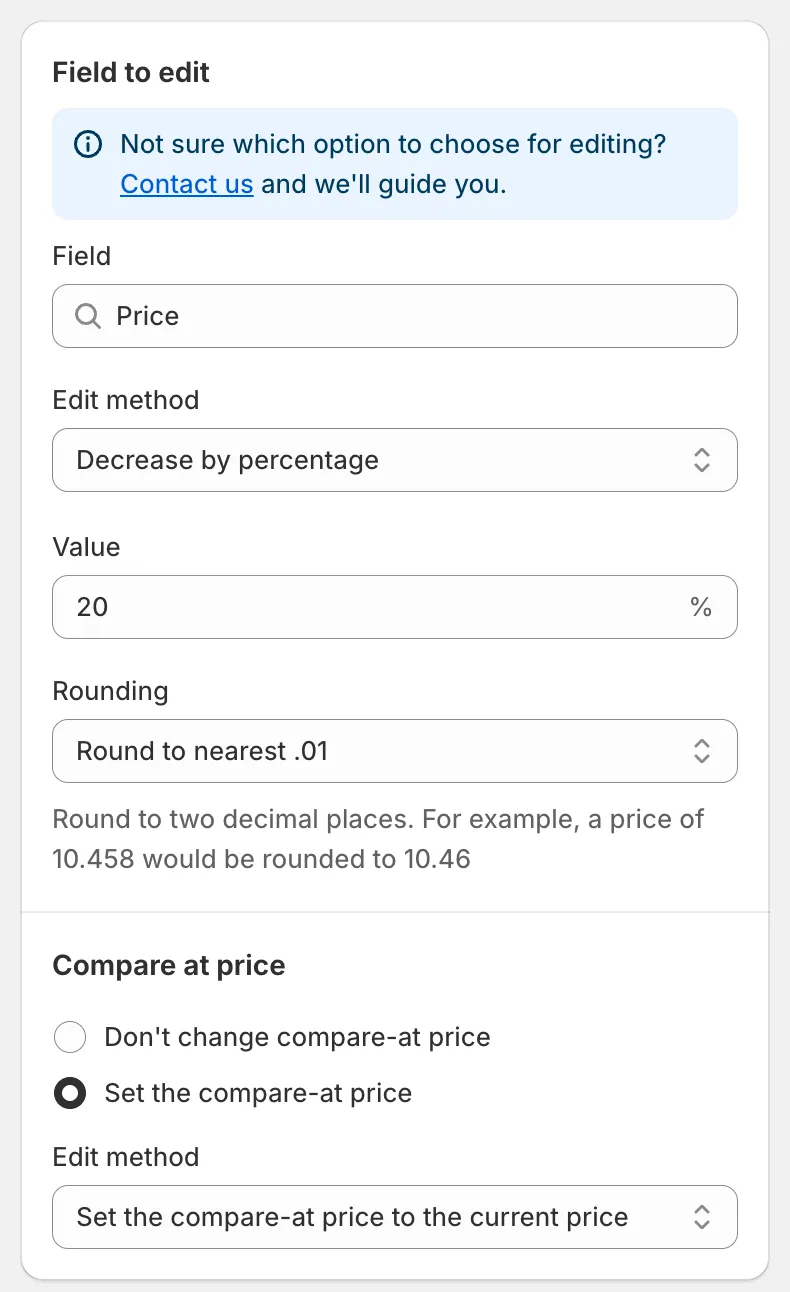
Priceフィールド
Priceの編集方法
Section titled “Priceの編集方法”| 編集方法 | 結果 | 例(価格50.00) |
|---|---|---|
| Decrease by percentage | 価格 − n% | 20 → 40.00 |
| Increase by percentage | 価格 + n% | 20 → 60.00 |
| Set to fixed value | 入力した値 | 45 → 45.00 |
| Decrease by amount | 価格 − n | 5 → 45.00 |
| Increase by amount | 価格 + n | 5 → 55.00 |
| Set as percentage of price | 価格 × n% | 80 → 40.00 |
| Set the price to the current compare-at price | 比較価格をコピーします | 比較価格 70.00 → 70.00 |
| Set as percentage of compare at price | 比較価格 × n% | 比較価格 70.00、50 → 35.00 |
| Set the price to the current cost price | 商品原価をコピーします | 原価 30.00 → 30.00 |
| Set as percentage of cost price | 原価 × n% | 原価 30.00、150 → 45.00 |
| Decrease by percentage of cost price | 原価 − n% | 原価 30.00、10 → 27.00 |
| Increase by percentage of cost price | 原価 + n% | 原価 30.00、50 → 45.00 |
注意事項:
- Value ボックスには正の数値を入力できます。比較価格や原価をもとにした方法では、その元の値が空のバリエーションはスキップされます。
- 結果が0を下回る場合は、0に設定されます。
- Set the price to the current … の2つのオプションを除くすべての方法には、Rounding ルールがあります。丸めルールを参照してください。
連動する比較価格
Section titled “連動する比較価格”価格設定の下にある Compare at price セクションでは、同じタスクで比較価格も変更できます。
- Don’t change compare-at price(既定)。
- Set the compare-at price:専用の Edit method、Value、Rounding が表示されます。既定の方法である Set the compare-at price to the current price は、変更前の価格を比較価格として保存します。これが割引を表示する通常の方法です。
Compare at priceの編集方法
Section titled “Compare at priceの編集方法”Compare at price フィールドでタスクを開始する場合、編集方法は次のとおりです。
Set the compare-at price to the current price (default), Set to fixed value, Decrease by amount, Increase by amount, Decrease by percentage, Increase by percentage, Set as percentage of price, Set as percentage of compare at price, Set the compare-at price to the current cost price, Set as percentage of cost price, Decrease by percentage of cost price, Increase by percentage of cost price, Set to null/blank。
Set to null/blank は比較価格を削除し、ストアフロントに取り消し線が表示されなくなります。
このフィールドで連動するセクションは Price です。Don’t change price または Set the price を選び、価格の編集方法の一覧がすべて表示されます。
Quick Discount Campaign Setup
Section titled “Quick Discount Campaign Setup”ダッシュボードのカード Quick Discount Campaign Setup は、価格タスクを自動で作成します。
- Discount を入力し、Percentage または Amount を選択します。
- 現在の価格を維持し、代わりに比較価格を引き上げてストアフロントに割引を表示したい場合は、Update compare-at price only にチェックを入れます。
- Quick Create をクリックします。入力済みの状態でタスクフォームが開くので、商品とスケジュールを確認して保存します。
元に戻される内容
Section titled “元に戻される内容”価格タスクを元に戻すと、更新したすべてのバリエーションの元の価格と、タスクで変更した場合は元の比較価格が復元されます。変更を元に戻すを参照してください。