
Volume Pricing 的其他 API 方法
使用 Public API 依 ID 取得或刪除單一 Volume Pricing 記錄。
本文件說明如何使用 Public API 取得及刪除 Volume Pricing 記錄。
取得 Volume Pricing 記錄
Section titled “取得 Volume Pricing 記錄”若要取得特定的 Volume Pricing 記錄:
GET https://wholesale.samita.io/api/v1/volume-pricings/{id}{id}是 Volume Pricing 記錄的 ID
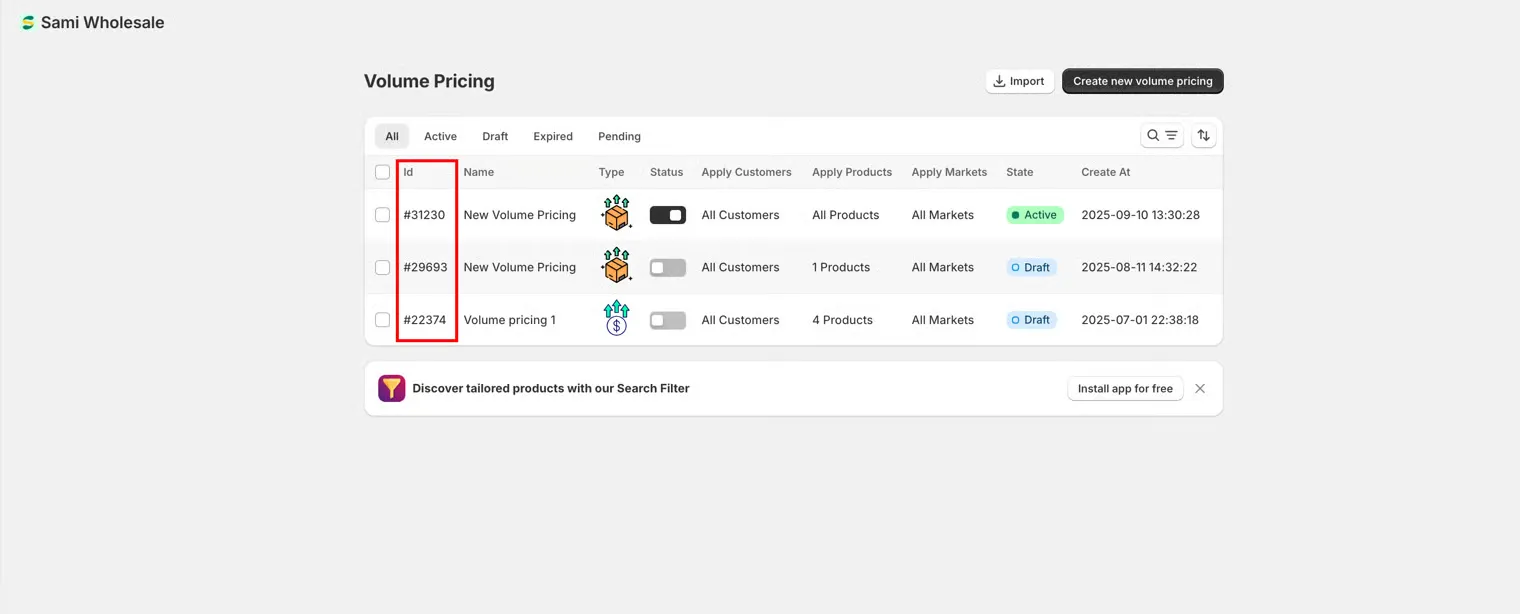
- 此 ID 可從應用程式介面取得
- 使用 ID 時請勿包含「#」符號
範例:
GET https://wholesale.samita.io/api/v1/volume-pricings/12. 請求標頭
Section titled “2. 請求標頭”所有 GET 請求都必須包含下列必填標頭:
| 標頭 | 說明 | 是否必填 |
|---|---|---|
X-SAMITA-API-KEY |
Wholesale 應用程式中提供的 API 金鑰 | 是 |
X-SAMITA-SHOP-URL |
Shopify 商店網域,格式為 xxx.myshopify.com | 是 |
CONTENT-TYPE |
必須為 application/json |
是 |
若缺少任何這些標頭,請求將被拒絕。
3. 請求本文
Section titled “3. 請求本文”- GET API不需要請求本文
- 只需要 URL 中的
{id}參數
4. API 回應
Section titled “4. API 回應”401 – Unauthorized
驗證失敗時會發生此錯誤。
可能的原因:
- 缺少商店 URL
- 缺少 API 金鑰
- 商店 URL 不正確
- API 金鑰不正確
- API 金鑰與所提供的商店不符
403 – This action is unauthorized
在下列情況會發生此錯誤:
- API 金鑰沒有 View 權限
- 所提供的 ID 不存在
- API 金鑰的存取權限不足
每個 API 金鑰可指派下列權限:
- View
- Create
- Update
- Delete
GET API 需要 View 權限。
429 – Too Many Requests
超過速率限制時會發生此錯誤。
目前的限制:
- 最多每 5 分鐘 1 次請求
- 最多每天 50 次請求
200 – API Success
- 請求有效
- 已成功取得記錄
- 回應以 JSON 格式傳回
範例:
{ "id": 1, "title": "New Volume Pricing", "status": true, "type": "quantity", "apply_customer": { "type": "all", "tags": [] }, "exclude_customer": { "type": "none", "tags": [] }, "apply_product": { "type": "all", "product_ids": [], "product_tags": [], "collection_ids": [], "apply_for_variants": false }, "exclude_product": { "type": "none", "product_ids": [], "collection_ids": [] }, "discount_for_variants": [ { "id": 8516448190631, "duplicated": false, "variant_pricing": true, "from_qty": "0", "from_amount": "0", "to_qty": "10", "to_amount": "0", "discount_groups": [ { "name": "all", "type": "percent", "value": "10" } ], "variants": [ { "id": 46747346763943, "duplicated": false, "from_qty": "0", "from_amount": "0", "to_qty": "10", "to_amount": "0", "discount_groups": [ { "name": "all", "type": "percent", "value": "10" } ] } ] } ], "apply_market": { "type": "all", "handle": [] }, "discount_method": "variant", "discount_groups": [ { "from_qty": "0", "from_amount": "0", "to_qty": "10", "to_amount": "0", "type": "percent", "value": "10" } ], "active_date": { "types": [], "start_at": "", "end_at": "" }, "created_at": "2026-01-15T10:00:00", "updated_at": "2026-01-15T10:00:00"}刪除 Volume Pricing 記錄
Section titled “刪除 Volume Pricing 記錄”若要刪除一筆或多筆現有的 Volume Pricing 記錄:
DELETE https://wholesale.samita.io/api/v1/volume-pricings/{id}- URL 中的
{id}應為有效的記錄 ID,但 API 實際上會刪除ids參數(見下方請求本文)中列出的記錄,而不是 URL 區段中的記錄。
範例:
DELETE https://wholesale.samita.io/api/v1/volume-pricings/12. 請求標頭
Section titled “2. 請求標頭”所有 DELETE 請求都必須包含下列必填標頭:
| 標頭 | 說明 | 是否必填 |
|---|---|---|
X-SAMITA-API-KEY |
Wholesale 應用程式中提供的 API 金鑰 | 是 |
X-SAMITA-SHOP-URL |
Shopify 商店網域,格式為 xxx.myshopify.com | 是 |
CONTENT-TYPE |
必須為 application/json |
是 |
3. 請求本文
Section titled “3. 請求本文”- 傳入
ids參數,內容為以逗號分隔的待刪除記錄 ID 清單(可作為查詢字串參數或 JSON 本文欄位)。這支援在一次呼叫中刪除多筆記錄,例如ids=1,2,3。 - 此
ids參數為必填,缺少時不會刪除任何記錄。
4. API 回應
Section titled “4. API 回應”401 – Unauthorized
驗證失敗時傳回。
可能的原因:
- 缺少商店 URL
- 缺少 API 金鑰
- 商店 URL 不正確
- API 金鑰不正確
- API 金鑰與商店不符
403 – This action is unauthorized
在下列情況會發生此錯誤:
- API 金鑰沒有 Delete 權限
- 所提供的 ID 不存在
- API 金鑰的存取權限不足
DELETE API 需要 Delete 權限。
429 – Too Many Requests
請求超過允許的速率限制時傳回。
速率限制:
| 限制類型 | 值 |
|---|---|
| 請求頻率 | 每 5 分鐘 1 次請求 |
| 每日上限 | 每天 50 次請求 |
200 – API Success
- Volume Pricing 記錄已成功刪除
- 可能不會傳回內容,或傳回確認訊息
範例:
{ "success": true}