
Free shipping
Make shipping free above a cart subtotal or number of items, with an optional discount on shipping at a lower threshold and a progress bar in the cart.
Ta treść nie jest jeszcze dostępna w Twoim języku.
A free shipping offer removes the shipping cost once the cart reaches a threshold, such as free shipping over $50. A progress bar in the cart shows shoppers how much more they need. You can add a lower step too, for example 50% off shipping over $25.
What shoppers see
Section titled “What shoppers see”- In the cart drawer and on the cart page, a progress bar: “Spend $12.00 more to unlock free shipping”, then “You unlocked free shipping!”. With a lower step, the bar has a mark for each step.
- At checkout, on the shipping step, the shipping rate crossed out and shown as free (or reduced), under the offer’s discount name.
Templates that start a free shipping offer
Section titled “Templates that start a free shipping offer”| Template | Starts with |
|---|---|
| Free shipping over $50 (Discounts tab) | Free shipping on all rates, to all countries, when the cart subtotal reaches $50 |
You can also click Start from blank in the Discounts category and pick Free shipping. See Create an offer.
Set up free shipping
Section titled “Set up free shipping”-
Set the threshold
Section titled “Set the threshold”In the offer editor, open the Offer tab. In the Rules section, pick the Threshold:
- Cart subtotal — enter the Minimum subtotal.
- Number of items — enter the Minimum items.
-
Choose which rates are discounted
Section titled “Choose which rates are discounted”Setting What it does Shipping rates All rates, or Standard only: the cheapest rate, plus any rate with “standard” in its name Max rate to discount Rates that cost more than this aren’t discounted. Leave it empty for No limit. Countries Leave it empty for All countries, or pick countries. Only shoppers shipping to those countries get it, going by the shipping address at checkout. 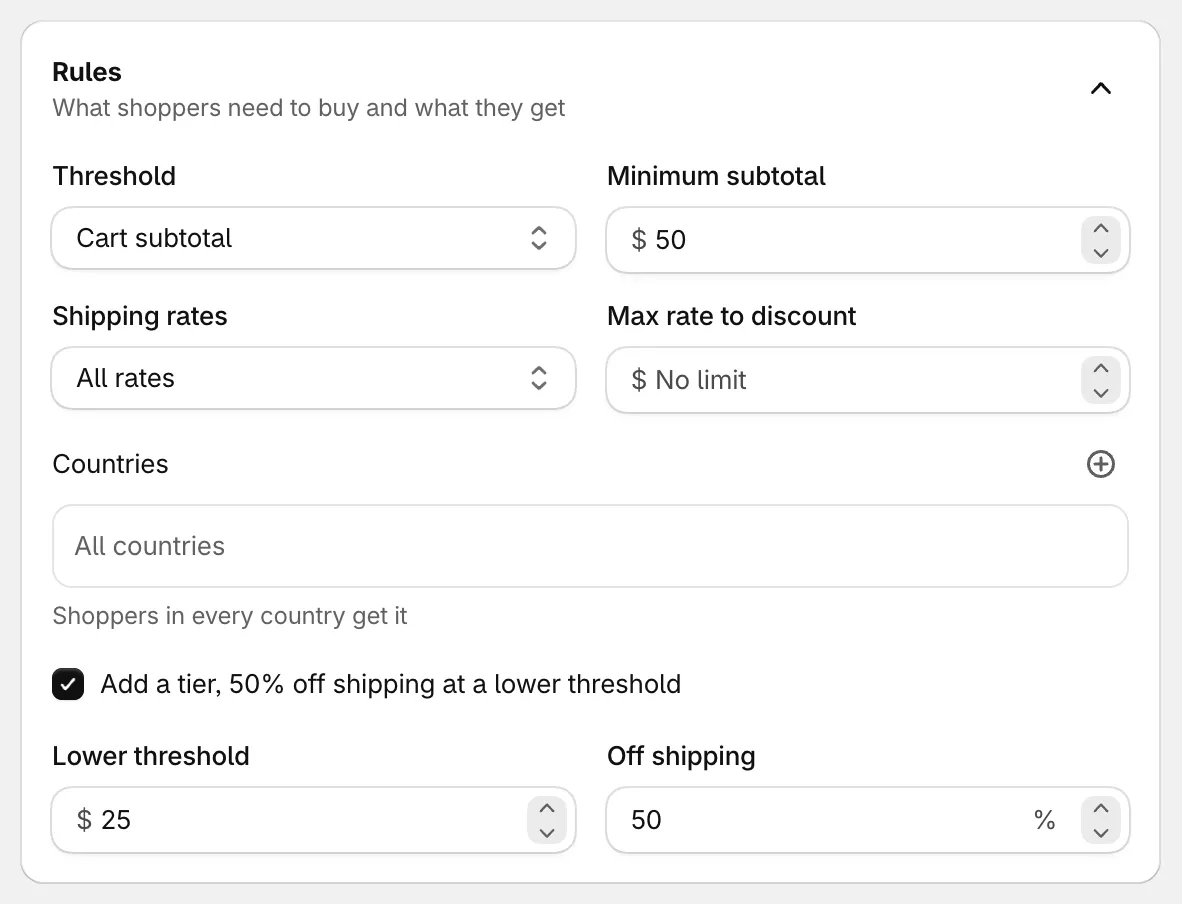
Free shipping over $50, with 50% off shipping from $25.
-
Add a lower step (optional)
Section titled “Add a lower step (optional)”Tick Add a tier, 50% off shipping at a lower threshold (the number follows Off shipping) and fill in:
- Lower threshold — where the reduced shipping starts. It has to be below the main threshold.
- Off shipping — the percentage off shipping, from 1 to 99.
Below the lower threshold shipping costs full price; between the two it’s reduced; above the main threshold it’s free.
-
Save and check your store
Section titled “Save and check your store”Set the status to Active and click Save. Add something to your cart and open the cart drawer to see the bar. Go to checkout and enter an address to see the shipping discount.
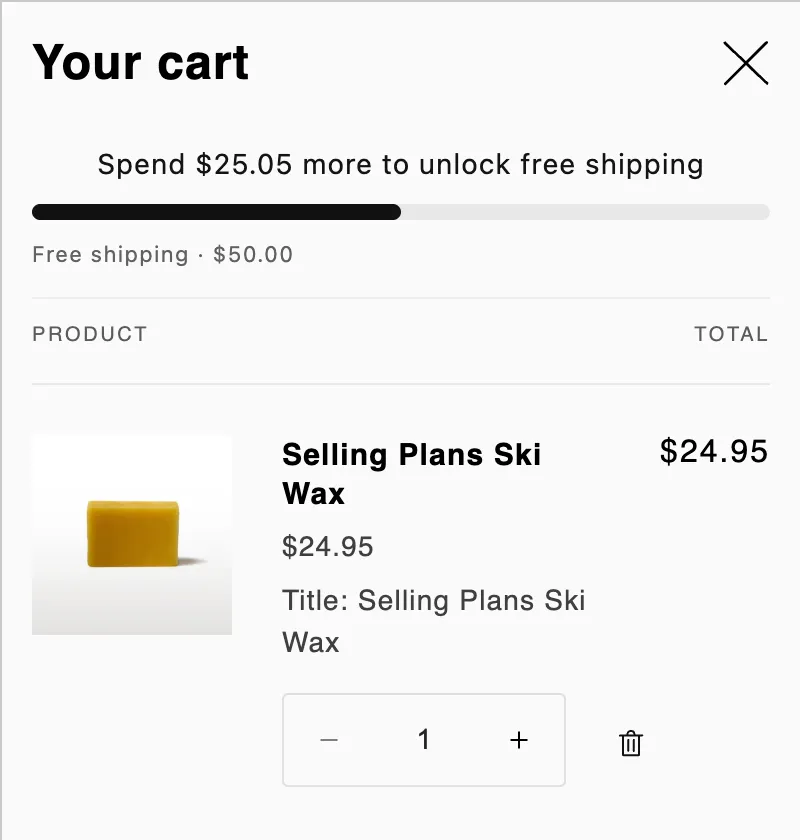
The free shipping bar in the cart drawer.
Good to know
Section titled “Good to know”- The whole cart counts. Free shipping has no Products section: every item in the cart counts toward the threshold. Free gifts added by the app don’t.
- The discount needs shipping rates. It takes money off the rates you set up in Shopify. Shoppers see it at checkout once there’s an address and a rate to discount.
- Other currencies. The threshold and the max rate convert to the shopper’s market currency at the market’s exchange rate.
- Bar text and position. Change the bar’s messages, its look, and where it sits in Placement.
- No A/B test. Free shipping offers don’t have a product page block, so they can’t be A/B tested.