
料金プラン
FREE、GOLD、DIAMONDの各プランを比較し、プランを切り替えて、割引コードを適用する方法を説明します。
Sami Product Labels には3つのプランがあります。まずはFREEで始めて、ストアの成長に合わせてアップグレードできます。
| プラン | 料金 | こんな方におすすめ |
|---|---|---|
| FREE | $0 | 基本的なラベルとバッジ、シンプルなカスタマイズ。開設したばかりの小規模ストアや、数点の商品でビジュアルのプロモーションを試したい場合に。 |
| GOLD | $9.9 USD/月 | スマートなターゲティングで、ラベルを無制限に作成。 |
| DIAMOND | $14.9 USD/月 | AIを活用したラベルを、大規模でも自在にコントロール。 |
Pricing plans ページの下部にある Show Pricing Details をクリックすると、完全な比較表が展開されます。表は5つのセクションに分かれています。
Limits & Resources
Section titled “Limits & Resources”| 機能 | FREE | GOLD | DIAMOND |
|---|---|---|---|
| Number of Badges/Labels | 5 | 無制限 | 無制限 |
| Number of Label groups | 1 | 1 | 無制限 |
| Number of Highlights | 2 | 無制限 | 無制限 |
| Number of Banners | 2 | 無制限 | 無制限 |
| Number of Trust Badges | 無制限 | 無制限 | 無制限 |
| Images samples | 1000 + | 5000 + | 10000 + |
| Select product from collections/tag | — | ✓ | ✓ |
| Choose product variants | — | — | ✓ |
| Create images with AI generation | — | — | ✓ |
Badge/Label Design
Section titled “Badge/Label Design”| 機能 | FREE | GOLD | DIAMOND |
|---|---|---|---|
| Add custom text Badges/Labels | ✓ | ✓ | ✓ |
| Design your images with the editor | ✓ | ✓ | ✓ |
| Adjust dimensions of Labels | ✓ | ✓ | ✓ |
| Display in 9 predefined positions | ✓ | ✓ | ✓ |
| Animation for Badge/Label/Trust Badge | ✓ | ✓ | ✓ |
| Countdown timer for Labels and Badges | — | ✓ | ✓ |
| Text hover for Badges/Labels | — | ✓ | ✓ |
| Customize unlimited position of Labels | — | — | ✓ |
| Multi-language (翻訳) | — | — | ✓ |
Label Display On
Section titled “Label Display On”| ページ | FREE | GOLD | DIAMOND |
|---|---|---|---|
| Related products block | ✓ | ✓ | ✓ |
| Collection pages | ✓ | ✓ | ✓ |
| Search page | ✓ | ✓ | ✓ |
| Home page | ✓ | ✓ | ✓ |
| Article Page | ✓ | ✓ | ✓ |
| Cart page | ✓ | ✓ | ✓ |
| Product pages (All images) | ✓ | ✓ | ✓ |
| Product pages (First image) | — | ✓ | ✓ |
Display Conditions
Section titled “Display Conditions”| 条件 | FREE | GOLD | DIAMOND |
|---|---|---|---|
| All products | ✓ | ✓ | ✓ |
| Specific products | 50 | 無制限 | 無制限 |
| Include/Exclude from Product Tag | — | ✓ | ✓ |
| Inventory Status (in stock / out of stock) | — | ✓ | ✓ |
| Sale products within specific ranges | — | ✓ | ✓ |
| Include/Exclude customers with specific tag | — | ✓ | ✓ |
| Products Created/Published | — | ✓ | ✓ |
| Set visibility date time | — | ✓ | ✓ |
| Set visibility country restriction | — | ✓ | ✓ |
| Specific languages | — | — | ✓ |
| Specific metafields | — | — | ✓ |
Analytics & Reporting
Section titled “Analytics & Reporting”| 機能 | FREE | GOLD | DIAMOND |
|---|---|---|---|
| Analytics dashboard | — | — | ✓ |
プランを変更する
Section titled “プランを変更する”-
Pricing plans ページを開く
Section titled “Pricing plans ページを開く”Shopify管理画面で Sami Product Labels アプリを開き、アプリのサイドバーにある Pricing plans をクリックします。
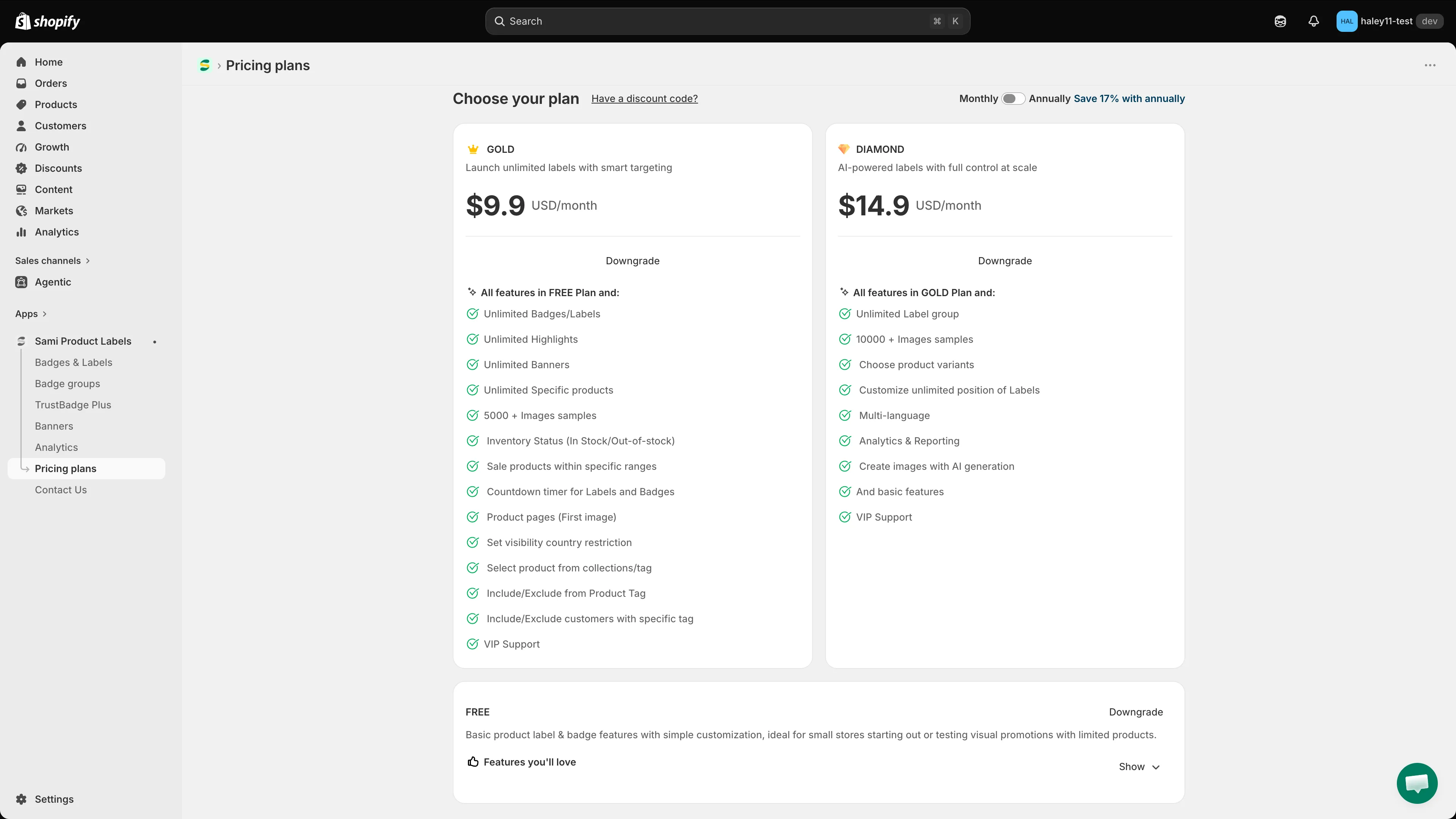
Pricing plansページには、各プランの主な機能が一覧表示されます。
-
請求期間を選択する
Section titled “請求期間を選択する”右上の Monthly / Annually トグルを使います。年払いは17%お得で、切り替えるとカードの価格も更新されます。
-
プランを選択する
Section titled “プランを選択する”各プランのカードには、そのプランを選ぶとどうなるかを示すボタンが表示されます。
- Current plan — グレーアウトされています。現在ご利用中のプランです。
- Downgrade — より低い料金のプランに変更します。
- 上位プランの同様のボタンをクリックすると、アップグレードが始まります。
-
Shopifyの請求で確定する
Section titled “Shopifyの請求で確定する”ここからはShopifyが引き継ぎ、Shopify独自の請求確認ページが表示されます。料金を確認して承認すると、新しいプランが有効になります。
割引コードを適用する
Section titled “割引コードを適用する”Choose your plan の見出しの横にある Have a discount code? をクリックします。Apply Discount Code ダイアログにコードを入力し、Apply をクリックします。割引後の価格が適用されるよう、プランを選択する前に行ってください。
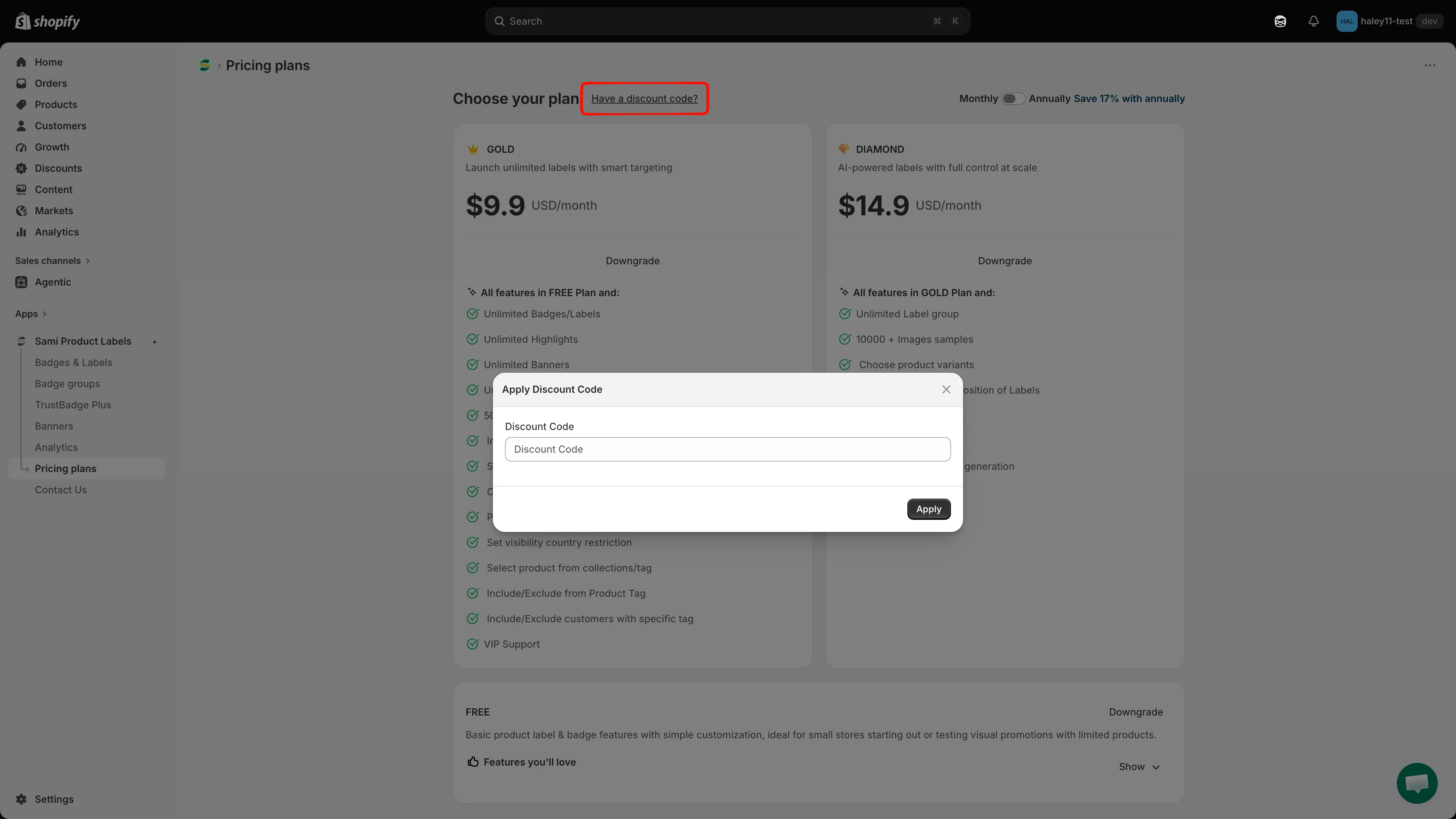
プランを選択する前に割引コードを適用します。
すべてのプランに含まれるもの
Section titled “すべてのプランに含まれるもの”どのプランでも、24時間365日のメールサポート、編集中のライブプレビュー、ヘルプドキュメント、画像サンプルライブラリへのアクセスが含まれます。
次のステップ
Section titled “次のステップ”- バッジとラベルの概要 — バッジの作成を始めましょう。
- クイックスタートガイド — 最初のバッジを数分で公開します。