
定價方案
比較 FREE、GOLD 和 DIAMOND 方案、切換方案,以及套用折扣碼。
Sami Product Labels 提供三種方案。您可以從 FREE 開始,隨著商店成長再升級。
| 方案 | 價格 | 適合對象 |
|---|---|---|
| FREE | $0 | 基本的標籤和徽章,可進行簡單的自訂,適合剛起步或想在少數商品上測試視覺促銷的小型商店。 |
| GOLD | $9.$9/月 | 無限標籤,並提供智慧目標設定。 |
| DIAMOND | $14.$9/月 | 以 AI 驅動的標籤,可大規模完整掌控。 |
點擊 Pricing plans 頁面底部的 Show Pricing Details,即可展開完整的比較表。比較表分為五個區段。
Limits & Resources
Section titled “Limits & Resources”| 功能 | FREE | GOLD | DIAMOND |
|---|---|---|---|
| Number of Badges/Labels | 5 | 無限 | 無限 |
| Number of Label groups | 1 | 1 | 無限 |
| Number of Highlights | 2 | 無限 | 無限 |
| Number of Banners | 2 | 無限 | 無限 |
| Number of Trust Badges | 無限 | 無限 | 無限 |
| Images samples | 1000 + | 5000 + | 10000 + |
| Select product from collections/tag | — | ✓ | ✓ |
| Choose product variants | — | — | ✓ |
| Create images with AI generation | — | — | ✓ |
Badge/Label Design
Section titled “Badge/Label Design”| 功能 | FREE | GOLD | DIAMOND |
|---|---|---|---|
| Add custom text Badges/Labels | ✓ | ✓ | ✓ |
| Design your images with the editor | ✓ | ✓ | ✓ |
| Adjust dimensions of Labels | ✓ | ✓ | ✓ |
| Display in 9 predefined positions | ✓ | ✓ | ✓ |
| Animation for Badge/Label/Trust Badge | ✓ | ✓ | ✓ |
| Countdown timer for Labels and Badges | — | ✓ | ✓ |
| Text hover for Badges/Labels | — | ✓ | ✓ |
| Customize unlimited position of Labels | — | — | ✓ |
| Multi-language(翻譯) | — | — | ✓ |
Label Display On
Section titled “Label Display On”| 頁面 | FREE | GOLD | DIAMOND |
|---|---|---|---|
| Related products block | ✓ | ✓ | ✓ |
| Collection pages | ✓ | ✓ | ✓ |
| Search page | ✓ | ✓ | ✓ |
| Home page | ✓ | ✓ | ✓ |
| Article Page | ✓ | ✓ | ✓ |
| Cart page | ✓ | ✓ | ✓ |
| Product pages (All images) | ✓ | ✓ | ✓ |
| Product pages (First image) | — | ✓ | ✓ |
Display Conditions
Section titled “Display Conditions”| 條件 | FREE | GOLD | DIAMOND |
|---|---|---|---|
| All products | ✓ | ✓ | ✓ |
| Specific products | 50 | 無限 | 無限 |
| Include/Exclude from Product Tag | — | ✓ | ✓ |
| Inventory Status(有庫存/無庫存) | — | ✓ | ✓ |
| Sale products within specific ranges | — | ✓ | ✓ |
| Include/Exclude customers with specific tag | — | ✓ | ✓ |
| Products Created/Published | — | ✓ | ✓ |
| Set visibility date time | — | ✓ | ✓ |
| Set visibility country restriction | — | ✓ | ✓ |
| Specific languages | — | — | ✓ |
| Specific metafields | — | — | ✓ |
Analytics & Reporting
Section titled “Analytics & Reporting”| 功能 | FREE | GOLD | DIAMOND |
|---|---|---|---|
| Analytics dashboard | — | — | ✓ |
-
開啟 Pricing plans 頁面
Section titled “開啟 Pricing plans 頁面”在 Shopify 後台中開啟 Sami Product Labels 應用程式,然後點擊應用程式側邊欄中的 Pricing plans。
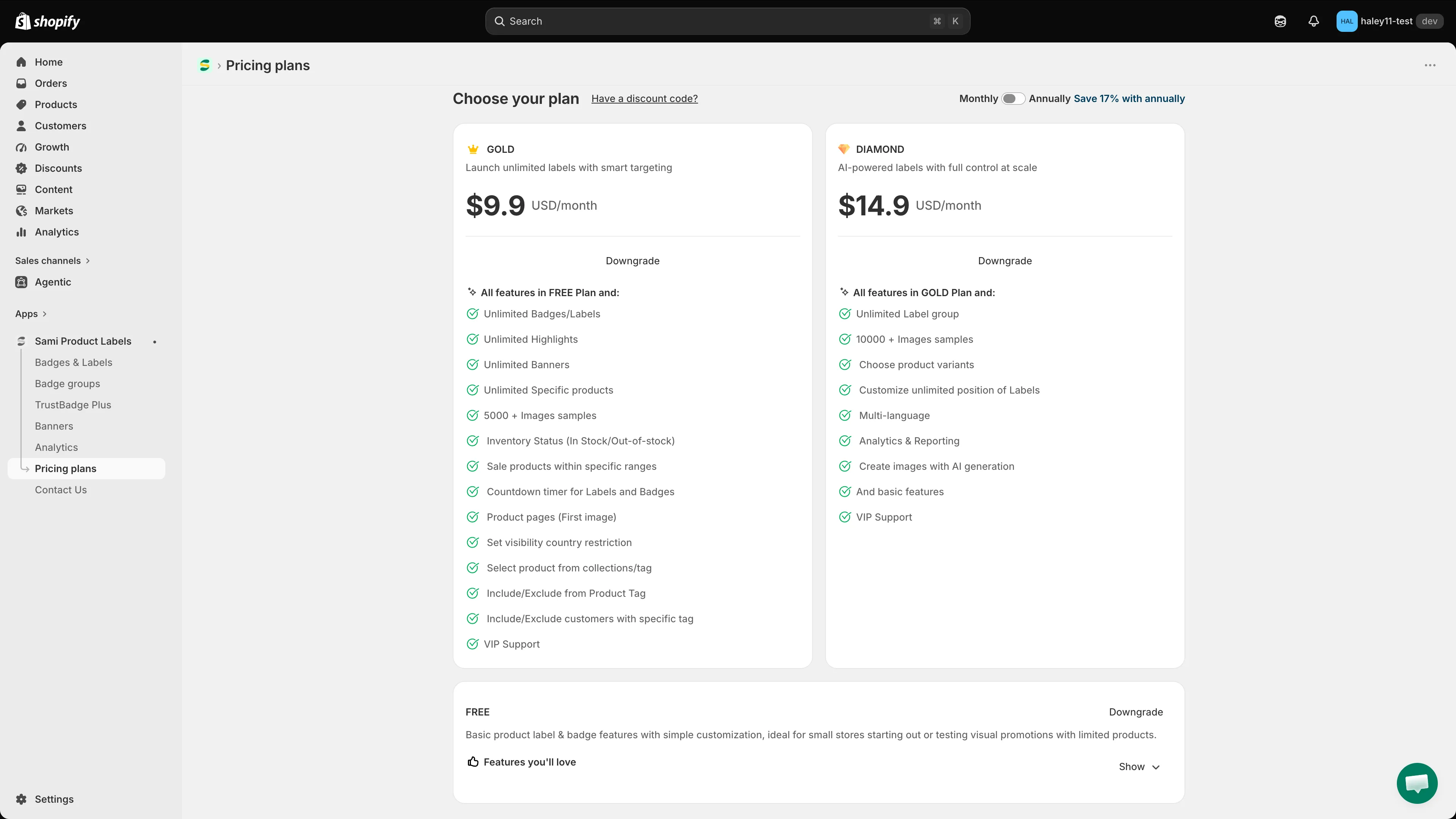
Pricing plans 頁面列出每個方案層級及其主要功能。
-
選擇計費週期
Section titled “選擇計費週期”使用右上角的 Monthly / Annually 切換開關。年繳便宜 17%,切換時卡片上的價格會隨之更新。
-
每張方案卡片上都有一個按鈕,說明該選擇會執行的動作:
- Current plan:呈現灰色,表示這是您目前使用的方案。
- Downgrade:切換到較低價的層級。
- 較高層級上對應的按鈕則會開始升級。
-
透過 Shopify 帳務確認
Section titled “透過 Shopify 帳務確認”接下來由 Shopify 接手,並顯示其自己的帳務確認頁面。請檢視費用並核准,即可啟用新方案。
點擊 Choose your plan 標題旁的 Have a discount code?。在 Apply Discount Code 對話方塊中輸入您的折扣碼,然後點擊 Apply。請在選擇方案之前完成此步驟,這樣才會採用折扣後的價格。
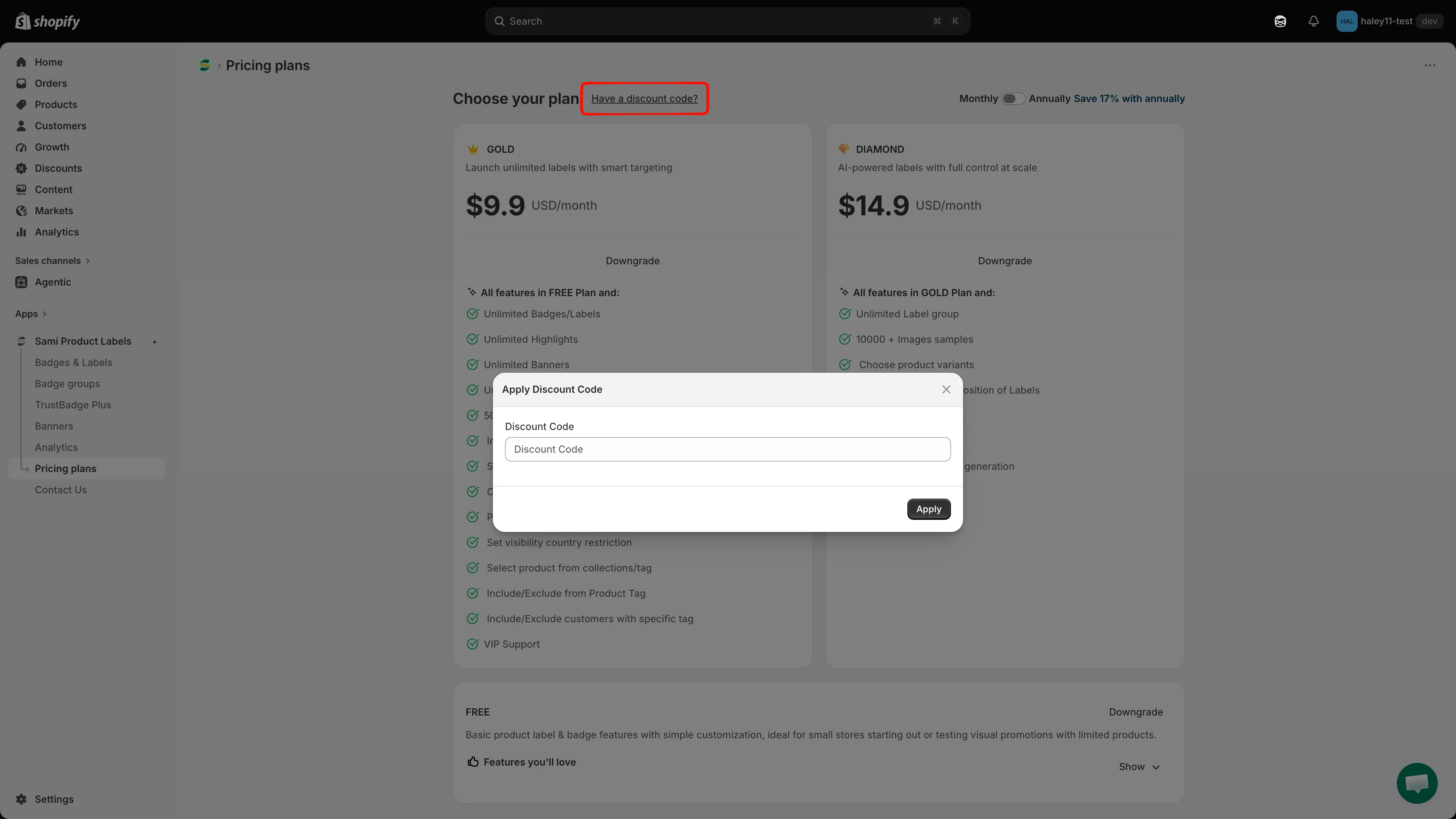
選擇方案前先套用折扣碼。
每個方案都包含的內容
Section titled “每個方案都包含的內容”無論哪個層級,所有方案都包含全天候電子郵件支援、即時編輯預覽、說明文件,以及圖片範例庫的使用權。