
依顧客指定
依登入狀態、訂單紀錄、消費金額、標籤等條件,將徽章顯示給特定的顧客區隔。
依顧客指定,可讓您根據瀏覽商店的對象顯示不同的徽章,例如登入狀態、訂單數量、消費金額和其他顧客屬性。
可用的顧客條件
Section titled “可用的顧客條件”| 條件類型 | 運算子 | 值欄位 |
|---|---|---|
| Customer | Is Logged In / Not Logged In | — |
| Customer tag | is equal to / is not equal to | 您現有 Shopify 顧客標籤的多選清單 |
| Customer order count | is equal to / is not equal to / is greater than / is less than | 數字 |
| Customer total spent | is equal to / is not equal to / is greater than / is less than | 數字 |
| Customer purchase | Product already purchased / Product not purchased | — |
| Customer company name | is equal to / is not equal to | 文字 |
如何設定依顧客指定
Section titled “如何設定依顧客指定”-
開啟 Display 索引標籤
Section titled “開啟 Display 索引標籤”在徽章編輯器中,開啟 Display,然後展開 Customer conditions。
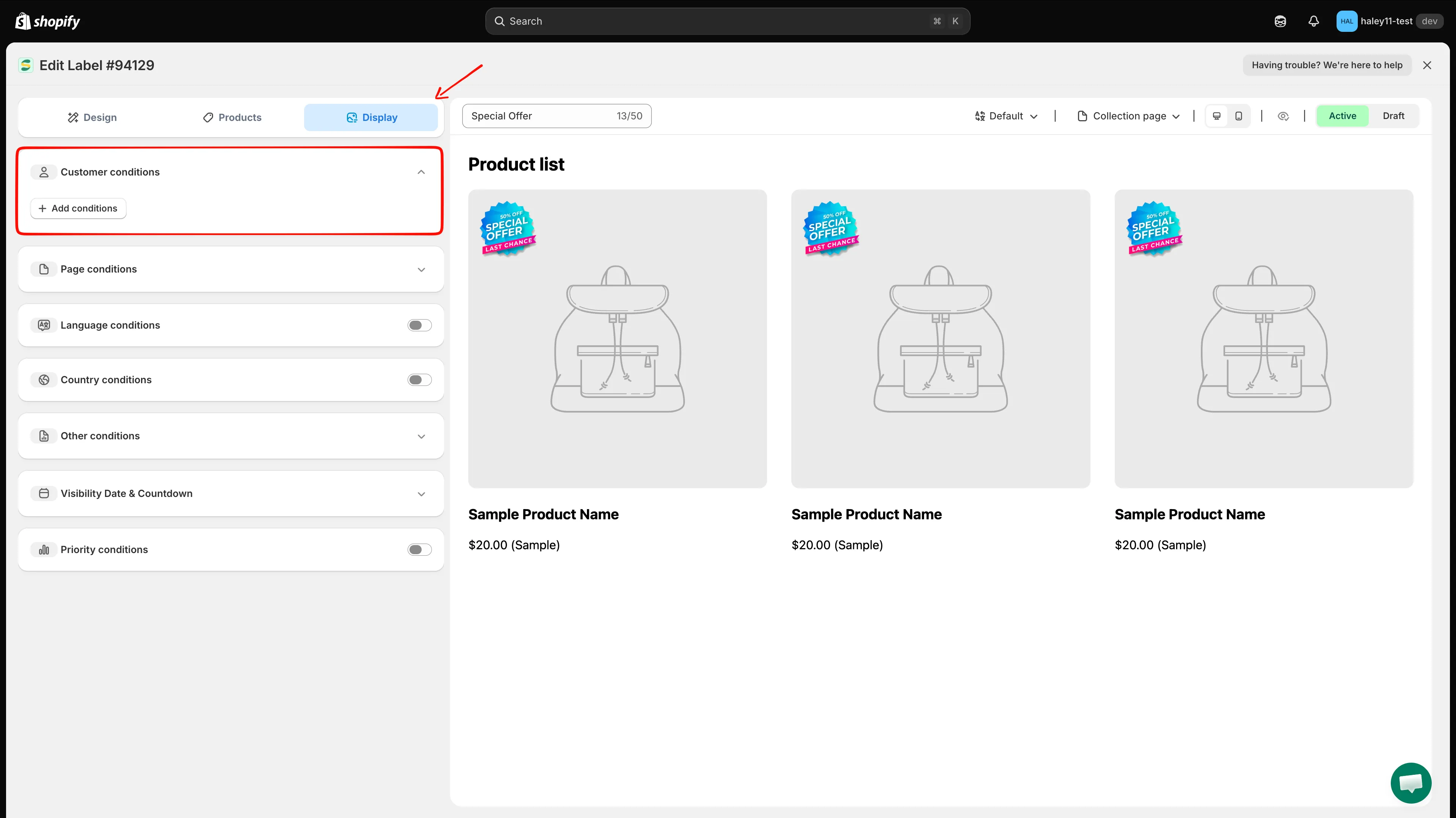
開啟 Display 索引標籤並展開 Customer conditions。
-
新增顧客條件
Section titled “新增顧客條件”點擊 Add conditions。畫面會出現一列新規則,預設填入 Customer / Is Logged In。開啟第一個下拉式選單即可選擇其他顧客條件。
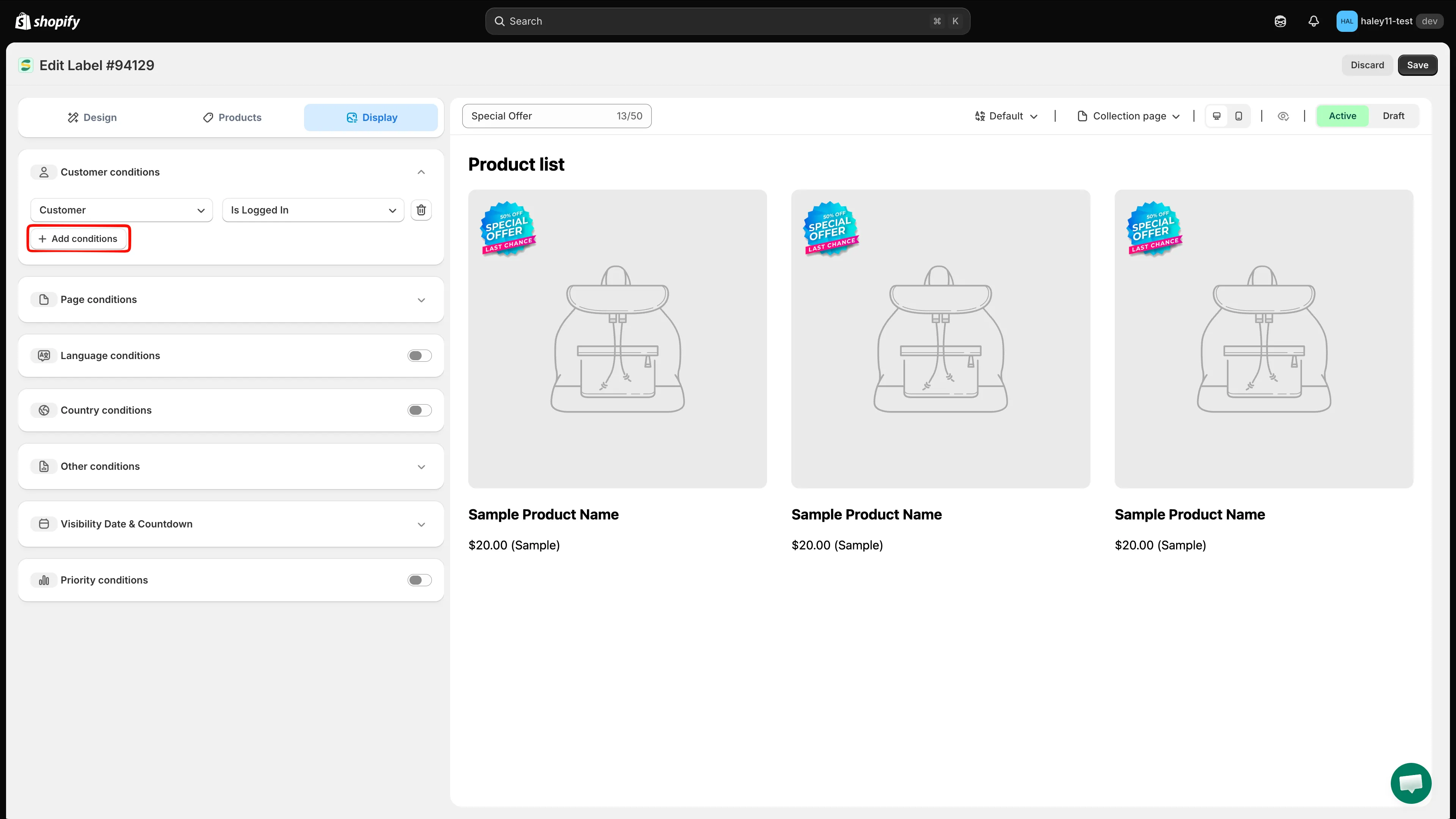
選擇 Customer、Customer tag、Customer order count、Customer total spent、Customer purchase 或 Customer company name。
-
設定運算子和值
Section titled “設定運算子和值”在第二個下拉式選單中選擇運算子,然後在第三個欄位中輸入或選擇值。例如,將 Customer order count 設為 is greater than,值為 10。
選擇 Customer tag 時,第三個欄位是可搜尋的清單,列出您商店中已有的顧客標籤,請勾選一個或多個標籤,而不是自由輸入文字。
Customer 和 Customer purchase 沒有第三個欄位,僅由運算子定義規則。Customer purchase 檢查的是顧客以前是否買過任何東西,因此不需要選擇商品。
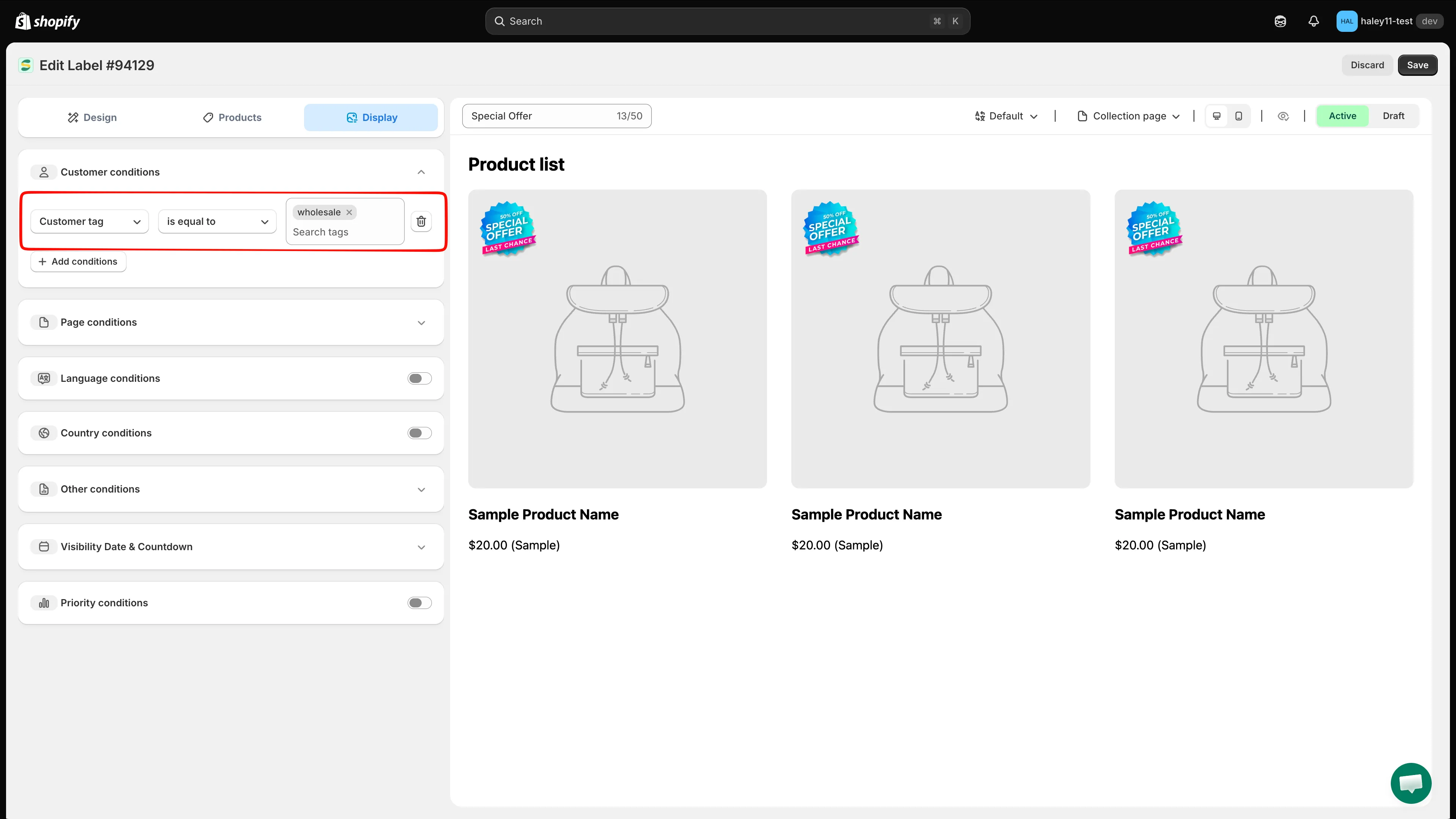
範例:將徽章顯示給標籤等於 wholesale 的顧客。
-
新增更多條件(選用)
Section titled “新增更多條件(選用)”再次點擊 Add conditions 即可疊加更多規則。顧客條件一律以 AND 合併,也就是購物者必須符合您新增的每一項顧客規則。此區段沒有 any/all 切換選項。
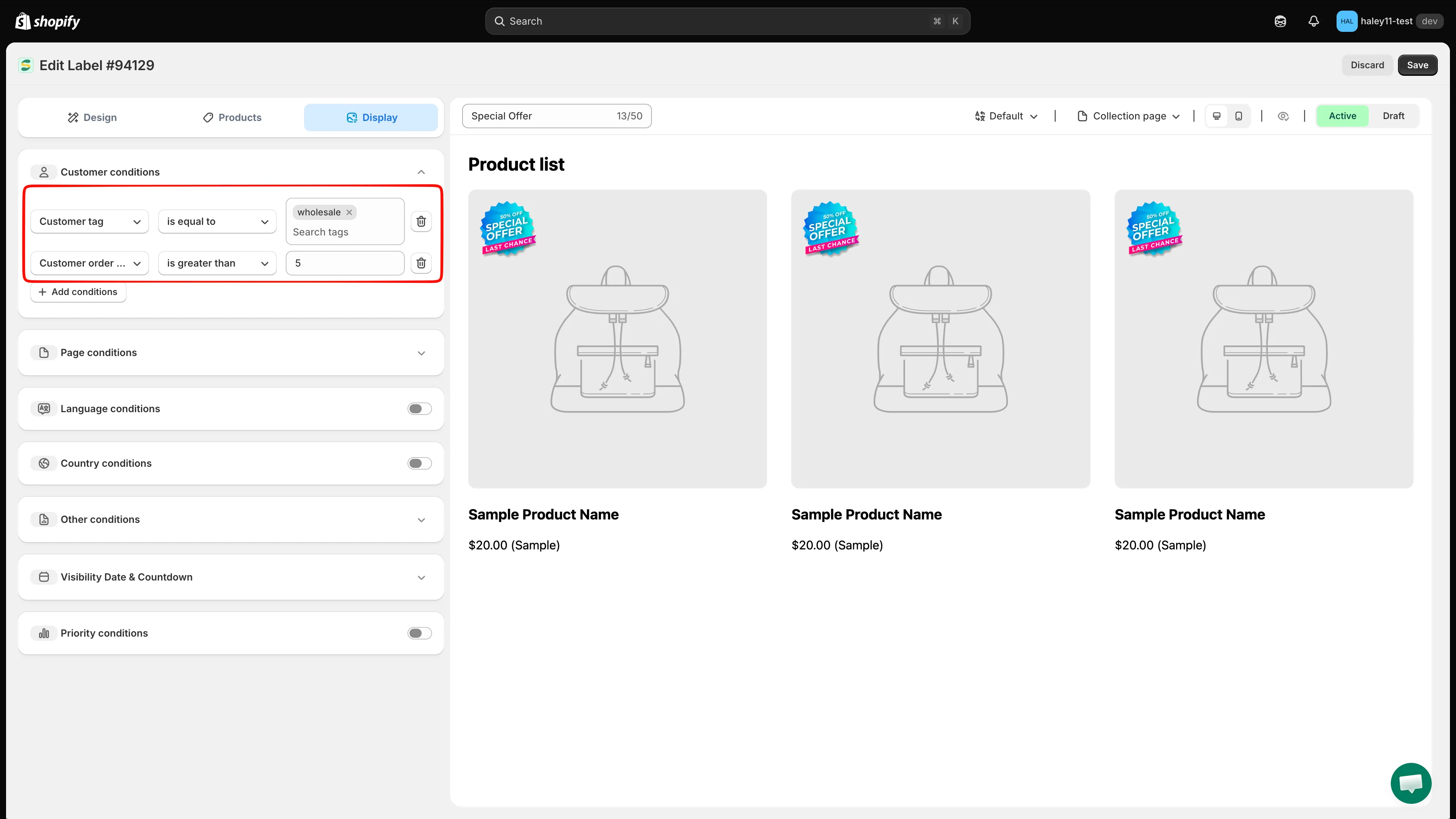
多個顧客條件必須全部符合。
-
點擊 Save 套用顧客指定。徽章只會顯示給符合您條件的訪客。
使用情境與範例
Section titled “使用情境與範例”為忠實顧客顯示 VIP 徽章
Section titled “為忠實顧客顯示 VIP 徽章”對下過 10 筆以上訂單的購物者顯示「VIP」或「Loyal Customer」徽章:
- **條件:**Customer order count is greater than 9
- **結果:**訂單達 10 筆以上的已登入顧客,會在指定的商品上看到 VIP 徽章。
為回訪顧客顯示歡迎回來徽章
Section titled “為回訪顧客顯示歡迎回來徽章”對任何已登入的顧客顯示「Welcome Back」徽章:
- **條件:**Customer Is Logged In
- **結果:**所有已登入的顧客都會看到個人化的歡迎徽章。
為高消費顧客提供專屬優惠
Section titled “為高消費顧客提供專屬優惠”對消費超過 $500 的顧客顯示「Special Price」徽章:
- **條件:**Customer total spent is greater than 500
- **結果:**高價值顧客會看到專屬價格徽章。
為 B2B 顧客顯示批發徽章
Section titled “為 B2B 顧客顯示批發徽章”對隸屬於特定公司的顧客顯示批發價格徽章:
- **條件:**Customer company name is equal to「Wholesale Partners Ltd」
- **結果:**該公司的 B2B 顧客會看到相關徽章。
使用 Shopify 顧客標籤來指定已儲存的顧客區隔:
- **條件:**Customer tag is equal to,然後在標籤清單中勾選 VIP
- **結果:**只有在 Shopify 中被標記為 VIP 的顧客會看到徽章。
為首次購買的顧客提供歡迎優惠
Section titled “為首次購買的顧客提供歡迎優惠”只對從未向您購買過的顧客顯示「First Order Discount」徽章:
- **條件:**Customer purchase Product not purchased
- **結果:**徽章只會顯示給沒有購買紀錄的已登入顧客。
為現有顧客顯示感謝徽章
Section titled “為現有顧客顯示感謝徽章”對曾經下過訂單的任何人顯示「Thanks for coming back」徽章:
- **條件:**Customer purchase Product already purchased
- **結果:**徽章會顯示給至少有過一筆訂單的已登入顧客。
合併顧客與商品條件
Section titled “合併顧客與商品條件”您可以在同一個徽章中,將顧客條件與商品屬性條件結合使用。例如:
- Customer order count is greater than 5 AND Product type is equal to「Premium」
- 結果:只有訂單達 5 筆以上的回訪顧客會看到徽章,而且僅限於高級商品。
請在 Products 中另外設定商品範圍,並在 Display 中設定顧客規則。購物者必須在瀏覽商品範圍內所含的商品時,同時符合顧客規則。依商品屬性指定中說明的 all conditions / any condition 選擇器僅適用於商品比對規則,不適用於顧客條件。
- 依商品屬性指定:依商品標題、類型、供應商、價格等條件篩選徽章。
- 依國家/地區和語言指定:將徽章顯示給來自特定國家/地區或使用特定商店語言的訪客。