> For the complete documentation index, see [llms.txt](https://docs.samita.io/llms.txt). Markdown versions of documentation pages are available by appending `.md` to page URLs; this page is available as [Markdown](https://docs.samita.io/sami-b2b-onboarding/reviewing-applications/request-more-information.md).

# Request more information

Ask a buyer for a missing document or detail, then review the application when they send it back.

When an application is missing something, ask the buyer for it instead of rejecting it. Sami B2B Onboarding emails the buyer a private link back to their application, and puts the application back in your queue when they answer.

{% hint style="info" %}
The link opens the page the app created for your form, so the app embed must be on in your theme. See [Turn on the app embed](/sami-b2b-onboarding/getting-started/turn-on-the-app-embed.md).
{% endhint %}

## Send a request

{% stepper %}
{% step %}

### Open the request dialog

Use any of these:

* On the **Applications** tab, click **…** at the end of the row and pick **Request info**.
* In the quick review drawer, click **Request info**, or press `E`.
* On the full application page, click **More actions › Request info**.

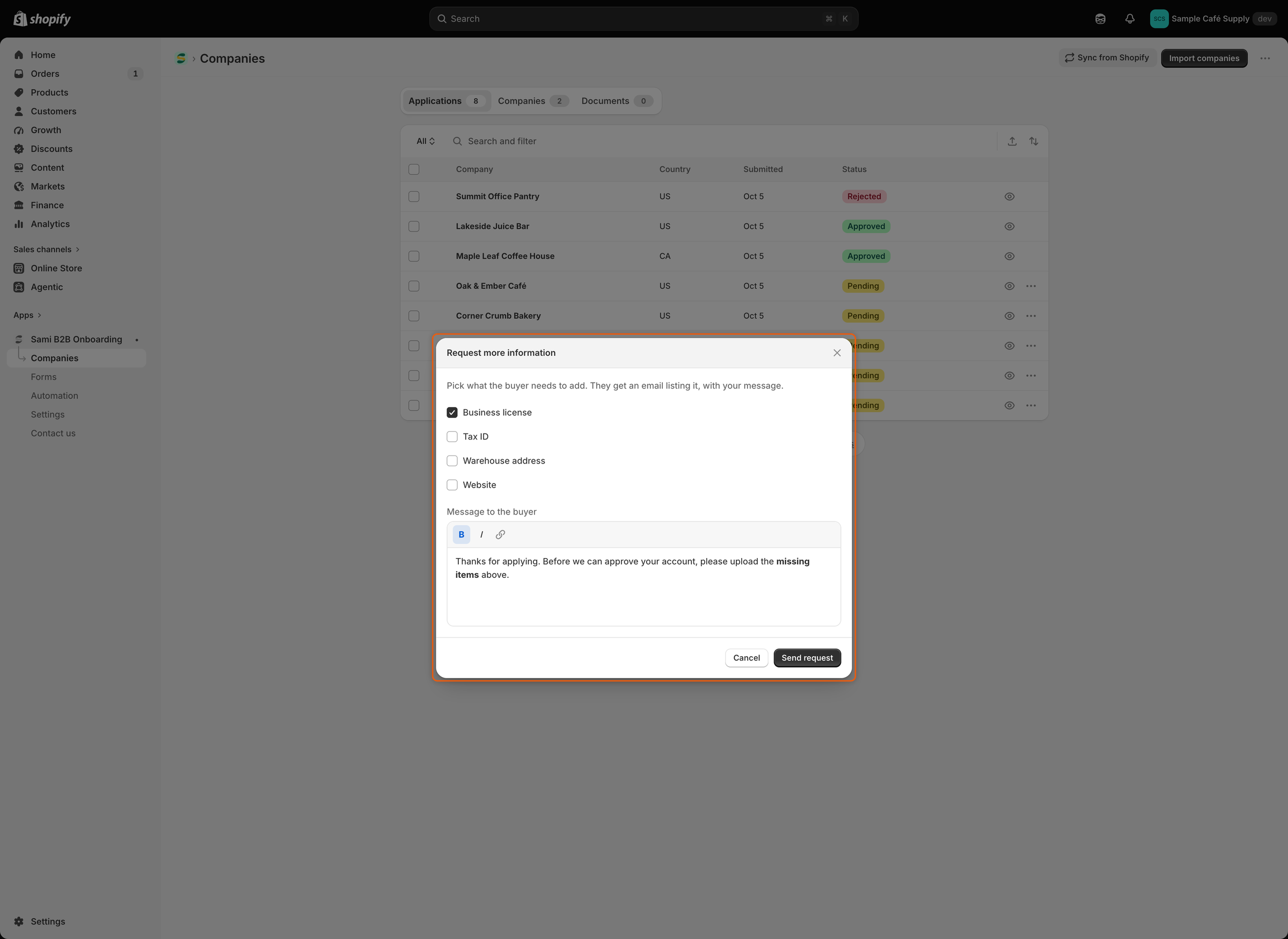
The **Request more information** dialog opens.
{% endstep %}

{% step %}

### Pick what the buyer must add

Tick one or more of **Business license**, **Tax ID**, **Warehouse address** and **Website**. You must tick at least one. The buyer's email lists each item you tick.
{% endstep %}

{% step %}

### Write your message

**Message to the buyer** starts with "Thanks for applying. Before we can approve your account, please upload the missing items above." Change it to say exactly what you need. The toolbar offers bold, italic and links.
{% endstep %}

{% step %}

### Send it

Click **Send request**. "Information requested" confirms it. The status changes to **Needs info**, the application moves to the **Waiting on buyer** view, and the timeline shows "Requested information from Acme Supply Co."
{% endstep %}
{% endstepper %}

<figure><img src="https://3844812229-files.gitbook.io/~/files/v0/b/gitbook-x-prod.appspot.com/o/spaces%2FRrf4pQPgjvb3GW7IN3Ci%2Fuploads%2Fgit-blob-4be342e2bd634784471e4c72bd3d61d557b1a15e%2Fscreenshot-applications-request-info-dialog.png?alt=media" alt="The Request more information dialog with Business license ticked among four checkboxes, the default message to the buyer with two words in bold, and the Send request button."><figcaption><p>Tick what the buyer must add and write a short note; both go into the buyer's email.</p></figcaption></figure>

{% hint style="info" %}
**Request info** goes to one application at a time. If several rows are ticked in the list, it goes only to the first ticked row, and the dialog doesn't say which one. Tick only one row, or use the row's **…** menu.
{% endhint %}

## What the buyer gets

The buyer receives the **More information needed** email ("We need a few more details"). It lists the items you ticked and your message, with an **Update my application** button. A note asks them to use this link rather than apply again, so they keep their place in your queue.

The email goes out when **More information needed** is turned on in the form builder's **Email** section and **Revision requested** is on under **Automation › Automations**. Both are on by default. To change its wording, see [Edit email templates](/sami-b2b-onboarding/settings/email-templates.md).

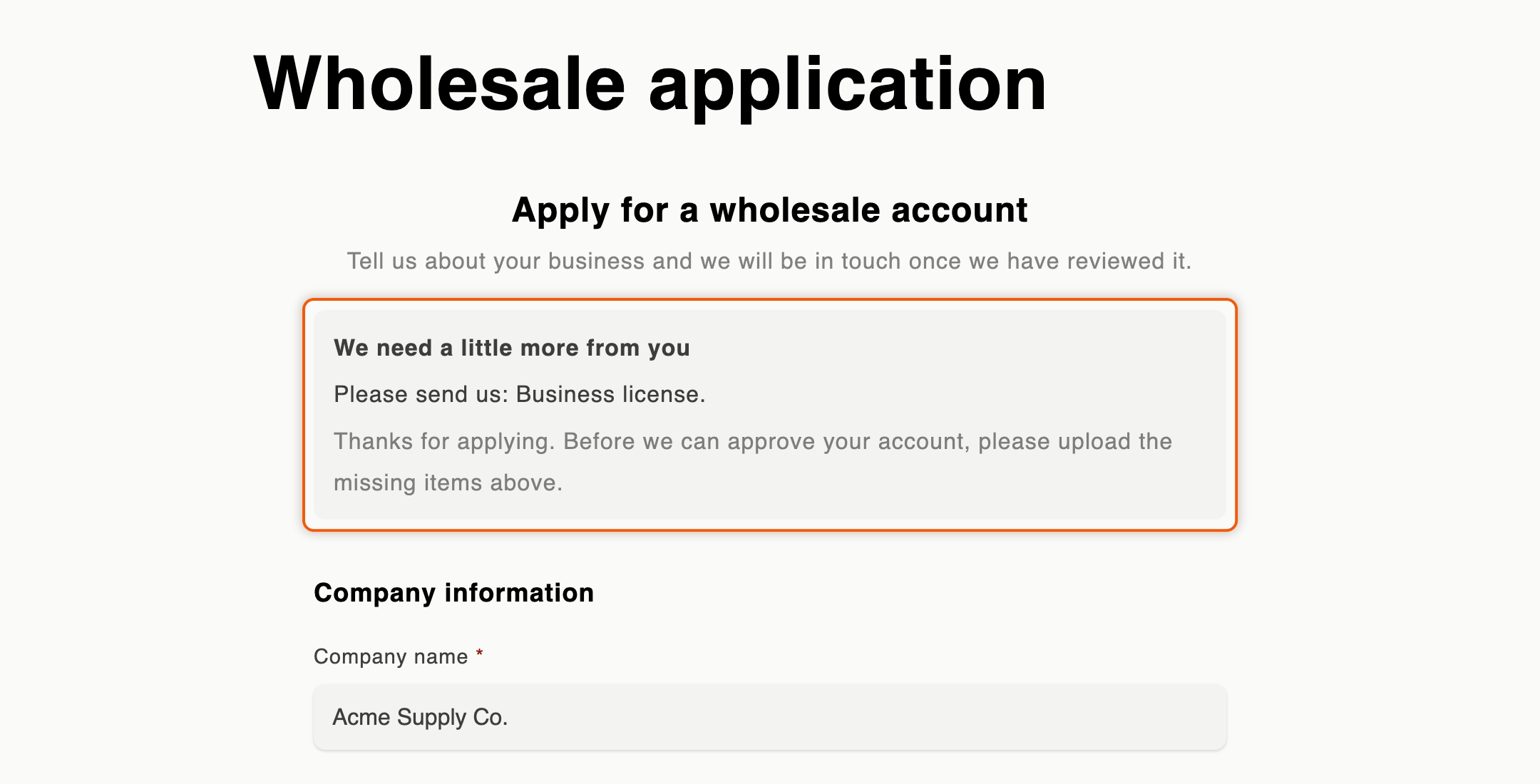
**Update my application** opens your form page with the buyer's answers already filled in. A box at the top says "We need a little more from you", lists what you asked for ("Please send us: Business license.") and shows your message. The buyer changes what's needed, adds files, and sends the form again. The link belongs to this one application.

A buyer who is signed in to their customer account also sees the request there, with an **Update your application** button. See [Company application page](/sami-b2b-onboarding/customer-accounts/company-application-page.md).

<figure><img src="https://3844812229-files.gitbook.io/~/files/v0/b/gitbook-x-prod.appspot.com/o/spaces%2FRrf4pQPgjvb3GW7IN3Ci%2Fuploads%2Fgit-blob-c3c44f5e5b5bdced9d2bb6e7b47db554a93b184b%2Fscreenshot-storefront-revision-request-box.png?alt=media" alt="The Wholesale application page with a box reading &#x22;We need a little more from you&#x22; and &#x22;Please send us: Business license.&#x22; plus the merchant&#x27;s message, above the Company name field filled with Acme Supply Co."><figcaption><p>The buyer sees what you asked for above their own answers, and sends the same application again.</p></figcaption></figure>

## When the buyer sends it back

* The status changes to **Resubmitted** and the application returns to **Needs your action**.
* The answers on the application are updated. New files appear under **Attachments** and on the **Documents** tab.
* Your team gets the **Buyer resubmitted** email ("Acme Supply Co. sent the information you asked for"). Its **Review changes** button opens the application; its **Approve** button opens it with the approve dialog ready, and never approves on its own. The email goes out when it's on in the form builder's **Email** section and **Application revised** is on under **Automation › Automations**, as both are by default. Choose who receives it in [Choose who gets notified](/sami-b2b-onboarding/settings/notification-recipients.md).
* The timeline shows an **Application revised** entry for that email.

Then review the application again and decide: [approve it](/sami-b2b-onboarding/reviewing-applications/approve-an-application.md), [reject it](/sami-b2b-onboarding/reviewing-applications/reject-an-application.md) or send another request.

## How rules treat a resubmitted application

It depends on who asked for the information:

* **Someone on your team asked.** The decision stays with your team. Your rules and the tax ID check still run and their results go on the timeline. A rule that would have decided says so, for example "The rule would approve it, but a person asked for this information, so it's theirs to decide". They don't approve, reject or ask the buyer again. Rules that assign or flag still act, but an application that already has a reviewer keeps them.
* **A rule or a Shopify Flow workflow asked.** Rules and the tax ID check can decide the resubmitted application, as they would a new one.

See [Rules that decide applications](/sami-b2b-onboarding/automation/rules.md) and [Tax ID checks](/sami-b2b-onboarding/automation/tax-id-checks.md).

## If the buyer doesn't answer

While you wait, you can still approve or reject the application, or send another request.

If nothing happens on the application for a set time, the app closes it as **Abandoned** and the buyer's link stops working. The timeline shows "Closed Acme Supply Co.: the buyer didn't answer". Set the time in **Settings › Application rules › Data retention › Abandoned applications**: **Expire after 30 days** (the default), **Expire after 14 days** or **Never expire**. Abandoned applications are later deleted on the same schedule as rejected ones; see [Application rules](/sami-b2b-onboarding/settings/application-rules.md).

## Next steps

* [Review an application](/sami-b2b-onboarding/reviewing-applications/review-an-application.md) — check what the buyer sent back.
* [Edit email templates](/sami-b2b-onboarding/settings/email-templates.md) — reword the More information needed email.
* [Automations and Shopify Flow](/sami-b2b-onboarding/automation/automations-and-shopify-flow.md) — ask for information from a Flow workflow.


---

# Agent Instructions
This documentation is published with GitBook. GitBook is the documentation platform designed so that both humans and AI agents can read, navigate, and reason over technical content effectively. Learn more at gitbook.com.

## Querying This Documentation
If you need additional information that is not directly available in this page, you can query the documentation dynamically by asking a question.

Perform an HTTP GET request on the current page URL with the `ask` query parameter, and the optional `goal` query parameter:

```
GET https://docs.samita.io/sami-b2b-onboarding/reviewing-applications/request-more-information.md?ask=<question>&goal=<endgoal>
```

`ask` is the immediate question: it should be specific, self-contained, and written in natural language.
`goal` is optional and describes the broader end goal you are ultimately trying to accomplish on behalf of the user. GitBook uses it to tailor the answer towards what is most useful for that goal.

The response will contain a direct answer to the question and relevant excerpts and sources from the documentation.

Use this mechanism when the answer is not explicitly present in the current page, you need clarification or additional context, or you want to retrieve related documentation sections.