
デザインと外観
オファーの外観を選び、タイマーやアップセルなどのモジュールを追加し、色とフォントを設定して、バリエーションと価格の表示方法を調整します。
Designタブでは、買い物客に表示されるオファーの見た目を設定します。まず外観を選び、色を微調整し、追加の要素を加え、価格の表示方法を決めます。右側のプレビューは、変更に合わせて更新されます。
商品ページのオファーには、以下のすべてのセクションがあります。カートのオファー(Order discount、Free shipping、Spending goals、Free gift)には、LookとColors and fontsだけがあります。カートのテキストは、表示場所のCustomizeで設定します。
Lookギャラリーには、このオファーの種類用に用意されたデザインが表示されます。各カードには、プレビュー、名前、1行の説明があります。★ Recommendedが付いた外観は、最初に選ぶのに適しています。見出しの下の行には、オファーが現在使っている外観が表示されます。
新しいオファーには、Settings › Looksでその種類に設定した外観が最初に適用されます。ここで外観を変更しても、変わるのはこのオファーだけです。
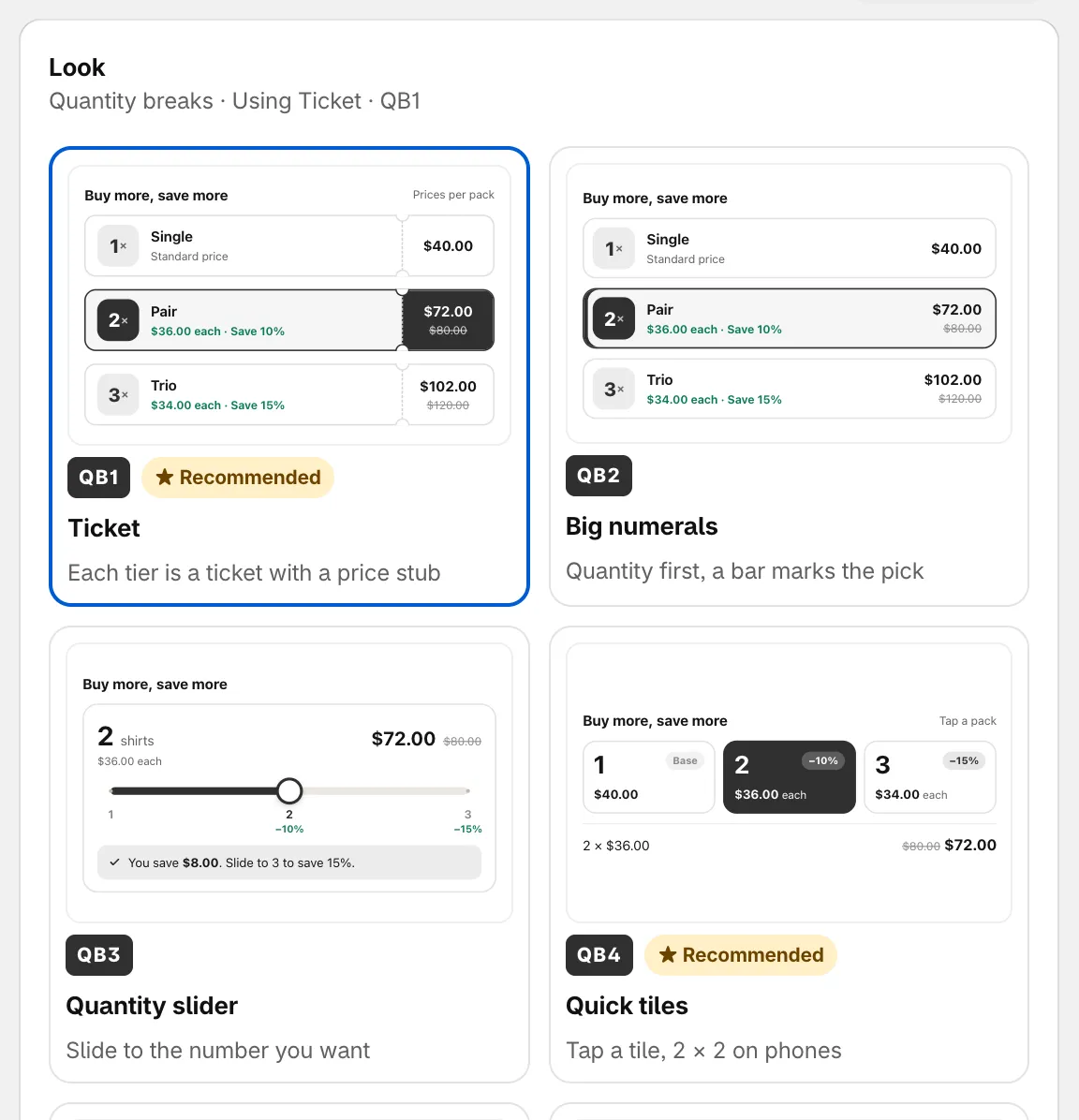
オファーブロックの外観を選択します。
| オファーの種類 | 外観 |
|---|---|
| Tiered discount、Custom offer | Ticket ★、Big numerals、Quantity slider、Quick tiles ★、Savings ring、Receipt |
| Buy one get one、Cheapest item free | Deal tickets ★、Pair、Tray |
| Buy X get Y | Deal tickets ★、Pair、Add-on switch ★ |
| Flash sale | Countdown ring ★、Running band ★、Big price tag、Night panel |
| Complete the bundle | Switch list ★、Fanned set、Formula |
| Order discount、Free shipping、Spending goals | Segment bar ★、Goal ring、One line、Reward tickets |
| Free gift | Gift envelopes ★、Gift carousel、Cart line |
Free gift以外のすべての種類には、Classicもあります(The earlier block styles, like table, cards, offer card and price row)。シンプルなブロックを好む場合は、これを選択します。
ブロックスタイル(Classicのみ)
Section titled “ブロックスタイル(Classicのみ)”Classicを選択すると、Block styleセクションでレイアウトを選べます。
- Tier table: 段階ごとに1行を表示します。
- Option cards: 段階をカードとして横に並べます。
- Offer card: 商品と追加商品を表示します。Buy X get YとComplete the bundleのみ。
- Price row: 割引タグ付きの価格を表示します。
Modulesは、オファーブロック内に追加する要素です(Extras inside the offer block)。モジュールをオンにすると追加され、矢印をクリックすると設定が開きます。ほとんどのモジュールでは、設定の上部で独自の外観を選べます。
| モジュール | 追加される内容 | オファーの種類 |
|---|---|---|
| Countdown timer | Timer inside the offer block, synced with the offer end. 詳しくは、スケジュールとタイマーをご覧ください。 | 商品ページのすべての種類 |
| Gifts by tier | Add a free gift to chosen tiers. | Tiered discount |
| Mix with other products | Shoppers pick other products to fill a tier. | Tiered discount |
| Checkbox upsells | Add-on products shoppers tick to add with the tier. | 商品ページのすべての種類 |
| Savings summary | Shows how much the shopper saves. | 商品ページのすべての種類 |
| Low stock alert | Shows “Only 3 left” when stock runs low. Shopifyで在庫を追跡しているバリエーションでのみ機能します。 | 商品ページのすべての種類 |
| Scratch-off | Hide one tier behind a scratch card. 買い物客は、スクラッチまたはタップして特典を表示します。 | Tiered discount、Buy one get one |
| Sticky add to cart | Bar at the bottom while shoppers scroll. | 商品ページのすべての種類 |
| Badges | Sale badge on images and “Most popular” on tiers. Flash sale、Buy X get Y、Complete the bundleでは、デフォルトでオフです。 | 商品ページのすべての種類 |
5つ以上のモジュールをオンにすると、ブロックが長くなることがあります。その場合はヒントにUse compact looksが表示され、各モジュールをそれぞれ1行に収まる外観に切り替えられます。
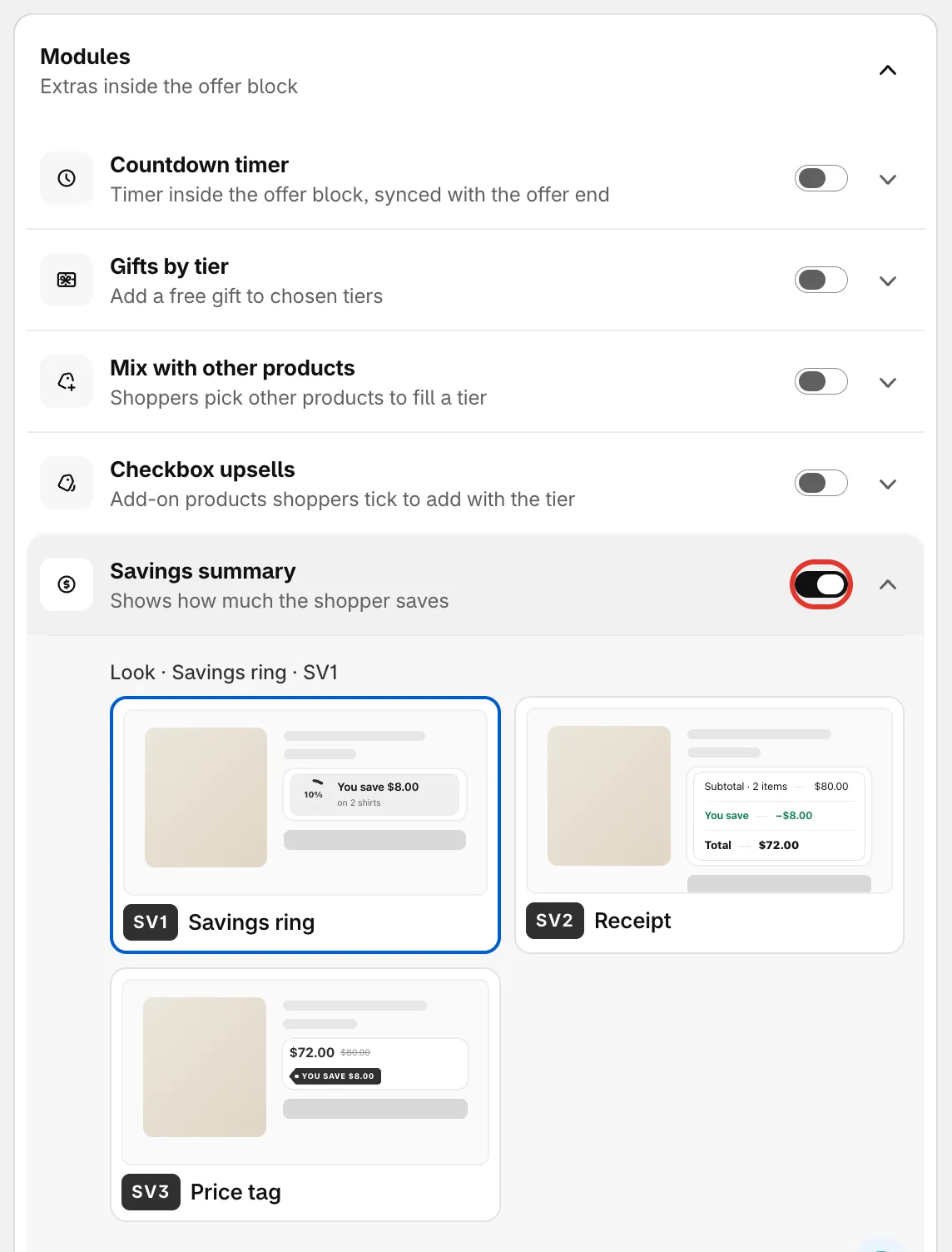
モジュールをオンにし、それぞれを開いて設定します。
色とフォント
Section titled “色とフォント”商品ページのオファーでは、このセクションの最初に、ブロックの上に表示される行であるBlock titleがあります。Suggestをクリックすると、用意されたタイトルが順に切り替わります。Title styleでは、Centered with lines、Centered、Leftのいずれかを設定します。
Color schemeには、2つのモードがあります。
- Preset: 用意されたスキームを選択します。Brand uses your brand colors. プリセットは見た目全体を設定するため、フォント、角、余白、パーツごとの色もリセットされます。
- Custom: Accent、Text、Box backgroundを自分で設定します。Box background colors the whole offer block. Customでは、ほかに次の項目も設定できます。
- Font: Use the theme font、Inter、Serif。
- Alignment、Corner radius、Space between tiers。
- Colors and text sizes by part: Part(Block title、Tiers、Prices、Gifts、Upsells)を選び、その色とサイズを設定します。Reset to the color schemeをクリックすると、これらの設定が元に戻ります。
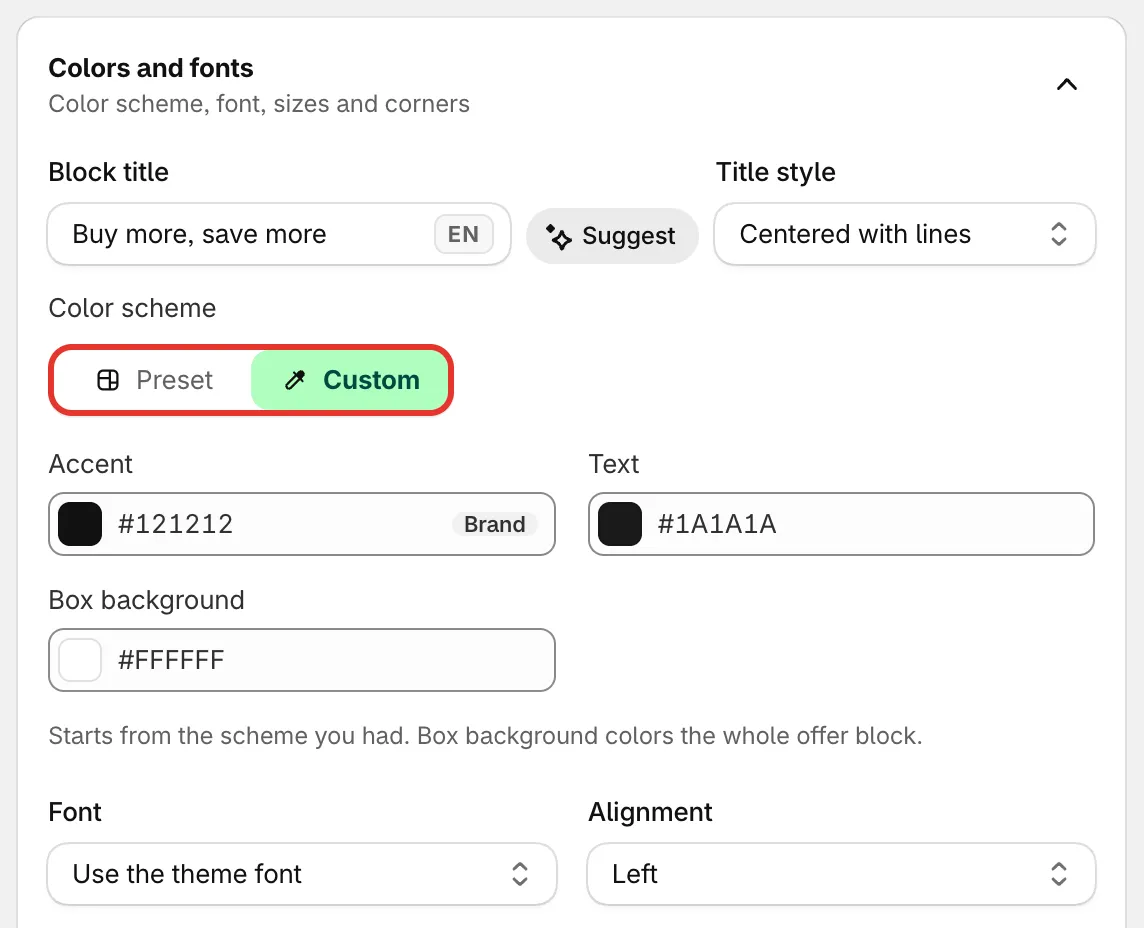
ブロックのタイトルとカラースキーム。
バリエーションと価格
Section titled “バリエーションと価格”商品ページのオファーには、3つのグループで構成されるVariants and pricingセクションがあります。表示されるオプションは、オファーの種類によって異なります。
Variants
- Let shoppers pick a variant for each item: A 3-item tier shows 3 pickers, e.g. 2 × Black and 1 × White. 次に、Picker style(Dropdown、Color swatches、Image swatches、Pill buttons)と、1アイテムの段階にも選択欄を表示するかどうかを選びます。
- Hide the theme’s variant picker: ブロックに独自の選択欄がある場合に、商品ページで選択欄が2つ表示されるのを防ぎます(Avoids two pickers on the product page)。
- Hide sold-out variants。
Price display
- Show the price per item: 段階の合計の横に、1アイテムあたりの価格を表示します(e.g. $34.00 each next to the tier total.)。
- Use the product’s compare-at price: 取り消し線付きの価格に、通常価格ではなく、商品に設定された比較価格を使います。
- Hide the crossed-out price: 買い物客には、支払う価格だけが表示されます(Shoppers see only the price they pay.)。
- Update the theme’s product price: ブロックの上の価格が、選択された段階に合わせて変わります(The price above the block follows the selected tier.)。Flash saleでは使えません。Flash saleでは、Discounted price on product pageの配置で価格を設定します。
- Show the total in the Add to cart button。
- Show prices without decimals。
- Round prices: ブロック内の価格の末尾が選択した形になるように、割引を調整します(Adjusts the discount so prices in the block end the way you pick)。Don’t round、End in .99、End in .95、Whole numbersから選択します。チェックアウトの割引も同じように調整されるため、買い物客は端数処理された価格を支払います。Flash sale、Tiered discount、Buy one get one、Cheapest item freeで使用できます。
Cart
- Skip the cart and go straight to checkout: ブロックでカートに追加すると、買い物客はそのままチェックアウトに進みます。
- Add to cart button in the block: バンドル、Mix & match、アイテムごとのバリエーション選択など、ブロックからカートに追加する場合のボタンです。Same style as the theme’s buttonまたはOffer accent colorを選択します。
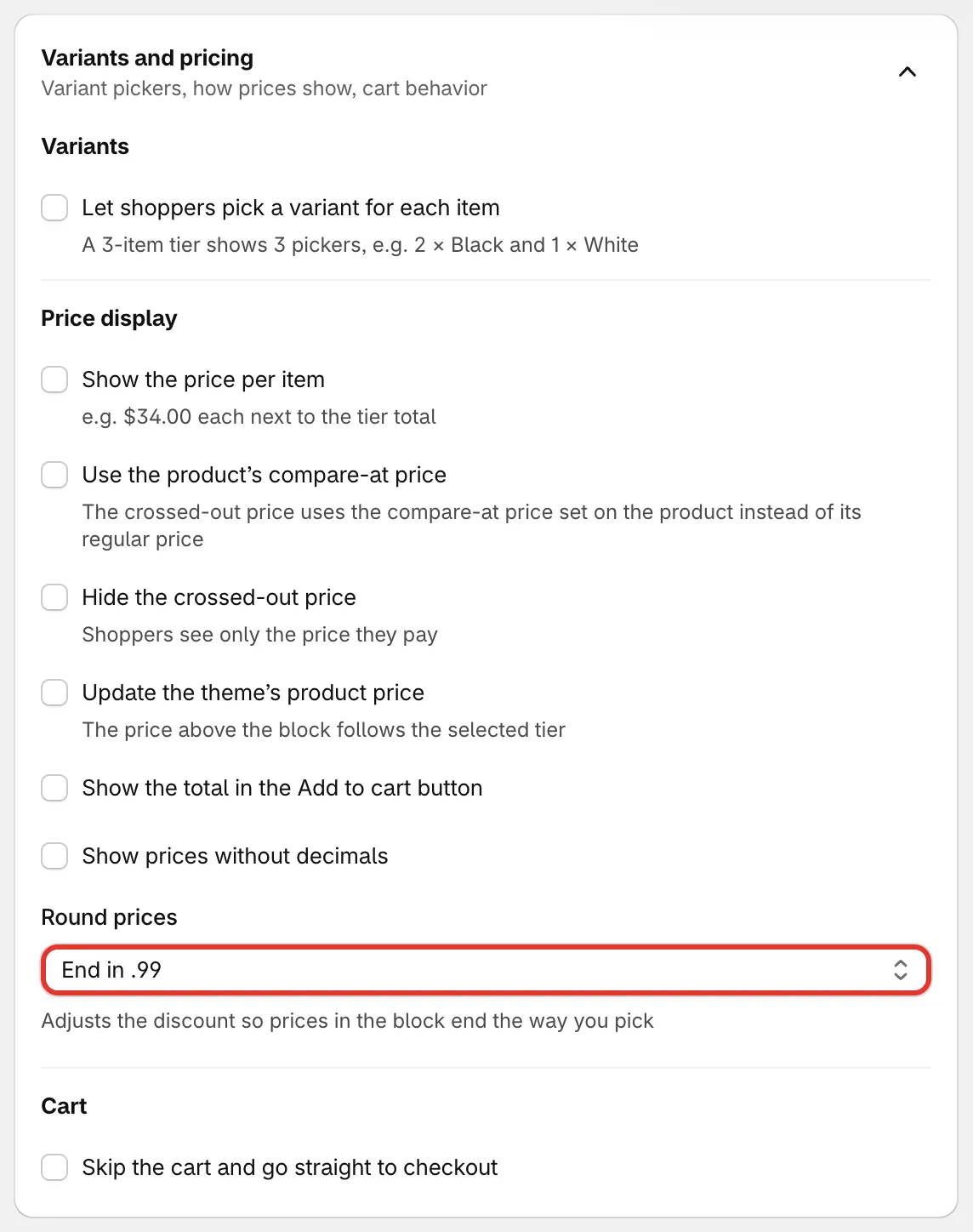
バリエーションと価格。
カスタムCSS
Section titled “カスタムCSS”Custom CSSは、開発者向けに、ブロックに独自のスタイルを追加する機能です(For developers, your own styles for the block)。ここで追加したCSSは、ストアのこのオファーに適用され、プレビューにもすぐに反映されます(Applies to this offer on your store, and right away in the preview.)。フィールドの下には、ブロックのクラス名と、それぞれがスタイルを設定する対象の一覧が表示されます。クラス名をクリックすると、そのクラスのルールが追加されます。
カウントダウン、ポップアップ、バナーのスタイルを設定する場合は、カスタムCSSをご覧ください。